
вступ
This manual provides comprehensive instructions for operating your AbergBest Mini Kids Digital Camera. Designed for ease of use, this compact camera allows users to capture memorable moments with its 21-megapixel sensor and HD 720P video recording capabilities. Please read this manual carefully before using your camera to ensure proper operation and longevity.
Що в коробці
- Корпус камери
- 2 Rechargeable Lithium Batteries
- USB-кабель для зарядки
- Настінний адаптер зарядного пристрою
- Ремінець на зап'ясті
- Сумка для перенесення
- Посібник користувача (друкована копія)
- Driver Disk (CD)
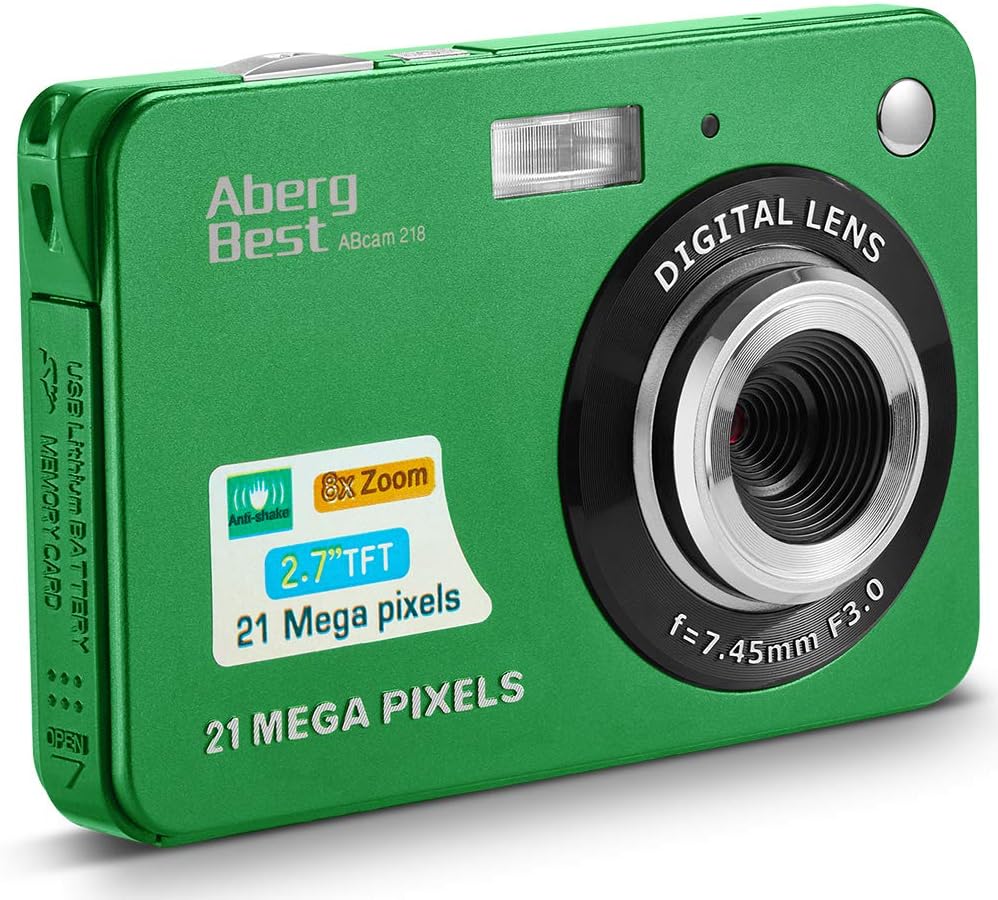
Image: The AbergBest Mini Kids Digital Camera box with all included accessories laid out, including the camera, batteries, cables, charger, wrist strap, pouch, manual, and driver disk.
Продукт закінченийview
The AbergBest Mini Digital Camera features a durable plastic body and a 2.7-inch TFT LCD screen, designed for easy handling and clear viewінж.

Зображення: Лицьова та зворотна сторони view of the AbergBest Mini Digital Camera in green, showing the lens, flash, and LCD screen with a sample зображення.

Зображення: Спина view of the AbergBest Mini Digital Camera in green, highlighting the 2.7-inch LCD screen and control buttons.

Зображення: Кілька views of the AbergBest Mini Digital Camera in green, showcasing its compact size, side ports (USB), and top buttons (power, shutter).
Компоненти камери
- Об'єктив: Digital lens with f=7.45mm F3.0.
- Спалах: Вбудований спалах для умов слабкого освітлення.
- РК-екран: 2.7-inch TFT LCD for viewі відтворення.
- Кнопка живлення: Located on the top for turning the camera on/off.
- Кнопка затвора: Located on the top for capturing photos and starting/stopping video recording.
- Мікрофон: For audio recording during videos.
- Порт USB: Mini USB port for charging and data transfer.
- Батарейний відсік: Located on the side for inserting the rechargeable battery.
- Слот для SD-карти: Supports SD memory cards up to 64GB (card not included).
- Wrist Strap Loop: Для кріплення ремінця на зап'ястя, що входить до комплекту.
Налаштування
Установка батареї
The camera requires a rechargeable lithium battery for operation. Two batteries are included in the package.
Video: This video demonstrates how to open the battery compartment on the side of the camera and correctly insert the rechargeable battery. Ensure the battery clicks into place before closing the compartment.
Встановлення SD-карти
An SD memory card (up to 64GB, Class 4 or above recommended) is required to store photos and videos. The SD card is NOT included and must be purchased separately.

Image: Visual guide for compatible SD memory cards, indicating that only certified brand SD cards (32GB to 4GB, Class 4 or above) are recommended for use with the camera.
Зарядка камери
Connect the mini USB cable to the camera's USB port and the other end to the provided wall charger adapter. Plug the adapter into a power outlet. The red indicator light on the charger will illuminate during charging and turn off when fully charged.
Увімкнення/вимкнення
To power on the camera, ensure a charged battery is inserted, then press and hold the Кнопка живлення located on the top of the camera until the LCD screen illuminates. To power off, press and hold the Кнопка живлення знову.
Інструкція з експлуатації
Основна операція
The 2.7-inch LCD screen provides a live view for framing your shots and navigating camera functions.
Відео: Це відео надає оглядview of the camera's display and basic functions, including navigating menus and viewing the live feed. The video also demonstrates battery installation and video recording.
Функція масштабування
The camera features 8X digital zoom. Use the zoom buttons on the back of the camera (next to the LCD screen) to zoom in or out.

Image: A boy on a beach demonstrating the 8X digital zoom capability of the camera, showing different zoom levels (4X, 6X, 8X) on the screen.
Налаштування фокусу
The camera has a fixed focus lens. For close-up shots (macro) or distant shots (landscape), use the focus switch on the left side of the camera. Slide the switch to the flower icon for close-up focus or the mountain icon for landscape focus.

Image: Illustration of the near (flower icon) and far (mountain icon) focus settings on the side of the camera, showing their effect on image clarity.
Camera Modes and Settings
The camera offers various scene modes and settings to optimize your photos. Press the central button on the directional pad to access the menu and navigate through options.
- Сюжетні режими: Auto, Night Portrait, Night Scenery, Portrait, Scenery, Sport, Party, Beach, High Sensitivity.
- Розмір зображення: Adjust resolution (e.g., 21MP, 12MP, 8MP, 5MP, 3MP). HD 720P resolution is available.
- Анти-шейк: Enable or disable for image stabilization.
- Face Detect: Automatically detects faces for optimal focus and exposure.
- Зйомка посмішки: Автоматично робить фотографію, коли розпізнає посмішку.
- Безперервний постріл: For capturing multiple photos in quick succession.
- Автоспуск: Set a delay (2, 5, or 10 seconds) before taking a photo.
- Керування спалахом: Toggle the built-in flash on/off or set to auto.
Фото Прampлес
The AbergBest Mini Digital Camera captures clear images suitable for sharing and personal use.

Image: A close-up photo of a woman's face taken with the AbergBest camera, demonstrating facial detail capture.

Image: A family enjoying the beach, captured with the AbergBest camera, showcasing its ability to capture outdoor scenes.
Відеозапис
The camera supports HD 720P video recording. To start recording, switch to video mode by pressing the button with the video icon on the directional pad, then press the кнопка затвора. Натисніть кнопка затвора ще раз, щоб зупинити запис.
Video: This video demonstrates the camera's video recording capabilities, showing how to start and stop recording. The video also covers battery installation and basic operation.
Відтворення
до view your captured photos and videos, press the playback button (usually indicated by a play icon or arrow) on the directional pad. Use the directional pad to navigate through your media files.
Технічні характеристики
| Особливість | Деталь |
|---|---|
| Бренд | Абергбент |
| Номер моделі | New2022ABDC5100 |
| Роздільна здатність фотодатчика | 21 Мп |
| Роздільна здатність відео | 720p |
| Цифровий зум | 8x |
| Розмір екрана | 2.7 дюймів |
| Тип дисплея | TFT LCD |
| Підтримується File Формат | AVI (Video), JPEG (Photo) |
| Тип флеш-пам'яті | SD-карта (до 64 ГБ) |
| Тип батареї | Літій-полімер |
| Технологія підключення | USB |
| Вага товару | 309 грамів |
| Колір | Зелений |
Усунення несправностей
Камера не вмикається
- Переконайтеся, що акумулятор повністю заряджений та правильно вставлений.
- Натисніть і утримуйте Кнопка живлення на кілька секунд.
"SD Card Full" or "No File Exist" Error
- Insert a compatible SD memory card.
- Видалити непотрібне files from the SD card or format it (this will erase all data).
Розмиті фотографії
- Ensure the focus switch (flower/mountain icon) is set correctly for your subject's distance.
- Використовуйте Анти-Шейк feature if enabled.
- Ensure adequate lighting; use the flash if necessary.
Короткий термін служби батареї
- Перед використанням переконайтеся, що батареї повністю заряджені.
- Зменште яскравість екрана, якщо можливо.
- Turn off unnecessary features like flash or continuous shot when not needed.
- Use the provided extra battery.
Гарантія та підтримка
The AbergBest Mini Kids Digital Camera comes with a Гарантія від виробника 1 рік.
For any questions or support regarding your product, please refer to the contact information provided in your physical user manual or visit the official AbergBest webсайт.