
вступ
This manual provides detailed instructions for the setup, operation, and maintenance of your Amazon Basics Projection Alarm Clock. Please read this manual thoroughly before using the product to ensure proper function and to prevent damage.

Image: The Amazon Basics Projection Alarm Clock, showing its digital display and projection lens.
Інструкції з техніки безпеки
- Не піддавайте пристрій впливу екстремальних температур, прямих сонячних променів, пилу чи вологості.
- Переконайтеся, що адаптер живлення сумісний з вашою місцевою електромережею.
- Тримайте пристрій подалі від води або інших рідин.
- Не намагайтеся розбирати або модифікувати пристрій. Це призведе до анулювання гарантії.
- Clean the unit only with a soft, dry cloth. Do not use liquid cleaners.
- Утилізуйте батареї належним чином відповідно до місцевих правил.
Вміст упаковки
- Amazon Basics Projection Alarm Clock
- Адаптер змінного струму
- Посібник користувача
Особливості продукту
- Projection of time onto a wall or ceiling.
- FM Radio with automatic/manual scan and up to 15 preset stations.
- USB port for charging mobile phones or tablets.
- 7-inch high-definition LED display with adjustable brightness.
- Dual alarms for separate wake-up times.
- Snooze function with adjustable duration (2 to 60 minutes).
- Sleep timer for automatic radio shut-off (5 to 90 minutes).
- DST button for Daylight Saving Time adjustment.
- Battery backup (requires 2 AAA batteries, not included) to maintain time settings during power outagес.

Зображення: Оверview of key features including sleep timer, radio presets, and snooze function.
Елементи управління та дисплей
Familiarize yourself with the buttons and ports on your alarm clock for optimal use.

Зображення: Збоку view illustrating the location of controls, USB charging port, and projection lens.
- Кнопка встановлення часу: Використовується для встановлення поточного часу.
- Кнопки будильника 1/2: Used to set and activate Alarm 1 and Alarm 2.
- Кнопка повтору/зменшення яскравості звуку: Activates snooze during an alarm; adjusts display brightness when not alarming.
- Кнопка радіо/сну: Turns FM radio on/off; sets sleep timer.
- Volume/Tune Dial: Adjusts radio volume and tunes FM frequencies.
- Projection On/Off/Flip Button: Controls the projection feature and flips the projected time.
- Projection Focus Wheel: Adjusts the clarity of the projected time.
- Projection Angle Adjuster: Changes the angle of the projected time.
- Порт заряджання USB: Для заряджання зовнішніх пристроїв.
- Кнопка літнього часу: Вмикає/вимикає перехід на літній час.
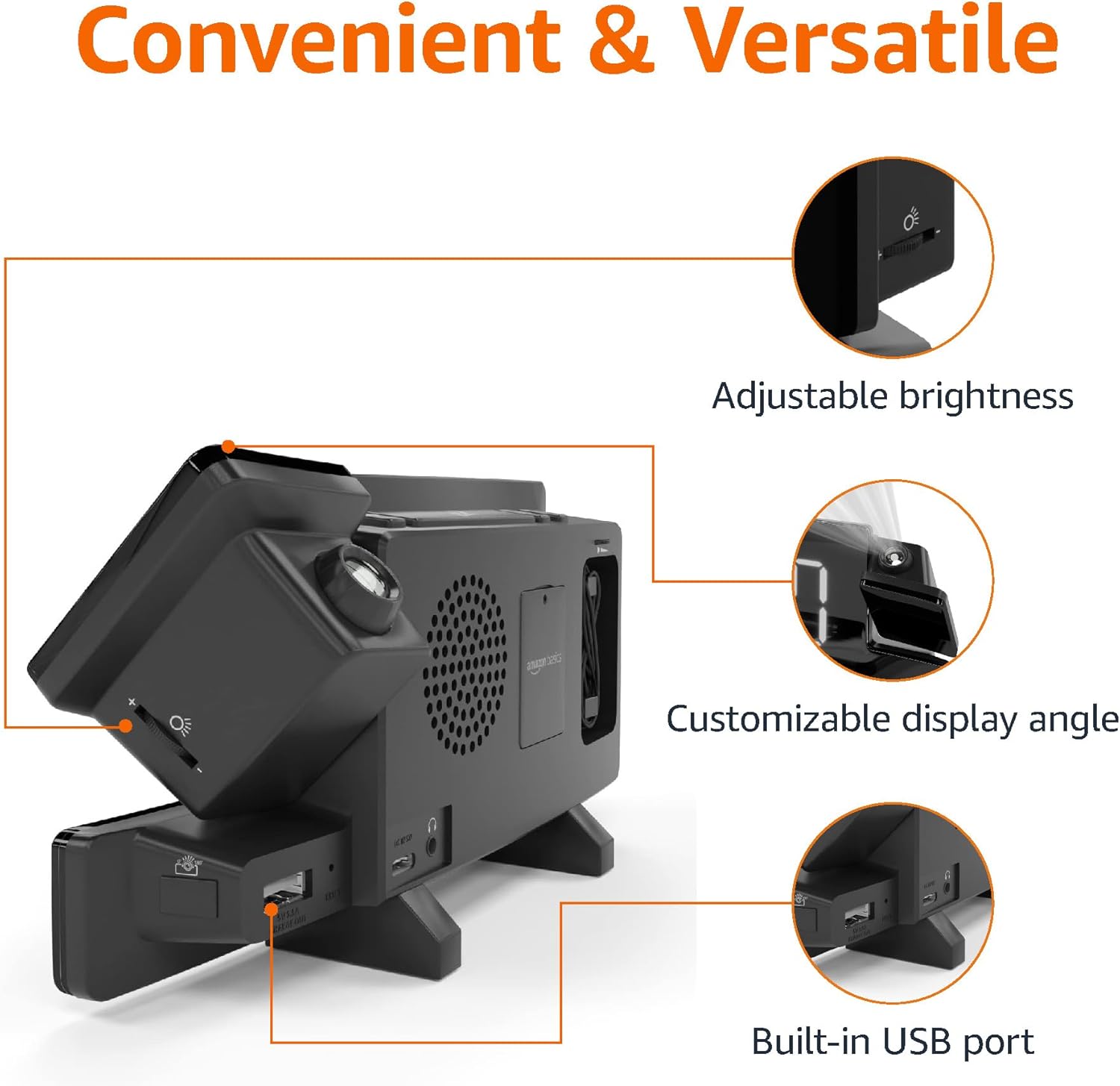
Image: Diagram highlighting the adjustable brightness, customizable projection angle, and USB charging port.
Налаштування
1. Підключення живлення
Connect the AC power adapter to the DC IN port on the back of the alarm clock and plug it into a standard wall outlet. The display will light up.
2. Встановлення резервної батареї
For battery backup, open the battery compartment on the bottom of the unit. Insert 2 AAA batteries (not included), ensuring correct polarity (+/-). Close the compartment. The battery backup maintains time settings during power outages but does not power the display or alarm functions.
3. Початкове налаштування часу
- Натисніть і утримуйте Набір часу кнопку. Цифри години блиматимуть.
- Використовуйте Volume/Tune Dial для налаштування години. Натисніть Набір часу знову для підтвердження.
- Цифри хвилин блиматимуть. Використовуйте Volume/Tune Dial для регулювання хвилин. Натисніть Набір часу знову для підтвердження.
- The time format (12H/24H) will flash. Use the Volume/Tune Dial щоб вибрати потрібний формат. Натисніть Набір часу щоб підтвердити та вийти з режиму налаштування часу.
4. Перехід на літній час (DST)
Натисніть літній час button to toggle Daylight Saving Time on or off. The DST indicator will appear or disappear on the display.
Інструкція з експлуатації
1. Налаштування будильників (Будильник 1 та Будильник 2)
- Натисніть і утримуйте Сигналізація 1 or Сигналізація 2 кнопка. Цифри годин будильника блиматимуть.
- Використовуйте Volume/Tune Dial to adjust the alarm hour. Press the respective сигналізація ще раз для підтвердження.
- The alarm minute digits will flash. Use the Volume/Tune Dial to adjust the alarm minutes. Press the respective сигналізація ще раз для підтвердження.
- The alarm source (FM radio or buzzer) will flash. Use the Volume/Tune Dial to select your preference. Press the respective сигналізація button to confirm and activate the alarm. An alarm icon will appear on the display.
- To deactivate an alarm, press the respective сигналізація button once. The alarm icon will disappear.
2. Using Snooze
Коли лунає будильник, натисніть кнопку Відкладення/диммер button to temporarily silence the alarm. The alarm will sound again after the set snooze duration. The default snooze duration is 9 minutes. To adjust the snooze duration, press and hold the Відкладення/диммер , а потім скористайтеся кнопкою Volume/Tune Dial to select a duration between 2 and 60 minutes. Press Відкладення/диммер знову для підтвердження.
3. Робота FM-радіо
- Увімкнути/вимкнути: Натисніть Radio/Sleep кнопку, щоб увімкнути або вимкнути FM-радіо.
- Налаштуйте станції: Використовуйте Volume/Tune Dial to manually tune to a desired FM frequency.
- Авто сканування: Натисніть і утримуйте Radio/Sleep кнопку для автоматичного сканування та збереження доступних FM-станцій як попередньо налаштованих станцій.
- Виберіть попередні налаштування: Once stations are saved, short press the Radio/Sleep button to cycle through the preset stations.
- Регулювання гучності: Обертайте Volume/Tune Dial to adjust the radio volume.
4. Таймер сну
Під час відтворення FM-радіо натисніть кнопку Radio/Sleep button repeatedly to set the sleep timer. Options typically range from 5 to 90 minutes. The radio will automatically turn off after the selected duration.
5. Функція проекції

Image: The alarm clock projecting the time onto a bedroom ceiling.
- Активувати/деактивувати: Натисніть Projection On/Off/Flip button to turn the time projection on or off.
- Відрегулювати кут: Manually adjust the projection arm to direct the time onto your desired surface (wall or ceiling).
- Фокус: Обертайте Projection Focus Wheel to achieve a clear image.
- Flip Display: Натисніть Projection On/Off/Flip button repeatedly to rotate the projected time 180 degrees, ensuring correct orientation.

Image: The alarm clock on a nightstand, projecting the time onto a wall, demonstrating its use in a bedroom setting.
6. Зарядка через USB
Connect your mobile phone or tablet's USB charging cable to the USB порт зарядки on the back of the alarm clock. The device will begin charging. This port is for charging only and does not support data transfer.
7. Регулювання яскравості дисплея
Натисніть Відкладення/диммер button (when no alarm is sounding) to cycle through different brightness levels for the main LED display.
Технічне обслуговування
1. прибирання
Wipe the unit with a soft, dry, lint-free cloth. Do not use abrasive cleaners, waxes, or solvents as they may damage the surface.
2. Заміна батареї
If the battery backup is not functioning correctly (e.g., time resets after a power outage), replace the 2 AAA batteries in the battery compartment, ensuring correct polarity.
Усунення несправностей
| проблема | Можлива причина | Рішення |
|---|---|---|
| Дисплей порожній. | Немає підключення до живлення. | Переконайтеся, що адаптер змінного струму надійно підключено до пристрою та до справної розетки. |
| Сигналізація не звучить. | Будильник не активовано або гучність занадто низька. | Check if the alarm icon is visible on the display. Re-set the alarm if necessary. Increase radio volume if FM is selected as alarm source. |
| Прогнозований час розмитий. | Projection focus is not adjusted. | Обертайте Projection Focus Wheel поки зображення не стане чітким. |
| Projected time is not visible. | Projection is off or room is too bright. | Натисніть Projection On/Off/Flip button to activate. The projection is best viewed in a dark room. |
| Радіоприйом поганий. | Положення антени або перешкоди. | Adjust the position of the FM antenna wire. Move the unit away from other electronic devices that may cause interference. |
| Зарядка через USB не працює. | Проблема з кабелем або несумісність пристроїв. | Ensure the USB cable is functional and properly connected. Try a different cable or device. |
Технічні характеристики
- модель: MET8831-US
- Споживана потужність: Адаптер змінного струму (в комплекті)
- Резервний акумулятор: 2 батареї AAA (не входять в комплект)
- Дисплей: 7-дюймовий LED
- Радіочастота: FM
- Вихід USB: 5V, 1A (for charging)
- Розміри (Д x Ш x В): 7.1 x 1.6 x 3.7 дюйми (18.03 x 4.06 x 9.4 см)
- вага: Приблизно 0.59 фунта (267.62 г)

Image: Product dimensions for the Amazon Basics Projection Alarm Clock.
Інформація про гарантію
This product is covered by the Amazon Basics warranty. For detailed information regarding warranty terms and conditions, please refer to the official Amazon Basics webсайту або зв’яжіться зі службою підтримки клієнтів.
Підтримка клієнтів
For further assistance, troubleshooting, or product inquiries, please contact Amazon Basics customer support through the Amazon website or your purchase platform. Have your product model number (MET8831-US) and purchase details ready.