
1. Вступ
Thank you for choosing the COMAOGO T002-W Mini Projector. This manual provides essential information for setting up, operating, and maintaining your projector to ensure optimal performance and longevity. The T002-W is a versatile projector featuring 9500 Lumens brightness, 1080P support, 5G WiFi, and Bluetooth 5.1 connectivity, designed for an immersive viewдосвід роботи до 220 дюймів.
2. Вміст упаковки
Будь ласка, перевірте упаковку на наявність наступних предметів:
- 1 x COMAOGO T002-W Mini Projector
- 1 x Пульт дистанційного керування
- 1 х кабель живлення
- 1 кабель HDMI
- 1 x AV кабель
- 1 х посібник користувача
3. Продукт закінчивсяview
Ознайомтеся з компонентами та інтерфейсами проектора.

Image: COMAOGO T002-W Projector with 5G and 2.4G WiFi capabilities, showing wireless screen synchronization with a tablet and smartphone.
The projector features various ports for connectivity, including HDMI, USB, VGA, AV, and a TF card slot, along with a 3.5mm audio output. It also supports dual-band 5G and 2.4G WiFi for stable wireless connections and Bluetooth 5.1 for audio devices.

Image: COMAOGO T002-W Projector connected to various devices including a laptop, game console, and streaming stick, highlighting its multiple input ports (AV, HDMI, USB, TF, VGA).
4. Налаштування
4.1 Розміщення
Position the projector on a stable, flat surface or mount it on a tripod. Ensure there are no obstructions to the ventilation vents. For optimal viewing, the projection distance should be between 1.5 meters and 5.5 meters, yielding a screen size from 45 inches to 220 inches.
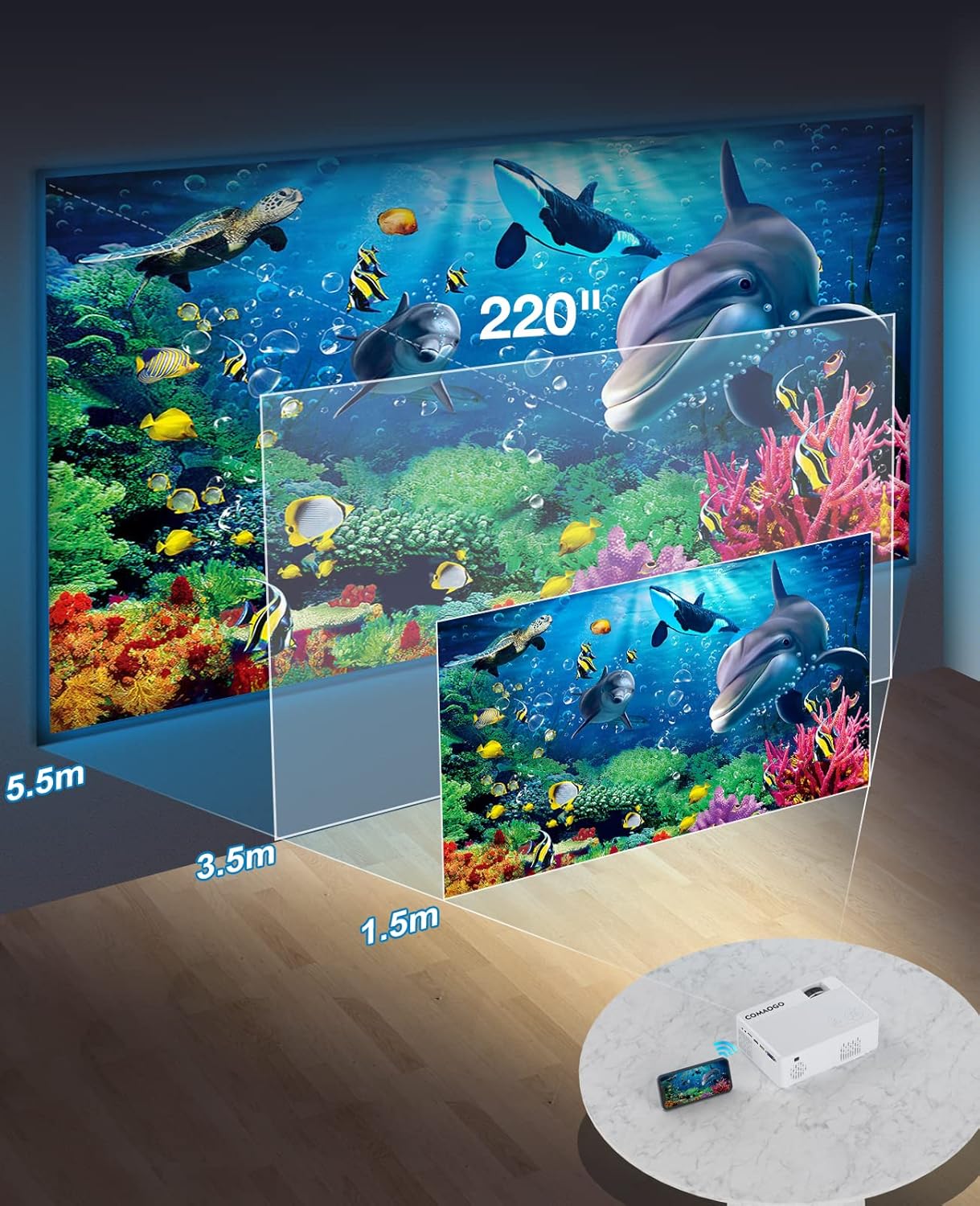
Image: Diagram illustrating the projection distances (1.5m to 5.5m) and corresponding screen sizes (45 to 220 inches) for the COMAOGO T002-W Projector.
4.2 Підключення живлення
Connect the power cable to the projector's power input and then plug it into a power outlet (AC 220V).
4.3 Фокусування та корекція трапецієподібних спотворень
To achieve a clear and rectangular image:
- Регулювання фокусу: Rotate the focus ring on the projector lens until the image appears sharp.
- Корекція трапецеїдальних спотворень: Adjust the keystone correction dial (if available, or via menu settings) to correct trapezoidal distortion, ensuring the image is rectangular. The projector supports ±15° keystone correction.

Image: Illustration of keystone correction and focus adjustment for the COMAOGO T002-W Projector, showing how to achieve a clear, rectangular image.
5. Інструкція з експлуатації
5.1 Увімкнення/вимкнення живлення
- Увімкнення: Натисніть кнопку живлення на проекторе або пульті дистанційного керування.
- Вимкнення живлення: Знову натисніть кнопку живлення, щоб вимкнути проектор.
5.2 Вибір джерела вхідного сигналу
Use the "Source" button on the remote control or the projector's control panel to select the desired input source (e.g., HDMI, USB, VGA, AV).
5.3 Бездротове з’єднання (Wi-Fi)
The projector supports dual-band 5G and 2.4G WiFi for stable screen mirroring.
- Navigate to the WiFi settings on the projector's menu.
- Select your desired WiFi network (5G for faster, more stable connection; 2.4G for longer range and better penetration).
- Введіть пароль для підключення.
- For screen mirroring, select the appropriate option (e.g., "iOS Cast" or "Android Cast") on the projector and follow the on-screen instructions to connect your smartphone or tablet.
5.4 Підключення Bluetooth
Connect external Bluetooth audio devices like speakers or headphones.

Image: COMAOGO T002-W Projector demonstrating Bluetooth 5.1 connection with a speaker and headphones.
- Перейдіть до налаштувань Bluetooth у меню проектора.
- Переконайтеся, що ваш пристрій Bluetooth перебуває в режимі сполучення.
- Виберіть свій пристрій зі списку для сполучення.
- Note: The projector's Bluetooth function is for connecting output devices (speakers, headphones) only.
5.5 Дротові підключення
Підключіть різні пристрої за допомогою доступних портів:
- HDMI: Connect laptops, PCs, game consoles (Xbox), TV sticks (Roku, Chromecast), DVD players.
- USB: Відтворювати медіа fileбезпосередньо з USB-накопичувачів.
- VGA: Підключіть старі комп'ютери або ноутбуки.
- AV: Connect legacy video devices.
- Картка TF: Вставте TF-карту для відтворення медіафайлів files.
- Important: Copyright-protected content from services like Netflix or Disney+ is not directly supported via screen mirroring. For these services, use an HDMI connection with a compatible adapter (e.g., Lightning Digital AV Adapter for iOS devices) or a streaming stick.
6. Технічне обслуговування
6.1 Очищення об'єктива
Use a soft, lint-free cloth or lens cleaning paper to gently wipe the projector lens. Avoid using abrasive materials or harsh chemicals that could damage the lens coating.
6.2 Система охолодження
The projector features an updated cooling system designed to reduce noise and maintain optimal operating temperature. Ensure the ventilation vents are clear of dust and obstructions to prevent overheating. Regular cleaning of the vents with a soft brush or compressed air is recommended.
7. Вирішення проблем
Якщо у вас виникли проблеми з проектором, зверніться до наступних поширених рішень:
- Немає зображення:
- Перевірте підключення живлення та переконайтеся, що проектор увімкнено.
- Verify the input source selection matches your connected device.
- Ensure all cables (HDMI, VGA, etc.) are securely connected.
- Налаштуйте фокус та корекцію трапецієподібних спотворень.
- Немає звуку:
- Adjust the projector's volume.
- Якщо ви використовуєте зовнішні динаміки, переконайтеся, що вони правильно підключені та увімкнені.
- Check Bluetooth connection for external audio devices.
- Ensure the audio output from your source device is enabled.
- WiFi/Screen Mirroring Issues:
- Ensure both the projector and your device are connected to the same WiFi network.
- Check for strong WiFi signal.
- Restart both the projector and your source device.
- For Android devices, ensure "Wireless Projection" or "Screen Mirroring" is enabled. For iOS, use "Screen Mirroring" from Control Center.
- Зображення розмите:
- Відрегулюйте кільце фокусування на об'єктиві.
- Переконайтеся, що відстань проекції знаходиться в межах рекомендованого діапазону.
- Зображення має трапецієподібну форму:
- Adjust the keystone correction dial or setting.
For further assistance or software updates, please contact COMAOGO customer support.
8. Технічні характеристики
| Особливість | Специфікація |
|---|---|
| Бренд | КОМАГО |
| Модель | Т002-Вт |
| Яскравість | 9500 люменів (220 ANSI) |
| Коефіцієнт контрастності | 6000:1 |
| Рідна роздільна здатність | 1280 х 720 |
| Підтримувана роздільна здатність | 1080P |
| Розмір проекції | 45" - 220" |
| Відстань проекції | 1.5 м - 5.5 м |
| Корекція коректури | ±15° |
| Wi-Fi підключення | Dual-band (5G + 2.4G) |
| Bluetooth | Bluetooth 5.1 |
| Апаратний інтерфейс | 3.5mm Audio, TF Card, USB 2.0, VGA, HDMI |
| Вбудований динамік | так |
| Рівень шуму | 45 децибели |
| Споживана потужність | 48 Вт |
| Розміри | 20.32 х 15.24 х 7.62 см |
| вага | 1 кілограм |
9. Офіційне відео продукту
Watch this video for a visual guide on the COMAOGO T002-W Mini Projector's features and operation.
Video: An official product video demonstrating the features and usage of the COMAOGO T002-W Mini Projector, including connectivity and display capabilities.
10. Гарантія та підтримка
The COMAOGO T002-W Mini Projector comes with a standard manufacturer's warranty. For warranty claims, technical support, or inquiries regarding software updates, please contact COMAOGO customer service through the retailer where you purchased the product or visit the official COMAOGO webсайт.
SOFTWARE UPDATES can be provided; please contact us if needed.