
Blackmagic Design CINECAMPOCHDEF6K2
Blackmagic Design Pocket Cinema Camera 6K G2 Instruction Manual
Model: CINECAMPOCHDEF6K2
1. Вступ
This manual provides essential information for the setup, operation, and maintenance of your Blackmagic Design Pocket Cinema Camera 6K G2. Please read this manual thoroughly before using the camera to ensure proper handling and optimal performance. This camera is designed for professional digital film production, offering advanced features for high-quality video capture.
2. Інформація про безпеку
- Джерело живлення: Use only the specified power supply and battery. Incorrect power sources can damage the camera or cause fire.
- Вода і вологість: Do not expose the camera to water or high humidity. This camera is not waterproof.
- температура: Operate the camera within the recommended temperature range (typically 0°C to 40°C / 32°F to 104°F). Avoid extreme heat or cold.
- Обробка: Поводьтеся з камерою обережно. Уникайте падінь та сильних ударів.
- Кріплення об'єктива: Always ensure the camera is powered off when attaching or detaching lenses to prevent damage to the sensor or lens mount.
- Прибирання: Use a soft, dry cloth for cleaning. For the sensor, use specialized cleaning kits and follow manufacturer guidelines.
3. Вміст упаковки
Перевірте наявність усіх предметів у вашій упаковці:
- Blackmagic Design Pocket Cinema Camera 6K G2 Body
- DaVinci Resolve Studio Activation Key
- Lens Turret Dust Cap
- Ремінь фотокамери
- 30W Power Supply with Locking Connector and International Adapters
- Акумулятор NP-F570
- NP-F Series Battery USB Charger
4. Камера закінченаview
The Blackmagic Design Pocket Cinema Camera 6K G2 features a compact design with a Super 35 sensor and an active EF/EF-S lens mount. It includes a large, bright adjustable tilt 5-inch LCD display for monitoring and menu navigation.

Рисунок 4.1: Кутова передня частина view of the Blackmagic Design Pocket Cinema Camera 6K G2, showing the lens mount and grip.

Малюнок 4.2: Спереду view of the camera, highlighting the EF/EF-S lens mount and Super 35 sensor.
4.1. З’єднання та порти
The camera offers various connectivity options for audio, video output, and data transfer.

Малюнок 4.3: Детально view of the camera's side panel, showing various input/output ports.
- Вхід мікрофона: Connect consumer microphones or a timecode master clock.
- 3.5 мм вихід для навушників: Supports consumer headphones for audio monitoring.
- Full Size HDMI Connector: Outputs 1080p up to 60fps as clean feed or with camera data.
- USB Expansion Port (USB-C): For recording to external SSD storage or connecting focus demands.
- Живлення 12 В постійного струму: Main power supply input or for external batteries.
- XLR Audio Connection: Two professional balanced Mini XLR audio inputs with phantom power support.

Малюнок 4.4: Сторона view of the camera, illustrating the arrangement of the various ports.
4.2. Задня панель та елементи керування
The rear panel features the tilting LCD touchscreen and essential control buttons.

Малюнок 4.5: Задня частина view of the camera displaying the menu interface on the 5-inch LCD screen.

Рисунок 4.6: Кутова задня частина view showing the camera's LCD screen tilted for flexible viewкути.
5. Налаштування
5.1. Встановлення та зарядка акумулятора
- Відкрийте кришку відсіку для батареї, розташовану на нижній частині камери.
- Insert the NP-F570 battery, ensuring correct orientation. Close the cover securely.
- To charge, connect the included NP-F series battery USB charger to a power source and attach the battery. Alternatively, connect the camera to the 30W power supply with the battery installed.
5.2. Кріплення об'єктива
- Переконайтеся, що камеру вимкнено.
- Remove the lens turret dust cap from the camera body and the rear cap from your EF/EF-S compatible lens.
- Align the red or white index mark on the lens with the corresponding mark on the camera's lens mount.
- Gently insert the lens into the mount and rotate it clockwise until it clicks into place.
5.3. Media Card Insertion
The camera supports SD/UHS-II and CFast 2.0 cards, as well as external SSDs via USB-C.
- Locate the SD card slot and CFast 2.0 card slot on the camera body.
- Insert the appropriate card into its slot until it clicks. Ensure the card is correctly oriented.
- For external SSD recording, connect a compatible SSD to the USB-C port.
5.4. Увімкнення/вимкнення живлення
Press and hold the power button located on the top of the camera until the screen illuminates or turns off.
6. Робота з камерою
6.1. Базовий запис
To begin recording, press the red record button on the top of the camera. Press it again to stop recording.

Figure 6.1: Camera menu displaying recording settings such as project frame rate and preferred media.
- Frame Rates and Resolution: Navigate the menu on the LCD to select desired frame rates (e.g., 24 fps, 60 fps) and resolutions (up to 6K).
- File Формати: The camera supports industry-standard formats like Apple ProRes (up to 4K) and 12-bit Blackmagic RAW. Select your preferred format in the recording settings.
6.2. Focusing and Exposure
- Фокус: Use the lens's manual focus ring or electronic focus controls if available. The LCD offers focus assist tools.
- ISO: Adjust the dual gain ISO up to 25,600 to manage sensitivity in various lighting conditions.
- Aperture and Shutter Speed: Control these settings via the camera's physical dials or the touchscreen interface to achieve desired exposure and depth of field.
6.3. Запис звуку
The camera includes a built-in stereo microphone. For professional audio, utilize the mini XLR or 3.5mm inputs for external microphones.
6.4. Моніторинг
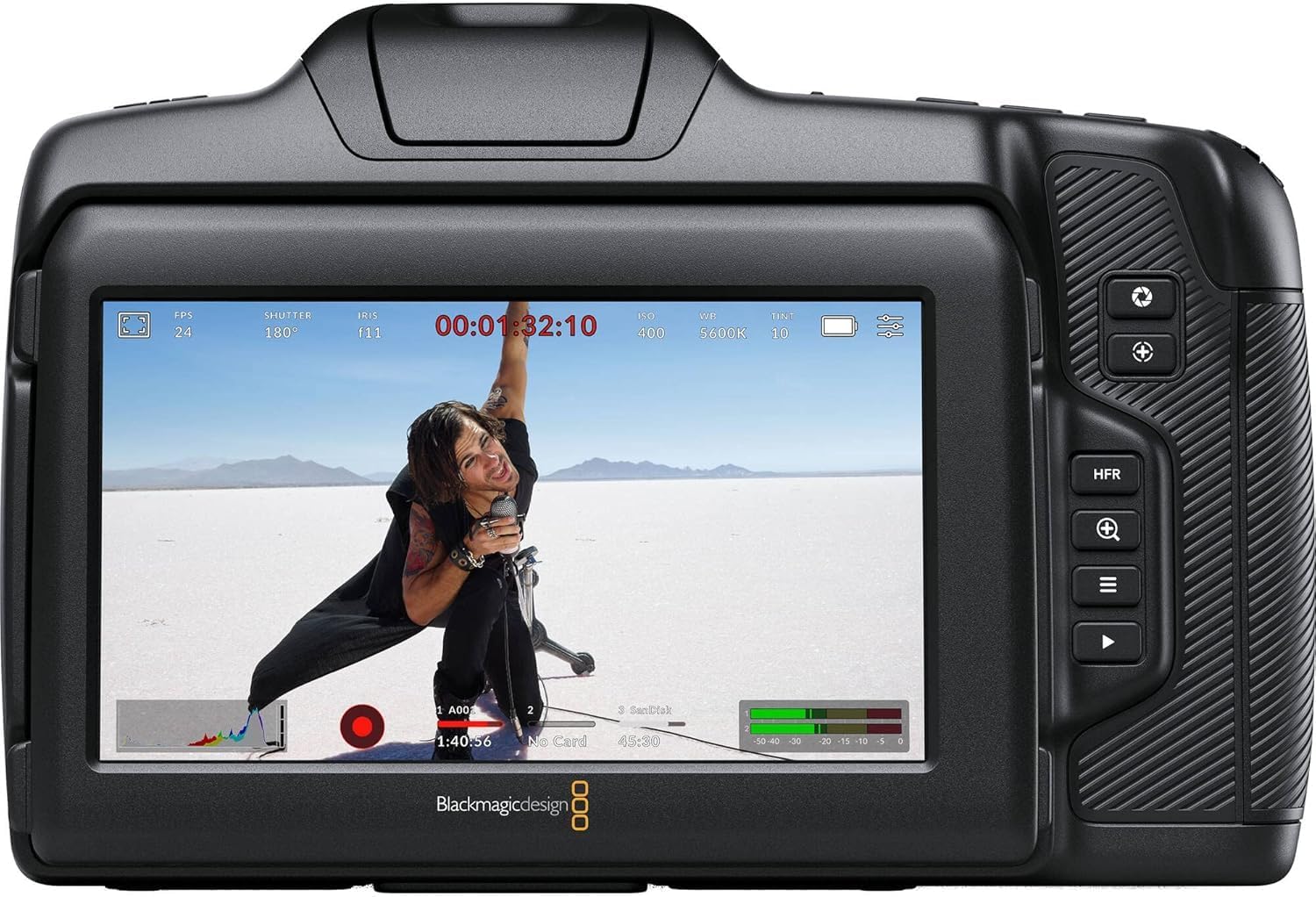
Малюнок 6.2: Задня частина view of the camera displaying live footage with overlays on the LCD screen.
5-дюймовий РК-дисплей забезпечує чітке відображення view твоєї їжіtage and camera settings. It can be tilted for better viewing angles. An external monitor can be connected via the HDMI port.

Figure 6.3: The camera's tilting LCD screen in an operational setup, demonstrating its flexibility.
6.5. DaVinci Resolve Studio
Your camera includes an activation key for DaVinci Resolve Studio. This software is a comprehensive solution for editing, color correction, visual effects, and audio post-production. Install and activate it on your computer to process your Blackmagic RAW and ProRes footage.
7. Технічне обслуговування
7.1. прибирання
- Корпус камери: Wipe with a soft, dry, lint-free cloth. Do not use harsh chemicals or solvents.
- Об'єктив: Use a lens brush or air blower to remove dust, then gently clean with a lens cleaning solution and microfiber cloth.
- датчик: Sensor cleaning should be performed with extreme care using a specialized sensor cleaning kit. If unsure, consult a professional.
7.2. Оновлення мікропрограми
Periodically check the Blackmagic Design website for firmware updates. Updates can improve performance, add features, and fix bugs. Follow the instructions provided by Blackmagic Design carefully during the update process.
7.3. Зберігання
When not in use, store the camera in a cool, dry place, away from direct sunlight and extreme temperatures. Use a protective case to prevent dust and physical damage.
8. Вирішення проблем
| проблема | Можлива причина | Рішення |
|---|---|---|
| Камера не вмикається | Battery depleted or incorrectly installed; power cable loose. | Charge battery, ensure correct installation. Check power cable connection. |
| Запис несподівано зупиняється | Media card full or too slow; battery low. | Use a faster card (UHS-II, CFast 2.0), free up space, or replace/charge battery. |
| Погана якість зображення | Incorrect exposure settings; dirty lens/sensor. | Adjust ISO, aperture, shutter speed. Clean lens or sensor. |
| Без аудіозапису | Microphone not connected or configured correctly; audio levels too low. | Check microphone connections and camera audio settings. Adjust input levels. |
9. Технічні характеристики
Key technical specifications for the Blackmagic Design Pocket Cinema Camera 6K G2:
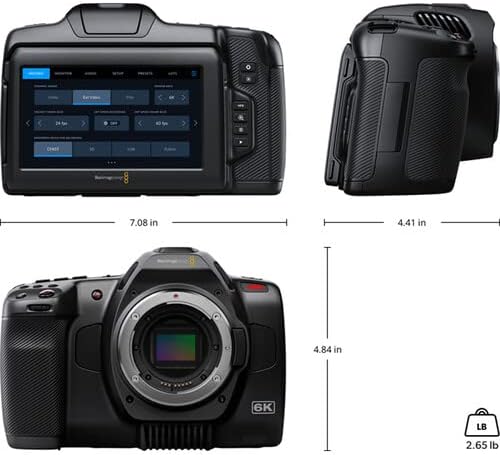
Figure 9.1: Dimensions of the Blackmagic Design Pocket Cinema Camera 6K G2.
| Особливість | Деталь |
|---|---|
| Номер моделі | ЦИНЕКAMPOCHDEF6K2 |
| Розмір датчика | Супер 35 |
| Рідна роздільна здатність | 6144 х 3456 |
| Динамічний діапазон | 13 Зупинки |
| Dual Gain ISO | До 25,600 |
| Кріплення об’єктива | Active EF/EF-S |
| Розмір екрана | 5 Inches (Adjustable Tilt LCD) |
| Носії інформації | SD/UHS-II, CFast 2.0, External SSD via USB-C |
| Роздільна здатність захоплення відео | 6K |
| Формат захоплення відео | Apple ProRes, Blackmagic RAW |
| Аудіоформат | WAV, BWF |
| Підключення | HDMI, USB-C, 3.5mm Audio, Mini XLR Audio, 12V DC |
| Вага товару | 3.8 фунта |
| Розміри продукту | 9.1 x 9.1 x 9.1 дюймів |
| Акумулятор | 1 Lithium Ion (NP-F570 included) |
10. Гарантія та підтримка
For detailed warranty information and technical support, please refer to the official Blackmagic Design webсайт або зверніться до служби підтримки клієнтів. Зберігайте чек про покупку для гарантійних випадків.
Інтернет-ресурси: Відвідайте www.blackmagicdesign.com/support for drivers, manuals, and FAQs.
Ask a question about this manual
Ask about setup, troubleshooting, compatibility, parts, safety, or missing instructions. Manuals+ will review the question and use this page’s manual context to help answer it.