
вступ
Thank you for choosing Cadrim Puck Lights. This manual provides detailed instructions for the safe and efficient use of your new 6-pack of 13-color changeable LED dimmable under cabinet lights with two wireless remote controls. These battery-powered lights are designed to enhance various indoor spaces with customizable illumination.
Що в коробці
Будь ласка, перевірте наявність усіх компонентів, перш ніж продовжувати встановлення.
- 6 x Cadrim Puck Lights
- 2 бездротових пульта дистанційного керування
- 12 х гвинти для кріплення
- 8 x Adhesive Pads for mounting
- 1 х посібник користувача

Image: Contents of the Cadrim Puck Lights package, including six puck lights, two remote controls, screws, and adhesive pads.
Інструкції з налаштування
1. Встановлення батареї
Each puck light requires 3 AAA batteries (not included). We recommend using high-quality alkaline batteries for optimal performance.
- Twist the back cover of the puck light counter-clockwise to open it.
- Вставте 3 батарейки типу AAA у батарейний відсік, дотримуючись правильної полярності (+/-).
- Align the back cover and twist clockwise to securely close it.

Image: Step 1 - Twist to open the back cover of the puck light.
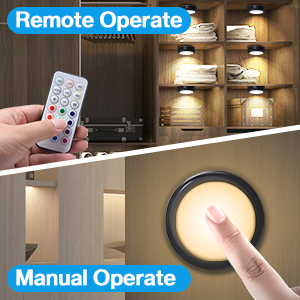
Image: Step 2 - Install 3 AAA batteries into the compartment.
2. Монтаж освітлення
The puck lights offer two installation methods: using screws or adhesive pads.
Adhesive Pad Installation:
- Clean the surface where you intend to mount the light, ensuring it is dry and free of dust or grease.
- Peel off one side of the adhesive pad and attach it firmly to the back of the puck light.
- Peel off the other side of the adhesive pad and press the light firmly onto the desired surface for at least 30 seconds.
- For optimal adhesion, allow 6 hours before applying significant pressure or adjusting the light.
Монтаж гвинта:
- Twist the back cover of the puck light counter-clockwise to separate it from the light unit.
- Position the back cover on the desired mounting surface and mark the screw holes.
- Use the provided screws to fix the back cover securely to the surface.
- Align the puck light unit with the fixed back cover and twist clockwise until it locks into place.
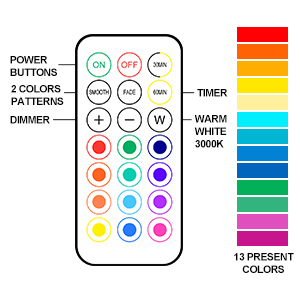
Image: Step 3 - Attach adhesive pad to the back of the light.
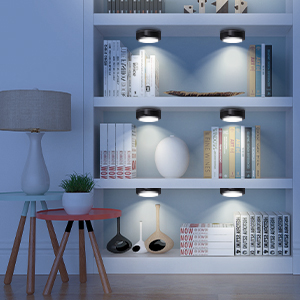
Image: Step 4 - Stick the light to the surface and press firmly.
Інструкція з експлуатації
1. Використання пульта дистанційного керування
The included wireless remote controls allow for convenient operation of your puck lights.
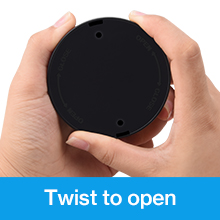
Image: Remote control layout with buttons for power, dimming, colors, and modes.
- УВІМК./ВИМК.: Press the 'ON' button to turn on the lights, and 'OFF' to turn them off.
- Регулювання яскравості: Use the '+' and '-' buttons to increase or decrease the brightness (10 levels).
- Вибір кольору: Оберіть один із 13 різних кольорів за допомогою кольорових кнопок на пульті дистанційного керування.
- Попередньо встановлені кольори: The 'W' button activates warm white light (2800-3300K). Red, Green, and Blue buttons activate their respective colors directly.
- Динамічні режими:
- ГЛАДКА: Enables an automatic color transformation mode, smoothly transitioning between colors.
- FADE: Activates a breathing light mode, where colors gently fade in and out.
- Функція таймера: Press '30MIN' or '60MIN' to set the lights to automatically turn off after 30 or 60 minutes, respectively. The lights will restart at the last used setting.
2. Manual Control (Touch)
Each puck light can also be controlled directly by touch.
- УВІМК./ВИМК.: Short press the center of the lampshade to turn the light on or off.
- Basic Color Change: Short press the center of the lampshade repeatedly to cycle through the four basic preset colors: warm white, red, green, and blue.
- Регулювання яскравості: Long press the center of the lampshade to adjust the brightness of the current color.

Image: A hand demonstrating touch control on a puck light mounted under a cabinet.
3. Застосування продукту Exampлес
Cadrim Puck Lights are versatile and can be used in various settings to create desired ambiance or provide task lighting.
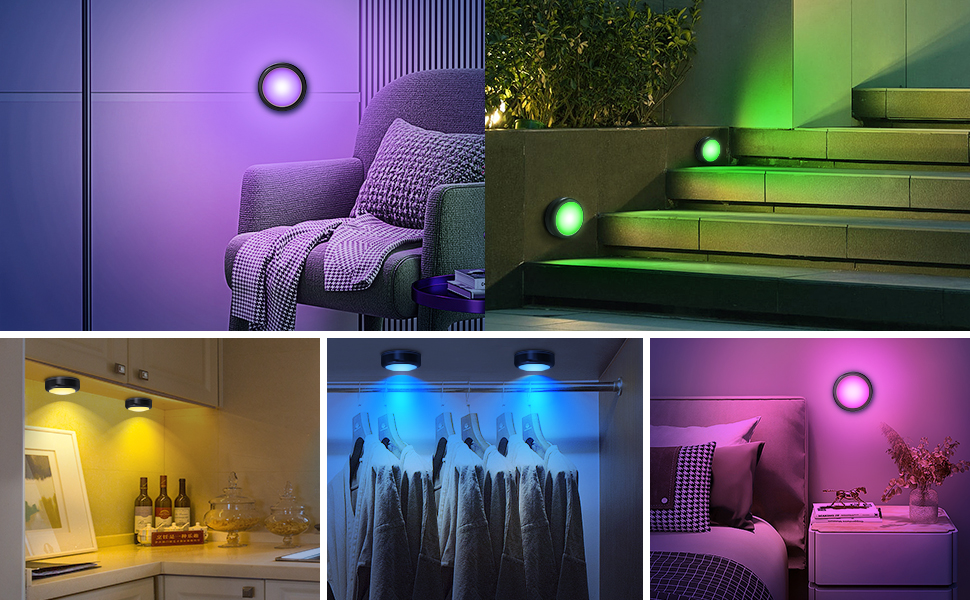
Image: Cadrim Puck Lights installed under kitchen cabinets, providing warm white illumination.
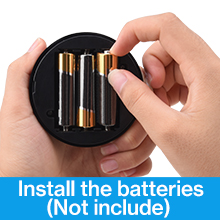
Image: Cadrim Puck Lights illuminating a bookshelf with a soft glow.
4. Офіційні відео про продукт
Watch these official videos from the seller for more insights on installation and features.
Video: Demonstration of Cadrim Under Cabinet Lights in Black. This video showcases the lights installed under cabinets and highlights their features and functionality.
Video: Cadrim RGB Puck Lights with Remote ReviewЦе відео містить детальний оглядview of the RGB puck lights, demonstrating their color-changing capabilities and remote control functions.
Технічне обслуговування
1. Заміна батареї
When the lights dim significantly or stop responding, it's time to replace the batteries. Follow the battery installation steps in the 'Setup Instructions' section.
2. прибирання
To clean the puck lights, gently wipe them with a soft, dry cloth. Avoid using abrasive cleaners or solvents, as these may damage the finish or electronic components. The lights are not water-resistant; do not immerse them in water.
Усунення несправностей
- Не вмикаються фари:
- Перевірте, чи правильно вставлені батарейки з дотриманням полярності.
- Замініть старі батарейки новими батарейками типу AAA.
- Пульт дистанційного керування не працює:
- Переконайтеся, що між пультом дистанційного керування та освітленням немає перешкод.
- Замініть батарейку в пульті дистанційного керування.
- Ensure the remote is pointed directly at the lights for best reception.
- Adhesive pads losing grip:
- Ensure the mounting surface was clean and dry before initial application.
- For textured surfaces or areas with high humidity (like kitchens), consider using the screw installation method for a more secure hold.
- Replace with stronger double-sided adhesive tape if necessary.
- Світло тьмяне:
- Increase brightness using the '+' button on the remote.
- Замініть батарейки, якщо вони низького заряду.
Технічні характеристики
| Бренд | Кадрім |
| Колір | чорний |
| матеріал | Полікарбонат |
| Форма світильника | Шайба |
| Тип кімнати | кухня |
| Розміри продукту | 1.57 см (Д) x 1.57 см (Ш) x 1.57 см (В) |
| Особливе використання | Кабінет |
| Використання в приміщенні/зовні | закритий |
| Джерело живлення | Працює від батареї |
| Тип установки | Поверхневий монтаж |
| Особливість | Зміна кольору, регулювання яскравості |
| Спосіб контролю | Дистанційний |
| Тип джерела світла | LED |
| Кількість джерел світла | 6 |
| томtage | 4.5 вольт |
| Світлий колір | Warm white, red, green, blue (13 color options via remote) |
| Вага товару | 0.77 фунта (12.3 унції) |
| Wattage | 1.2 Вт |
| Яскравість | 55 люмен |
| Рівень водонепроникності | Не водостійкий |
Гарантія та підтримка
For warranty information or technical support, please refer to the product packaging or contact Cadrim customer service directly. Keep your purchase receipt for warranty claims.