
вступ
This manual provides detailed instructions for the proper setup, operation, and maintenance of your TOMLOV DM04 Digital Microscope. Please read this manual thoroughly before using the device to ensure optimal performance and longevity.
The TOMLOV DM04 is a versatile digital microscope featuring a 9-inch LCD screen, 16MP camera, and up to 1300X digital magnification. It is designed for various applications including coin inspection, circuit board repair, and general observation of small objects. It is compatible with Windows and Mac OS for advanced functions.
Вміст упаковки
Перевірте, чи всі перелічені нижче предмети входять до вашої упаковки:
- 9-inch Microscope Unit
- Опорна плита
- 10-inch Stand Pole
- Пульт дистанційного керування
- USB Cable for Microscope (Micro USB)
- USB Cable for Base (USB-C)
- Світловий бар'єр
- Посібник користувача
- SD-карта на 32 ГБ (попередньо встановлена або постачається окремо)

Image: All components included in the TOMLOV DM04 Digital Microscope package, including the microscope unit, stand, base, cables, remote, and manual.
Інструкції з налаштування
- Зберіть підставку: Attach the 10-inch stand pole to the base plate. Ensure it is securely fastened.
- Встановлення мікроскопа: Slide the microscope unit onto the stand pole and tighten the securing screw at the desired height.
- Підключіть живлення:
- Connect the Micro USB cable to the microscope unit and a power source (e.g., USB adapter, computer USB port).
- Connect the USB-C cable to the base plate (for auxiliary lights) and a separate power source.
- Вставте SD-карту: If not pre-installed, insert the provided 32GB SD card into the slot on the back of the microscope unit.
- Position Auxiliary Lights: Adjust the flexible auxiliary lights on the base to illuminate your observation area as needed.
- Увімкнення: Press and hold the power button on the microscope unit to turn it on.
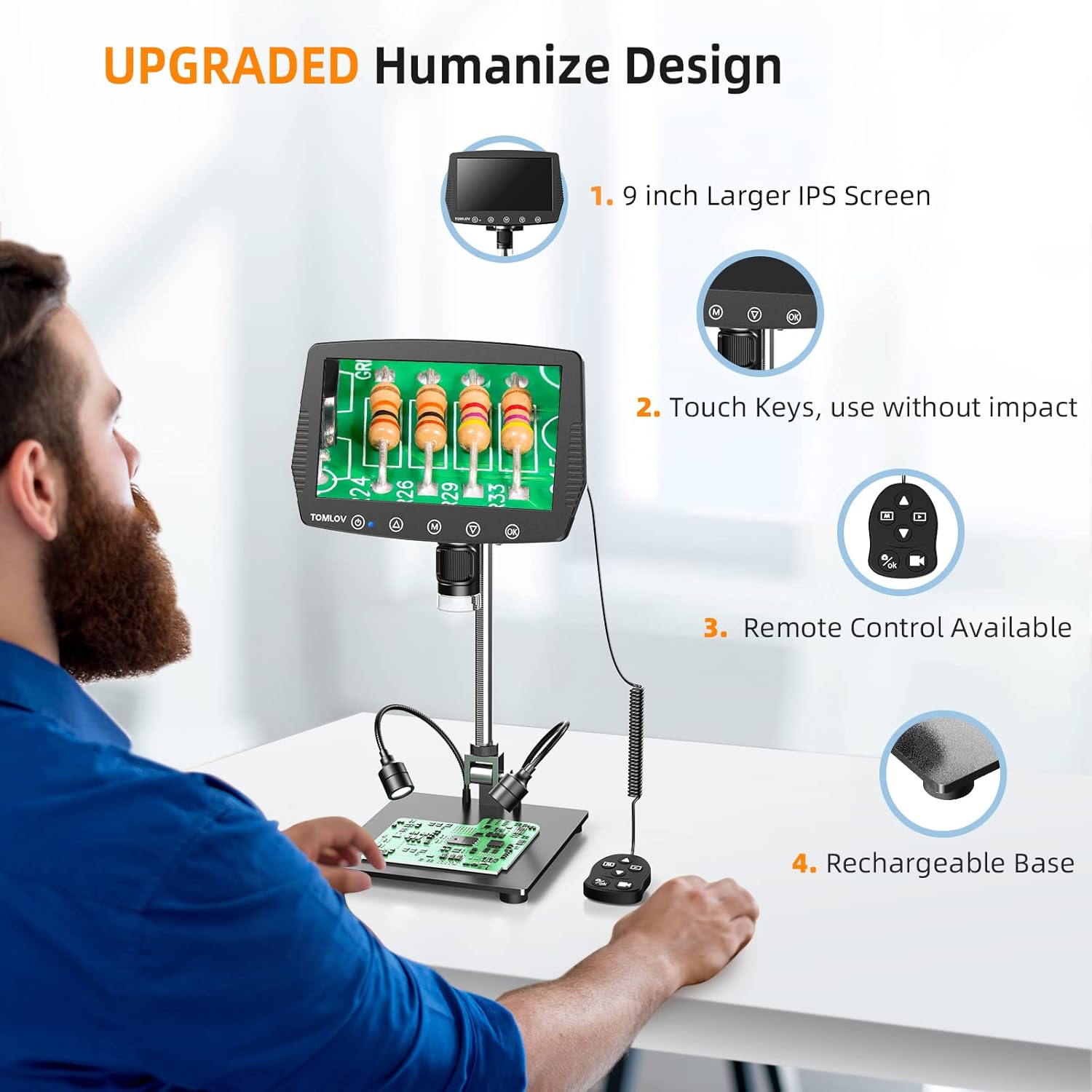
Image: A user setting up the TOMLOV DM04 microscope, demonstrating the assembly of the stand and placement of the microscope unit.
Інструкція з експлуатації
Основна операція
- Увімкнення/вимкнення живлення: Натисніть і утримуйте кнопку живлення (⑂), щоб увімкнути або вимкнути пристрій.
- Регулювання фокусу: Rotate the focus wheel on the microscope unit to achieve a clear image on the 9-inch LCD screen.
- Збільшення: The microscope offers digital magnification up to 1300X. Adjust the height of the microscope on the stand and use the digital zoom functions (if available via menu) to change magnification.
- Освітлення:
- Вбудовані світлодіодні лампи: The microscope head has built-in LED lights. These can be adjusted via the menu or dedicated buttons.
- Auxiliary Base Lights: The two flexible lights on the base can be adjusted independently using their respective controllers to provide additional illumination.
- Захоплення зображень/відео:
- Натисніть OK button on the microscope or remote control to take a picture.
- Натисніть і утримуйте OK кнопка для початку/зупинення відеозапису.
- Captured images and videos are saved to the inserted SD card.
Розширені функції
- Навігація по меню: Використовуйте M (Menu) button and arrow buttons (▲, ▼) to navigate through settings and options on the LCD screen.
- Пульт дистанційного керування: The included remote control allows for stable operation, reducing image shake during capture.
- Rotatable Screen & Bracket Pole: The screen can be rotated up to 80 degrees and the bracket pole up to 180 degrees for flexible viewкути.
- PC Connection (Windows/Mac OS):
- Connect the microscope to your computer using the appropriate USB cable.
- Select "PC Camera" mode on the microscope's screen.
- Install the dedicated software (refer to the included software CD or manufacturer's website for download) to enable measurement and marking functions, and to view пряма трансляція на вашому комп’ютері.
- Files can be transferred directly from the SD card when connected to a PC.

Image: The TOMLOV DM04 microscope connected to a laptop, showing the "PC Camera" function and measurement capabilities on the computer screen.

Зображення: Крупний план view of the TOMLOV DM04 microscope's dual auxiliary lighting system, highlighting the built-in LED ring light and the two flexible base lights.
Video: A demonstration of the TOMLOV DM04 digital microscope's capabilities, showing a detailed view of a fly. This video illustrates the clarity and magnification achievable with the device.
Технічне обслуговування
- Прибирання:
- Use a soft, dry cloth to clean the exterior of the microscope and screen.
- Для об’єктива використовуйте серветку для чищення об’єктивів та спеціальний розчин для чищення об’єктивів. Уникайте абразивних матеріалів.
- Do not use liquid cleaners directly on the screen or lens.
- Зберігання: Зберігайте мікроскоп у чистому, сухому місці, подалі від прямих сонячних променів та екстремальних температур.
- Догляд за акумулятором: Для оптимального терміну служби батареї регулярно заряджайте мікроскоп і уникайте повного розрядження протягом тривалого часу.
- Оновлення програмного забезпечення: Periodically check the TOMLOV official website for any available software or firmware updates for your DM04 model.
Усунення несправностей
| проблема | Можлива причина | Рішення |
|---|---|---|
| На екрані немає зображення | Пристрій не увімкнено; кришка об'єктива закрита; фокус не налаштовано. | Ensure device is powered on. Remove lens cap. Adjust focus wheel. |
| Зображення розмите | Improper focus; insufficient lighting; dirty lens. | Adjust focus wheel. Increase illumination using built-in or auxiliary lights. Clean the lens. |
| Не вдається зберегти зображення/відео | No SD card inserted; SD card full or corrupted; incorrect file налаштування формату. | Вставте сумісну SD-карту. Видаліть непотрібне files or replace SD card. Check menu settings for file формат. |
| PC connection not working | Incorrect USB cable; "PC Camera" mode not selected; driver issues. | Ensure correct USB cable is used. Select "PC Camera" mode on microscope. Install necessary drivers/software. |
Технічні характеристики
- модель: DM04
- Розмір екрана: 9-дюймовий РК-дисплей
- Роздільна здатність камери: 16 мегапікселів
- Роздільна здатність відео: 1080P
- Digital Magnification: До 1300 разів
- Stand Length: 10 дюймів
- Діапазон фокусування: Up to 8 inches (with enhanced stand)
- Освітлення: Built-in 8-LED fill lights, Rechargeable base lights (2)
- КОНТРОЛЬ: Touch buttons, Remote control
- Зберігання: Підтримка карт Micro SD (32 ГБ у комплекті)
- Сумісність з ПК: Windows, Mac OS
- Джерело живлення: Живлення від батареї (5 вольт)
- матеріал: 10'' Metal Stand + 9'' LCD Screen + Large Metal Base
Інформація про гарантію
TOMLOV products typically come with a standard manufacturer's warranty. Please refer to the warranty card included in your product packaging or visit the official TOMLOV webсайт для отримання детальних гарантійних умов, включаючи термін дії та процедури подання претензій.
Підтримка клієнтів
For technical assistance, troubleshooting not covered in this manual, or warranty inquiries, please contact TOMLOV customer support:
- Webсайт: www.tomlov.com (Примітка: Це тимчасовий фрагмент URL, будь ласка, зверніться до документації до вашого продукту для отримання офіційної підтримки webсайт.)
- Електронна пошта: Refer to your product documentation.
- телефон: Refer to your product documentation.
When contacting support, please have your product model (DM04) and purchase information ready.