
1. Більшеview
The Hoco ES61 Manner Sports Wireless Bluetooth Headset is designed for active lifestyles, offering a blend of comfort, long battery life, and versatile connectivity. This manual provides detailed instructions to help you get the most out of your headset.
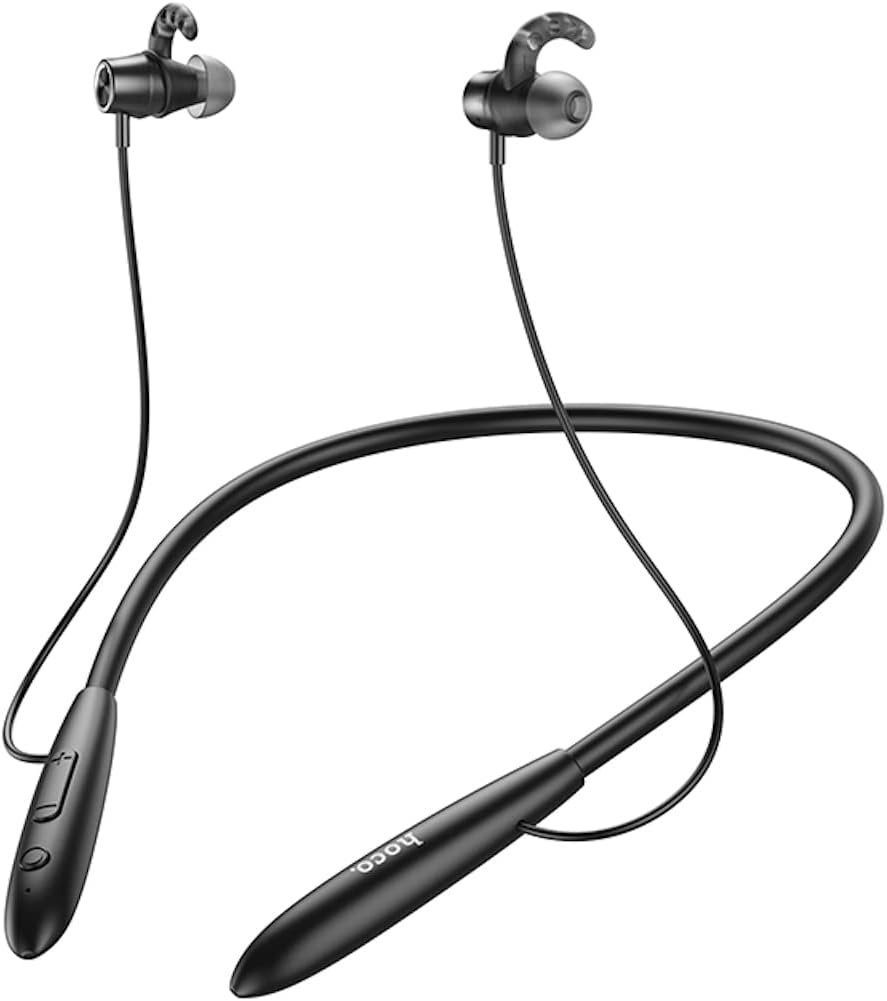
Зображення: спереду view of the Hoco ES61 headset, showcasing its neckband design and in-ear earbuds.
2. Особливості продукту
- Підключення Bluetooth 5.1: Equipped with JL AC7006 chip for stable and efficient wireless connection.
- Подовжений термін служби батареї: Features a 200mAh battery, providing up to 20 hours of music/talk time and an impressive 330 hours of standby time.
- Швидка зарядка: Повністю заряджається приблизно за 2 години.
- Легкий і зручний дизайн: The earphone cord measures 85cm in length, and the headset weighs only 22g, ensuring comfort during extended wear.
- Універсальні параметри відтворення: Supports Bluetooth audio streaming and TF card playback (up to 32GB) for direct music listening.
- Багатомовні голосові підказки: Offers voice prompts in both Chinese and English for user convenience.
- Широка сумісність: Compatible with a broad range of devices including iPhone, Samsung, OnePlus, Huawei, Xiaomi, and Oppo smartphones.

Зображення: Крупний план view of the Hoco ES61 headset, highlighting the integrated TF card slot for direct music playback.
Відео: Офіційна відеопрезентація продуктуasing the Hoco ES61 Bluetooth Headset's features, including its 20-hour battery life, voice prompts, and compatibility with iOS and Android devices.
3. Посібник із налаштування
3.1 Заряджання гарнітури
Before first use, fully charge the headset. Use a standard USB charger (not included) to connect the charging port on the headset to a power source.
- Світлодіодний індикатор зазвичай світиться червоним світлом під час заряджання.
- Once fully charged (approximately 2 hours), the LED indicator will turn blue or off.
3.2 Створення пари Bluetooth
To connect your Hoco ES61 headset to a Bluetooth-enabled device:
- Переконайтеся, що гарнітуру вимкнено.
- Press and hold the multi-function button (usually the power button) for approximately 3-5 seconds until the LED indicator flashes red and blue alternately. This indicates pairing mode.
- На своєму пристрої (смартфоні, планшеті тощо) увімкніть Bluetooth та виконайте пошук доступних пристроїв.
- Select "Hoco ES61" from the list of found devices.
- Once connected, the LED indicator on the headset will typically flash blue slowly or turn off, and you will hear a voice prompt confirming the connection.
3.3 Відтворення з TF-картки
The Hoco ES61 supports direct music playback from a TF (MicroSD) card.
- Carefully insert a TF card (up to 32GB) with your music files into the designated TF card slot on the headset.
- The headset will automatically switch to TF card playback mode if a card is detected and contains playable audio files.
- Use the headset controls to manage playback (play, pause, skip tracks).
4. Інструкція з експлуатації
4.1 Основні елементи керування
| Кнопка/Дія | функція |
|---|---|
| Багатофункціональна кнопка (MFB) | Увімкнення/вимкнення живлення, відтворення/пауза, відповідь/завершення виклику |
| Збільшення гучності (+) | Збільшити гучність, Наступний трек (довге натискання) |
| Зменшення гучності (-) | Зменшення гучності, Попередній трек (довге натискання) |
4.2 Відтворення музики
- Відтворення/пауза: Коротке натискання MFB.
- Наступний трек: Тривале натискання кнопки збільшення гучності (+).
- Попередній трек: Тривало натисніть кнопку зменшення гучності (-).
- Регулювання гучності: Коротко натисніть кнопку збільшення гучності (+) або зменшення гучності (-).
4.3 Керування викликами
- Відповісти/закінчити виклик: Коротко натисніть багатофункціональну кнопку під час вхідного дзвінка.
- Відхилити виклик: Тривале натискання багатофункціональної кнопки під час вхідного дзвінка.
- Повторний набір останнього номера: Double-click the MFB when not on a call.

Image: The Hoco ES61 headset resting on a smartphone, illustrating its use with mobile devices for music and calls.
5. Технічне обслуговування та догляд
- Тримайте гарнітуру сухою. Не піддавайте її впливу екстремальних температур або вологості.
- Clean the earbuds and charging port regularly with a soft, dry cloth to prevent dust and debris buildup.
- Уникайте використання агресивних хімікатів або абразивних засобів для чищення.
- Зберігайте гарнітуру в прохолодному сухому місці, коли вона не використовується.
- Do not attempt to disassemble or modify the headset, as this will void the warranty and may cause damage.

Image: The Hoco ES61 headset shown with different sizes of silicone ear tips, emphasizing the importance of proper fit for comfort and sound quality.
6. Вирішення проблем
6.1 Headset Not Turning On
- Ensure the headset is fully charged. Connect it to a charger and check the LED indicator.
- Press and hold the multi-function button for a few seconds to power on.
6.2 Не вдається з’єднати пристрій
- Make sure the headset is in pairing mode (LED flashing red and blue alternately).
- Переконайтеся, що на вашому пристрої ввімкнено Bluetooth, і він знаходиться в межах досяжності (зазвичай 10 метрів).
- Forget/delete "Hoco ES61" from your device's Bluetooth list and try pairing again.
- Перезавантажте гарнітуру та пристрій.
6.3 Немає звуку або низька гучність
- Збільште гучність як на гарнітурі, так і на підключеному пристрої.
- Переконайтеся, що гарнітура правильно підключена до вашого пристрою.
- If using TF card, ensure the card is inserted correctly and contains playable audio files.
- Check for any obstructions in the earbud nozzles and clean if necessary.
6.4 Короткий термін служби батареї
- Перед використанням переконайтеся, що гарнітура повністю заряджена.
- Термін служби батареї може змінюватися залежно від рівня гучності та режиму використання.
- Уникайте впливу на акумулятор екстремальних температур.
7. Технічні характеристики
| Особливість | Деталь |
|---|---|
| Версія Bluetooth | 5.1 |
| Чіп Bluetooth | JL AC7006 |
| Ємність акумулятора | 200 мАг |
| Час зарядки | прибл. 2 години |
| Музика / Час розмов | До 20 годин |
| Час очікування | До 330 годин |
| Earphone Cord Length | 85 см |
| вага | 22г |
| Підтримка карт TF | Так, до 32 ГБ |
| Голосові підказки | китайська та англійська |
| Сумісність | iPhone, Samsung, OnePlus, Huawei, Xiaomi, Oppo |
8. Гарантія та підтримка
For warranty information and customer support, please refer to the product packaging or contact your retailer. Keep your purchase receipt as proof of purchase for any warranty claims.