
вступ
This manual provides detailed instructions for the setup, operation, maintenance, and troubleshooting of your Keychron V5 Wired Custom Mechanical Keyboard. The Keychron V5 is a 96% layout keyboard featuring QMK/VIA programmability, hot-swappable switches, double-shot PBT keycaps, and compatibility with macOS, Windows, and Linux systems.
Вміст упаковки
Будь ласка, перевірте наявність усіх предметів у вашій упаковці:
- Дротова спеціальна механічна клавіатура Keychron V5
- Кабель USB-C – USB-C
- Перехідник USB-A до USB-C
- Знімач ключів
- Знімач перемикача
- Additional Keycaps for Windows/macOS
Налаштування
Підключення клавіатури
To connect your Keychron V5 keyboard:
- Знайдіть порт USB-C на задній панелі клавіатури.
- Connect one end of the provided USB-C to USB-C cable to the keyboard.
- Connect the other end of the cable to a USB-C port on your computer. If your computer only has USB-A ports, use the provided USB-A to USB-C adapter.
- Клавіатуру буде автоматично розпізнано вашою операційною системою.
System Toggle (Mac/Windows)
The Keychron V5 includes a system toggle switch to ensure full compatibility with both macOS and Windows operating systems. This switch is typically located on the back or side of the keyboard.
Щоб перемикатися між операційними системами:
- Locate the 'Win/Mac' toggle switch.
- Slide the switch to the 'Mac' position for macOS or 'Win' position for Windows.
- The keyboard will adjust its key mappings accordingly.

Зображення: Збоку view of the Keychron V5 keyboard, highlighting the system toggle switch and USB-C port for system compatibility.
Ergonomic Angle Adjustment
The keyboard features adjustable feet to customize the typing angle for improved ergonomics.
To adjust the typing angle:
- Flip the keyboard over to access the feet on the underside.
- Gently pull out the feet to extend them to your desired angle. There are usually two levels of adjustment.

Image: The Keychron V5 keyboard with its adjustable feet extended, demonstrating the ergonomic angle design.
Інструкція з експлуатації
Ключові функції та розташування
The Keychron V5 features a 96% layout with 97 keys, efficiently retaining function keys and a num pad while saving desk space. The keyboard comes with pre-installed double-shot PBT keycaps in an OSA profile, designed for a comfortable fingertip feel and excellent oil resistance.
Зображення: Повний view of the Keychron V5 keyboard, showcasinйого 96% розташування клавіш та дизайн ковпачків клавіш.
Налаштування QMK/VIA
The Keychron V5 supports QMK/VIA firmware, allowing for comprehensive customization of key mappings, macros, and backlight effects. VIA is a graphical user interface that simplifies the programming process.
Щоб налаштувати клавіатуру:
- Завантажте програмне забезпечення VIA з офіційного сайту Keychron. webсайт або репозиторій VIA GitHub.
- Connect your keyboard to your computer.
- Launch the VIA software. The software should automatically detect your Keychron V5.
- Use the intuitive interface to remap keys, create macros, and adjust lighting settings across multiple layers.
For detailed instructions on using QMK/VIA, refer to the official Keychron documentation or community guides.

Image: A visual representation of the VIA software interface, demonstrating how users can customize key layouts and macros for the Keychron V5.
Programmable Knob
The Keychron V5 features a programmable rotary knob, which can be customized via QMK/VIA to control various functions such as volume, zoom, or scrolling.
To customize the knob's function:
- Open the VIA software.
- Navigate to the knob customization section.
- Assign desired functions for clockwise rotation, counter-clockwise rotation, and pressing the knob.

Зображення: Крупний план view of the programmable rotary knob on the Keychron V5 keyboard, highlighting its textured surface.
Перемикачі з можливістю гарячої заміни
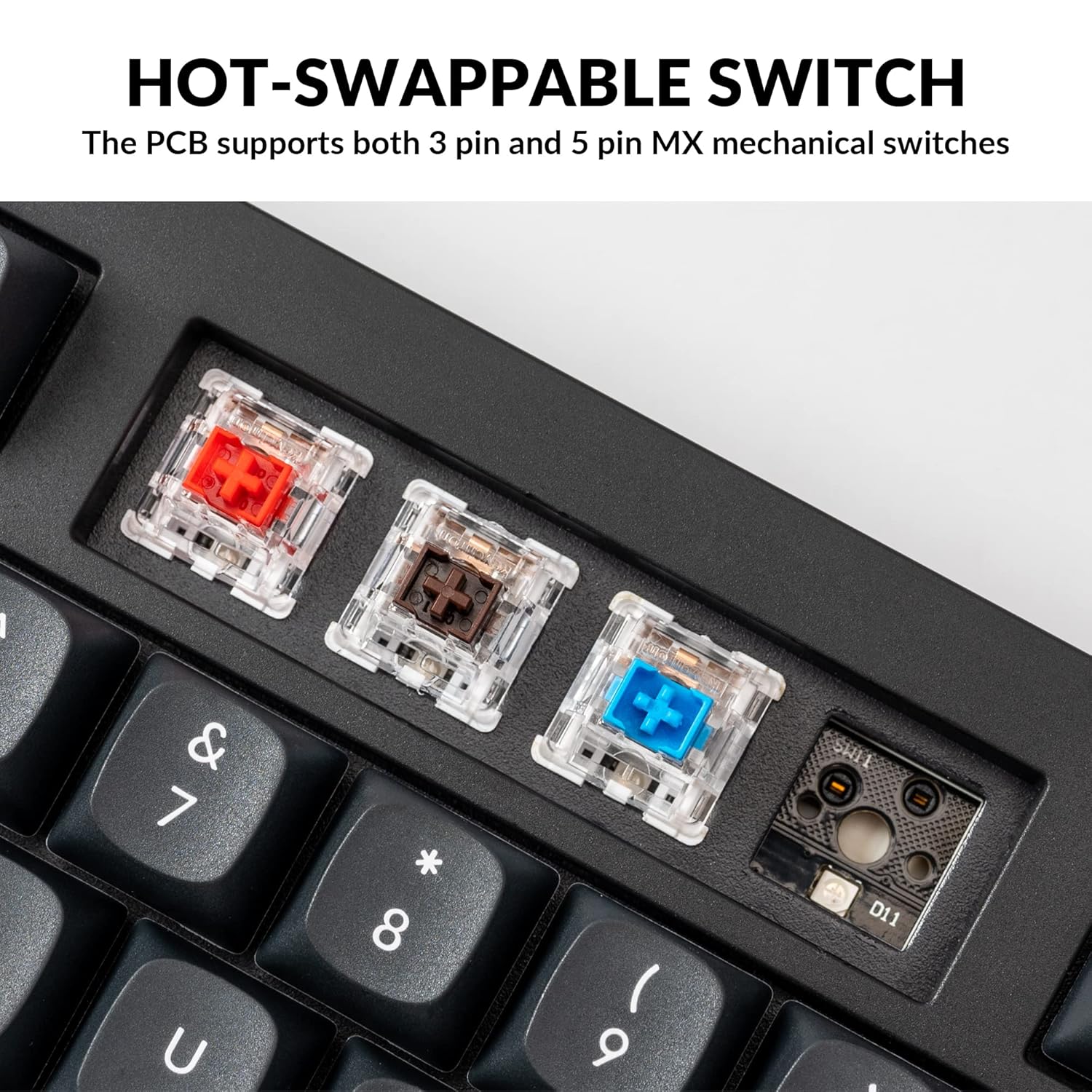
The Keychron V5 is equipped with hot-swappable sockets, allowing you to change mechanical switches without soldering. It supports most 3-pin and 5-pin MX mechanical switches (e.g., Cherry, Gateron, Kailh, Panda).
The keyboard comes with pre-lubed K Pro Red linear switches, offering a smooth and responsive typing experience with a lifespan of up to 50 million keystrokes.
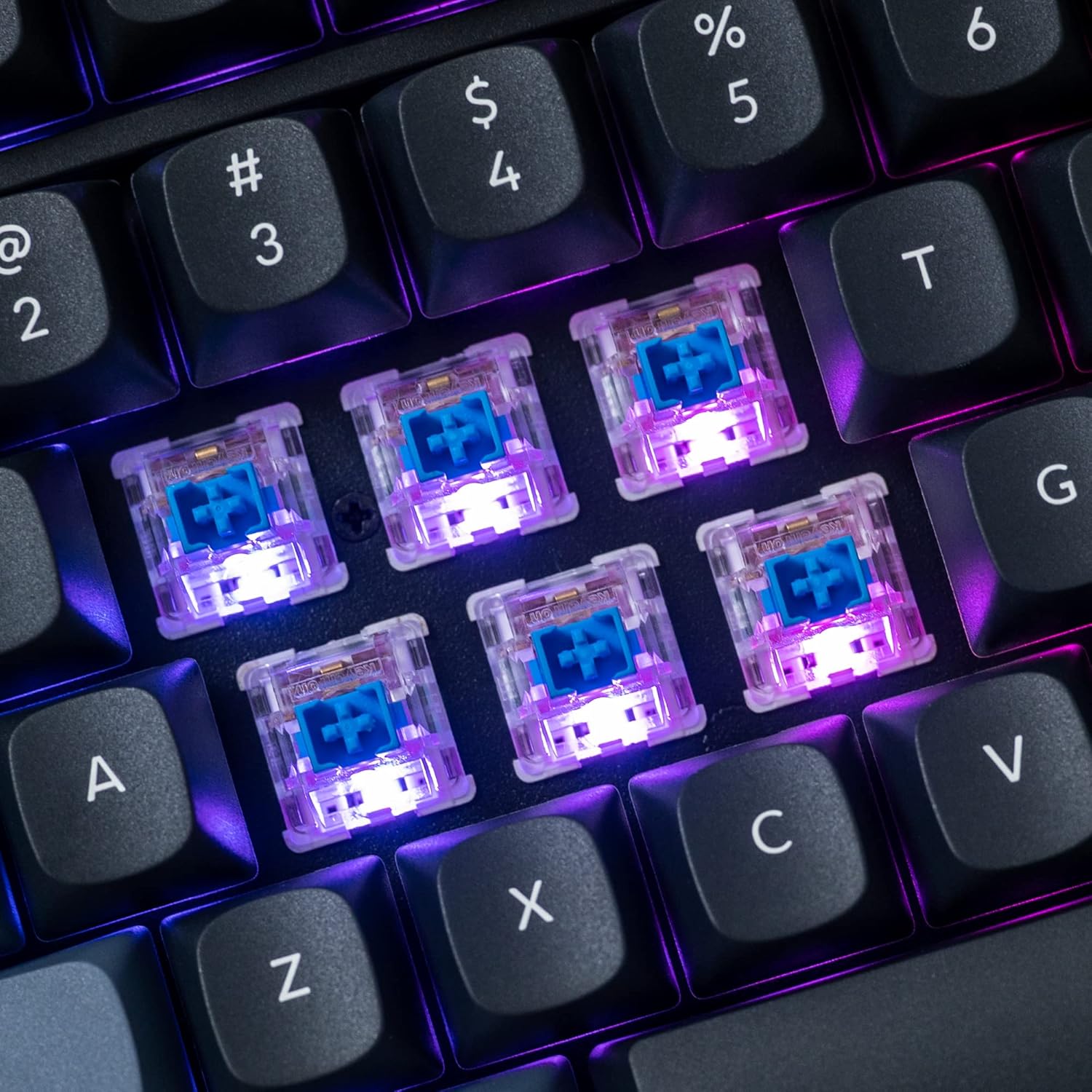
Зображення: Детальний view of the hot-swappable mechanical switches on the Keychron V5 keyboard, illuminated by RGB backlighting.
Підсвічування
The V5 features south-facing RGB backlighting, designed to better illuminate the keyboard from the typist's angle and prevent interference when using Cherry-profile keycaps. You can customize the backlight effects and colors using the VIA software.

Image: A close-up of the double-shot PBT keycaps on the Keychron V5 keyboard, showcasing their texture and legends.
Технічне обслуговування
прибирання
Щоб підтримувати чистоту та довговічність клавіатури:
- Клавіатури: Використовуйте знімач для ковпачків клавіш. Почистіть їх м’яким мильним розчином і м’якою тканиною, потім промийте та ретельно висушіть, перш ніж знову прикріплювати.
- Корпус клавіатури: Wipe the keyboard body with a soft, damp тканина. Уникайте використання агресивних хімікатів або абразивних матеріалів.
- Пил: Використовуйте стиснене повітря, щоб видалити пил та сміття між клавішами та перемикачами.
Заміна перемикача
Щоб замінити вимикач:
- Використовуючи наданий знімач для ковпачків клавіш, обережно зніміть ковпачок клавіші з перемикача, який ви хочете замінити.
- Insert the switch puller tool around the top and bottom clips of the switch.
- Gently squeeze the clips and pull the switch straight up to remove it from the PCB.
- Зіставте контакти нового перемикача з отворами на друкованій платі. Переконайтеся, що контакти розташовані рівно.
- Press the new switch firmly into place until it clicks. Ensure it is seated properly and not bent.
- Знову прикріпіть ковпачок клавіші.
Заміна ковпачка клавіш
Щоб замінити ковпачки клавіш:
- Use the keycap puller to gently remove the existing keycap by hooking it onto the keycap and pulling upwards.
- Align the new keycap with the cross-shaped stem of the switch.
- Press the new keycap firmly down until it is fully seated.
Усунення несправностей
- Клавіатура не реагує:
Ensure the USB cable is securely connected to both the keyboard and the computer. Try a different USB port or cable. Verify the system toggle switch is set correctly for your operating system. - Ключі не реєструються:
If specific keys are not working, the switch might be faulty or not fully seated. Try removing and re-inserting the switch. If the issue persists, replace the switch. - Проблеми з підсвічуванням:
Check VIA software settings to ensure backlighting is enabled and configured correctly. If only certain LEDs are not working, it might indicate a faulty LED or switch. - Програмне забезпечення QMK/VIA не розпізнає клавіатуру:
Ensure the keyboard is connected via USB. Close and reopen the VIA software. Make sure you have the correct firmware loaded if you have flashed custom firmware. - Keycaps Feel Loose:
Ensure keycaps are fully pressed onto the switch stems. If a keycap consistently feels loose, the switch stem might be damaged, or the keycap's cross-mount might be worn.
Технічні характеристики
| Особливість | Специфікація |
|---|---|
| Бренд | Keychron |
| Модель | V5 |
| Опис клавіатури | Механічний |
| Розкладка клавіатури | QWERTY, 96% Layout (97 Keys) |
| Технологія підключення | Дротовий (USB-C) |
| Сумісні пристрої | PC (macOS, Windows, Linux) |
| Тип перемикача | Linear (K Pro Red) |
| Hot-swappable Support | Yes (3-pin and 5-pin MX mechanical switches) |
| Клавіатури | Double-shot PBT, OSA Profile |
| Підсвічування | RGB-підсвітка на південь |
| Матеріал корпусу | Полібутилентерефталат, силікон |
| Додаткові функції | QMK/VIA Programmable, Programmable Knob, Screw-in Stabilizers |
Гарантія та підтримка
Keychron products are typically covered by a limited warranty. For specific warranty terms, duration, and conditions, please refer to the warranty information provided with your product packaging or visit the official Keychron webсайт.
For technical support, troubleshooting assistance, or to inquire about replacement parts, please contact Keychron customer service through their official website's support portal. When contacting support, please have your product model (Keychron V5) and purchase details ready.