
1. Вступ
The UMLIFE STC-1000 is a versatile digital temperature controller designed for precise temperature management in various applications. This device features a clear LED display, NTC 10K thermistor sensor, and dual relay outputs for both heating and cooling control. This manual provides detailed instructions for installation, operation, and maintenance to ensure optimal performance and longevity of your temperature controller.
2. Продукт закінчивсяview
2.1 Основні характеристики
- Digital LED display for clear temperature readings.
- Wide temperature measurement and control range: -50°C to 99°C.
- High control accuracy of 0.1°C.
- Dual relay output for simultaneous heating and cooling control.
- Waterproof NTC 10K thermistor sensor for reliable measurements in various environments.
- Функція калібрування температури.
- Delay start protection for cooling control.
- ABS flame-retardant shell for enhanced safety.
2.2 Компоненти та дисплей
Familiarize yourself with the main components and display interface of the STC-1000 controller.

малюнок 1: Front panel of the STC-1000 controller showing the digital display, power switch, UP button, Setting button, and DOWN button.
- Digital Display Window: Shows current temperature and parameter settings.
- Вимикач живлення: Вмикає або вимикає пристрій.
- Кнопка ВГОРУ (▲): Збільшує значення або переміщується по меню.
- Кнопка ВНИЗ (▼): Зменшує значення або переміщується по меню.
- Кнопка налаштування (S): Enters parameter setting mode.
- Cool Indicator: Illuminates when cooling relay is active.
- Індикатор тепла: Illuminates when heating relay is active.

малюнок 2: Physical dimensions of the STC-1000 controller and the included 1-meter NTC 10K waterproof sensor probe.
3. Технічні характеристики
| Параметр | Значення |
|---|---|
| Модель | STC-1000 |
| Діапазон вимірювання температури | -50°C до 99°C |
| Діапазон контролю температури | -50°C до 110°C |
| Точність вимірювання | ±0.2°C |
| роздільна здатність | 0.1°C |
| Точність контролю | ±0.1°C |
| датчик | NTC 10K L=1M waterproof probe |
| Джерело живлення | 12 В постійного струму |
| Споживана потужність | <3 Вт |
| Ємність контакту реле | Cool (10A/220VAC), Heat (10A/220VAC) |
| Температура навколишнього середовища | від 0°C до 60°C |
| Температура зберігання | -30°C до 75°C |
| Відносна вологість | 20-84% |
| Монтажний розмір | 71 мм х 29 мм |
| Розміри продукту | 75 мм x 34.5 мм x 85 мм |
| Вага товару | 7 унцій (приблизно 198 г) |
| матеріал | Акрилонітрилбутадієнстирол (АБС) |
4. Налаштування та встановлення
Важливе зауваження щодо безпеки: Installation should be performed by qualified personnel. Ensure power is disconnected before wiring to prevent electric shock. Strictly distinguish between power supply, sensor, and relay interfaces. Maintain proper distance between sensor down-lead and power wires to avoid interference.
4.1 Схема підключення
Refer to the following diagram for correct wiring connections. This model operates on DC 12V power supply.
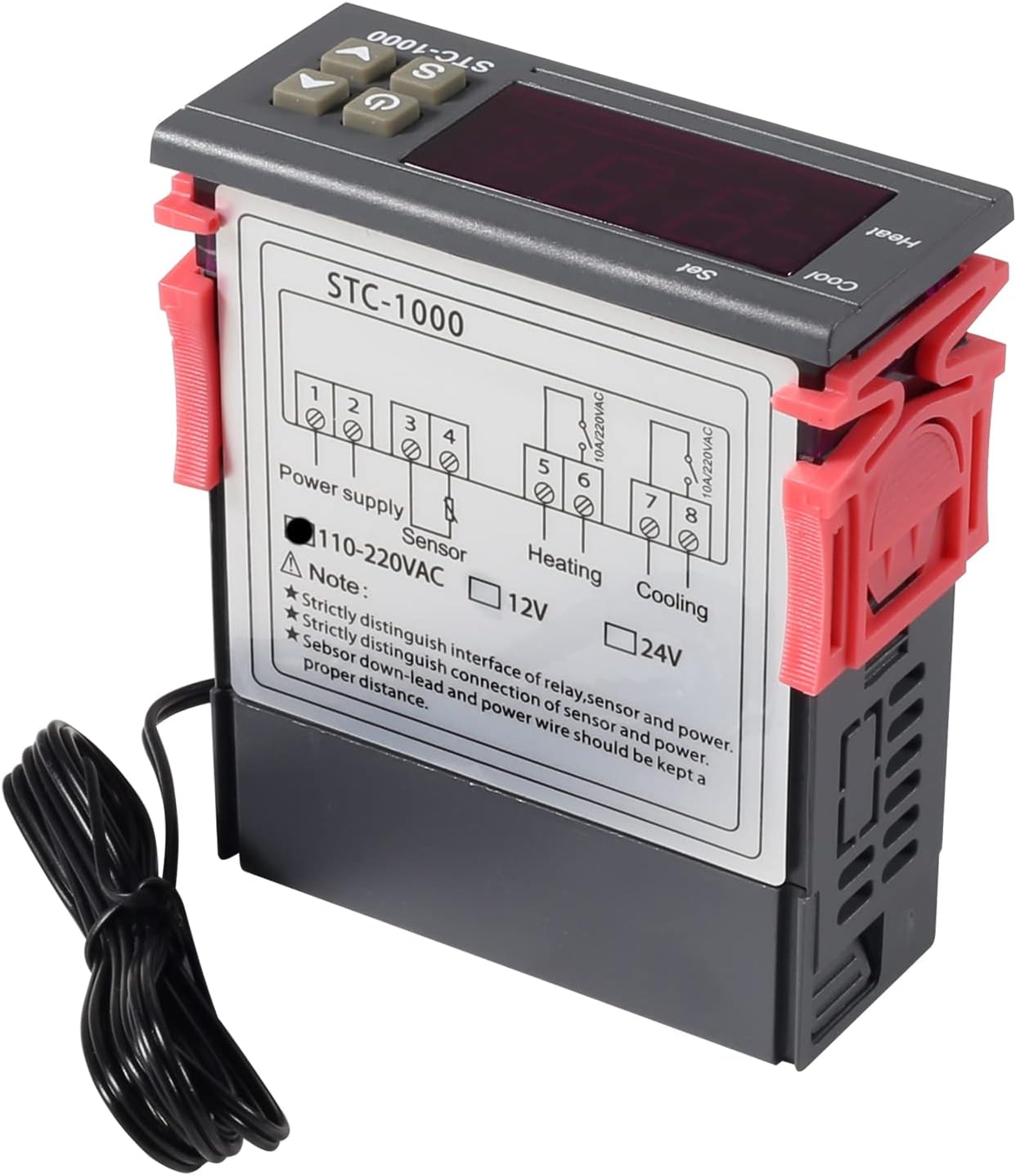
малюнок 3: Wiring diagram for the STC-1000 12V temperature controller. Connections are for power supply, NTC sensor, heating relay, and cooling relay.
- Термінали 1 та 2: Power Supply (DC 12V).
- Термінали 3 та 4: NTC Sensor connection.
- Термінали 5 та 6: Heating Relay Output (Connect to heating device).
- Термінали 7 та 8: Cooling Relay Output (Connect to cooling device).
Ensure all connections are secure and insulated. Verify the power supply voltage matches the controller's requirement (DC 12V for this model).
4.2 Монтаж
The STC-1000 is designed for panel mounting. Cut an opening of 71mm x 29mm in your panel. Insert the controller and secure it using the provided clips or mounting brackets.
5. Інструкція з експлуатації
The STC-1000 operates in Celsius only. It cannot be switched to Fahrenheit.
5.1 Увімкнення/вимкнення живлення
- Натисніть Вимикач живлення button (marked with ⏻), щоб увімкнути або вимкнути контролер.
5.2 Налаштування параметрів температури
The controller has two main temperature settings: the Set Temperature (ST) і Difference Temperature (DT), also known as hysteresis.
- до view the Set Temperature (ST): Коротко натисніть Setting (S) button. The display will show the current set temperature.
- To modify the Set Temperature (ST):
- Натисніть і утримуйте Setting (S) button for approximately 3 seconds until the display flashes.
- Використовуйте ВГОРУ (▲) or ВНИЗ (▼) buttons to adjust the desired set temperature.
- Натисніть Вимикач живлення button to save the setting and exit, or wait for 10 seconds for it to save automatically.
5.3 Advanced Parameter Settings (F1-F4)
To access and modify advanced parameters:
- Натисніть і утримуйте Setting (S) button for approximately 3 seconds until the display flashes.
- Поки дисплей блимає, натисніть кнопку Setting (S) button again (do not hold) to cycle through parameters F1, F2, F3, F4.
- Використовуйте ВГОРУ (▲) or ВНИЗ (▼) buttons to adjust the value of the selected parameter.
- Натисніть Вимикач живлення button to save the setting and exit, or wait for 10 seconds for it to save automatically.
| Параметр | опис | Діапазон | За замовчуванням |
|---|---|---|---|
| F1 | Difference Temperature (Hysteresis): The difference between the set temperature and the temperature at which the relay switches off. | від 0.3°C до 10°C | 2.0°C |
| F2 | Highest Set Point Limit: Limits the maximum adjustable set temperature. | Set Temp to 110°C | 110°C |
| F3 | Lowest Set Point Limit: Limits the minimum adjustable set temperature. | -50°C to Set Temp | -50°C |
| F4 | Калібрування температури: Adjusts the temperature reading to match a known accurate thermometer. | -10°C до 10°C | 0.0°C |
5.4 Режими опалення та охолодження
The STC-1000 automatically switches between heating and cooling based on the set temperature (ST) and difference temperature (DT).
- Режим охолодження: If the current temperature is higher than (ST + DT), the cooling relay activates. It deactivates when the temperature drops to ST.
- Режим нагріву: If the current temperature is lower than (ST - DT), the heating relay activates. It deactivates when the temperature rises to ST.
6. Технічне обслуговування
- Прибирання: Протріть поверхню контролера м’якою сухою тканиною. Не використовуйте абразивні засоби для чищення або розчинники.
- Догляд за датчиком: Ensure the NTC sensor probe is clean and free from debris. While waterproof, avoid unnecessary physical damage to the probe or cable.
- Підключення: Periodically check wiring connections for tightness and signs of corrosion.
- Середовище: Operate the controller within the specified ambient temperature and humidity ranges to ensure optimal performance and lifespan.
7. Вирішення проблем
| проблема | Можлива причина | Рішення |
|---|---|---|
| Display shows "EE" | Помилка датчика або розрив ланцюга. | Перевірте підключення датчика. Замініть датчик, якщо він пошкоджений. |
| Display shows "HHH" | Temperature exceeds upper limit of measurement range. | Ensure the environment temperature is within the sensor's range (-50°C to 99°C). |
| Display shows "LLL" | Temperature falls below lower limit of measurement range. | Ensure the environment temperature is within the sensor's range (-50°C to 99°C). |
| Контролер не вмикається | Немає живлення або неправильна гучністьtage. | Check power connections and ensure DC 12V is supplied. |
| Обігрів/охолодження не активується | Incorrect temperature settings (ST, DT), wiring error, or device malfunction. | Verify ST and DT settings. Check heating/cooling device wiring. Ensure the device is within operating parameters. |
8. Гарантія та підтримка
UMLIFE products are manufactured to high-quality standards. For warranty information or technical support, please contact UMLIFE customer service through your purchase platform or visit the official UMLIFE website. Please have your product model (STC-1000 12V) and purchase details ready when contacting support.
Для отримання додаткової допомоги ви також можете звернутися до UMLIFE Store on Amazon.