
1. Вступ
This manual provides detailed instructions for the Minno Maverick A10 Rugged 10-inch Android 10 Tablet. It covers initial setup, operation, maintenance, and troubleshooting to ensure optimal performance and longevity of your device. Please read this manual thoroughly before using the tablet.
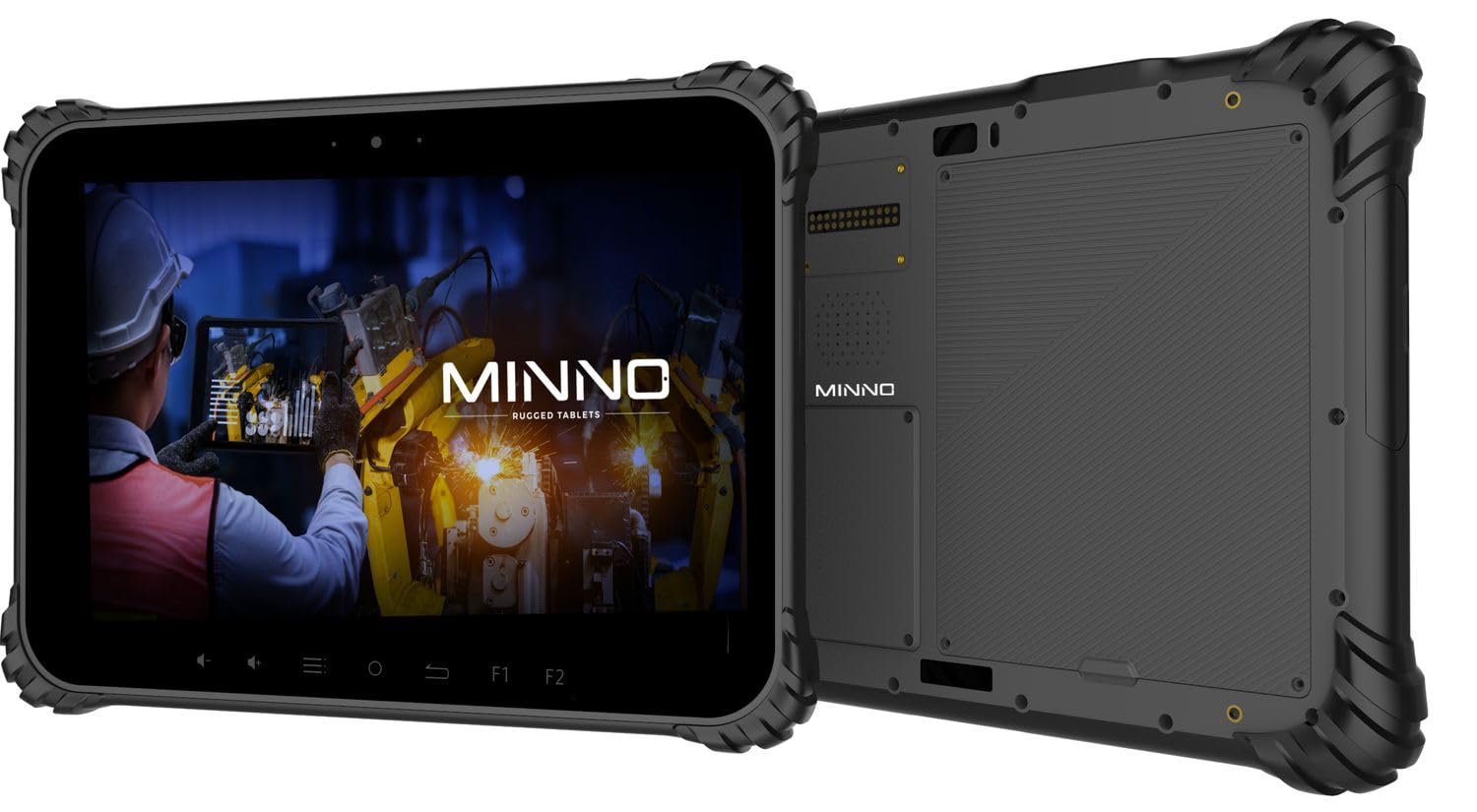
Figure 1.1: Minno Maverick A10 Rugged Tablet
2. Вміст упаковки
Перевірте наявність усіх елементів в упаковці:
- Minno Maverick A10 Rugged Android Tablet
- Адаптер живлення
- Ручка портфеля
- Hand Strap (pre-installed)
3. Пристрій закінчивсяview
3.1 Основні характеристики
- Міцний дизайн: IP67 dust and waterproof, MIL-STD-810H certified for drop, shock, and vibration resistance.
- Дисплей: 10-inch sunlight-readable touchscreen.
- Продуктивність: Android 10 operating system, 4GB RAM, 64GB internal storage.
- Підключення: LTE (unlocked for AT&T & T-Mobile), Wi-Fi, Bluetooth, NFC, GPS.
- Батарея: 11,700 mAh swappable battery for extended use.
- Камери: 13 MP rear camera, 5 MP front camera.
- Фізичні кнопки: Dedicated buttons for easy access to functions.

Figure 3.1: Minno Maverick A10 with core specifications
3.2 Physical Buttons and Ports
The tablet features physical buttons for common functions and easy access, even in demanding environments.

Figure 3.2: Tablet cameras and easy access buttons
- Кнопка живлення: Розташований збоку, використовується для ввімкнення/вимкнення або пробудження/переведення пристрою в режим сну.
- Збільшення/зменшення гучності: Регулює гучність звуку.
- Function Buttons (F1, F2): Customizable buttons for quick access to specific applications or features.
- Кнопка повернення: Повернення до попереднього екрана.
- Кнопка "Додому: Повернення на головний екран.
- Кнопка меню: Accesses application options or recent apps.
- Порти USB: Для зарядки та передачі даних.
- Закриті порти: Designed to protect against dust and water ingress.
4. Початкове налаштування
4.1 Заряджання батареї
Before first use, fully charge the tablet battery. Connect the provided power adapter to the tablet's charging port and plug it into a power outlet. The charging indicator will show the charging status.
4.2 Увімкнення/вимкнення
- Щоб увімкнути: Press and hold the Power button until the Minno logo appears on the screen.
- Щоб вимкнути: Натисніть і утримуйте кнопку живлення, доки не з’явиться меню параметрів живлення. Виберіть «Вимкнути живлення» та підтвердіть.
- Для сну/пробудження: Коротко натисніть кнопку живлення, щоб перевести планшет у режим сну або розбудити його.
4.3 Початкова конфігурація
Після першого ввімкнення дотримуйтесь інструкцій на екрані, щоб завершити початкове налаштування, зокрема:
- Вибір мови
- Підключення до мережі Wi-Fi
- Google account setup
- Налаштування дати та часу
4.4 Installing SIM/SD Card
The tablet supports a SIM card for LTE connectivity and an SD card for expanded storage. Locate the covered slot on the side of the tablet. Carefully open the cover, insert the SIM card and/or SD card into their respective slots, ensuring correct orientation. Close the cover securely to maintain IP67 rating.
5. Основна операція
5.1 Навігація за допомогою сенсорного екрана
The 10-inch display is a multi-touch screen. Use standard Android gestures:
- Торкніться: Виберіть елемент або відкрийте програму.
- Натисніть і утримуйте: Доступ до контекстних меню або переміщення значків.
- Проведіть пальцем: Прокручуйте списки або перемикайтеся між екранами.
- Масштабування за допомогою розведення пальців: Збільшення або зменшення масштабу зображень та web сторінки.
5.2 Підключення
- Wi-Fi: Перейдіть до Налаштування > Мережа та інтернет > Wi-Fi, щоб підключитися до доступних мереж.
- LTE: Ensure a valid SIM card is installed. Go to Settings > Network & internet > Mobile network to enable mobile data.
- Bluetooth: Перейдіть до Налаштування > Підключені пристрої > Bluetooth, щоб підключитися до аксесуарів Bluetooth.
6. Розширені функції
6.1 Використання камери
The tablet is equipped with a 13 MP rear camera and a 5 MP front camera. Open the Camera application to capture photos and videos. Adjust settings such as flash, timer, and mode within the app.
6.2 GPS-навігація
The integrated GPS module allows for location tracking and navigation. Ensure location services are enabled in Settings > Location for optimal performance with mapping applications.
6.3 Функціональність NFC
NFC (Near Field Communication) allows for short-range wireless communication. Enable NFC in Settings > Connected devices > Connection preferences > NFC to use features like contactless payments or quick data sharing with compatible devices.
7. Догляд і технічне обслуговування
7.1 Очищення планшета
Використовуйте м’яку тканину без ворсу для очищення екрана та корпусу планшета. Для стійких плям злегкаampПротріть тканину водою або розчином для чищення екрану. Уникайте використання агресивних хімікатів або абразивних матеріалів.
7.2 Догляд за акумулятором
The tablet features a swappable 11,700 mAh battery. To maximize battery life:
- Уникайте екстремальних температур.
- Не розряджайте акумулятор повністю регулярно.
- Використовуйте лише наданий адаптер живлення.
- If replacing the battery, ensure it is an official Minno replacement part.
7.3 Охорона навколишнього середовища
The Minno Maverick A10 is designed for harsh environments with IP67 and MIL-STD-810H certifications.

Figure 7.1: IP67 Dustproof and Spillproof Protection

Figure 7.2: MIL-STD-810H Certified Durability
- Рейтинг IP67: Provides protection against dust ingress and immersion in water up to 1 meter for 30 minutes. Ensure all port covers are securely closed.
- MIL-STD-810H: Certified to resist drops up to 4 feet, withstand prolonged intense vibrations, and operate in extreme temperatures from -4°F to 150°F.
8. Вирішення проблем
If you encounter issues with your Minno Maverick A10, refer to the following common solutions:
| проблема | Можливе рішення |
|---|---|
| Планшет не вмикається | Ensure the battery is charged. Connect the power adapter and try again. If the battery is swappable, ensure it is correctly seated. |
| Сенсорний екран не реагує | Restart the tablet by holding the power button. If the issue persists, perform a factory reset (data will be lost). |
| Неможливо підключитися до Wi-Fi | Перевірте, чи ввімкнено Wi-Fi у налаштуваннях. Перезавантажте маршрутизатор. Переконайтеся, що ви вводите правильний пароль. |
| LTE/Mobile data not working | Ensure a valid SIM card is properly inserted. Check mobile data settings and APN configurations. Contact your service provider. |
| Applications are crashing | Clear the cache of the problematic application (Settings > Apps > [App Name] > Storage & cache). Update the app or the Android system. |
9. Технічні характеристики
Detailed technical specifications for the Minno Maverick A10 Rugged Tablet:
| Особливість | Специфікація |
|---|---|
| Номер моделі | A10Z03001 |
| Операційна система | Android 10 |
| Розмір екрана | 10 дюймів |
| Роздільна здатність екрана | 1280x800 (Max: 1920x1200 Pixels) |
| ОЗУ | 4 ГБ |
| Внутрішня пам'ять | 64 ГБ |
| Марка процесора | MediaTek |
| Бездротовий тип | 802.11ac (Wi-Fi), Bluetooth, NFC, GPS, 4G LTE |
| Задня WebРоздільна здатність камери | 13 Мп |
| Роздільна здатність передньої камери | 5 Мп |
| Акумулятор | 11,700 mAh Lithium-ion polymer (swappable) |
| Вага товару | 3.89 фунта |
| Розміри продукту | 10 x 1 x 8 дюймів |
| Колір | чорний |
| Сертифікати довговічності | IP67, MIL-STD-810H |
10. Гарантія та підтримка
10.1 Інформація про гарантію
Minno warrants its products to be free from material and workmanship defects for 2 роки from the date of purchase. This warranty covers manufacturing defects under normal use. It does not cover damage caused by misuse, accidents, unauthorized modifications, or natural disasters.
10.2 Підтримка клієнтів
For technical assistance, warranty claims, or further inquiries, please contact Minno customer support through the official Minno website or your point of purchase. Have your model number (A10Z03001) and purchase date ready when contacting support.