
вступ
Thank you for choosing the BOBLOV W3 WiFi Body Camera. This manual provides detailed instructions for the proper setup, operation, and maintenance of your device. Please read this manual thoroughly before using the camera to ensure optimal performance and to prevent damage.
Вміст упаковки
Перевірте, чи всі перелічені нижче предмети входять до вашої упаковки:
- 1x BOBLOV W3 Body Camera
- 1x 64GB Micro SD Card (pre-installed in camera)
- 1x зарядний кабель USB-C
- 1x Викрутка
- 1x Посібник користувача (цей документ)
- 1x Back Magnets Clip
- 1x Brooch
Продукт закінченийview
Ознайомтеся з компонентами та елементами керування камери:

зображення: BOBLOV W3 Body Camera with labels indicating the Power/Video Button, Audio/WiFi Button, Microphone, Reset button, Brooch attachment point, Back Magnetic Clip, and USB-C Charging Interface. The image also shows the dimensions of the camera.
- Power/Video Button: Used to power on/off the device and start/stop video recording.
- Audio/WiFi Button: Used to start/stop audio recording and activate/deactivate WiFi function.
- Мікрофон: Мікрофон для запису аудіо.
- Скинути: Small button to reset the device (requires a pin).
- Brooch: Attachment point for the included brooch clip.
- Back Magnetic Clip: Removable clip for magnetic attachment.
- Інтерфейс зарядки: Порт USB-C для заряджання та передачі даних.
Налаштування
1. Зарядка камери
Before initial use, fully charge the camera. The built-in 1450mAh battery takes approximately 3 hours to fully charge.
- Connect the provided USB-C charging cable to the camera's charging interface.
- Підключіть інший кінець кабелю до USB-адаптера живлення (не входить до комплекту) або USB-порту комп’ютера.
- Індикатор заряджання світитиметься під час заряджання та вимкнеться після повного заряджання.
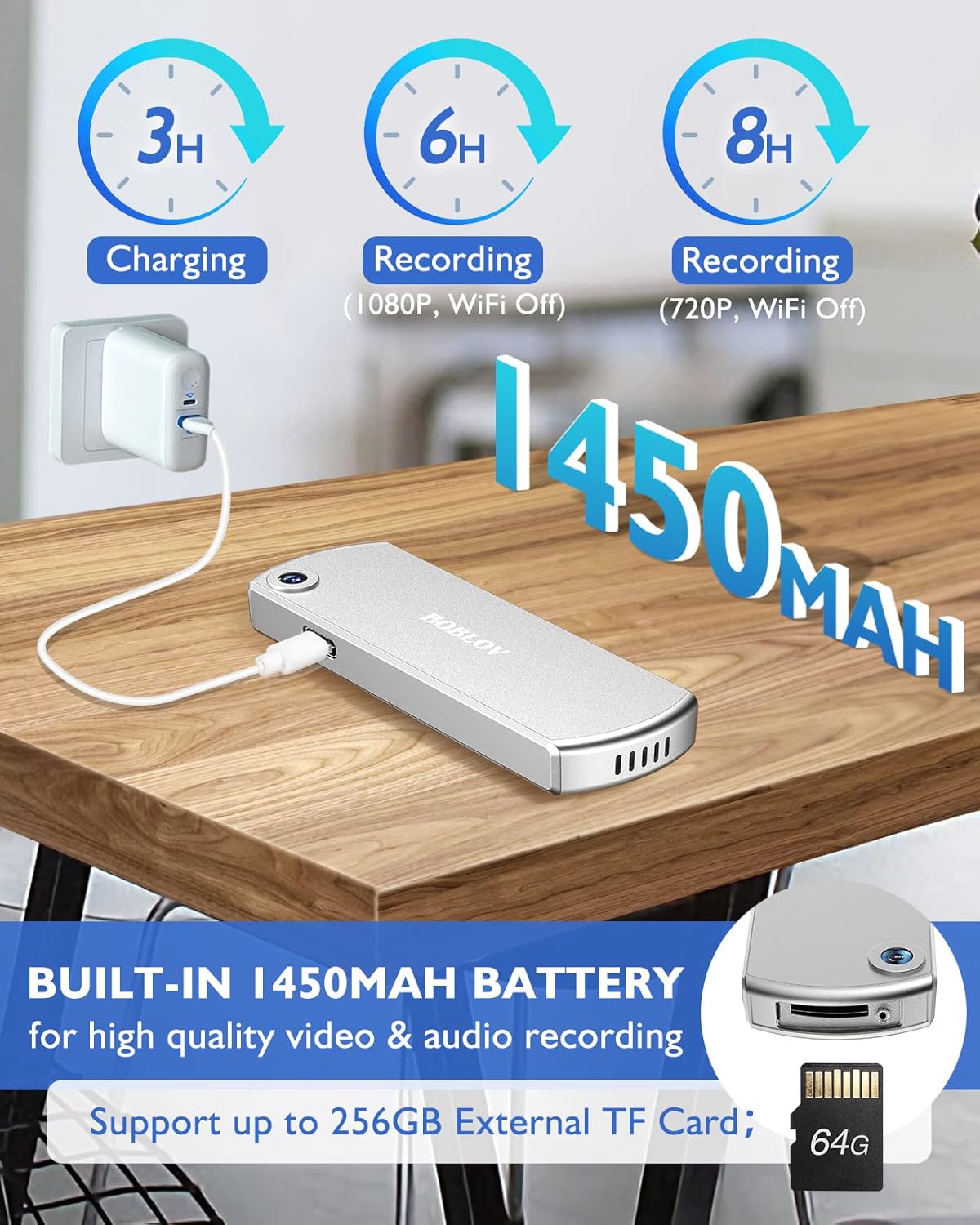
зображення: The BOBLOV W3 Body Camera being charged via a USB-C cable, highlighting the 1450mAh battery and charging times: 3 hours for full charge, 6 hours recording (1080P, WiFi Off), and 8 hours recording (720P, WiFi Off).
2. Inserting/Expanding Memory Card
The W3 Body Camera uses an external Micro SD card. A 64GB card is included and pre-installed.
- Знайдіть на камері слот для карти пам’яті.
- Use the included screwdriver to carefully unscrew the cover of the card slot.
- Insert or replace the Micro SD card (up to 256GB) into the slot with the contacts facing down.
- Securely fasten the card slot cover with the screwdriver.
3. Підключення камери
The camera offers two attachment options: a back magnetic clip and a brooch.
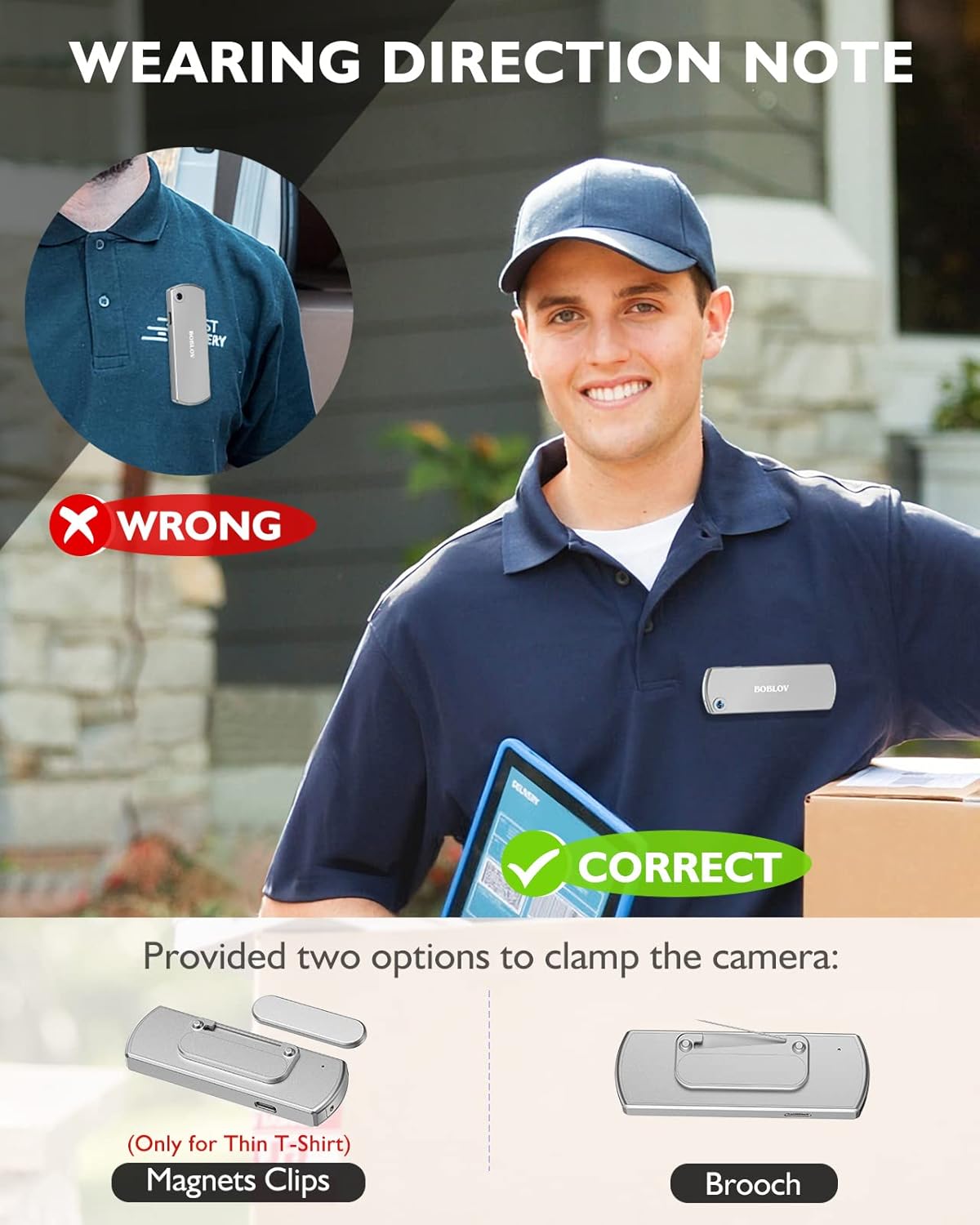
зображення: Illustration demonstrating correct and incorrect ways to wear the BOBLOV W3 Body Camera. It shows that magnetic clips are suitable for thin T-shirts, while a brooch provides a more secure attachment for other clothing types.
- Магнітний затиск: Attach the magnetic clip to the back of the camera. This is suitable for thin fabrics like T-shirts. Ensure the camera is securely held.
- Brooch: For more secure attachment or thicker clothing, use the provided brooch. Attach it to the camera's designated brooch point and then pin it to your clothing.
Інструкція з експлуатації
1. Увімкнення/вимкнення живлення
- Увімкнення: Натисніть і утримуйте Power/Video Button for a few seconds until the indicator light illuminates.
- Вимкнення живлення: Натисніть і утримуйте Power/Video Button again for a few seconds until the indicator light turns off.
2. Запис відео
- While the camera is powered on, press the Power/Video Button once to start video recording. The indicator light will flash to indicate recording is in progress.
- Натисніть Power/Video Button again to stop video recording. The indicator light will return to a steady state.
- The camera supports 1080P and 720P video recording. With WiFi off, it can record for approximately 6 hours at 1080P or 8 hours at 720P on a full charge.
- Videos are saved in 5-minute fragments by default. The camera supports loop recording, overwriting older files, коли карта пам'яті заповнена.
3. Запис звуку
- While the camera is powered on, press the Audio/WiFi Button once to start audio recording.
- Натисніть Audio/WiFi Button ще раз, щоб зупинити аудіозапис.
4. WiFi Function and App Connectivity
The BOBLOV W3 features WiFi connectivity, allowing you to manage files and change settings via a smartphone app.
- Активуйте Wi-Fi: Натисніть і утримуйте Audio/WiFi Button for a few seconds to turn on the WiFi function. The WiFi indicator light will flash.
- Завантажити додаток:
- For Android devices, download the DHiHZ додаток
- For iOS devices, download the Mini-XRcam додаток
- Підключення до камери: On your smartphone, go to WiFi settings and connect to the camera's WiFi network (usually named "BOBLOV_W3_XXXX"). The default password is typically "12345678".
- Використовуйте додаток: Open the downloaded app to view жити footagе, відтворення записів, завантаження fileта налаштуйте параметри камери.
- Deactivate WiFi: Натисніть і утримуйте Audio/WiFi Button знову, щоб вимкнути WiFi.

зображення: The BOBLOV W3 Body Camera wirelessly connected to a smartphone, illustrating the WiFi function for managing files, changing settings, and accessing features like video, audio, preview, playback, and download through the dedicated Android (DHiHZ) and iOS (Mini-XRcam) applications.
5. Підключення до ПК
You can connect the camera to a computer to manage recorded files і змініть налаштування.
- Ensure the camera is powered ON before connecting to the PC.
- Connect the camera to your computer using the provided USB-C cable.
- The camera will appear as a removable disk drive on your computer.
- You can then access, copy, delete, or upload recorded files. Some settings may also be configurable via a configuration file on the camera's storage.

зображення: The BOBLOV W3 Body Camera connected to a laptop via a USB-C cable, demonstrating how to manage recorded files and change settings. Icons for Playback, Delete, Upload, and Settings are shown, with a note to ensure the camera is powered ON for connection.
Технічне обслуговування
- Прибирання: Use a soft, dry cloth to clean the camera body. Do not use liquid cleaners or solvents.
- Зберігання: Зберігайте камеру в прохолодному, сухому місці, подалі від прямих сонячних променів та екстремальних температур.
- Догляд за акумулятором: Щоб подовжити термін служби акумулятора, уникайте частого повного розряджання акумулятора. Регулярно заряджайте камеру, навіть якщо вона не використовується протягом тривалого часу.
- Карта пам'яті: Periodically back up important recordings from the Micro SD card to a computer. Format the Micro SD card regularly (e.g., once a month) to maintain optimal performance and prevent data corruption.
- Водонепроникність: The camera has an IP65 waterproof rating, meaning it is protected against dust and low-pressure water jets. It is not designed for submersion.
Усунення несправностей
| проблема | Можлива причина / рішення |
|---|---|
| Камера не вмикається. | Battery may be depleted. Charge the camera for at least 3 hours. If the issue persists, try resetting the camera using a pin in the reset hole. |
| Camera gets hot when WiFi is on. | This is normal behavior for the camera when the WiFi function is active due to increased power consumption. |
| Cannot connect to WiFi via smartphone app. | Ensure WiFi is enabled on the camera. Check if you have downloaded the correct app (DHiHZ for Android, Mini-XRcam for iOS). Verify the WiFi password (default is "12345678"). Try restarting both the camera and your phone. |
| Camera stops recording unexpectedly. | The memory card may be full. The camera supports loop recording, but if the card is corrupted or too slow, it might cause issues. Try formatting the card or using a different high-speed Micro SD card. Battery may be low. |
| Неможливо отримати доступ files на ПК. | Ensure the camera is powered ON before connecting to the PC. Try a different USB-C cable or USB port. |
Технічні характеристики
| Особливість | Деталь |
|---|---|
| Бренд | БОБЛОВ |
| Назва моделі | W3 |
| Номер моделі | B-W3 |
| Технологія підключення | Wi-Fi |
| Особливості | Легкий |
| Сумісні пристрої | Android/iOS Phone |
| Джерело живлення | Працює від батареї |
| Роздільна здатність захоплення відео | 1080p |
| колір | Срібло |
| Тип монтажу | Поверхневий монтаж |
| Форм-фактор | Компактний |
| Матеріал корпусу | метал |
| Тип сповіщення | Лише рух |
| Джерело світла | Інфрачервоний |
| Рейтинг водонепроникності | IP65 |
| Спосіб контролю | додаток |
| Wattage | 3.7 ват-годин |
| Нічне бачення | Нічний колір |
| Розміри предмета | 9 х 3 х 1.5 сантиметрів |
| Ємність акумулятора | 1450 мАг (вбудований) |
| Recording Time (1080P, WiFi Off) | прибл. 6 години |
| Recording Time (720P, WiFi Off) | прибл. 8 години |
| Час зарядки | прибл. 3 години |
| Зовнішня пам'ять | Micro SD Card, up to 256GB (64GB included) |
| Вага нетто | 60 г / 2 унції |
Гарантія та підтримка
BOBLOV provides a two-year warranty for high-value products, including the W3 Body Camera. For any technical assistance, troubleshooting, or warranty claims, please contact BOBLOV customer service.
Please refer to the official BOBLOV website or your purchase documentation for the most up-to-date contact information and warranty details.


