
1. Вступ
This manual provides essential instructions for the safe installation, operation, and maintenance of your OOYCYOO 100A MPPT Solar Charge Controller. Please read this manual thoroughly before installation and use to ensure optimal performance and longevity of the product. Keep this manual for future reference.
Техніка безпеки
- Ensure all wiring is correctly connected and secured to prevent short circuits or damage.
- Завжди спочатку підключайте акумулятор, потім сонячну панель і, нарешті, навантаження. Від’єднуйте у зворотному порядку.
- Не намагайтеся самостійно ремонтувати або модифікувати контролер. Зверніться до кваліфікованого персоналу для обслуговування.
- Встановіть контролер у добре провітрюваному приміщенні, подалі від легкозаймистих матеріалів та прямих сонячних променів.
- Під час встановлення використовуйте відповідні засоби індивідуального захисту (ЗІЗ), включаючи засоби захисту очей та ізотермічні рукавички.
2. Продукт закінчивсяview
The OOYCYOO 100A MPPT Solar Charge Controller is designed to efficiently manage power from your solar panels to charge various battery types, including 12V, 24V, 36V, and 48V systems. It features advanced Maximum Power Point Tracking (MPPT) technology for high conversion efficiency.
Ключові характеристики:
- Automatic identification of 12V/24V/36V/48V DC system voltage.
- High maximum power tracking rate (≥99%) and conversion rate (>99%).
- Compatible with multiple battery types: USER (customizable), Flooded, Sealed, Gel, and Lithium (LiFePO4, Li(NiCoMn)O2).
- Programmable settings for absorption voltagе, плаваючий обtagе, і низький обtagе відключити.
- Integrated LCD display showing charge amount (KWH) and other operational data.
- Comprehensive protection functions: PV over current/power, PV short circuit, PV reverse polarity, night reverse charging, battery reverse polarity, battery over voltage, battery over discharge, battery overheating, controller overheating, lithium battery low temperature, load short circuit, load overload, TVS high voltagперехідні процеси.
- Built-in cooling fan for efficient heat dissipation, activating when temperature >45℃ and deactivating when <40℃.
- USB 5V 2A charging ports.
Ідентифікація компонента:

малюнок 1: Спереду і ззаду view of the OOYCYOO 100A MPPT Solar Charge Controller, showing the LCD display and connection terminals.

малюнок 2: Детальний view of the controller's connection terminals, including Solar Panel, Battery, Load, Remote Temp Sensor, and USB ports.
3. Технічні характеристики
| Параметр | Значення |
|---|---|
| Номінальний струм заряду | 100А |
| Системний номінальний обсягtage | 12V/24V/36V/48V DC Auto Identifying |
| Макс. PV Open Circuit Voltage | 150 В постійного струму |
| 12V System Max. PV Input Power | 1300W (Voc ≤96V) |
| 24V System Max. PV Input Power | 2600W (Voc ≤112V) |
| 36V System Max. PV Input Power | 3800 Вт |
| 48V System Max. PV Input Power | 5000W (Voc ≤150V) |
| MPPT Best Working VoltagДіапазон (12 В) | DC18V-DC96V |
| MPPT Best Working VoltagДіапазон (24 В) | DC36V-DC112V |
| MPPT Best Working VoltagДіапазон (48 В) | DC72V-DC150V |
| Maximum DC/DC Transfer Efficiency | 98.7% |
| Power Terminal Wire Gauge | 10 AWG |
| Розміри (Д x Ш x В) | 12 дюйма x 7.8 дюйма x 3.2 дюйма (30.5 см x 19.8 см x 8.1 см) |
| вага | 9.5 фунти (4.3 кг) |
| Робоча температура | Up to 40℃ (Fan operates above 45℃) |
| матеріал | метал |
| Тип дисплея | ЖК |
| Вихід USB | 5В 2А |
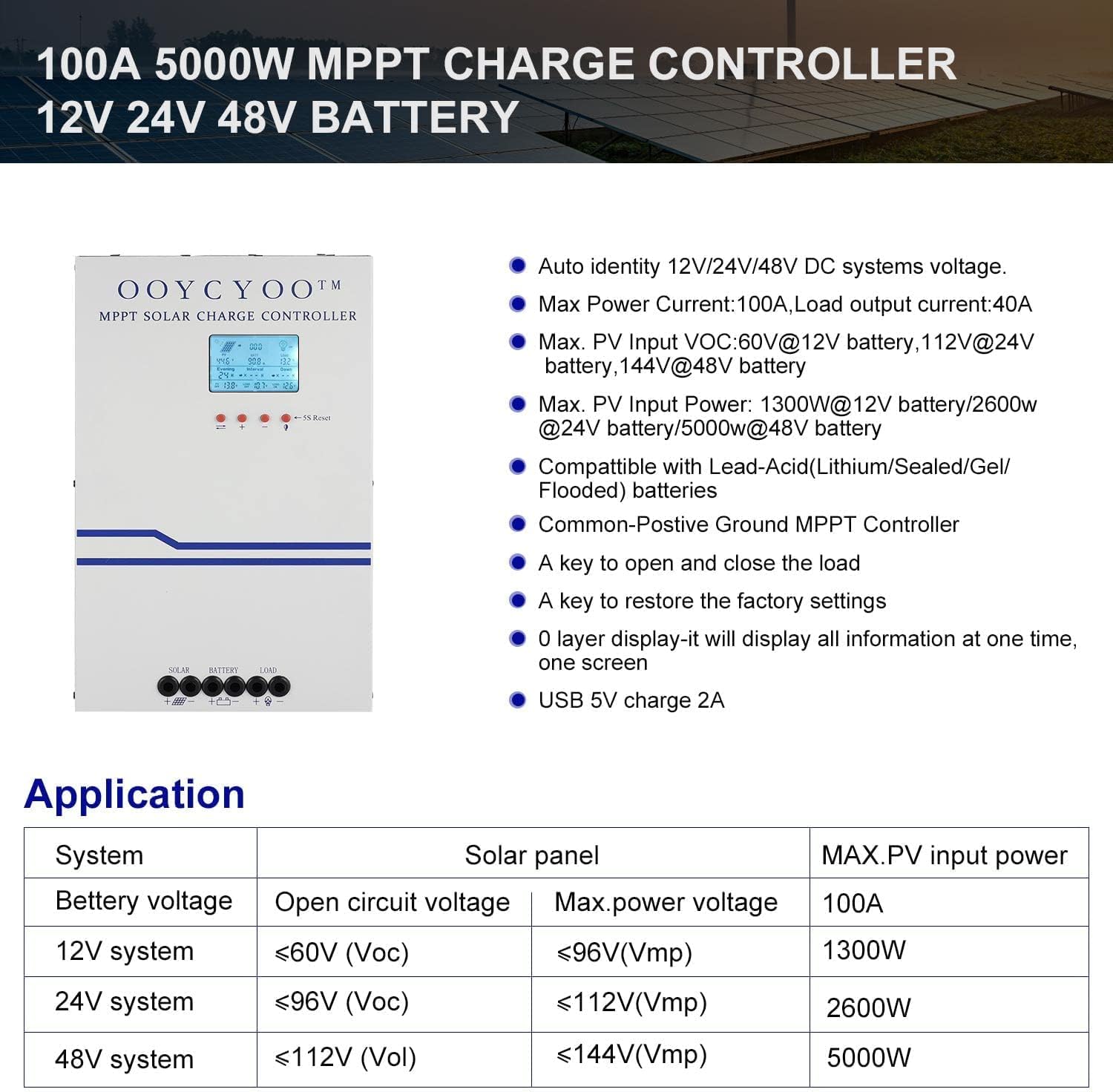
малюнок 3: Application table detailing solar panel input requirements for different system voltagес.
4. Налаштування та встановлення
Proper installation is crucial for the safe and efficient operation of your solar charge controller. Refer to Figure 2 for terminal identification.
Кроки встановлення:
- Монтаж: Choose a dry, well-ventilated location, protected from direct sunlight, high temperatures, and moisture. Ensure adequate clearance around the controller for air circulation, especially for the cooling fan. Use the mounting holes provided to secure the controller to a stable surface.
- Підключення акумулятора: Connect the battery cables to the battery terminals on the controller (marked with '+' and '-'). Ensure correct polarity. Connect the other end of the cables to your battery bank. Завжди спочатку підключайте акумулятор.
- Підключення сонячної панелі: Connect the solar panel cables to the PV terminals on the controller (marked with '+' and '-'). Ensure correct polarity. Connect the other end of the cables to your solar panel array.
- Підключення навантаження (необов'язково): If you are connecting a DC load directly to the controller, connect the load cables to the load terminals (marked with '+' and '-'). Ensure correct polarity.
- Підключення датчика температури: Connect the included temperature sensor to the designated 'TEMP SENSOR' port. Place the sensor near the battery to ensure accurate temperature compensation for charging.
- Увімкнення: Once all connections are secure and verified for correct polarity, the controller will power on and display information on the LCD screen.
Сумісні типи батарей:
The controller supports various battery types. Ensure you select the correct battery type in the controller settings for proper charging and protection.

малюнок 4: The controller is compatible with AGM, Sealed, Gel, Flooded, and Lithium-Iron Phosphate batteries.
5. Інструкція з експлуатації
РК-дисплей та навігація:
The backlit LCD display provides real-time operational data. It directly shows the amount of charge in KWH, eliminating the need for external measuring instruments. Use the buttons below the display to navigate through menus and adjust settings.
- Кнопки навігації: Typically, there are buttons for 'Up', 'Down', 'Enter', and 'Escape' or similar functions to browse and confirm settings.
- 5S Reset: A dedicated button or combination of buttons may be available for a 5-second reset, which can be used to restart the controller or clear certain errors.
Параметри параметрів:
The controller allows user-programmable settings for various parameters, especially for the 'USER' battery type. Consult the on-screen menu for specific options.
- Вибір типу батареї: It is critical to select the correct battery type (AGM, Sealed, Gel, Flooded, or Lithium) to ensure proper charging algorithms and prevent battery damage. For Lithium batteries, specific voltage parameters may need to be set.
- Зарядка Voltages: For 'USER' battery types, you can customize absorption voltage, float voltagе, і низький обtage disconnect (LVD) thresholds. Refer to your battery manufacturer's specifications for recommended values.
- Load Timer: If a DC load is connected, you may be able to set a timer for its operation.
- Заводські налаштування: A key is available to restore the factory settings if needed.
6. Технічне обслуговування
Regular maintenance ensures the long-term reliability and performance of your solar charge controller.
- Прибирання: Periodically clean the exterior of the controller with a dry cloth. Ensure the ventilation openings are free from dust and debris to maintain proper airflow for cooling.
- Перевірки підключення: Annually, inspect all wiring connections for tightness and corrosion. Loose connections can cause overheating and power loss.
- Екологічна інспекція: Ensure the installation environment remains dry and free from excessive dust or extreme temperatures.
- Оновлення прошивки: Перевірте виробника website periodically for any available firmware updates, though this controller may not support user updates.
7. Вирішення проблем
У цьому розділі розглядаються поширені проблеми, з якими ви можете зіткнутися. Якщо у вас проблеми, не перелічені тут, зверніться до служби підтримки клієнтів.
| проблема | Можлива причина | Рішення |
|---|---|---|
| Controller not powering on / No display | Батарея не підключена або неправильна полярність; заряд батареїtagзанадто низький рівень заряду; погане з'єднання акумулятора. | Перевірте підключення та полярність акумулятора. Переконайтеся, що заряд акумулятораtage is above the minimum operating threshold. Tighten connections. |
| Немає зарядки від сонячних панелей | PV panels not connected or reverse polarity; PV voltage too low/high; Shading on panels; PV short circuit. | Check PV connections and polarity. Ensure PV voltage is within the controller's operating range. Remove shading. Check for PV short circuit. |
| Акумулятор заряджений не повністю | Incorrect battery type setting; Insufficient solar input; Battery degradation. | Verify battery type setting. Increase solar panel capacity or reduce load. Test battery health. |
| Навантаження не працює | Load not connected or reverse polarity; Load short circuit; Load overload; Battery low voltage disconnect (LVD) activated. | Check load connections and polarity. Check for short circuits or overloads. Charge battery. |
| Перегрів контролера | Погана вентиляція; Надмірна температура навколишнього середовища; Перевантаження. | Ensure adequate airflow around the controller. Reduce load if possible. Relocate to a cooler environment. |
8. Гарантія та підтримка
OOYCYOO products are manufactured to high-quality standards. Specific warranty terms and conditions are typically provided with your purchase documentation or can be found on the official OOYCYOO webсайт.
For technical support, troubleshooting assistance, or warranty claims, please contact OOYCYOO customer service through the retailer where you purchased the product or visit the official OOYCYOO webсайт для контактної інформації.
Please have your product model number (100A 12V 24V 36V 48V) and purchase date available when contacting support.