
1. Вступ
This manual provides detailed instructions for the setup, operation, and maintenance of your KECAG 10.1 Inch Digital Picture Frame. Please read this manual thoroughly before using the device to ensure proper functionality and to maximize your user experience. Keep this manual for future reference.
2. Продукт закінчивсяview
2.1 Основні характеристики
- 10.1 Inch 1080P HD IPS Screen: Features a 1920x1080 resolution with a 180° wide-angle IPS display for clear viewз різних ракурсів.
- Відтворення мультимедіа: Supports photo slideshows, video playback, and music playback.
- Датчик руху: Automatically turns the frame on/off based on detected movement to conserve energy.
- Timing On/Off Function: Allows scheduled power on and off times.
- Versatile Media Support: Compatible with SD cards and USB flash drives.
- Зручний інтерфейс: Simple main menu for easy navigation.
- Пульт дистанційного керування: Забезпечує зручне керування на відстані.
- Додаткові функції: Includes calendar and alarm features.
2.2 Вміст упаковки
- KECAG 10.1 Inch Digital Picture Frame
- USB флеш-диск 32 Гб
- Пульт дистанційного керування
- Адаптер живлення
- Посібник користувача

малюнок 2.2.1: The KECAG 10.1 Inch Digital Picture Frame displaying a family photo, accompanied by its remote control.
3. Налаштування
3.1 Підключення живлення
- Locate the power adapter included in the package.
- Connect the small end of the power adapter cable to the DC IN port on the back of the digital picture frame.
- Підключіть інший кінець адаптера живлення до стандартної електричної розетки.
- The frame will automatically power on or enter standby mode.
3.2 Inserting Media (USB Drive or SD Card)
The digital picture frame supports both USB flash drives and SD cards for media playback.
- Identify the USB port and SD card slot on the side or back of the frame.
- For a USB drive: Carefully insert the USB flash drive into the USB port.
- For an SD card: Insert the SD card into the SD card slot with the metal contacts facing down, until it clicks into place.
- Ensure the media is inserted correctly to avoid damage.

малюнок 3.2.1: Illustrated steps for connecting media (USB/SD card) and power to the digital picture frame.
3.3 Initial Power On and Language Settings
- Once powered on, the frame may display a language selection screen.
- Use the remote control's navigation buttons (Up/Down/Left/Right) to select your preferred language.
- Натисніть ENTER кнопку для підтвердження вибору.
4. Інструкція з експлуатації
4.1 Функції дистанційного керування
The remote control allows for convenient navigation and setting adjustments. Ensure the remote is aligned with the infrared sensor on the frame during use.
- МЕНЮ: Access the main menu or return to the previous menu.
- ФОТО: Directly enter photo playback mode.
- МУЗИКА: Directly enter music playback mode.
- ФІЛЬМ: Directly enter video playback mode.
- ВИХІД: Вихід з поточної функції або меню.
- Введіть: Confirm selection or play/pause media.
- НАЛАШТУВАННЯ: Доступ до налаштувань системи.
- Кнопки навігації (Вгору/Вниз/Вліво/Вправо): Навігація по меню та параметрам.
- VOL+/VOL-: Adjust volume during video or music playback.
4.2 Навігація в головному меню
From the main menu, you can select different functions:
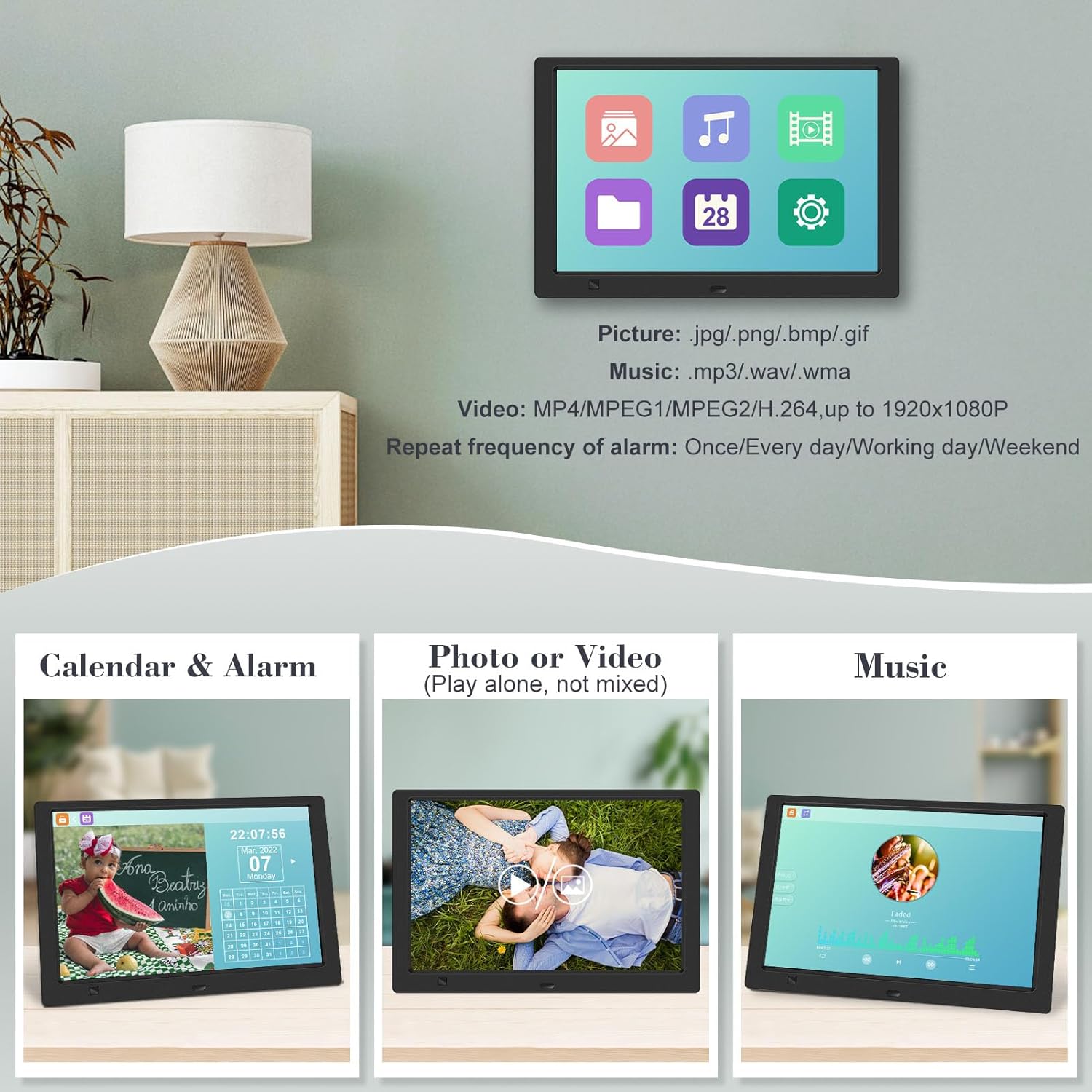
- зображення: View photos in a slideshow.
- музика: Відтворити аудіо files.
- Календар: Display calendar and set alarms.
- Налаштування: Налаштуйте параметри пристрою.

малюнок 4.2.1: The digital picture frame's interface showing options for Calendar, Photo/Video, and Music playback.
4.3 Photo Playback
- У головному меню виберіть малюнок або натисніть ФОТО кнопку на пульті.
- The frame will automatically start a slideshow of photos found on the inserted media.
- Порядок відтворення: In settings, you can choose between Shuffle, Sequential, or Repeat All.
- Ефекти переходу: Select from various effects like Up/Down, Mosaic, Left/Right, or Random.
- Зображення попередньоview: Access a thumbnail view of your photos.
- Поворот зображення: Adjust the orientation of images (vertical/horizontal).
- Яскравість екрану: Adjust the display brightness in the settings menu.
малюнок 4.3.1: The digital picture frame displaying a photo slideshow with background music and various image transition options.

малюнок 4.3.2: Visual representation of slideshow and image preview options, including settings for playback order, display scale, picture rotation, time window, and screen brightness adjustment.
4.4 Video and Music Playback
- У головному меню виберіть фільм or музика, or use the corresponding buttons on the remote.
- Перейдіть до потрібного file using the remote control and press ENTER грати.
- Supported video formats: MP4/MPEG1/MPEG2/H.264 up to 1920x1080.
- Supported music formats: MP3/WAV/WMA.
4.5 Функція датчика руху
The motion sensor helps save energy by automatically turning the frame on or off.
- To enable/disable the motion sensor, go to the Налаштування меню.
- Select the motion sensor option and toggle it On or Off.
- When enabled, the frame will power on when movement is detected and turn off after a period of inactivity.
4.6 Timing On/Off Function
Set specific times for the frame to automatically power on and off.
- Доступ до Налаштування меню.
- Locate the Timing On/Off function.
- Set your desired power-on time and power-off time. You can also configure this for specific days (e.g., weekdays, weekends, every day).

малюнок 4.6.1: Demonstrates the smart motion sensor turning on the frame when movement is detected and the timing on/off function for scheduled operation.
5. Технічне обслуговування
5.1 Очищення екрана
Щоб очистити екран, обережно протріть його м’якою, сухою тканиною без ворсу. Для стійких плям злегка протрітьampПротріть тканину водою або розчином для чищення екранів. Уникайте використання агресивних хімікатів або абразивних матеріалів.
5.2 Загальний догляд
- Тримайте рамку подалі від прямих сонячних променів, джерел тепла та надмірної вологи.
- Не кидайте пристрій і не піддавайте його сильним ударам.
- Do not attempt to disassemble the frame; this will void the warranty.
- Забезпечте належну вентиляцію навколо пристрою.
6. Вирішення проблем
If you encounter issues with your digital picture frame, please refer to the following common problems and solutions:
| проблема | Можлива причина | Рішення |
|---|---|---|
| Рамка не вмикається. | Адаптер живлення не підключений або несправна розетка. | Переконайтеся, що адаптер живлення надійно підключено до рами та робочої електричної розетки. Спробуйте іншу розетку. |
| No photos/videos/music displayed. | No media inserted, media not recognized, or unsupported file формат. | Ensure a USB drive or SD card is properly inserted. Check if files are in supported formats (JPG/PNG/BMP/GIF for photos; MP4/MPEG1/MPEG2/H.264 for video; MP3/WAV/WMA for music). Try reformatting the media (backup data first). |
| Не працює пульт дистанційного керування. | Battery depleted, remote not aimed correctly, or sensor obstructed. | Replace the remote control battery. Ensure the remote is pointed directly at the frame's infrared sensor. Remove any obstructions between the remote and the frame. |
| Екран порожній або завислий. | Тимчасовий збій програмного забезпечення. | Від’єднайте адаптер живлення, зачекайте 10 секунд, а потім знову під’єднайте його, щоб перезапустити рамку. |
7. Технічні характеристики
| Особливість | Специфікація |
|---|---|
| Розмір екрана | 10.1 дюймів |
| роздільна здатність | 1920 x 1080 (1080p HD IPS) |
| Співвідношення сторін | 16:9 |
| Viewкут нахилу | 180° |
| Сумісні пристрої | SD Card, USB Drive |
| Підтримувані формати фотографій | JPG, PNG, BMP, GIF |
| Підтримувані формати відео | MP4, MPEG1, MPEG2, H.264 (up to 1920x1080) |
| Підтримувані музичні формати | MP3, WAV, WMA |
| Датчик руху | так |
| Номер моделі товару | KECAG-CA-001 |
| Розміри продукту | 6.4 x 9.7 x 0.99 дюймів |
| Вага товару | 1.59 фунта |
| Батарейки (пульт дистанційного керування) | 1 літій-металева батарея (у комплекті) |
| Виробник | KECAG |
8. Гарантія та підтримка
For warranty information, please refer to the documentation included with your product packaging. KECAG provides 24-hour customer service to assist with any issues or questions you may have regarding your digital picture frame. Please contact customer support for assistance.