
вступ
Thank you for choosing the AMERTEER H101 Digital Presenter. This device is designed to enhance your presentations with advanced features such as a digital pointer, spotlight, magnifier, and timer. Please read this manual carefully to ensure proper use and optimal performance.
Вміст упаковки
- AMERTEER H101 Presenter Unit x 1
- USB-приймач х 1
- Інструкція з експлуатації x 1
Продукт закінченийview
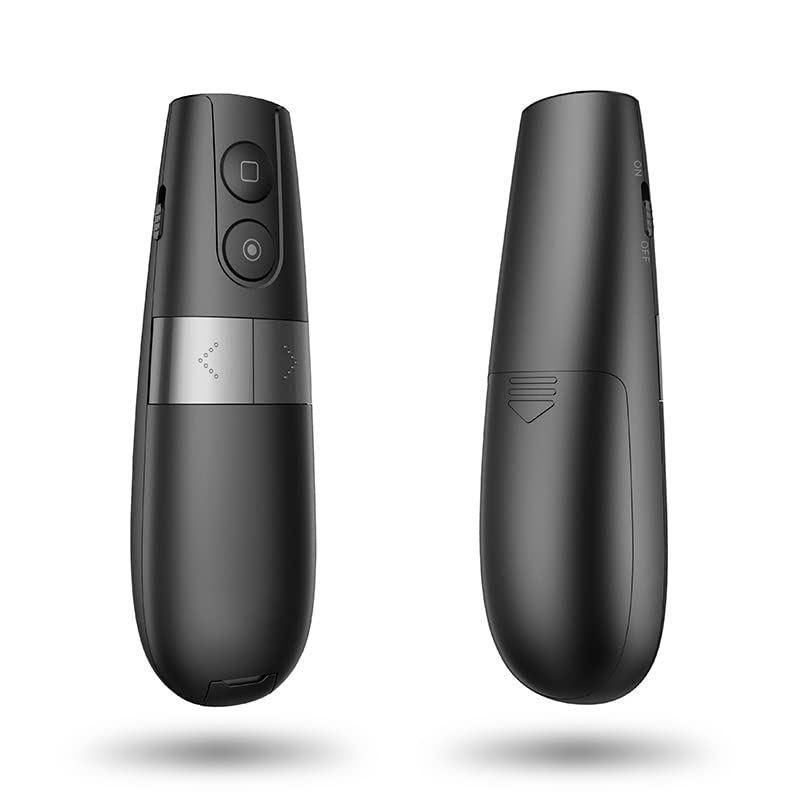
The AMERTEER H101 features an ergonomic design for comfortable handling and intuitive controls for seamless presentation delivery. Its black and silver finish provides a professional appearance.

малюнок 1: Спереду і ззаду view of the AMERTEER H101 Digital Presenter, showcasing its sleek design and ergonomic shape.
Ключові особливості:
- Digital Pointer: Displays a red circle on screen, visible on LED/LCD displays, controlled by gravity induction.
- Функція Spotlight: Dims surroundings to highlight content within a circular area.
- Magnifier Function: Enlarges content within a circular area for detailed viewінж.
- Функція таймера: Helps manage presentation time with an on-device display, configurable via a PC application.
- Бездротовий діапазон: Operates up to 20 meters (66.6 feet) radius.
- Сумісність: Supports Windows, macOS, and Android operating systems. Compatible with presentation software like PowerPoint and Keynote.
малюнок 2: The presenter is compatible with Windows, macOS, Android, and Linux, supporting applications like PowerPoint and Keynote.
Налаштування
1. Встановлення батарей
The AMERTEER H101 requires batteries for operation. Locate the battery compartment on the presenter unit.
малюнок 3: The battery compartment is located at the bottom of the presenter. Insert the required batteries, ensuring correct polarity.
- Відкрийте кришку батарейного відсіку.
- Insert the specified alkaline batteries, observing the correct polarity (+/-).
- Надійно закрийте кришку батарейного відсіку.
2. Підключення USB-приймача
The presenter communicates wirelessly with your computer via the USB receiver.

малюнок 4: The USB receiver is conveniently stored within the presenter unit. Remove it before use.

малюнок 5: Insert the USB receiver into an available USB port on your computer. For Android devices, a Type-C adapter may be required.
- Remove the USB receiver from its storage slot in the presenter.
- Plug the USB receiver into an available USB port on your computer (Windows, macOS) or Android device (using a Type-C adapter if necessary).
- Ваша операційна система повинна автоматично виявити та встановити необхідні драйвери.
Інструкція з експлуатації
Основні функції

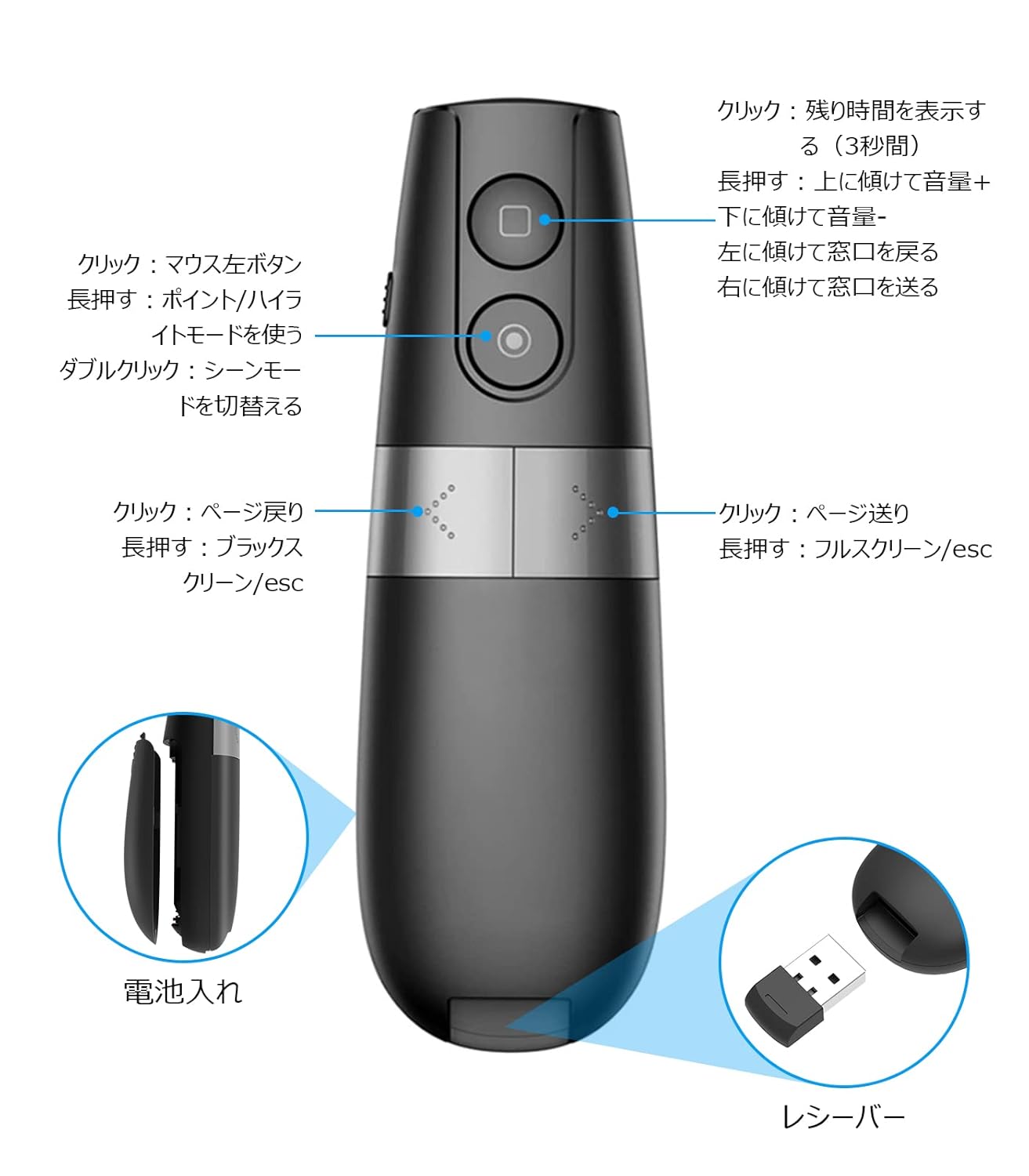
малюнок 6: Детальний view of the presenter's buttons and their corresponding functions for navigation and special features.
- Page Up/Down: Use the dedicated buttons to navigate slides forward or backward.
- Повноекранний/чорний екран: Long press the page down button to enter/exit full screen or black screen mode.
- Регулювання гучності: Tilt the presenter up or down while holding the appropriate button (refer to Figure 6 for exact button) to adjust volume.
- Window Switching: Tilt the presenter left or right while holding the appropriate button to switch between open windows.
Advanced Pointer Modes
The AMERTEER H101 offers three distinct emphasizing modes: Spotlight, Magnifier, and Digital Pointer.

малюнок 7: Visual representation of the three pointer modes: Analog Pointer, Spotlight, and Magnifier, demonstrating their effects on screen content.
- Entering Mode: Press and hold the designated mode button (refer to Figure 6).
- Перемикання режимів: Double-click the mode button to cycle between Spotlight, Magnifier, and Digital Pointer.
- У центрі уваги: Dims the screen except for a circular area, drawing attention to specific content.
- Екранна лупа: Enlarges content within a circular area for detailed viewінж.
- Digital Pointer: Displays a red circular pointer on the screen, controlled by the presenter's movement (gravity induction). The size of the pointer can be adjusted.
Функція таймера
The built-in timer helps you keep track of your presentation time.
- Встановлення таймера: Use the accompanying PC application to set your desired presentation time.
- Displaying Remaining Time: Click the square button on the presenter to display the remaining time on its mini screen.
Технічне обслуговування
- Тримайте пристрій у чистоті, протираючи його м’якою сухою тканиною.
- Avoid exposing the presenter to extreme temperatures, humidity, or direct sunlight.
- Вийміть батарейки, якщо пристрій не використовуватиметься протягом тривалого часу, щоб запобігти витіканню.
- Store the USB receiver inside the presenter unit when not in use to prevent loss.
Усунення несправностей
| проблема | Можлива причина | Рішення |
|---|---|---|
| Ведучий не відповідає |
|
|
| Digital pointer not visible |
|
|
| Таймер не працює |
|
|
Технічні характеристики
| Номер моделі | LNKO13157-01 |
| Бренд | АМЕРТІР |
| Бездротова технологія | TELEC certified wireless technology |
| Відстань дії | До 20 метрів (66.6 фути) |
| Сумісні операційні системи | Windows, macOS, Android, iOS |
| Сумісне програмне забезпечення | PowerPoint, Keynote |
| Вага товару | 50 г |
| Розміри упаковки | 14.9 х 6.1 х 2.9 см |
| Тип батареї | Alkaline (Batteries not included) |
| Колір | чорний |
Гарантія та підтримка
AMERTEER products undergo rigorous inspection before shipping. If you encounter any quality issues or require assistance, please contact AMERTEER customer support. Refer to your purchase documentation for specific warranty terms and contact information.
For support, please visit the AMERTEER official webабо зв’яжіться зі своїм продавцем.
Інформація про відповідність
This device complies with TELEC wireless technology standards, ensuring reliable and safe operation.