
Shargeek STM2E-1
Shargeek STORM2 Slim Portable Charger User Manual
Модель: STM2E-1
вступ
This manual provides comprehensive instructions for the safe and efficient use of your Shargeek STORM2 Slim Portable Charger. Please read this manual thoroughly before operating the device and retain it for future reference.
The Shargeek STORM2 Slim is a high-capacity portable power bank featuring a unique transparent design and an IPS display screen. It offers 130W max output with 100W USB-C and 30W USB-A ports, suitable for charging various devices including laptops, tablets, and smartphones.

Image: The Shargeek STORM2 Slim portable charger, showcasing its transparent design that reveals internal components and the included yellow USB-C to USB-C cables.
Особливості продукту
- Прозорий дизайн: The see-through casing reveals the internal battery and circuit layout, highlighting the device's engineering.
- IPS Display Screen: A clear screen provides real-time information on battery life, output distribution, temperature, operation hours, and active ports.
- Висока місткість: 20000mAh battery capacity, capable of multiple charges for various devices.
- Швидка зарядка: Features a 100W USB-C PD port and a 30W USB-A port, supporting 130W max output for rapid charging.
- Універсальна сумісність: Charges laptops, phones, tablets, and other devices with USB-C or USB ports.

Зображення: Детальний view of the Shargeek STORM2 Slim's IPS LCD screen, showing various data points such as input/output wattagе, випtage, current, battery level, and temperatures.
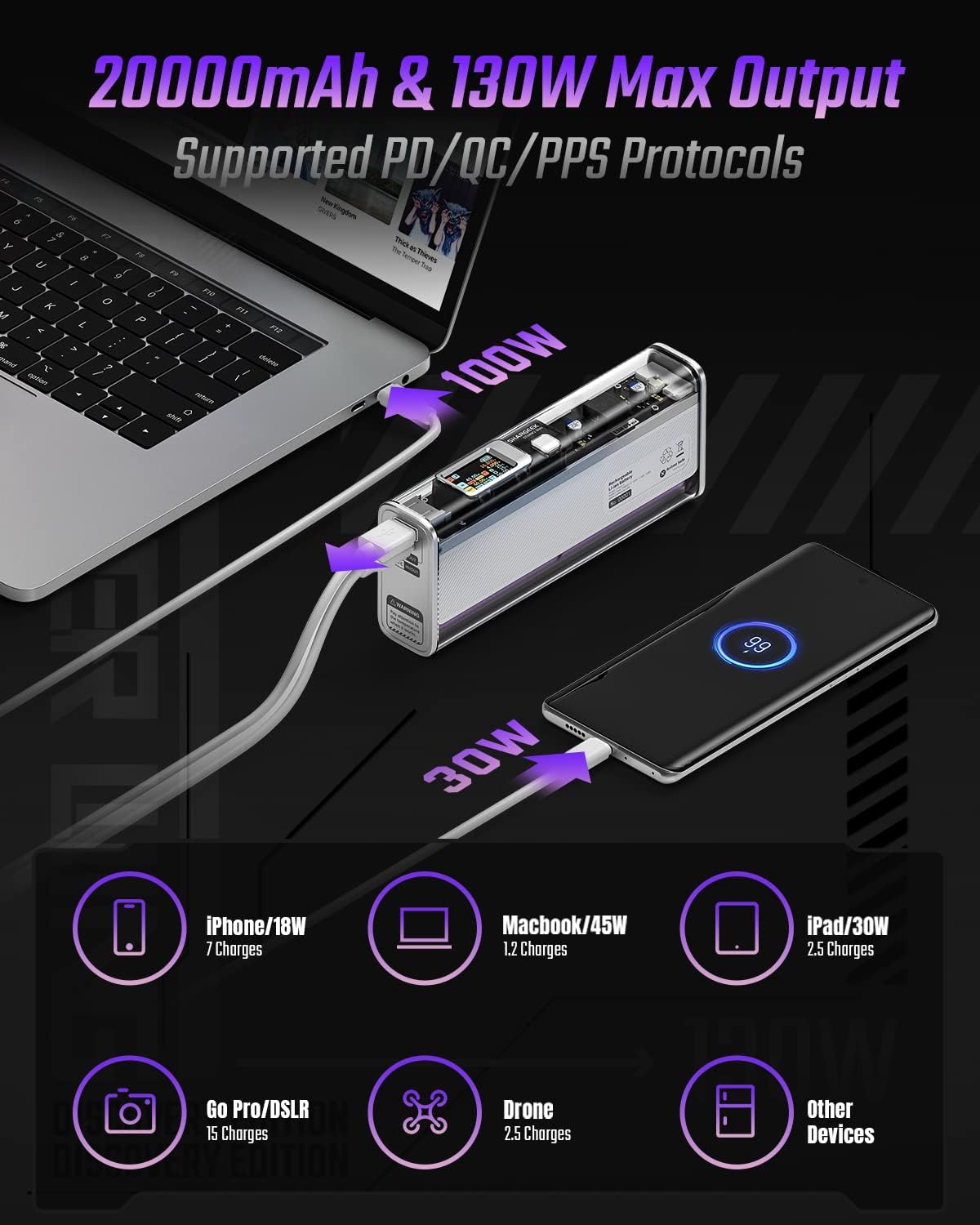
Image: The Shargeek STORM2 Slim connected via USB-C to a laptop for 100W charging and via USB-A to a smartphone for 30W charging, demonstrating its dual-port capability.
Налаштування та перше використання
Вміст упаковки:
- Shargeek STORM2 Slim Portable Charger
- Кабель USB-C – USB-C
- Посібник користувача (цей документ)
Початкова зарядка:
- Before first use, fully charge your STORM2 Slim.
- Connect the provided USB-C to USB-C cable to the USB-C port on the STORM2 Slim.
- Connect the other end of the cable to a compatible USB-C power adapter (not included) with a minimum of 100W output for fastest charging.
- The IPS screen will display charging status and battery percentage. The device is fully charged when the screen indicates 100%.
- A full recharge typically takes approximately 90 minutes with a 100W power adapter.
Інструкція з експлуатації
Пристрої зарядки:
- Identify the appropriate charging cable for your device (USB-C to USB-C or USB-A to device-specific cable).
- Connect one end of the cable to your device and the other end to the corresponding port (USB-C or USB-A) on the STORM2 Slim.
- The IPS screen will automatically activate and display the charging output (watts, volts, amps) for the connected device(s).
- The STORM2 Slim can charge two devices simultaneously using both the USB-C and USB-A ports.
Understanding the IPS Screen:
The IPS screen provides detailed real-time information. Use the physical button on the side of the power bank to navigate through different display modes or access settings.
- Input/Output Dashboard: Shows power input (IN) when charging the power bank and power output (OUT) when charging devices, including wattagе, випtagе, та струм для кожного порту.
- Рівень заряду батареї: Відображає залишок заряду батареї у відсоткахtage and a visual icon.
- томtage & Current: Detailed readings for the internal battery cells.
- температура: Shows the internal circuit board and battery temperatures.
- Тривалість: A resettable timer indicating the duration of current operation.
To access menus: Long-press the button. To navigate: Short-press. Щоб вибрати: Long-press.
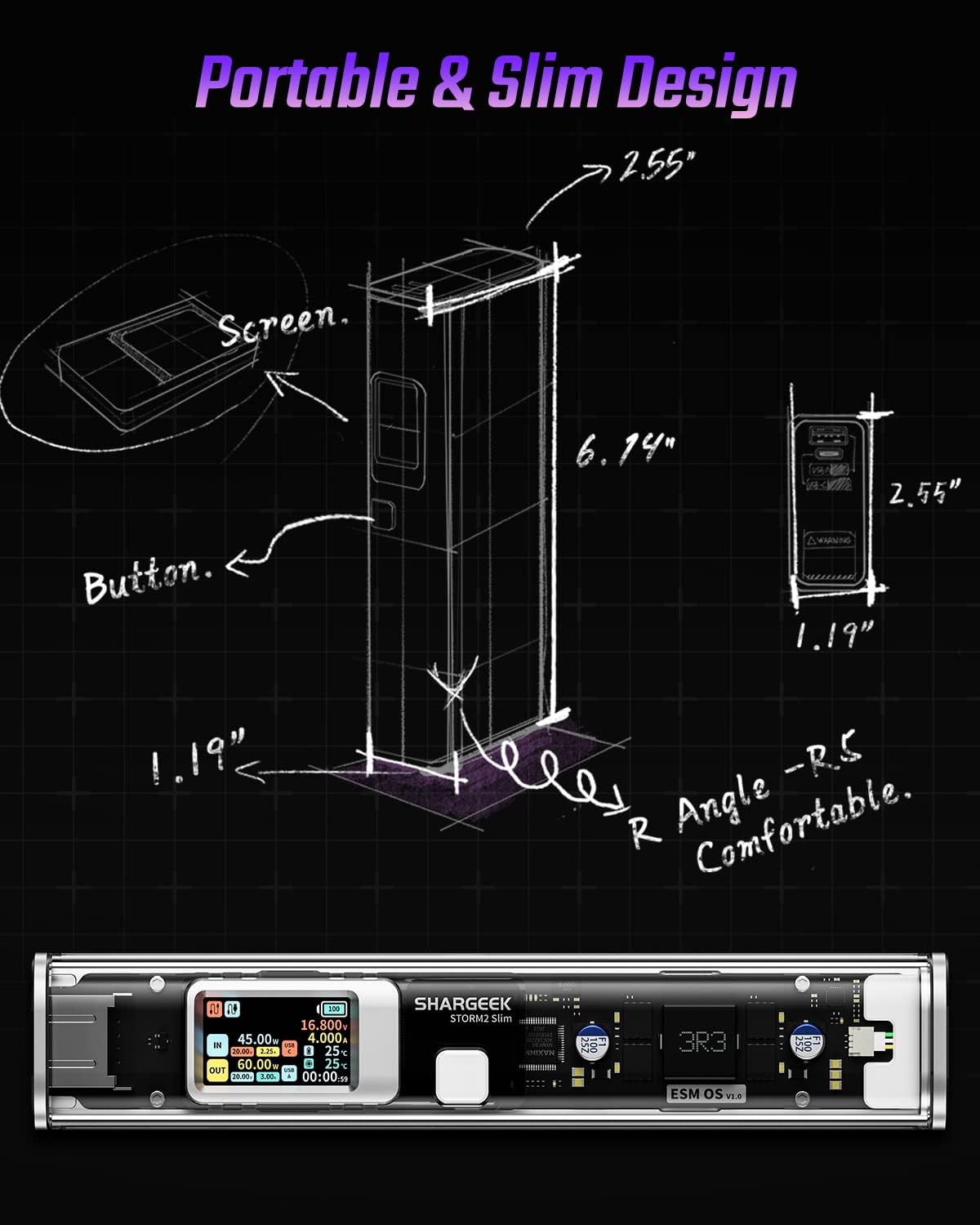
Image: A technical drawing illustrating the dimensions of the Shargeek STORM2 Slim and pointing out the screen and button locations.
Технічне обслуговування
- Прибирання: Використовуйте м’яку суху тканину для очищення зовнішньої частини портативного зарядного пристрою. Уникайте використання агресивних хімікатів або абразивних матеріалів.
- Зберігання: Зберігайте пристрій у прохолодному, сухому місці, подалі від прямих сонячних променів, екстремальних температур та високої вологості.
- Догляд за акумулятором: To prolong battery life, avoid fully discharging the power bank frequently. Recharge it when the battery level is low. If storing for extended periods, charge it to approximately 50-70% every 3-6 months.
- Уникайте крапель: While designed with an aluminum alloy frame for durability, avoid dropping the device as it may damage internal components or the transparent casing.
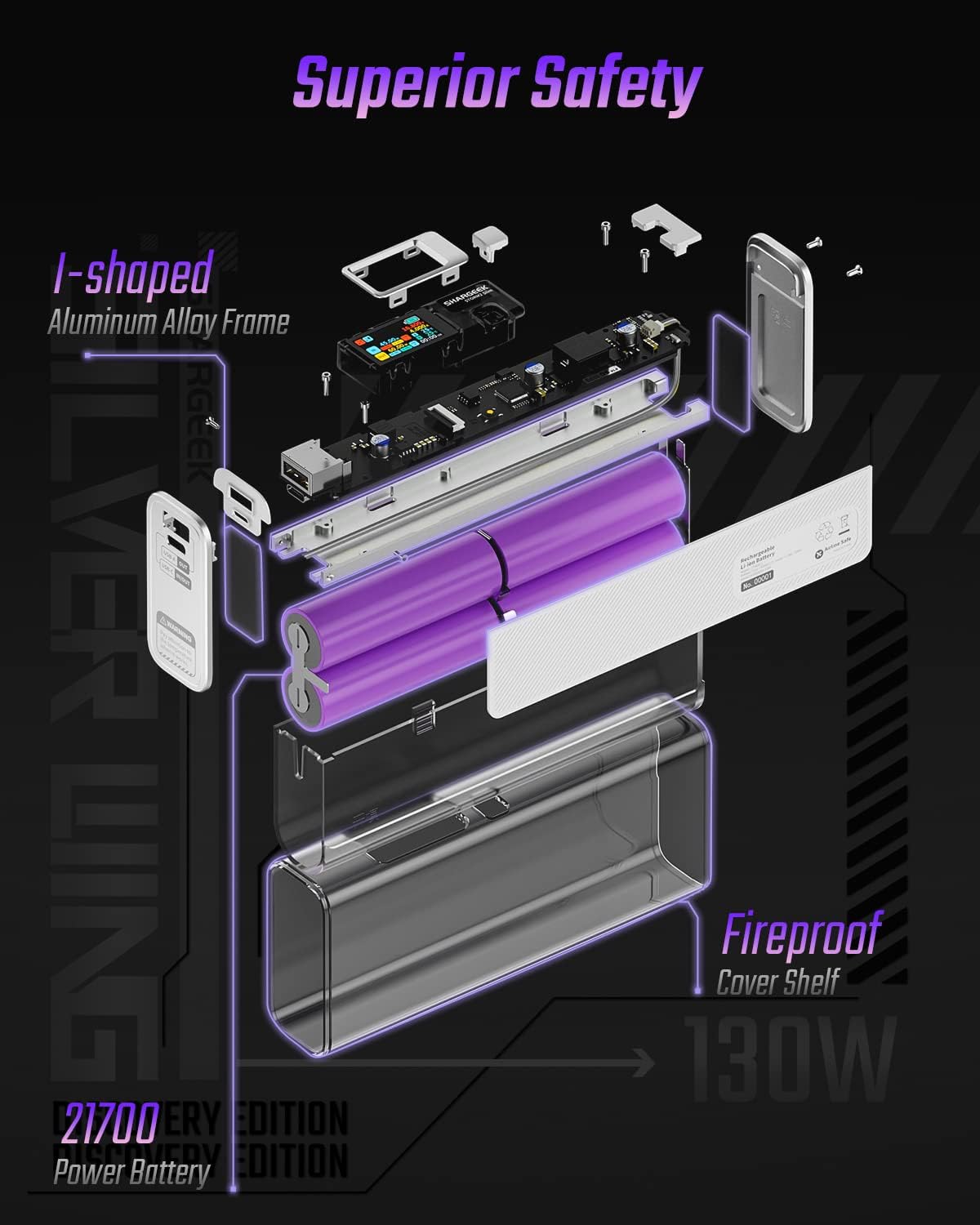
Image: An exploded diagram of the Shargeek STORM2 Slim, illustrating its internal structure including the I-shaped aluminum alloy frame, fireproof cover shelf, and 21700 power batteries, highlighting its robust construction.
Усунення несправностей
| проблема | Можлива причина | Рішення |
|---|---|---|
| Пристрій не заряджається від портативного зарядного пристрою (зовнішнього акумулятора). | Low power bank battery; incompatible cable; device not properly connected; device requires more power than available. | Recharge the STORM2 Slim. Ensure cable is fully inserted and compatible. Check device power requirements against power bank output. Try a different cable or port. |
| Зовнішній зарядний пристрій не заряджається. | Несправний зарядний кабель або адаптер; пошкоджено порт зарядного пристрою. | Try a different USB-C cable and power adapter. Ensure the adapter meets the recommended power output (e.g., 100W). If problem persists, contact support. |
| IPS screen is blank or unresponsive. | Power bank is off; temporary software glitch. | Press the button to activate the screen. If unresponsive, try connecting a device to charge or connecting the power bank to a charger to see if it activates. If problem persists, contact support. |
| Повільна зарядка. | Кабель не підтримує швидку зарядку; пристрій не підтримує швидку зарядку; підключено кілька пристроїв. | Ensure you are using a high-quality USB-C PD cable. Verify your device supports fast charging. Charging multiple devices simultaneously may reduce individual charging speeds. |
Технічні характеристики
- Номер моделі: STM2E-1
- Ємність батареї: 20000 мАг
- Максимальний вихід: 130 Вт
- Вихід USB-C: Потужність живлення до 100 Вт (PD)
- Вихід USB-A: До 30 Вт
- введення: USB-C (up to 100W PD)
- Дисплей: Екран IPS
- Розміри: 3 x 6.5 x 15.59 см (приблизно 1.18 x 2.56 x 6.14 дюймів)
- вага: Приблизно 689 г (1.52 фунта)
- Тип батареї: Літій-іонний
Гарантія та підтримка
Інформація про гарантію:
Shargeek products are covered by a limited warranty against defects in materials and workmanship. Please refer to the warranty card included with your purchase or visit the official Shargeek webсайт для отримання детальних гарантійних умов.
Підтримка клієнтів:
For technical assistance, troubleshooting, or warranty claims, please contact Shargeek customer support through their official webсайт або контактну інформацію, зазначену на упаковці вашого продукту.
Official Shargeek Store Link: Shargeek Official Store
Інформація про безпеку
- Не піддавайте пристрій впливу води, вологи або екстремальних температур.
- Do not disassemble, modify, or attempt to repair the device yourself. This will void the warranty and may cause damage or injury.
- Зберігати в недоступному для дітей місці.
- Використовуйте лише сертифіковані та сумісні зарядні кабелі та адаптери.
- Уникайте падіння та сильних ударів пристрою.
- Dispose of the device responsibly according to local regulations for electronic waste.
Ask a question about this manual
Ask about setup, troubleshooting, compatibility, parts, safety, or missing instructions. Manuals+ will review the question and use this page’s manual context to help answer it.