1. Вступ
Thank you for choosing the Xigmatek Lux M Micro-ATX Mini Tower PC Case. This manual provides detailed instructions for the installation, operation, and maintenance of your new PC chassis. Please read this manual carefully before beginning the assembly process to ensure proper installation and to maximize the performance and longevity of your system.
The Lux M case is designed to offer a robust and aesthetically pleasing housing for your computer components, featuring a tempered glass side panel, a metallic front panel with a unique cut-out pattern, and pre-installed fixed RGB fans for optimal cooling and visual appeal. It supports Micro-ATX and Mini-ITX motherboards and is compatible with various cooling solutions, including water cooling.
2. Інформація про безпеку
Будь ласка, дотримуйтесь наступних запобіжних заходів під час встановлення та експлуатації:
- Always disconnect the power supply from the wall outlet before installing or removing any components to prevent electric shock.
- Handle all components with care. Avoid touching circuit boards directly; hold them by their edges.
- Wear an anti-static wrist strap when handling sensitive electronic components to prevent electrostatic discharge (ESD) damage.
- Keep the case and components away from liquids, excessive heat, and direct sunlight.
- Забезпечте належну вентиляцію навколо корпусу ПК, щоб запобігти перегріву.
- Зберігайте дрібні деталі та гвинти у недоступному для дітей місці.
3. Вміст упаковки
Verify that all items are present in your package. If any items are missing or damaged, please contact your retailer.
- Xigmatek Lux M Micro-ATX Mini Tower PC Case
- Accessory box (containing screws, standoffs, cable ties, etc.)
- Посібник користувача (цей документ)
4. Продукт закінчивсяview
Familiarize yourself with the various parts of your Xigmatek Lux M PC case.
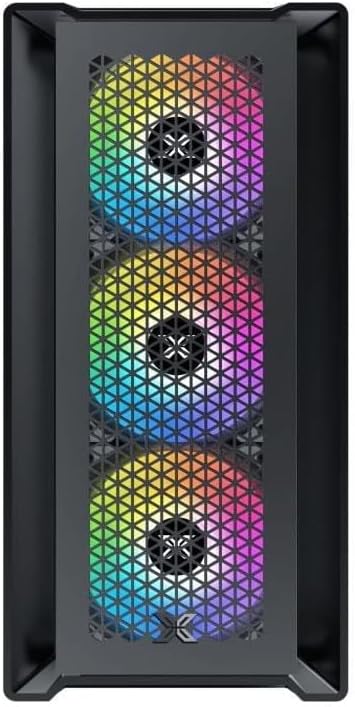
Малюнок 4.1: Спереду View. This image displays the front of the Xigmatek Lux M case, highlighting the metallic mesh panel with a triangular design and the three pre-installed 120mm fixed RGB fans.

Figure 4.2: Angled Top-Front View. This perspective shows the tempered glass side panel, offering a clear view of the interior, and the top panel with its I/O ports (USB, audio) and power button.
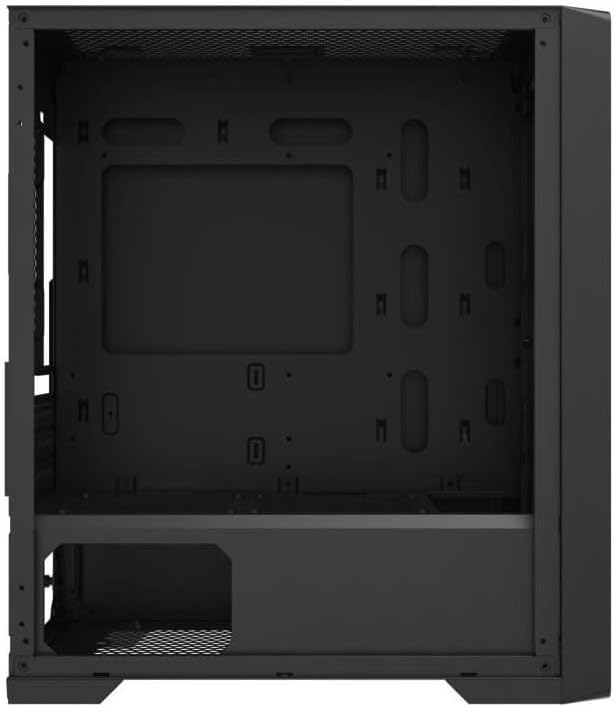
Figure 4.3: Interior Layout. The internal structure of the case, featuring the motherboard mounting tray, cutouts for cable management, and the power supply shroud at the bottom.
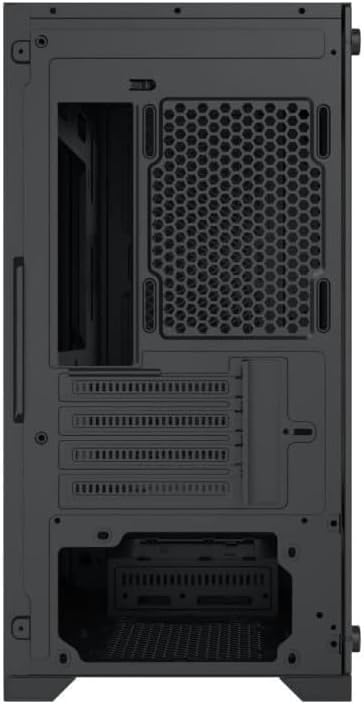
Малюнок 4.4: Задня частина View. This image illustrates the rear of the case, including the expansion slots for graphics cards and other add-in cards, the rear fan mounting area, and the power supply mounting bracket.
5. Налаштування та встановлення
Follow these steps to install your computer components into the Xigmatek Lux M case.
5.1. Підготовка справи
- Поставте корпус на рівну, стійку поверхню.
- Remove the tempered glass side panel by unscrewing the thumb screws and carefully lifting it off. Set it aside on a soft, non-abrasive surface.
- Remove the opposite steel side panel by unscrewing the thumb screws and sliding it backward.
5.2. Встановлення материнської плати
The Lux M supports Micro-ATX and Mini-ITX motherboards.
- Встановіть панель вводу/виводу (якщо вона не встановлена попередньо на материнській платі) у задній отвір корпусу.
- Align the motherboard with the pre-installed standoffs. Ensure all screw holes on the motherboard match the standoffs.
- Secure the motherboard using the provided motherboard screws. Do not overtighten.
5.3. Встановлення блоку живлення (БЖ)
The PSU mounts at the rear bottom of the case.
- Вставте блок живлення у відведений для нього відсік із задньої частини корпусу.
- Align the PSU's screw holes with the holes on the case's rear panel.
- Закріпіть блок живлення за допомогою наданих гвинтів.
5.4. Storage Drive Installation (2.5"/3.5" Drives)
The case supports 2x 2.5"/3.5" storage drives.
- Locate the drive cage beneath the PSU shroud or dedicated 2.5" mounting points behind the motherboard tray.
- For 3.5" HDDs, slide the drive into a drive tray (if applicable) and secure it with screws.
- For 2.5" SSDs, secure them directly to the mounting points using the provided screws.
5.5. Встановлення відеокарти (VGA) та плати розширення
Корпус підтримує відеокарти довжиною до 320 мм.
- Зніміть необхідні кришки слотів розширення із задньої частини корпусу.
- Insert your graphics card or other expansion card into the appropriate PCIe slot on your motherboard.
- Secure the card to the case using the expansion slot screws.
5.6. Встановлення системи охолодження (необов'язково)
The Lux M comes with 4x 120mm X24F fixed RGB fans. It supports additional cooling options.
- Кулер процесора: Max height of 160mm. Install your CPU cooler according to its manufacturer's instructions.
- Підтримка радіатора: The case supports radiators of 360mm, 240mm, or 120mm. Refer to your radiator's manual for installation. Common mounting locations include the front and top panels.
5.7. Кабельний менеджмент
Використовуйте вирізи для прокладання кабелів та точки кріплення за лотком материнської плати для їх упорядкування. Це покращує потік повітря та естетику.
5.8. Фінальна збірка
- Once all components are installed and cables are managed, reattach the steel side panel and secure it with thumb screws.
- Carefully reattach the tempered glass side panel and secure it with thumb screws.
6. Інструкція з експлуатації
After completing the installation, connect your peripherals (monitor, keyboard, mouse) and power cable to the PC. Press the power button located on the top panel of the case to start your system.
The pre-installed X24F RGB fans feature fixed RGB lighting, which will illuminate automatically upon system power-on. No additional software or controller is required for their basic operation.
Ensure that the case's ventilation is not obstructed to maintain optimal airflow and cooling performance.
7. Технічне обслуговування
Регулярне технічне обслуговування допомагає забезпечити довговічність та оптимальну продуктивність компонентів вашого ПК.
- Очищення від пилу: Періодично очищуйте пилові фільтри (якщо є) та внутрішню частину корпусу за допомогою стисненого повітря або м’якої щітки. Накопичення пилу може перешкоджати потоку повітря та призводити до перегріву.
- Зовнішнє очищення: Протріть зовнішні поверхні м’якою, damp cloth. Avoid harsh chemicals that may damage the finish or tempered glass.
- Загартоване скло: Clean the tempered glass panel with a glass cleaner and a microfiber cloth to avoid scratches and streaks.
8. Вирішення проблем
Якщо під час або після встановлення у вас виникли проблеми, розгляньте такі поширені кроки щодо усунення несправностей:
- Немає живлення:
- Переконайтеся, що кабель живлення надійно підключений як до блоку живлення, так і до розетки.
- Перевірте, чи перемикач блоку живлення знаходиться в положенні «УВІМК.».
- Перевірте, чи кабель вимикача живлення на передній панелі правильно підключений до роз'єму на передній панелі материнської плати.
- Fans Not Spinning / RGB Not Lighting:
- Ensure all fan power cables are securely connected to the motherboard or a fan controller.
- For RGB, confirm that any necessary RGB headers are connected to the motherboard (though the included fans are fixed RGB and should light up with power).
- Немає виводу на дисплей:
- Verify that your monitor cable is connected to the graphics card (if installed) and not the motherboard's integrated graphics port.
- Перевстановіть відеокарту в слот PCIe.
- Перегрів:
- Переконайтеся, що всі вентилятори корпусу обертаються та правильно орієнтовані для оптимального потоку повітря (впускного/випускного).
- Очистіть будь-які пилові фільтри та внутрішні компоненти.
- Verify that the CPU cooler is properly seated and making good contact with the CPU.
For more complex issues, consult your component manuals or seek assistance from Xigmatek support or a qualified technician.
9. Технічні характеристики
| Особливість | Специфікація |
|---|---|
| Бренд | Ксігматек |
| Назва моделі | Lux M |
| Номер моделі | EN48540 |
| Тип корпусу | Міні-вежа |
| Сумісність материнської плати | Micro-ATX, Mini-ITX |
| матеріал | Tempered Glass (side panel), Metal (front panel) |
| Колір | чорний |
| Попередньо встановлені вентилятори | 4 x 120mm X24F Fixed RGB Fans |
| Опора радіатора | 360 мм, 240 мм, 120 мм |
| Максимальна висота процесорного кулера | 160 мм |
| Максимальна довжина VGA | 320 мм |
| Максимальна довжина блоку живлення | 165 мм |
| Відсіки для зберігання | 2x 2.5"/3.5" |
| Особливості | RGB Lighting, Triangular Mesh Front Design |
10. Гарантія та підтримка
Xigmatek products are manufactured to the highest quality standards. For warranty information and technical support, please refer to the warranty card included with your product or visit the official Xigmatek webсайт. Будь ласка, збережіть підтвердження покупки для гарантійних претензій.
For further assistance, you may contact Xigmatek customer support through their official channels.