
1. Вступ
The ASUS ExpertCenter D700SC is a powerful and compact Small Form Factor (SFF) desktop PC designed for business and personal use. Engineered for durability and security, it features cutting-edge components and advanced security solutions to meet diverse computing needs.

Figure 1.1: ASUS ExpertCenter D700SC Desktop PC, front and side view.
This image displays the sleek black chassis of the ASUS ExpertCenter D700SC, highlighting its compact design and front panel ports.
Ключові особливості:
- 11th Gen Intel Core i7-11700 Octa-Core Processor for high performance.
- Операційна система Windows 11 Pro для підвищеної продуктивності та безпеки.
- 512GB PCIe NVMe M.2 SSD and 16GB DDR4 RAM, expandable up to 128GB.
- TPM 2.0 Security for secure data encryption.
- Compact Small Form Factor design, weighing approximately 11.02 lbs.
- Seamless connectivity with Wi-Fi 5 (802.11ac) and Dual-Band Bluetooth 5.0.
- Meets MIL-STD-810G US military standards for durability.

Figure 1.2: Military Grade Durability of ASUS ExpertCenter D700SC.
This image illustrates the rigorous testing the ASUS ExpertCenter D700SC undergoes, including package drop, shock, thermal shock, and vibration tests, ensuring its robust build quality.
2. Інформація про безпеку
Please read the following safety guidelines carefully before operating your ASUS ExpertCenter D700SC. Failure to follow these instructions may result in injury or damage to the device.
- Джерело живлення: Use only the power adapter supplied with your device or a compatible replacement. Ensure the power outlet is properly grounded.
- Вентиляція: Не блокуйте вентиляційні отвори. Забезпечте достатній потік повітря навколо ПК, щоб запобігти перегріву.
- Вплив рідини: Keep the device away from liquids. Do not expose it to rain or moisture.
- Прибирання: Від’єднайте шнур живлення від мережі перед чищенням. Використовуйте м’яку суху тканину. Не використовуйте рідкі або аерозольні засоби для чищення.
- Обслуговування: Не намагайтеся самостійно обслуговувати пристрій. Передайте всі послуги з обслуговування кваліфікованому сервісному персоналу.
- Розміщення: Place the PC on a stable, flat surface. Avoid placing it near heat sources or in direct sunlight.
3. Вміст упаковки
Перевірте наявність усіх предметів у вашій упаковці. Якщо якийсь предмет відсутній або пошкоджений, зверніться до продавця.
- ASUS ExpertCenter D700SC Desktop PC (Model: D700SC-XH704)
- Провідна клавіатура
- Дротова миша
- Шнур живлення
- Документація (Короткий посібник, Гарантійний талон)
4. Продукт закінчивсяview
4.1 Front and Rear I/O Ports
Familiarize yourself with the input/output ports on your ASUS ExpertCenter D700SC for connecting peripherals and accessories.

Figure 4.1: Front and Rear I/O Ports.
Ця діаграма надає детальне view of all available ports on the front and rear panels of the desktop PC, including USB, audio, video, and network connections.
Передні порти введення/виведення:
- 1x Headphone jack
- 1x 3.5mm combo audio jack
- 2 порти USB 2.0 типу А
- 1x USB 3.2 Gen 2 Type-C port
- 2 порти USB 3.2 Gen 1 типу A
- 2 порти USB 3.2 Gen 2 типу A
- 1x 2-in-1 Card Reader (SD/MMC)
- 1x Smart Card Reader (optional)
Задні порти введення/виведення:
- 1 порт Gigabit Ethernet RJ45
- 1 порт HDMI 1.4
- Порт VGA 1x
- 1x DisplayPort 1.2
- 2x PS/2 ports (for mouse and keyboard)
- 3x Audio jacks (Line in, Line out, Microphone)
- 4 порти USB 2.0 типу А
4.2 Internal Components and Expansion
The ASUS ExpertCenter D700SC offers various expansion slots for future upgrades and customization.
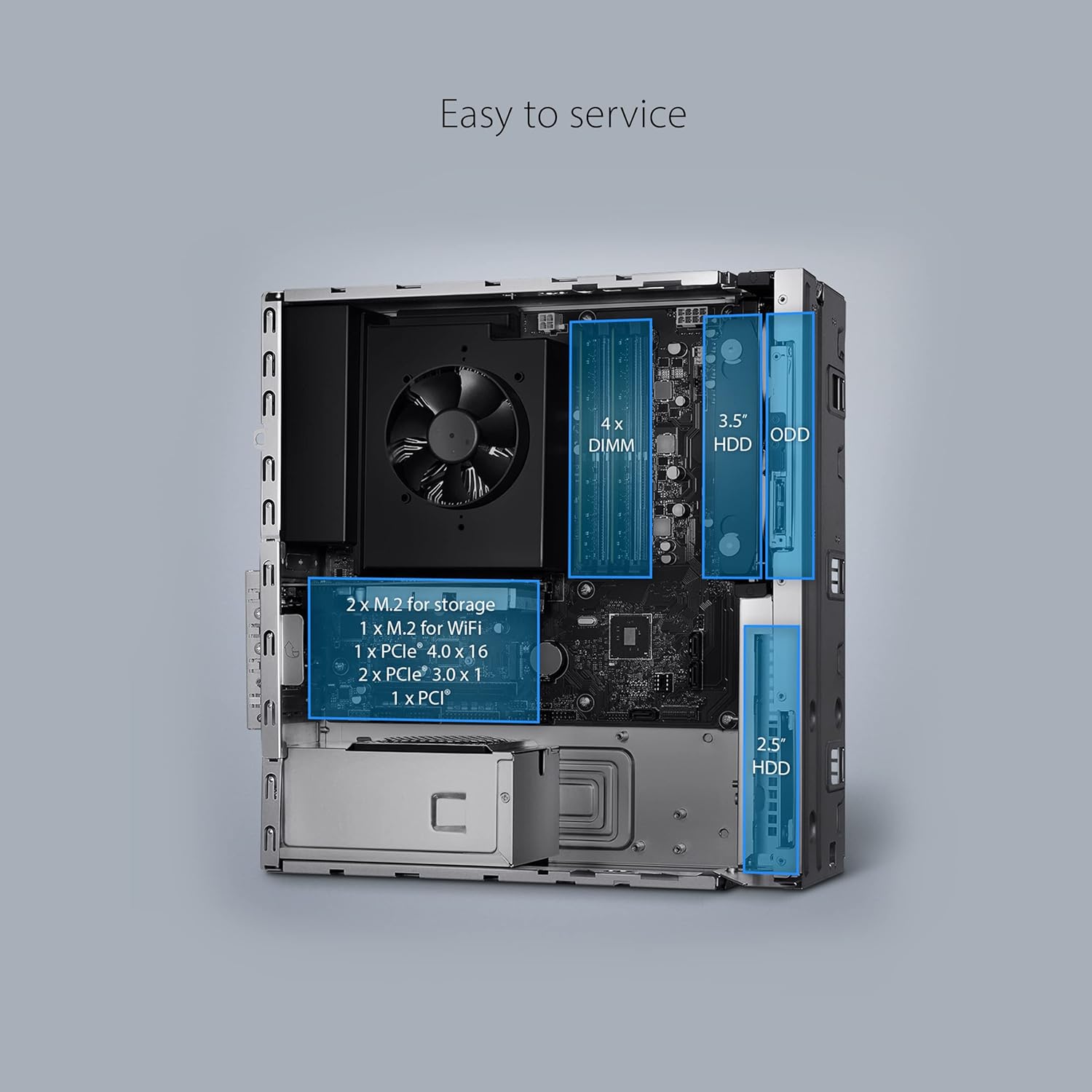
Figure 4.2: Internal Layout and Expansion Slots.
This image shows the internal layout of the desktop PC, highlighting the locations of RAM slots, M.2 slots, PCIe slots, and drive bays for easy servicing and upgrades.
Слоти розширення:
- 1x PCIe 3.0 x16 слот
- 2 слоти PCIe 3.0 x1
- 1x M.2 connector for WiFi
- 2x M.2 connectors for storage
- 4x DDR4 U-DIMM slots (expandable up to 128GB RAM)
Відсіки для дисків:
- 3.5" HDD bay
- 2.5" HDD bay
- Optical Disk Drive (ODD) bay (if applicable)
5. Посібник із налаштування
Follow these steps to set up your ASUS ExpertCenter D700SC for the first time.
- Розпакуйте ПК: Carefully remove the desktop PC, keyboard, mouse, and power cord from the packaging.
- Підключення периферійних пристроїв:
- Connect your monitor to one of the video output ports (HDMI, VGA, or DisplayPort) on the rear of the PC.
- Connect the wired keyboard and mouse to the available USB ports (or PS/2 ports if using older peripherals).
- Connect any other peripherals such as speakers, external drives, or network cables.
- Підключіть живлення: Insert the power cord into the power input on the rear of the PC, then plug the other end into a grounded electrical outlet.
- Увімкнення: Натисніть кнопку живлення, розташовану на передній панелі ПК.
- Початкове налаштування: Дотримуйтесь інструкцій на екрані, щоб завершити налаштування Windows 11 Pro, включаючи мову, регіон, мережеве підключення та створення облікового запису користувача.

Figure 5.1: Connecting the ASUS ExpertCenter D700SC to a monitor, keyboard, and mouse.
This image demonstrates a typical setup of the desktop PC with a monitor, keyboard, and mouse, ready for use in an office or home environment.
6. Інструкція з експлуатації
Your ASUS ExpertCenter D700SC comes pre-installed with Windows 11 Pro, offering a secure and efficient computing experience.
6.1 Основна операція
- Увімкнення/вимкнення живлення: Натисніть кнопку живлення, щоб увімкнути. Щоб вимкнути комп’ютер, натисніть кнопку «Пуск» у Windows, а потім виберіть «Живлення» > «Вимкнути».
- Перезапуск: From the Power menu, select Restart to reboot the system.
- Режим сну: From the Power menu, select Sleep to put the PC into a low-power state.
- Підключення до мережі: Use the Ethernet port for a wired connection or connect to a Wi-Fi network via Windows settings.
- Пристрої Bluetooth: Pair Bluetooth devices (e.g., headphones, speakers) through Windows Bluetooth settings.

Figure 6.1: ASUS ExpertCenter D700SC running Windows 11.
This image shows the desktop PC alongside a monitor displaying the Windows 11 logo, indicating the pre-installed operating system.
6.2 Використання Windows 11 Pro
Windows 11 Pro provides advanced features for business and productivity:
- Покращена безпека: Features like BitLocker device encryption and Windows Information Protection help secure your data.
- Віддалений робочий стіл: Connect to your PC from another device.
- Domain Join: Easily connect to your company's network domain.
- Віртуалізація: Utilize Hyper-V for running virtual machines.
7. Технічне обслуговування
Regular maintenance helps ensure the longevity and optimal performance of your ASUS ExpertCenter D700SC.
- Прибирання:
- Use a soft, lint-free cloth to wipe the exterior.
- For dust, use compressed air to clean ventilation grilles and ports.
- Не використовуйте агресивні хімікати або абразивні миючі засоби.
- Оновлення програмного забезпечення: Regularly check for and install Windows updates and driver updates from the ASUS support webсайт для забезпечення стабільності та безпеки системи.
- Резервне копіювання даних: Періодично створюйте резервні копії важливих даних на зовнішній диск або хмарне сховище, щоб запобігти їх втраті.
- Оптимізація системи: Run disk cleanup and defragmentation (for HDDs) or TRIM (for SSDs) utilities periodically.
8. Вирішення проблем
This section provides solutions to common issues you might encounter with your ASUS ExpertCenter D700SC.
| проблема | Можливе рішення |
|---|---|
| ПК не вмикається. |
|
| Немає зображення на моніторі. |
|
| Клавіатура/миша не реагує. |
|
| Повільна продуктивність. |
|
If the problem persists, please refer to the ASUS support webсайту або зв’яжіться зі службою підтримки клієнтів.
9. Технічні характеристики
Detailed technical specifications for the ASUS ExpertCenter D700SC (Model: D700SC-XH704).
| Особливість | Деталь |
|---|---|
| Процесор | Intel Core i7-11700 (11th Gen), Octa-Core, up to 4.9 GHz |
| Операційна система | Windows 11 Pro |
| ОЗУ | 16GB DDR4 2933 MHz (expandable up to 128GB) |
| Зберігання | Твердотільний накопичувач PCIe NVMe M.2 ємністю 512 ГБ |
| Графіка | Integrated Intel UHD Graphics 11th Gen |
| Бездротове підключення | Wi-Fi 5 (802.11ac), Dual-Band Bluetooth 5.0 |
| Передній вхід/вихід | 1x Headphone, 1x 3.5mm combo audio jack, 2x USB 2.0 Type-A, 1x USB 3.2 Gen 2 Type-C, 2x USB 3.2 Gen 1 Type-A, 2x USB 3.2 Gen 2 Type-A, 1x 2-in-1 Card Reader (SD/MMC), 1x Smart Card Reader (optional) |
| Задня панель введення/виведення | 1x RJ45 Gigabit Ethernet, 1x HDMI 1.4, 1x VGA Port, 1x DisplayPort 1.2, 2x PS/2, 3x Audio jacks, 4x USB 2.0 Type-A |
| Слоти розширення | 1x PCIe 3.0 x16, 2x PCIe 3.0 x1, 1x M.2 for WiFi, 2x M.2 for storage, 4x DDR4 U-DIMM |
| Безпека | TPM 2.0 |
| Форм-фактор | Малий форм-фактор (SFF) |
| Розміри (ДxШxВ) | 3.72 x 11.52 x 13.37 дюймів |
| вага | 14.04 фунта |
| Включені периферійні пристрої | Дротова клавіатура та миша |
10. Гарантія та підтримка
ASUS provides a limited warranty for the ExpertCenter D700SC. Please refer to the warranty card included in your package for specific terms and conditions.
For technical support, driver downloads, FAQs, and more information, please visit the official ASUS support webсайт:
You can also find additional resources and contact information on the ASUS brand store on Amazon: