
1. Вступ
The Sunshine DT-17N Digital Multimeter is a versatile and reliable tool designed for accurate electrical measurements. It is particularly suitable for phone repair technicians and general electronics work, capable of measuring various electrical parameters including voltage, current, resistance, capacitance, and temperature. Its compact design and user-friendly features make it an essential tool for diagnosing and repairing electronic devices.

Figure 1: The Sunshine DT-17N Digital Multimeter, demonstrating its compact size for portability.
2. Інформація про безпеку
To ensure safe operation and prevent damage to the meter, please read and follow all safety instructions carefully. This multimeter features double insulation protection for enhanced user safety.
- Always ensure the test leads are in good condition and properly connected before taking measurements.
- Не застосовувати обtage or current that exceeds the maximum rated values for each range.
- Never use the multimeter if it appears damaged or if the test leads are frayed.
- Будьте обережні під час роботи з томtagвище 30 В змінного струму (RMS), 42 В пікового значення або 60 В постійного струму, оскільки це створює небезпеку ураження електричним струмом.
- Завжди відключайте живлення від кола та розряджайте високовольтніtagконденсатори перед вимірюванням опору, перевірки провідності кола або діодів.
- Негайно замінюйте батарейку, коли з'являється індикатор низького заряду батареї, щоб забезпечити точність показань.
3. Продукт закінчивсяview
3.1. Компоненти мультиметра

Малюнок 2: Спереду view of the DT-17N Multimeter, highlighting its main display and controls.
3.2. Функції дисплея
The DT-17N features a large LCD display with a backlight, ensuring clear readability in various lighting conditions.

Figure 3: The multimeter's LCD display with its backlight feature, improving visibility in low-light environments.
- Великий РК-дисплей: Provides clear numerical readings.
- Підсвічування: Improves visibility in dark or low-light conditions. Activated by pressing and holding the HOLD button.
- Одиниця виміру: Displays the appropriate unit (e.g., V, A, Ω, °C/°F).
- Стан батареї: Показує поточний рівень заряду батареї.
- Automatic Polarity Display: Shows positive or negative polarity automatically.
3.3. Controls and Input Ports
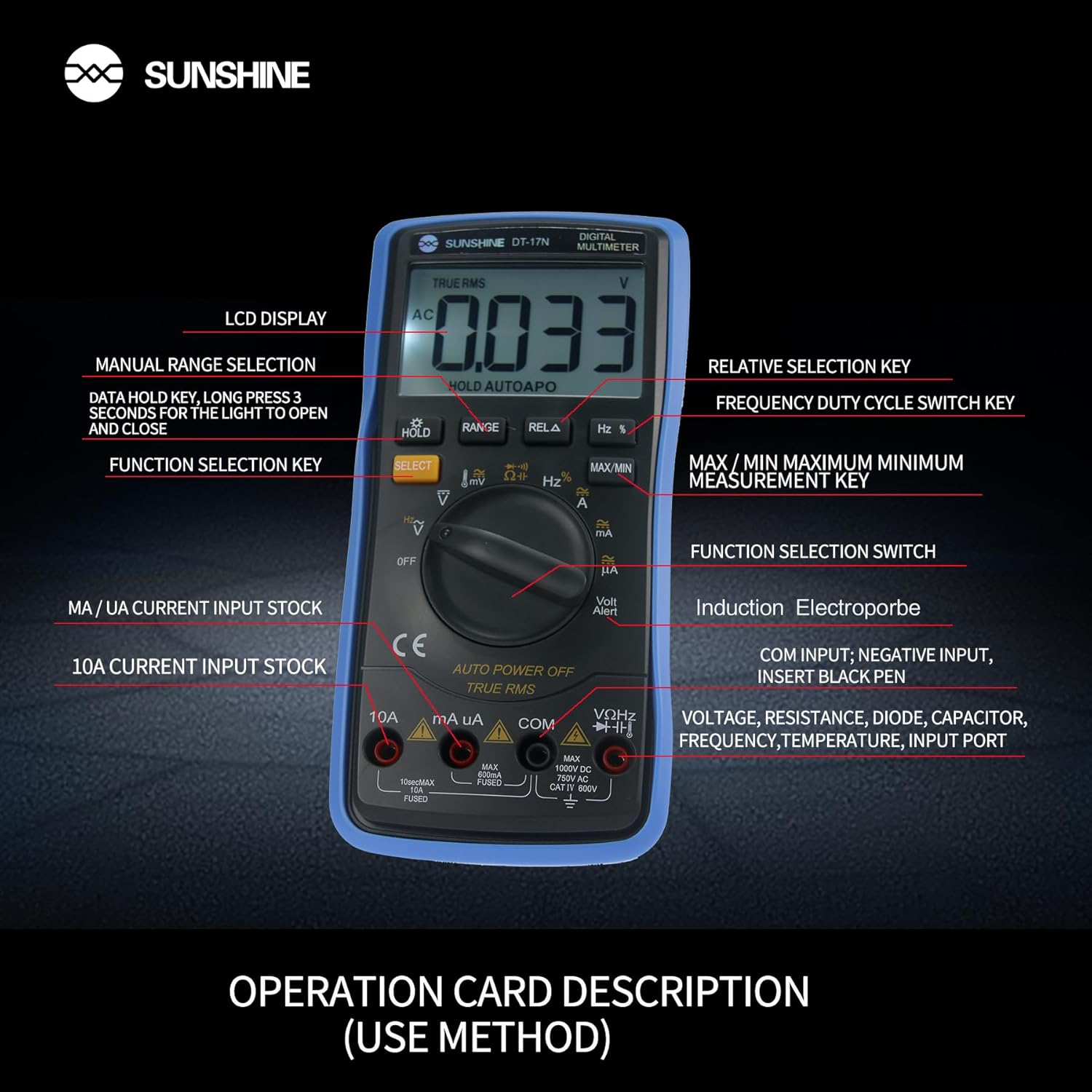
Малюнок 4: Детально view of the multimeter's controls and input ports with their respective functions.
- Поворотний перемикач функцій: Використовується для вибору потрібної функції вимірювання (наприклад, об'ємtagе., Струм, Опір, Температура).
- Кнопка ВИБІР: Toggles between different measurement modes within a single rotary switch position (e.g., AC/DC voltagе., Діод/Провірка цілісності).
- Кнопка HOLD: Freezes the current reading on the display. Press and hold to activate/deactivate the backlight.
- Кнопка RANGE: Allows manual selection of measurement ranges, overriding the automatic ranging feature.
- RELA Button (Relative Selection Key): Measures the difference between a stored reference value and the current reading.
- Hz % Button (Frequency Duty Cycle Switch Key): Перемикається між вимірюваннями частоти та шпаруватості.
- Кнопка MAX/MIN: Displays the maximum or minimum measured value during a measurement session.
- Вхідний порт VΩHz: Connect the red test lead for voltagе., вимірювання опору, частоти, ємності, діодів та температури.
- COM Input Port: Connect the black test lead (common ground) for all measurements.
- mA/uA Input Port: Connect the red test lead for measuring small currents (milliamperes and microamperes).
- 10A Input Port: Connect the red test lead for measuring large currents (up to 10 Amperes).
- Volt Alert (NCV): Безконтактний випtage detection feature.
4. Налаштування
4.1. Встановлення батареї
The DT-17N is battery-powered. To install or replace the battery:
- Переконайтеся, що мультиметр вимкнено.
- Знайдіть кришку відсіку для батарейок на задній панелі пристрою.
- Відкрутіть кріпильний(і) гвинт(и) та зніміть кришку.
- Insert the new battery, observing correct polarity (+ and -).
- Встановіть кришку відсіку для батарейок та закріпіть її гвинтом(ами).
4.2. Підключення вимірювальних щупів
Always connect the black test lead to the COM input jack. Connect the red test lead to the appropriate input jack based on the measurement you intend to perform:
- Для томtage, Resistance, Capacitance, Frequency, Diode, and Temperature measurements: Connect the red test lead to the VΩHz Джек.
- For Current measurements (mA/uA): Connect the red test lead to the mA/uA Джек.
- For High Current measurements (10A): Connect the red test lead to the 10А Джек.
5. Інструкція з експлуатації
The Sunshine DT-17N features automatic identification for most ranges, simplifying operation. Use the rotary switch to select the primary function and the SELECT button to toggle sub-functions.
5.1. Вимірювання об'ємуtage (змінний/постійний струм)
- Поверніть поворотний перемикач у положення V положення.
- За потреби натисніть ВИБРАТИ button to toggle between AC (~) and DC (—) voltage.
- Підключіть чорний контрольний провід до COM гніздо та червоний вимірювальний дріт до VΩHz Джек.
- Підключіть вимірювальні щупи паралельно до кола або компонента, який ви хочете виміряти.
- Прочитайте томtage значення на дисплеї.

Figure 5: The multimeter showing a DC millivolt measurement on its display.
5.2. Measuring Current (AC/DC)
Увага: Never connect the multimeter in parallel when measuring current, as this can damage the meter and the circuit. Always connect in series.
- Поверніть поворотний перемикач у положення mA/uA or 10А положення, залежно від очікуваного струму.
- За потреби натисніть ВИБРАТИ button to toggle between AC (~) and DC (—) current.
- Підключіть чорний контрольний провід до COM гніздо. Підключіть червоний вимірювальний дріт до mA/uA or 10А jack accordingly.
- Open the circuit and connect the test probes in series with the load.
- Зчитайте поточне значення на дисплеї.
5.3. Вимірювання опору
- Поверніть поворотний перемикач у положення Ω положення.
- Підключіть чорний контрольний провід до COM гніздо та червоний вимірювальний дріт до VΩHz Джек.
- Переконайтеся, що ланцюг знеструмлений, а всі конденсатори розряджені.
- Підключіть вимірювальні щупи до компонента, щоб виміряти його опір.
- Зчитайте значення опору на дисплеї.
5.4. Вимірювання ємності
- Поверніть поворотний перемикач у положення Ємність symbol (often shared with diode/continuity).
- Натисніть ВИБРАТИ button until the capacitance mode is active.
- Підключіть чорний контрольний провід до COM гніздо та червоний вимірювальний дріт до VΩHz Джек.
- Ensure the capacitor is fully discharged before connecting the test probes.
- Підключіть тестові щупи до конденсатора.
- Зчитайте значення ємності на дисплеї.
5.5. Measuring Frequency / Duty Cycle
- Поверніть поворотний перемикач у положення Гц % положення.
- Натисніть Гц % button to toggle between frequency (Hz) and duty cycle (%).
- Підключіть чорний контрольний провід до COM гніздо та червоний вимірювальний дріт до VΩHz Джек.
- Підключіть вимірювальні щупи паралельно до джерела сигналу.
- Зчитайте значення частоти або робочого циклу на дисплеї.
5.6. Вимірювання температури
The DT-17N can measure temperature using a K-type thermocouple (not always included, check package contents).

Малюнок 6: Впрample of temperature measurement using the DT-17N Multimeter with a thermocouple.
- Поверніть поворотний перемикач у положення ° C / ° F положення.
- За потреби натисніть ВИБРАТИ button to choose between Celsius or Fahrenheit.
- Connect the K-type thermocouple to the VΩHz і COM гнізда, дотримуючись полярності.
- Place the thermocouple tip on or in the object whose temperature you wish to measure.
- Зчитайте значення температури на дисплеї.
5.7. Diode Test and Continuity
- Поверніть поворотний перемикач у положення Діод/Процілісність символ.
- Натисніть ВИБРАТИ button to toggle between Diode Test and Continuity Test.
- Підключіть чорний контрольний провід до COM гніздо та червоний вимірювальний дріт до VΩHz Джек.
- For Diode Test: Connect the probes across the diode. The display will show the forward voltagпадіння напруги. Поміняйте місцями щупи, щоб перевірити наявність розриву ланцюга.
- For Continuity Test: Connect the probes across the circuit or component. A beep indicates continuity (low resistance).
5.8. Безконтактний Voltage (NCV) Виявлення
Функція NCV дозволяє виявляти об'єм змінного струмуtagе без прямого контакту з провідниками.
- Поверніть поворотний перемикач у положення NCV position (often indicated by a Volt Alert symbol).
- Move the top part of the multimeter near the conductor.
- The meter will beep and/or flash an indicator light if AC voltage виявлено.
5.9. Data Hold and Backlight
- Утримання даних: Натисніть ТРИМАТИ коротко натисніть кнопку, щоб зафіксувати поточне значення на дисплеї. Натисніть ще раз, щоб відпустити.
- Підсвічування: Натисніть і утримуйте ТРИМАТИ button for approximately 3 seconds to turn the display backlight ON or OFF.
5.10. Вимірювання МАКС/МІН
This function records the maximum and minimum values measured during a session.
- Виберіть потрібну функцію вимірювання (наприклад, Voltagд).
- Натисніть МАКС/МІН button. The display will show 'MAX' and the maximum value recorded.
- Прес МАКС/МІН again to cycle to 'MIN' and view the minimum value.
- Натисніть і утримуйте МАКС/МІН щоб вийти з цього режиму.
6. Технічне обслуговування
Правильне обслуговування забезпечує довговічність та точність вашого мультиметра.
6.1. прибирання
Протріть корпус рекламоюamp тканиною та м’яким миючим засобом. Не використовуйте абразивні засоби або розчинники. Перед використанням переконайтеся, що глюкометр повністю сухий.
6.2. Заміна батареї
Refer to Section 4.1 for battery replacement instructions. Always use the specified battery type.
6.3. Holster Care
The multimeter is protected by a thick rubber shockproof holster, designed for durability and a non-slip grip. Keep the holster clean and free from debris.

Figure 7: The durable rubber holster provides protection and a comfortable grip for the multimeter.
7. Вирішення проблем
If you encounter issues with your DT-17N multimeter, refer to the table below for common problems and solutions.
| проблема | Можлива причина | Рішення |
|---|---|---|
| Немає дисплея або дисплей тьмяний | Low or dead battery; Poor battery contact | Replace battery; Check battery contacts |
| Неправильні показання | Wrong function selected; Improper test lead connection; Damaged test leads; Out of range | Select correct function; Ensure leads are in correct jacks; Replace leads; Select higher range or check specifications |
| Немає звукового сигналу про безперервність | Circuit resistance too high; Continuity mode not selected | Ensure resistance is below threshold; Press SELECT to enter continuity mode |
| Fuse blown (for current measurements) | Overcurrent applied | Replace fuse with specified type and rating; Ensure correct current measurement procedure |
8. Технічні характеристики
Technical specifications for the Sunshine DT-17N Digital Multimeter.
| Особливість | Специфікація |
|---|---|
| Модель | ДТ-17Н |
| Тип вимірювання | мультиметр |
| Дисплей | 5999 (5 5/6) counts, Automatic Polarity Display, Backlit LCD |
| Sampлінг -курс | Приблизно 3 разів на секунду |
| Джерело живлення | Працює від батареї |
| Мінімальний робочий об'ємtage | 3 вольт (постійний струм) |
| Діапазон вимірювання температури | 0°C до 1000°C (32°F до 1832°F) |
| Induction Electroprobe Function | Yes (NCV) |
| Подвійне інтегральне аналого-цифрове перетворення | так |
| Розміри предмета | 5.51 x 2.76 x 1.18 дюймів |
| Вага товару | 0.55 кілограма |
| Колір | Синій |
9. Гарантія та підтримка
9.1. Інформація про гарантію
This product comes with a warranty of 3 місяців з дати покупкиБудь ласка, збережіть чек про покупку для гарантійного випадку. Гарантія поширюється на виробничі дефекти за умов нормального використання.
9.2. Підтримка клієнтів
For technical assistance or inquiries regarding your Sunshine DT-17N Digital Multimeter, please contact your retailer or the manufacturer's customer service department. Refer to your purchase documentation for specific contact details.