
1. Вступ
This manual provides detailed instructions for the installation, setup, and operation of your OHMAX Smart Light Switch with Remote Control, Model SWS10-1. Please read this manual thoroughly before installation and use to ensure proper functionality and safety.

Image 1.1: OHMAX Smart Light Switch and Remote Control packaging. The image shows the product box containing the smart light switch and a separate wireless remote control.
2. Інформація про безпеку
- Електрична безпека: Installation must be performed by a qualified electrician or a person with a thorough understanding of electrical wiring. Always turn off power at the circuit breaker before installation.
- Необхідний нейтральний дріт: This device requires a neutral wire for operation. If your electrical box does not have a neutral wire, consult a qualified electrician.
- Тільки Wi-Fi 2.4 ГГц: This device operates on a 2.4GHz Wi-Fi network. It is not compatible with 5GHz Wi-Fi networks.
- Тільки один полюс: This switch is designed for single-pole applications only. It is not compatible with 3-way or multi-way switch configurations unless used with the included remote as a virtual 3-way.
- Максимальне навантаження: Do not exceed the maximum power rating of 1800W or current rating of 15A.
3. Вміст упаковки
The OHMAX Smart Light Switch kit includes:
- OHMAX Smart Light Switch (Model SWS10-1)
- SM04 RF Wireless Remote Control
- Настінний тримач для пульта
- Лицьова пластина
- гвинти
- Клейка стрічка 3M
- Посібник користувача (цей документ)
4. Налаштування та встановлення
4.1 Електричний монтаж
- Вимкніть живлення: Знайдіть автоматичний вимикач і вимкніть живлення вимикача світла, який ви замінюєте. Переконайтеся, що живлення вимкнено за допомогою регулятора гучності.tagтестер.
- Зняти старий вимикач: Carefully remove the existing wall plate and unscrew the old switch from the electrical box. Disconnect the wires.
- Визначення проводів: Identify the following wires in your electrical box:
- Нейтральний провід: Often white and capped together. This is essential for the smart switch.
- Лінійний дріт: Often black, providing constant power. Use an electric pen to confirm it's live when power is on (before turning off for installation).
- Провід навантаження: Connects to the light fixture. May be red or black.
- Дріт заземлення: Always green or bare copper.
- Підключити новий комутатор: Connect the wires from your electrical box to the corresponding terminals on the OHMAX Smart Light Switch. Ensure connections are secure.
- Connect the Neutral wire to the 'Neutral' terminal.
- Connect the Line wire to the 'Line' terminal.
- Connect the Load wire to the 'Load' terminal.
- Connect the Ground wire to the 'Ground' terminal.
Note: If the switch does not function after installation, try reversing the Line and Load connections.
- Перемикач кріплення: Gently push the wired switch into the electrical box and secure it with screws. Attach the face plate.
- Відновлення живлення: Знову увімкніть живлення на автоматичному вимикачі.

Image 4.1: Step-by-step wiring diagram. This image illustrates how to replace an old switch, identify neutral, line, load, and ground wires, and connect them to the new smart switch.
4.2 Налаштування програми та підключення до Wi-Fi
The OHMAX Smart Light Switch uses the Smart Life app for smart control. Ensure your Wi-Fi network is 2.4GHz.
- Завантажити додаток: Download the "Smart Life" app from the App Store (iOS) or Google Play Store (Android).
- Реєстрація/Вхід: Відкрийте застосунок і зареєструйте новий обліковий запис або увійдіть, використовуючи існуючий.
- Додати пристрій: Tap "Add Device" or the "+" icon in the app.
- Виберіть тип пристрою: Choose "Light Switch" or the appropriate category.
- Підключіться до Wi-Fi 2.4 ГГц: Виберіть мережу Wi-Fi 2.4 ГГц і введіть пароль.
- Скидання пристрою: On the smart switch, press and hold the main switch button for approximately 5 seconds until the indicator light blinks rapidly. This puts the switch into pairing mode.
- Підтвердьте миготіння: In the app, confirm that the indicator light on the switch is blinking rapidly.
- Підключити: The app will begin searching for and connecting to the device. Once connected, you can rename the switch.
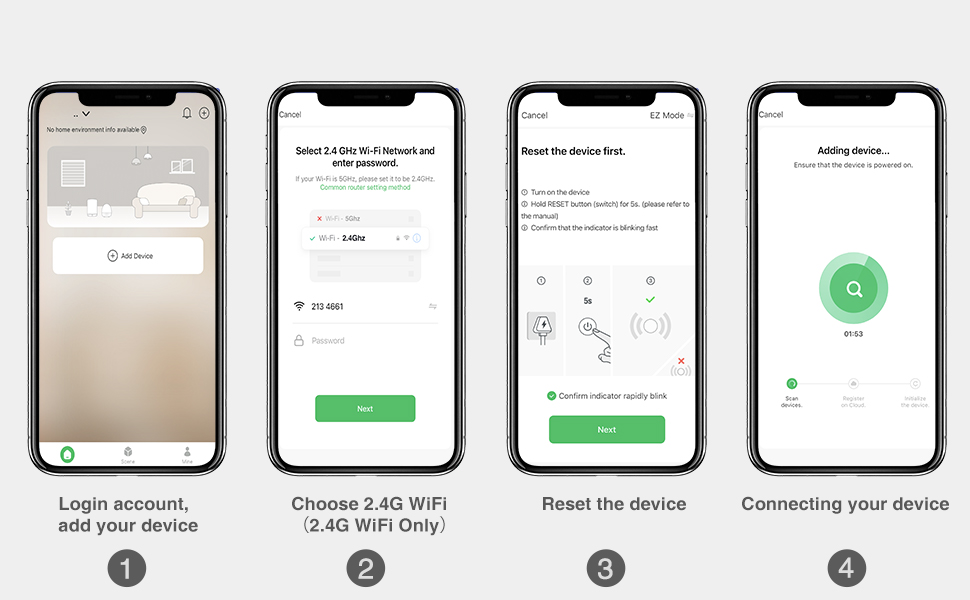
Image 4.2: Smart Life app setup steps. This image shows the four main steps: logging in and adding a device, selecting the 2.4G Wi-Fi network, resetting the device, and connecting the device.
4.3 Сполучення дистанційного керування
The included SM04 RF remote control needs to be paired with the smart light switch.
- Enter Pairing Mode on Switch: Quickly press the main smart switch button 3 times. The indicator light on the switch will flash green.
- Парний пульт: While the switch indicator is flashing, press the "ON" button on the wireless remote control.
- Підтвердження: The remote will blink green, and the switch indicator light will slow down its flashing, indicating successful pairing.
Note: The remote control can be mounted to a wall using the provided wall holder, screws, or 3M adhesive tape. It uses a replaceable CR2032 coin cell battery.
5. Інструкція з експлуатації
5.1 Кілька методів керування
The OHMAX Smart Light Switch offers several ways to control your lights:
- Увімкнення/вимкнення вручну: Press the physical button on the smart light switch.
- Бездротовий пульт дистанційного керування: Use the included SM04 RF remote control to turn lights ON or OFF from anywhere within range (up to 260ft).
- Контроль програми: Use the Smart Life app on your smartphone to control lights remotely, set schedules, and manage settings.
- Голосове керування: Інтеграція з Amazon Alexa або Google Home для керування без використання рук.

Image 5.1: Control Your Lights in Multiple Ways. This image visually demonstrates control via the remote, manual switch, voice commands through smart speakers, and the Smart Life mobile application.
5.2 Інтеграція голосового керування
To enable voice control, link your Smart Life account to Amazon Alexa or Google Home through their respective apps.
- Для Amazon Alexa:
- Відкрийте програму Alexa.
- Перейдіть до розділу «Навички та ігри».
- шукати "Smart Life" and enable the skill.
- Підключіть свій обліковий запис Smart Life.
- Відкрийте для себе пристрої.
- Для Google Home:
- Відкрийте програму Google Home.
- Tap "Add" > "Set up device" > "Works with Google".
- шукати "Smart Life" and link your account.
Once linked, you can use commands such as: "Alexa, turn on Kitchen Light" or "Hey Google, turn off Bedroom Light."

Image 5.2: Hands-free Voice Control. A person is shown interacting with a smart speaker to control lights, demonstrating the convenience of voice commands.
5.3 Функції таймера та розкладу
Utilize the Smart Life app to set up schedules and timers for automated lighting control.
- Таймер: Set a countdown timer for the light to turn ON or OFF after a specified duration.
- Розклад: Create daily or weekly schedules for lights to turn ON or OFF at specific times. This can simulate occupancy when you are away from home.

Image 5.3: Light Scheduling. This image illustrates the timer and scheduling capabilities, showing a countdown for turning off and a scheduled time for turning on.
6. Технічне обслуговування
- Прибирання: To clean the switch and face plate, gently wipe with a soft, dry cloth. Do not use abrasive cleaners or solvents.
- Віддалена заміна акумулятора: The wireless remote control is powered by a CR2032 coin cell battery. Replace the battery when the remote's indicator light no longer illuminates or its range decreases significantly.
- Оновлення прошивки: Periodically check the Smart Life app for available firmware updates for your smart switch to ensure optimal performance and security.
7. Вирішення проблем
7.1 Поширені проблеми та рішення
- Switch Not Turning On/Off Manually:
- Переконайтеся, що живлення відновлено на автоматичному вимикачі.
- Verify all wires are securely connected.
- Check if the Line and Load wires are correctly identified and connected. If unsure, try reversing them.
- Пульт дистанційного керування не працює:
- Ensure the remote is paired with the switch (refer to Section 4.3).
- Check the remote's battery (CR2032). Replace if necessary.
- Ensure the remote is within range of the smart switch.
- Unable to Connect to Wi-Fi / App Control Not Working:
- Confirm your Wi-Fi network is 2.4GHz. The switch is not compatible with 5GHz networks.
- Ensure your Wi-Fi signal is strong at the switch's location.
- Verify the Wi-Fi password entered in the Smart Life app is correct.
- Try resetting the smart switch to pairing mode (press and hold the main button for 5 seconds until it blinks rapidly) and attempt to connect again via the app.
- Перезавантажте свій Wi-Fi роутер.
- Голосове керування не реагує:
- Ensure your Smart Life account is correctly linked to Alexa or Google Home (refer to Section 5.2).
- Check if the smart speaker is online and functioning correctly.
- Verify the device name in the Smart Life app matches the name you are using in voice commands.
8. Технічні характеристики
| Номер моделі | SWS10-1 |
| Бренд | OHMAXX |
| Розміри продукту | 2.3 x 1.5 x 2.1 дюймів |
| Вага товару | 8.64 унції |
| Режим роботи | ВКЛ-ВИМК-ВКЛ |
| Поточний рейтинг | 15 Amps |
| Робочий випtage | 120 вольт |
| Тип контакту | Нормально відкритий |
| Тип роз'єму | Підключити |
| Термінал | Гвинт |
| Тип схеми | 1-сторонній (однополюсний) |
| Контактний матеріал | Мідь |
| Сумісність з Wi-Fi | Лише 2.4 ГГц |
| Максимальна потужність | 1800 Вт |
9. Гарантія та підтримка
9.1 Інформація про гарантію
OHMAX products typically come with a 12-month warranty from the date of purchase. Please refer to the product packaging or contact customer support for specific warranty terms and conditions.
9.2 Підтримка клієнтів
If you encounter any difficulties during installation or operation, or have questions about your OHMAX Smart Light Switch, please do not hesitate to contact our customer support team. We are available to assist you.
For support, please refer to the contact information provided on the product packaging or the OHMAXX brand store on Amazon: OHMAXX Store