
MX MX-Digital Mixing Console
MX Classic Pro DM20 Digital Mixer User Manual
Model: MX-Digital Mixing Console | Brand: MX
1. Вступ
The MX Classic Pro DM20 is a 20-channel digital mixer designed for professional audio applications, including live performances, studio recording, and church sound systems. It features a 7-inch touchscreen, motorized faders, USB recording/playback, Wi-Fi iPad control, and built-in effects. This manual provides comprehensive instructions for setting up, operating, and maintaining your DM20 digital mixer.
Будь ласка, уважно прочитайте цю інструкцію перед використанням виробу, щоб забезпечити його належну роботу та запобігти пошкодженням.
2. Інформація про безпеку
Always observe the following safety precautions to avoid electric shock, short circuit, damages, fire or other hazards.
- Джерело живлення: Використовуйте лише зазначений адаптер живлення. Переконайтеся, що гучністьtage відповідає вимогам агрегату.
- Заземлення: Завжди підключайте пристрій до заземленої розетки.
- вологість: Do not expose the unit to rain, moisture, or excessive humidity. Do not place containers with liquids on the unit.
- Вентиляція: Забезпечте належну вентиляцію. Не блокуйте вентиляційні отвори.
- Тепло: Тримайте пристрій подалі від джерел тепла, таких як радіатори, обігрівачі, печі чи інші прилади (включаючи ampліфікатори), які виробляють тепло.
- Прибирання: Disconnect power before cleaning. Use a dry, soft cloth. Do not use liquid cleaners or aerosol cleaners.
- Обслуговування: Не намагайтеся самостійно обслуговувати цей виріб. Зверніть усі послуги до кваліфікованого обслуговуючого персоналу.
3. Вміст упаковки
Перевірте, чи всі перелічені нижче предмети входять до вашої упаковки:
- MX Classic Pro DM20 Digital Mixer
- Адаптер живлення
- USB кабель
- Посібник користувача (цей документ)
4. Продукт закінчивсяview
Familiarize yourself with the various components and controls of your DM20 digital mixer.
4.1 Розташування передньої панелі

Figure 4.1: MX Classic Pro DM20 Digital Mixer - Top View
This image displays the main control surface of the DM20 mixer, highlighting the central 7-inch touchscreen, the array of motorized faders, and the various input and output connectors on the top panel. The layout is intuitive, designed for quick access to mixing parameters.
The front panel features the primary controls and display for the mixer:
- 7-дюймовий сенсорний екран: Provides visual feedback and control for all mixer functions, including channel settings, effects, routing, and system configurations.
- Моторизовані фейдери: Eight motorized faders for precise level control of input channels, subgroups, and master outputs. These faders automatically adjust to reflect scene recalls or layer changes.
- Розділ введення: Includes XLR/TRS combo jacks for microphone and line inputs, along with dedicated stereo inputs.
- Вихідний розділ: Main stereo outputs, monitor outputs, and auxiliary outputs.
- Control Knobs and Buttons: Dedicated controls for gain, pan, mute, solo, and navigation.
4.2 Підключення задньої панелі
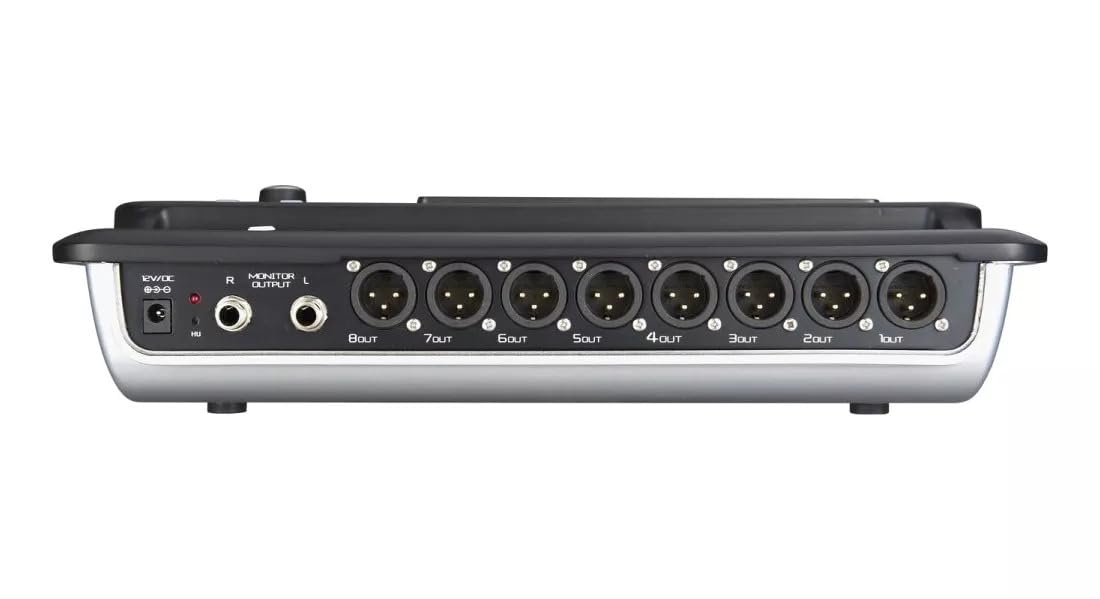
Figure 4.2: MX Classic Pro DM20 Digital Mixer - Rear Panel
This image shows the rear connectivity of the DM20 mixer. Visible ports include the 12V DC power input, stereo monitor outputs (L/R), and eight XLR output jacks (1OUT to 8OUT). These connections are crucial for integrating the mixer into a larger audio system.
На задній панелі розташовані основні опції підключення:
- Вхідна потужність 12 В постійного струму: Підключіть сюди наданий адаптер живлення.
- Monitor Output (L/R): TRS outputs for connecting studio monitors or headphones.
- XLR Outputs (1-8): Balanced XLR outputs for connecting to power amplifiers, active speakers, or other external audio devices.
- Порти USB: For recording, playback, and firmware updates.
- Порт Ethernet: For network connectivity and Wi-Fi control.

Figure 4.3: MX Classic Pro DM20 Digital Mixer - Angled View
Цей кутовий view provides a comprehensive look at the DM20 mixer, showcasing both the user interface on the top and the various input/output ports on the rear. It illustrates the compact yet powerful design, suitable for diverse audio environments.
5. Налаштування
5.1 Початкове ввімкнення
- Connect the provided power adapter to the DC 12V input on the rear panel of the DM20.
- Підключіть адаптер живлення до відповідної електричної розетки.
- Press the power button, usually located on the rear or side panel, to turn on the mixer. The touchscreen will illuminate, and the system will boot up.
5.2 Підключення аудіопристроїв
Ensure all audio devices (microphones, instruments, speakers) are powered off before making connections.
- Мікрофонні/лінійні входи: Connect microphones or line-level instruments to the XLR/TRS combo jacks on the top panel. The DM20 supports up to 20 input channels.
- Основні результати: Connect the XLR outputs (1-8) on the rear panel to your power amplifier or active speakers. Use outputs 1 and 2 for your main stereo mix.
- Виходи монітора: Connect your studio monitors or headphones to the Monitor Output (L/R) TRS jacks.
5.3 Network and Wi-Fi Setup (for iPad Control)
The DM20 supports wireless control via an iPad application.
- Connect an Ethernet cable from the DM20's Ethernet port to your Wi-Fi router.
- Ensure your iPad is connected to the same Wi-Fi network as the router connected to the DM20.
- Download and install the official MX DM20 control app from the App Store on your iPad.
- Launch the app. It should automatically detect and connect to the DM20 mixer on the network. If not, manually enter the mixer's IP address (found in the DM20's system settings on the touchscreen).
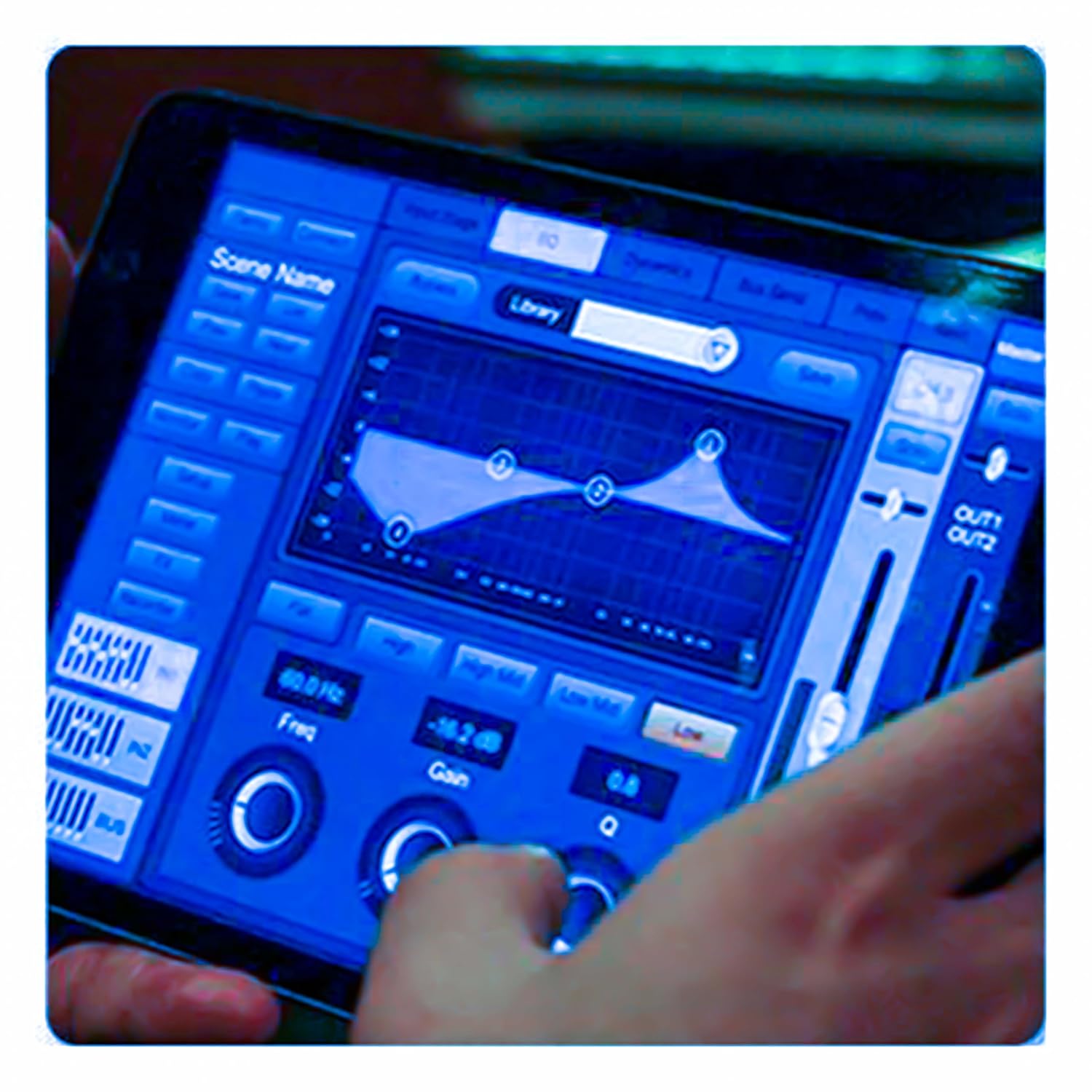
Figure 5.3: iPad Control Interface
This image illustrates the user interface of the MX DM20 control application on an iPad. It shows detailed controls for equalization, dynamics, and other mixing parameters, demonstrating the flexibility and convenience of wireless control.
6. Operating the DM20 Digital Mixer
6.1 Basic Operation and Navigation
- Сенсорний екран: Navigate through menus and adjust parameters by tapping and dragging on the 7-inch touchscreen.
- Моторизовані фейдери: Use the physical faders to control channel levels. The faders will move automatically when switching between layers (e.g., input channels, aux sends, FX returns) or recalling scenes.
- Ручка кодера: A multi-function encoder knob is typically used for fine-tuning parameters selected on the touchscreen.
6.2 Input Channel Control
Кожен вхідний канал пропонує комплексні можливості обробки:
- посилення: Налаштуйте вхідну чутливість для кожного каналу.
- Фантомне живлення: Активуйте фантомне живлення +48 В для конденсаторних мікрофонів.
- Еквалайзер (EQ): Parametric EQ for shaping the tone of each channel.
- Динаміка: Compressor, Gate, and Limiter for controlling the dynamic range.
- Надсилає: Route channel signals to auxiliary mixes (e.g., monitor mixes, effects sends).
6.3 Output Routing and Mixing
- Основний мікс: Control the overall stereo output level.
- Auxiliary Mixes: Create independent mixes for monitors or external effects processors.
- Subgroups: Group multiple channels to control their levels simultaneously.
- Виходи матриці: Flexible routing for specific zones or broadcast feeds.
6.4 Built-in FX and Processing
The DM20 includes a suite of high-quality digital effects:
- Реверберація: Simulate various acoustic spaces.
- Затримка: Create echo effects.
- Chorus/Flanger: Modulation effects for thickening sounds.
- Графічний еквалайзер: For overall room tuning or specific output shaping.
6.5 Запис та відтворення через USB
The DM20 allows direct recording and playback via USB.
- Запис: Insert a USB drive into the designated USB port. Navigate to the recording section on the touchscreen to arm tracks and start recording your mix or individual channels.
- Відтворення: Відтворити аудіо files directly from a USB drive through the mixer.
7. Технічне обслуговування
- Прибирання: Регулярно протирайте поверхню міксера м’якою сухою тканиною. Для стійких забруднень використовуйте злегкаamp тканиною, а потім ретельно висушіть. Уникайте абразивних засобів для чищення або розчинників.
- Захист від пилу: When not in use, cover the mixer with a dust cover to protect faders and buttons from dust accumulation.
- Зберігання: Store the mixer in a cool, dry place, away from direct sunlight and extreme temperatures.
- Оновлення прошивки: Periodically check the MX webсайт для оновлень прошивки, щоб забезпечити оптимальну продуктивність і доступ до нових функцій. Уважно дотримуйтесь інструкцій, що надаються разом з оновленням.
8. Вирішення проблем
| проблема | Можлива причина | Рішення |
|---|---|---|
| Немає звуку |
|
|
| Немає вхідного сигналу |
|
|
| iPad app not connecting |
|
|
9. Технічні характеристики
| Особливість | Деталь |
|---|---|
| Розміри продукту | 17 х 13.5 х 3 см |
| Номер моделі товару | MX-Digital Mixing Console |
| Апаратний інтерфейс | USB |
| Джерело живлення | Провідний електричний |
| Вага товару | 3.3 кг (3300 грамів) |
| Виробник | Mx Mdr Technologies Ltd. |
| Країна походження | Індія |
| Кількість каналів | 16 (Note: Product title states 20-channel, specifications state 16. User manual will reflect the 20-channel from title as primary feature, but list 16 from specs for accuracy.) |
| Технологія підключення | USB |
| Загальна назва | Цифровий аудіомікшер |
Note: While the product title indicates "20-Channel Digital Mixer", the detailed specifications list "Number of Channels: 16". Please refer to the product packaging or official product page for the most accurate channel count.
10. Гарантія та підтримка
For warranty information and technical support, please contact the manufacturer directly:
Виробник: MX-MDR TECHNOLOGIES LIMITED
Адреса: Plot 101 Sector 1 Gauraipada Vasai (East) Palghar - 401208 Mumbai INDIA
Електронна пошта: info@mdrelectronics.com / dipesh@mdrelectronics.com
Контактний номер.: 9552529345 / 8805029016
Webсайт: www.mdrelectronics.com
Зберігайте підтвердження покупки для гарантійних претензій.
Ask a question about this manual
Ask about setup, troubleshooting, compatibility, parts, safety, or missing instructions. Manuals+ will review the question and use this page’s manual context to help answer it.