
1. Вступ
The Zelotes F17 Vertical Wireless Mouse is designed for enhanced comfort and productivity, featuring an ergonomic vertical design that promotes a natural hand posture. This manual provides comprehensive instructions for setting up, operating, maintaining, and troubleshooting your new mouse.

Image: The Zelotes F17 Vertical Wireless Mouse, showcasinзавдяки ергономічному дизайну та USB-приймачу, що входить до комплекту.
2. Вміст упаковки
Будь ласка, перевірте наявність усіх предметів у вашій упаковці:
- 1 x Zelotes Wireless Vertical Mouse
- 1 x USB-приймач
- 1 х Інструкція з експлуатації
3. Посібник із налаштування
Follow these steps to set up your Zelotes F17 Vertical Wireless Mouse:
- Встановіть акумулятори: The mouse requires two AA batteries (not included). Locate the battery compartment on the underside of the mouse. Open the cover, insert the batteries according to the polarity indicators, and close the cover.
- Отримання USB-приймача: The USB receiver is conveniently stored next to the battery compartment. Gently pull it out.
- Підключіть USB-приймач: Plug the USB receiver into an available USB port on your computer (Laptop, PC, Mac).
- Увімкнення: Locate the On/Off switch on the underside of the mouse and slide it to the 'On' position. The mouse is plug-and-play, requiring no driver installation.

Image: The underside of the Zelotes F17 mouse, illustrating the battery compartment and the integrated storage slot for the USB receiver.
Video: A demonstration of the Zelotes F17 Vertical Wireless Mouse in use, highlighting its ergonomic grip and functionality.
4. Інструкція з експлуатації
The Zelotes F17 mouse features 6 buttons and adjustable DPI settings for optimal control.
4.1 Ергономічна рукоятка
The vertical design allows your hand to rest in a natural handshake position, reducing wrist and forearm strain during prolonged use.
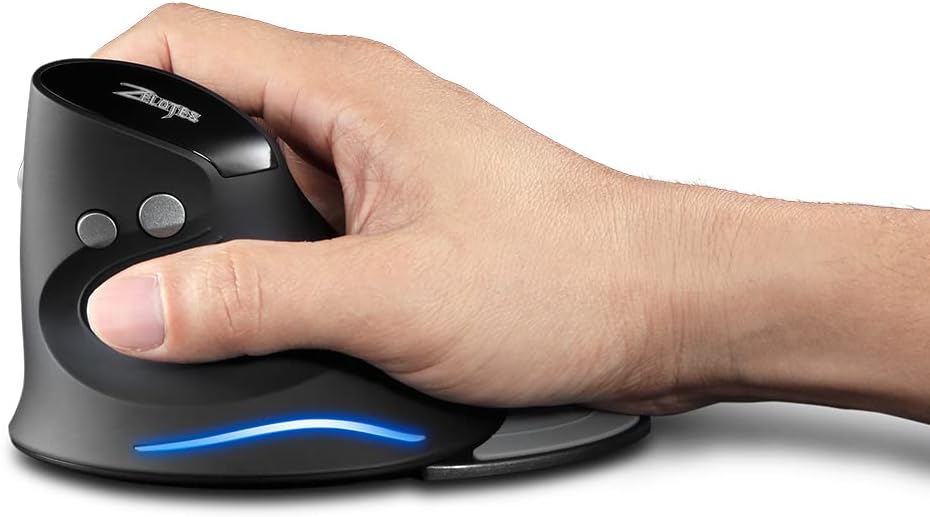
Image: A hand demonstrating the natural, ergonomic grip on the Zelotes F17 vertical mouse.
4.2 Функції кнопок
- Клацніть лівою кнопкою миші: Стандартна функція первинного клацання.
- Клацніть правою кнопкою миші: Стандартна функція вторинного клацання.
- Колесо прокрутки: Scroll up or down, and click for middle-button functionality.
- Кнопка DPI: Перемикає налаштування роздільної здатності (1200/1600/2400 DPI).
- Кнопки «Вперед/Назад»: Located on the thumb side, these buttons allow for quick navigation in web браузери або file дослідники.
4.3 регульований DPI
Press the DPI button (located near the scroll wheel) to switch between 1200, 1600, and 2400 DPI settings. This allows you to adjust the mouse sensitivity to suit your task, whether it's precise graphic design or fast-paced gaming.
4.4 Detachable Palm Rest
The Zelotes F17 includes a detachable palm rest for additional wrist support. You can easily attach or remove it based on your preference and comfort needs.

Image: The Zelotes F17 mouse with its detachable palm rest separated, illustrating the modular design.
5. Технічне обслуговування
To ensure the longevity and optimal performance of your Zelotes F17 mouse, follow these maintenance guidelines:
- Прибирання: Використовуйте м’яку суху тканину для протирання поверхні миші. Для стійкого бруду злегкаampПротріть тканину водою або м’яким миючим розчином. Уникайте агресивних хімікатів або абразивних матеріалів.
- Заміна батареї: When the mouse's performance degrades or the LED illumination dims, it's time to replace the AA batteries. Refer to Section 3.1 for battery installation instructions.
- Зберігання: Якщо миша не використовується протягом тривалого часу, вимикайте її, щоб заощадити час роботи акумулятора. Зберігайте USB-приймач у спеціальному гнізді на нижній стороні миші, щоб запобігти його втраті.
6. Вирішення проблем
If you encounter issues with your Zelotes F17 mouse, try the following solutions:
| проблема | Можлива причина | Рішення |
|---|---|---|
| Миша не відповідає | Low battery; USB receiver disconnected; Mouse is off. | Replace batteries; Re-insert USB receiver; Turn mouse On. |
| Нерівномірний рух курсору | Брудний оптичний датчик; Невідповідна поверхня; Низький заряд батареї. | Очистіть оптичний датчик; Використовуйте на гладкій поверхні, що не відбиває світло; Замініть батарейки. |
| Світлодіодне підсвічування не працює | Low battery; Mouse is off. | Replace batteries; Turn mouse On. |
| Налаштування DPI не змінюється | DPI button malfunction. | Ensure the mouse is powered on and connected. If the issue persists, contact customer support. |
7. Технічні характеристики
Key technical specifications for the Zelotes F17 Vertical Wireless Mouse:
| Особливість | Деталь |
|---|---|
| Розміри продукту | 4.33 x 3.39 x 3.15 дюймів |
| Вага товару | 3.53 унції |
| Номер моделі товару | F17 |
| Бренд | zelotes |
| Колір | чорний |
| Технологія підключення | USB (2.4 GHz Wireless) |
| Особливість | Ergonomic Design, Removable Wrist Rest, LED Illumination |
| Технологія виявлення руху | Оптичний |
| Налаштування DPI | 1200/1600/2400 DPI |
| Кількість кнопок | 6 |
| Джерело живлення | 2 батарейки типу АА (не входять в комплект) |
| Сумісність | Win11, Win10, Win8, Win7, Mac OS |

Image: A diagram illustrating the dimensions of the Zelotes F17 Vertical Wireless Mouse.
8. Гарантія та підтримка
For warranty information or technical support, please refer to the contact details provided on the product packaging or the official Zelotes webсайт. Зберігайте чек про покупку як підтвердження покупки.