
1. Вступ
This manual provides detailed instructions for the PRYME BTH-900-MAX Wireless Dual-Muff Headset. This professional-grade headset is designed for reliable communication in demanding environments, offering dual-link capability for simultaneous connection to two-way radios, cellphones, and tablets.
Ключові характеристики:
- Noise-Reducing Condenser Boom Microphone: Equipped with a replaceable wind sock for clear audio transmission.
- Fully Integrated Wireless Technology: Provides a clean, professional, and wire-free communication experience.
- Можливість подвійного зв'язку: Connects to both cellphones/tablets and two-way radios simultaneously.
- Broad Radio Compatibility: Works with all PrymeBLU radio adapters (V2 series), and ICOM, Kenwood, EFJ, and BK radios with internal Bluetooth.
- Dedicated Control Buttons: Separate buttons for Push-To-Talk (PTT) radio functions and cellphone (Answer/Call) operations.
- Водостійкий дизайн: Ensures durability and reliable performance in various conditions.
- Звук шуму: Покращує чіткість звуку, зменшуючи навколишній шум.
- Складана конструкція: Allows for convenient storage and transport.

Figure 1: The PRYME BTH-900-MAX Wireless Dual-Muff Headset, showcasing its robust design and integrated boom microphone.
2. Налаштування
2.1 Заряджання гарнітури
Before initial use, fully charge the headset. The headset includes a Lithium Polymer battery. Use the provided USB charging cable and adapter.
- Підключіть менший кінець USB-кабелю для заряджання до порту заряджання на гарнітурі.
- Підключіть більший кінець USB-кабелю до адаптера живлення.
- Підключіть адаптер живлення до стандартної електричної розетки.
- The LED indicator on the headset will show charging status (e.g., red for charging, blue for fully charged).
- Allow approximately [X hours - information not provided, user should refer to product packaging or full manual] for a full charge. A full charge provides up to 50 hours of battery life.

Figure 2: USB charging cable and power adapter for the headset.
2.2 Увімкнення/вимкнення
- Щоб увімкнути: Press and hold the Power button (usually marked with a power symbol) until the LED indicator illuminates.
- Щоб вимкнути: Натисніть і утримуйте кнопку живлення, доки світлодіодний індикатор не згасне.
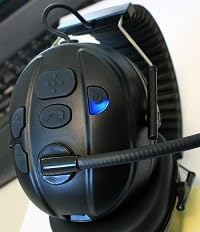
Figure 3: Headset controls showing the power button and a blue indicator light, typically indicating power on or pairing mode.

Figure 4: Headset controls showing the power button and a red indicator light, typically indicating low battery or charging status.
2.3 Створення пари Bluetooth
The BTH-900-MAX supports dual-link Bluetooth connectivity, allowing connection to two devices simultaneously (e.g., a radio adapter and a cellphone).
- Увійдіть у режим сполучення: With the headset off, press and hold the Power button for approximately 5-7 seconds until the LED indicator flashes rapidly (e.g., alternating red and blue).
- Pair with First Device: On your first device (e.g., PrymeBLU radio adapter, cellphone, or tablet), enable Bluetooth and search for available devices. Select "BTH-900-MAX" from the list.
- Підтвердити підключення: Once paired, the LED indicator on the headset will change (e.g., slow blue flashes) to indicate a successful connection.
- Pair with Second Device (Dual Link): To connect a second device, repeat step 1 to enter pairing mode again. Then, on your second device, enable Bluetooth and select "BTH-900-MAX". The headset will attempt to connect to both devices.
- Ensure both devices show "BTH-900-MAX" as connected in their Bluetooth settings.
3. Операція
3.1 Носіння гарнітури
The BTH-900-MAX features a behind-the-head racing style design for a secure and comfortable fit. Adjust the headband and earcups for optimal comfort and noise isolation.

Figure 5: The BTH-900-MAX headset positioned on a mannequin head, illustrating the behind-the-head wearing style.
3.2 Контроль надview
The headset features dedicated control buttons for various functions. Familiarize yourself with their placement and operation.

Рисунок 6: Зверху вниз view of the headset's control panel, showing the layout of buttons for various functions.

Рисунок 7: Крупний план view of the side control buttons on the headset, including volume and call controls.
3.3 Radio Communication (PTT)
When connected to a compatible two-way radio via a PrymeBLU adapter or built-in Bluetooth:
- Press and hold the dedicated PTT button on the headset to transmit.
- Відпустіть кнопку PTT, щоб прослухати.
3.4 Cellphone/Tablet Communication
When connected to a cellphone or tablet:
- Відповісти/закінчити виклик: Press the dedicated Call button (usually marked with a phone icon) to answer an incoming call or end an active call.
- Голосовий помічник: Long press the Call button to activate your device's voice assistant (e.g., Siri, Google Assistant).
- Регулювання гучності: Use the Volume Up (+) and Volume Down (-) buttons to adjust audio levels.

Малюнок 8: Прample of a Push-to-Talk (PTT) application on a smartphone, demonstrating compatibility for mobile communication.
3.5 Microphone Adjustment
The boom microphone is flexible and can be adjusted for optimal voice pickup. Position it approximately 1-2 inches from your mouth.

Рисунок 9: Детальний view of the noise-reducing condenser boom microphone, including its protective wind sock.
4. Технічне обслуговування
4.1 Очищення
- Протріть поверхні гарнітури м’якою тканиноюamp тканина. Уникайте використання агресивних хімікатів або абразивних засобів для чищення.
- The ear cushions can be gently cleaned with a mild soap solution if necessary. Ensure they are completely dry before reattaching.
- The microphone wind sock can be removed and cleaned or replaced if it becomes worn or dirty.

Figure 10: A close-up of the padded earphone, highlighting the comfortable and replaceable ear cushions.
4.2 Зберігання
Коли гарнітура не використовується, зберігайте її в прохолодному сухому місці. Складана конструкція забезпечує компактне зберігання.
- Fold the headset to minimize its footprint.
- Avoid exposing the headset to extreme temperatures or direct sunlight for prolonged periods.
5. Вирішення проблем
Поширені проблеми та рішення:
- Немає живлення:
- Ensure the headset is fully charged. Connect it to the charger and check the LED indicator.
- Не вдається з’єднати пристрій із:
- Ensure the headset is in pairing mode (rapidly flashing LED).
- Make sure Bluetooth is enabled on your device and it's within the 10-meter range.
- Спробуйте вимкнути та ввімкнути як гарнітуру, так і Bluetooth на вашому пристрої.
- If previously paired, try "forgetting" the device on your phone/radio and re-pairing.
- Poor Audio Quality / No Sound:
- Перевірте рівні гучності як на гарнітурі, так і на підключеному пристрої.
- Ensure the microphone boom is correctly positioned and the wind sock is clean.
- Verify that the headset is properly connected via Bluetooth.
- Move closer to the connected device to ensure you are within the 10-meter Bluetooth range.
- Проблеми з подвійним з’єднанням:
- Ensure both devices are successfully paired and show as connected.
- Some devices may prioritize one connection over another. Test functionality with each device individually first.
6. Технічні характеристики
| Назва моделі: | BTH-900-MAX |
| Технологія підключення: | Бездротовий (Bluetooth) |
| Діапазон Bluetooth: | 10 метрів |
| Термін служби батареї: | 50 години |
| Тип батареї: | 1 літій-полімерний (у комплекті) |
| Тип управління: | Volume Control, Push Button (PTT) |
| Особливості: | Foldable, Lightweight, Noise Cancellation, Water Resistant, iOS Phone Control |
| Розташування вуха: | Над вухом |
| Форм-фактор: | Над вухом |
| Контроль шуму: | Активне шумозаглушення |
| Вага товару: | 14.4 унції (0.9 фунта) |
| Розміри продукту: | 9.45 x 6.3 x 9.06 дюймів |
| Включені компоненти: | Амбушюри |
| UPC: | 638615134348 |
7. Інформація про гарантію
Specific warranty details for the PRYME BTH-900-MAX Wireless Dual-Muff Headset are not provided in the product data. Please refer to the manufacturer's official website or the product packaging for comprehensive warranty terms and conditions.
8. Підтримка клієнтів
For technical assistance, troubleshooting beyond this manual, or inquiries regarding your PRYME BTH-900-MAX headset, please contact PRYME customer support. Contact information can typically be found on the official PRYME webсайті або в упаковці продукту.
9. Відеогід з продукту
Video 1: An official product video demonstrating the PRYME Wireless Dual-Muff Headset with Boom Mic, highlighting its key features and professional applications. (Duration: 1:29)