1. Вступ
This manual provides essential instructions for the safe and efficient operation of your Fuegobird Mini Projector, Model B09R73DF6G. Please read this manual thoroughly before using the product and retain it for future reference.
The Fuegobird Mini Projector is a portable LCD video projector designed for home entertainment, offering a versatile viewing experience with support for HD 1080P content.
2. Особливості продукту
- Superior Home Theater Experience: Features a 2000:1 contrast ratio and supports 1080p resolution, delivering brighter images for an enhanced viewнабутий досвід.
- Проекція на великий екран: Offers a projection size from 72 inches to 240 inches, with a recommended projection distance between 6.8 feet and 22 feet. The optimal projection distance is 9.5 feet.
- Вбудовані динаміки: Integrated speakers provide audio without the need for external sound systems.
- Підключення кількох пристроїв: Connects easily to laptops, smartphones, tablets, and USB drives. For smartphone connection, an additional HDMI adapter is required.
- 1080P HD Supported: Enjoy home entertainment such as movies, TV shows, video games, and music with 1080P HD supported content and native 720P resolution.
- Компактний і портативний дизайн: This pocket-sized projector measures approximately 21.9cm x 15.1cm x 7.6cm and weighs 0.475kg. Its portability allows for use in various settings, including home, outdoor campабо вечірки.
3. Продукт закінчивсяview

Image 3.1: Fuegobird Mini Projector with smartphone connected.

Image 3.2: Projector demonstrating its compact and portable size.
3.1 Дисплей інтерфейсу

Image 3.3: Projector Interface Diagram.
- Фокусувальний шків: Регулює чіткість зображення.
- Кнопка вимкнення: Увімкнення/вимкнення живлення.
- Кнопка меню: Доступ до опцій меню.
- Main interface button: Navigates to the main screen.
- Кнопка зі стрілкою вправо: Navigates right in menus.
- Кнопка введення: Підтверджує вибір.
- Ключ повернення: Повернення до попереднього екрана.
- Вхід DC 12 В: Порт введення живлення.
- Вхід DC 5 В: Alternative power input port.
- Світловий індикатор: Shows power/status.
- Інтерфейс USB: Підключає USB-накопичувачі.
- ІЧ: Інфрачервоний приймач для дистанційного керування.
- Гніздо для навушників: Підключає зовнішні аудіопристрої.
3.2 Пульт дистанційного керування
Зображення 3.4: Розташування пульта дистанційного керування.
The remote control allows for convenient operation of the projector from a distance. Key functions include power on/off, volume control, menu navigation, and input selection.
4. Налаштування
4.1 Розміщення
Розташуйте проектор на стійкій, рівній поверхні. Для оптимального viewing, place the projector with the lens facing the wall or screen. Ensure there is adequate ventilation around the projector.

Image 4.1: Recommended Projection Distances and Screen Sizes.
Зверніться до таблиці нижче, щоб дізнатися про рекомендовані відстані проекції та розміри екрана:
| Відстань проекції | Розмір екрана |
|---|---|
| 0.8 м (2.6 футів) | 30 дюймів |
| 2.5 м (8.2 футів) | 80 дюймів |
| 3.8 м (12.5 футів) | 110 дюймів |
| Optimal: 9.5ft | Optimal: 72-240 inches |
4.2 Підключення живлення
- Connect the power adapter to either the DC 12V input or DC 5V input port on the projector.
- Підключіть адаптер живлення до відповідної електричної розетки.
4.3 Початкове увімкнення та налаштування фокуса
- Press the 'Off' button on the projector or the 'ON/OFF' button on the remote control to power on the device.
- Once the projector is on, adjust the Focusing Pulley (refer to Image 3.3) until the projected image appears clear and sharp on the screen.
5. Операція
5.1 Вибір джерела вхідного сигналу
To display content from an external device:
- Connect your device (e.g., USB drive, laptop via HDMI) to the appropriate port on the projector.
- Press the 'Menu' button on the projector or remote control to access the input source options.
- Use the navigation buttons (e.g., 'Right arrow' on the projector or directional buttons on the remote) to select the desired input source (e.g., USB, HDMI).
- Press the 'Enter' or 'OK' button to confirm your selection.
5.2 Media Playback (USB Input)
When using a USB drive:
- Insert the USB drive into the USB interface port.
- Виберіть «USB» як джерело вхідного сигналу.
- Navigate through the on-screen menu to select the type of media you wish to play (e.g., Movies, Music, Picture, Text).
- Виберіть потрібний file and press 'Enter' or 'OK' to begin playback.
5.3 Регулювання гучності
Adjust the volume using the 'Vol+' and 'Vol-' buttons on the remote control. You can also mute the audio using the 'Mute' button on the remote.
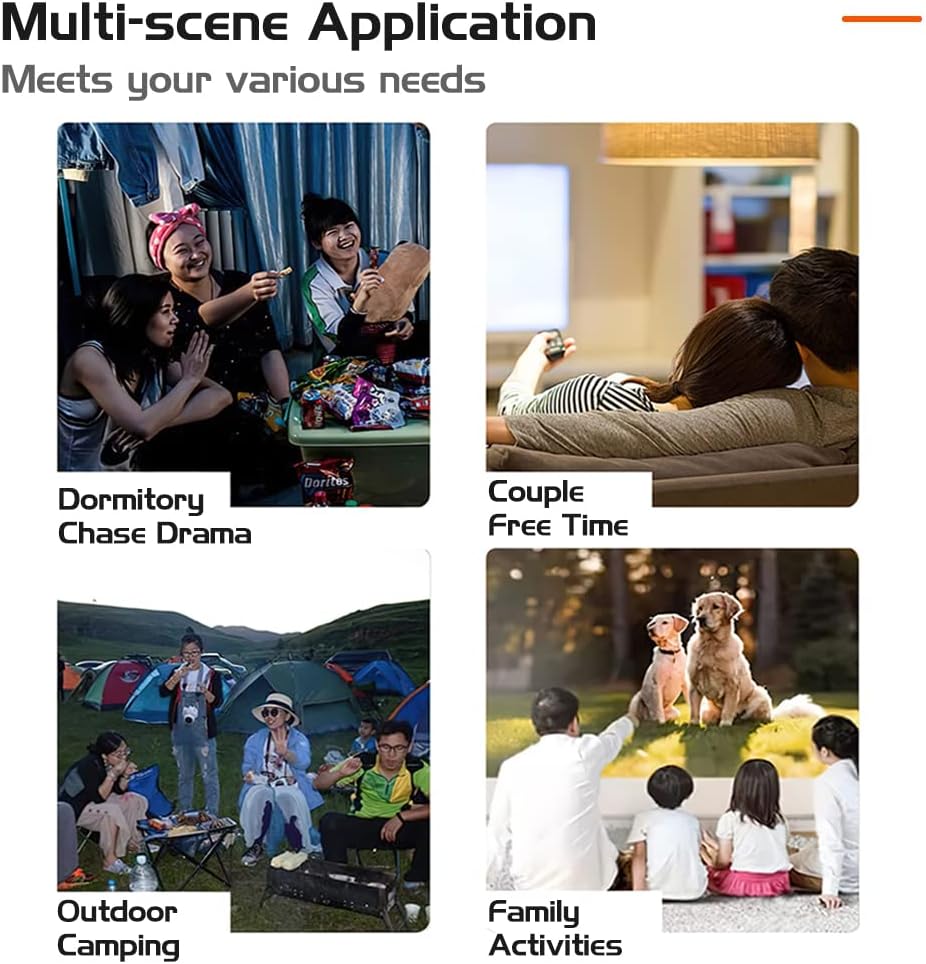
5.4 Multi-Scene Application

Зображення 5.1: Наприкладamples of projector use in various environments.
The projector is suitable for a variety of uses, including:
- Home cinema for movies and TV shows.
- Outdoor movies and campстворення розваг.
- Gaming with connected consoles or devices.
- Sharing photos and videos with family and friends.
6. Підключення
The Fuegobird Mini Projector offers multiple connectivity options:
- USB: Для відтворення медіа files безпосередньо з USB-накопичувачів.
- HDMI: Connects to laptops, gaming consoles, and other HDMI-enabled devices. An additional HDMI adapter is required for smartphone connection.
- Роз'єм для навушників: Для підключення зовнішніх навушників або динаміків.
- Wireless Connectivity (via adapter/device): Supports WIFI, AIRPLAY, MIRACAST, WIRECAST, DLNA functions when connected to compatible external devices or adapters.
7. Технічне обслуговування
7.1 Remote Control Battery Care
- Не змішуйте старі та нові батареї.
- Якщо пульт дистанційного керування не використовуватиметься протягом тривалого часу, вийміть батарейки, щоб запобігти їх витіканню.
- Переконайтеся, що батарейки вставлені з дотриманням правильної полярності.
7.2 Очищення
- Використовуйте м’яку суху тканину для очищення зовнішньої поверхні проектора.
- Для об’єктива використовуйте спеціальну серветку та розчин для чищення об’єктивів, щоб уникнути подряпин.
- Не використовуйте абразивні засоби чи розчинники.
8. Вирішення проблем
Якщо у вас виникли проблеми з проектором, зверніться до наступних поширених рішень:
- Немає живлення: Переконайтеся, що адаптер живлення надійно підключено як до проектора, так і до справної електричної розетки. Спробуйте іншу розетку.
- Без зображення: Check that the correct input source is selected. Verify all cables (HDMI, USB) are properly connected. Adjust the focus ring.
- Розмите зображення: Adjust the Focusing Pulley until the image is clear. Ensure the projection distance is within the recommended range.
- Немає звуку: Check the volume settings on both the projector and the connected device. Ensure the projector is not muted. If using external speakers, verify their connection and power.
- Пульт дистанційного керування не працює: Перевірте батарейки в пульті дистанційного керування. Переконайтеся, що між пультом дистанційного керування та ІЧ-приймачем проектора немає перешкод.
Для отримання додаткової допомоги зверніться до служби підтримки клієнтів.
9. Технічні характеристики
| Особливість | Специфікація |
|---|---|
| Блок зображення | TFT LCD |
| Рідна роздільна здатність | 320x240 |
| Підтримка резолюції | 1920x1080 (1080P HD) |
| Lamp Тип | LED |
| Lamp життя | 20000 години |
| Споживана потужність | 20 Вт (макс.) |
| Джерело живлення | 12В-1.5А |
| Об'єктив | Лінзи з покриттям |
| Режим роботи | Ручний/Дистанційний |
| Відстань проекції | 60-400cm (6.8ft - 22ft) |
| Розмір проекції | 16-110 inches (72-240 inches stated in features) |
| Розміри (ДШВ) | 21.9 х 15.1 х 7.6 см |
| Вага нетто | 0.475 кг |
| Співвідношення сторін | 16:9/4:3 |
| Спікер | 4Ω2W |
| Вхідний термінал | USB, 5V-2A power in |
| Вихідний термінал | Навушники |
| Технологія підключення | HDMI, USB |
| Особливості | Вбудований динамік, портативний |
| Тип монтажу | Настільне кріплення |
| томtage | 5 вольт |
| Wattage | 60 Вт |
| Технологія дисплея | ЖК |
10. Гарантія та підтримка
For warranty information, product registration, and customer support, please refer to the retailer's website where you purchased the product or contact the manufacturer directly. Keep your purchase receipt as proof of purchase.