
1. Вступ
The SENSTREE DTC310ZJ-JP is a digital waterproof temperature controller designed for precise temperature management in various environments. Its robust construction and versatile functionality make it suitable for applications such as greenhouses, home brewing, fermentation, incubation, terrariums, and general heating or cooling control. This manual provides essential information for the safe and effective operation of your device.
2. Особливості продукту
- Водонепроникний дизайн (IP65): The controller body and sensor are designed to be waterproof, allowing for reliable outdoor use in environments like greenhouses without concern for rain.
- Багатоцільове застосування: Ideal for a wide range of uses including home wine/beer brewing, aquariums, seedling heat mats, BBQ, boiler control, grow tents, mushroom growing, fermentation, incubation, refrigerators, chest freezers, heaters, fans, and AC units. It is also suitable for controlling temperatures for various reptiles and amphibians such as bearded dragons, geckos, snakes, and turtles.
- Зручна робота: Features a plug-and-play design for easy setup and use. Supports both Celsius (°C) and Fahrenheit (°F) display modes. The handheld device is ergonomically designed for comfortable handling.
- Високоточний датчик: Equipped with a high-quality silicone temperature sensor that is waterproof, ensuring precise temperature readings and consistent optimal environmental conditions.
- Великий РК-екран: The display is glare-free and eye-protected, providing clear and easy-to-read temperature information and programming options. It features a standard U.S. outlet.

Image: The controller demonstrating its waterproof design, suitable for outdoor use.
3. Продукт закінчивсяview
Familiarize yourself with the components and controls of your temperature controller.
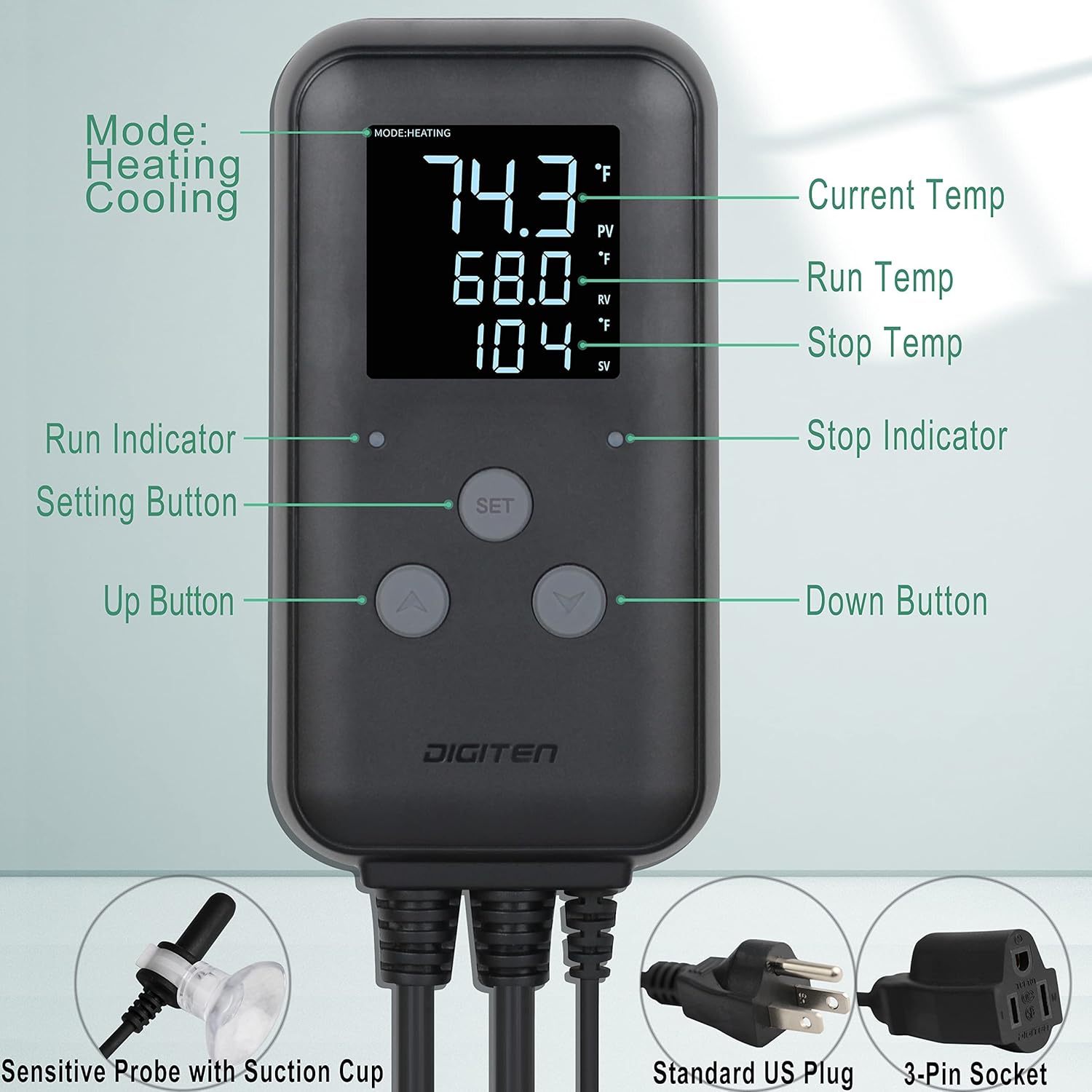
Image: Labeled diagram of the temperature controller's display, buttons, and connections.
- Дисплей: Shows Current Temperature (PV), Run Temperature (RV), and Stop Temperature (SV).
- кнопки:
- Кнопка SET: Використовується для введення та підтвердження налаштувань.
- Кнопка «Вгору» (▲): Використовується для збільшення значень або навігації по меню.
- Кнопка «Вниз» (▼): Використовується для зменшення значень або навігації по меню.
- Індикатори:
- Run Indicator: Illuminates when the connected device is active (heating or cooling).
- Stop Indicator: Illuminates when the connected device is inactive.
- Підключення:
- Датчик температури: Waterproof silicone sensor with suction cup for placement.
- Вилка живлення: Standard US 3-pin plug for power input.
- Вихідний роз'єм: 3-pin socket for connecting heating or cooling devices.

Image: Controller dimensions and key features.
4. Налаштування
- Монтаж контролера: Choose a suitable location for the controller. It can be mounted on a wall or hung using the integrated hanging function. Ensure it is easily accessible and visible.
- Підключення датчика температури: Plug the waterproof temperature probe into the designated sensor port on the controller. Place the sensor in the environment where temperature needs to be monitored and controlled. Use the suction cup to secure the sensor if needed.
- Підключення пристрою опалення/охолодження: Plug your heating or cooling appliance (e.g., heater, fan, heat mat) into the 3-pin output socket on the controller.
- Увімкнення: Plug the controller's power plug into a standard 110V US electrical outlet. The display will light up, showing the current temperature.
Video: Demonstration of the waterproof feature and connecting the temperature controller. This video illustrates the durability and ease of connection for the device.
5. Інструкція з експлуатації
5.1 Перемикання одиниць вимірювання температури (°C/°F)
Щоб переключитися між градусами Цельсія та Фаренгейта:
- Натисніть Вгору (▲) і Вниз (▼) buttons simultaneously. The display will change to the selected unit.
5.2 Setting Run and Stop Temperatures
Follow these steps to set your desired temperature range:
- Тримайте і утримуйте НАБІР button for 3 seconds to enter the temperature preset mode.
- Натисніть Вгору (▲) or Вниз (▼) button to set the Run Temperature (RV). This is the temperature at which your connected device will activate (e.g., heater turns on, fan turns off).
- Коротко натисніть кнопку НАБІР button to move to the next value (Stop Temperature).
- Натисніть Вгору (▲) or Вниз (▼) button to adjust the Stop Temperature (SV). This is the temperature at which your connected device will deactivate (e.g., heater turns off, fan turns on).
- Тримайте і утримуйте НАБІР button for 3 seconds to save your settings and exit the preset mode.

Image: Step-by-step guide for setting the temperature parameters.
5.3 Режими опалення та охолодження
The controller automatically determines whether to operate in heating or cooling mode based on your set Run and Stop temperatures. If the Run Temperature is higher than the Stop Temperature, it operates in heating mode. If the Run Temperature is lower than the Stop Temperature, it operates in cooling mode.
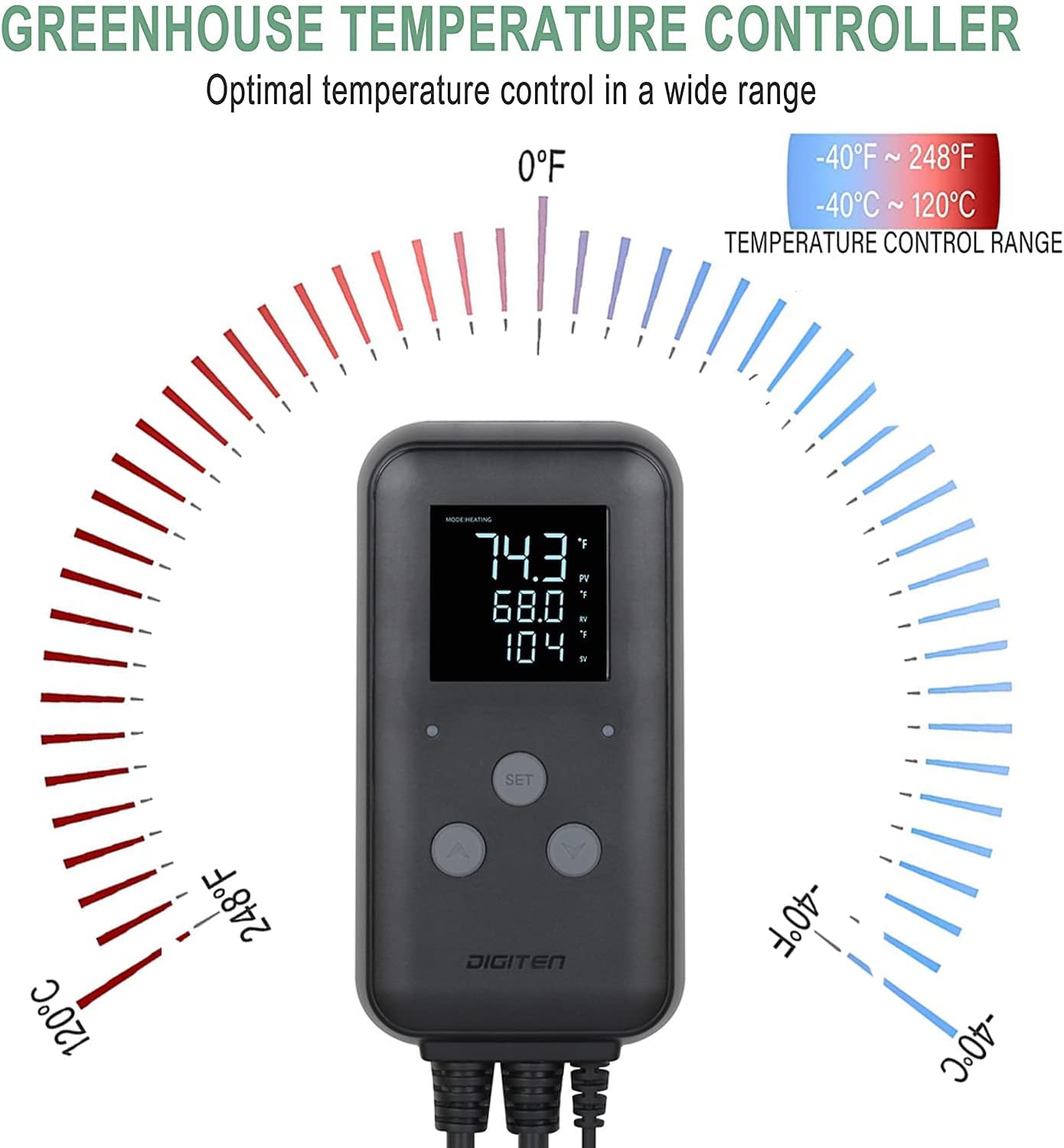
Image: Illustration of the wide temperature control range.
6. Технічне обслуговування
- Прибирання: Wipe the controller and sensor with a soft, damp тканиною. Не використовуйте абразивні засоби для чищення або розчинники. Перед чищенням переконайтеся, що пристрій відключено від мережі.
- Догляд за датчиком: Regularly check the temperature sensor for any damage or debris that might affect its accuracy. Ensure it is securely placed in the desired monitoring area.
- Зберігання: Якщо пристрій зберігається протягом тривалого часу, переконайтеся, що він чистий, сухий і зберігається в прохолодному, сухому місці, захищеному від прямих сонячних променів.
7. Вирішення проблем
| проблема | Можлива причина | Рішення |
|---|---|---|
| Дисплей порожній | Немає джерела живлення. | Check if the power plug is securely connected to a live outlet. Ensure the outlet is functioning. |
| Неправильне показання температури | Sensor is damaged or improperly placed. | Verify the sensor is correctly plugged in and positioned in the desired area. Inspect the sensor cable for damage. |
| Heating/Cooling device not activating | Incorrect temperature settings or device not plugged in. | Check your Run and Stop temperature settings. Ensure the heating/cooling device is properly plugged into the controller's output socket and is functional. |
| Контролер не реагує на натискання кнопок | Тимчасовий збій програмного забезпечення. | Unplug the controller from the power outlet, wait 10 seconds, then plug it back in to reset. |
8. Технічні характеристики
- модель: DTC310ZJ-JP
- Бренд: SENSTREE
- томtage: 110V (compatible with 220V models if specified, but product data says 110V 10A 1100W, and specifications list 110V, 220V. I will stick to 110V as per title and primary bullet point, but mention the spec data.)
Note: Product specifications indicate compatibility with 110 Volts and 220 Volts. Please verify your specific model's rating. - поточний: 10А
- Потужність: 1100 Вт
- Діапазон контролю температури: Від -40°F до 248°F (від -40°C до 120°C)
- Рівень водонепроникності: IP65
- Розміри продукту (Д x Ш x В): 5.39 см x 2.56 см x 1.1 см
- матеріал: Акрилонітрилбутадієнстирол (АБС)
- Тип дисплея: ЖК
- Робоча температура: До 120°C (248°F)
- Сумісність із Smart Home: Not Smart Home Compatible
9. Гарантія та підтримка
For warranty information or technical support, please contact SENSTREE customer service through the retailer where the product was purchased or visit the official SENSTREE website. Please have your product model number (DTC310ZJ-JP) and purchase details ready when contacting support.
You can visit the SENSTREE store for more information: SENSTREE Store