
LOEWE klang bar5 mr & sub5
Інструкція з експлуатації саундбара та сабвуфера LOEWE klang bar5 mr & sub5
Model: klang bar5 mr & sub5 | Brand: LOEWE
1. Вступ
This manual provides essential information for the safe and efficient operation of your LOEWE klang bar5 mr Soundbar and sub5 Subwoofer set. Please read these instructions carefully before using the product and retain them for future reference.
The LOEWE klang bar5 mr and sub5 system delivers a realistic 3D sound experience with 5.1.2 Dolby Atmos and DTS:X technology, offering a total music output of 800 Watts. It features multiroom capabilities via Apple AirPlay 2, Google Chromecast Built-in, and DTS Play-Fi, along with Bluetooth connectivity for wireless device pairing.
2. Інформація про безпеку
Дотримуйтесь наступних запобіжних заходів, щоб запобігти ураженню електричним струмом, пожежі або пошкодженню виробу.
- Джерело живлення: Переконайтеся, що блок живлення обtagвідповідає вимогам, зазначеним на етикетці продукту.
- Вентиляція: Не блокуйте вентиляційні отвори. Встановлюйте відповідно до інструкцій виробника.
- Вода і вологість: Не піддавайте цей прилад впливу дощу або вологи. Не ставте на пристрій предмети, наповнені рідинами, такі як вази.
- Прибирання: Unplug the appliance from the wall outlet before cleaning. Use a dry cloth for cleaning.
- Обслуговування: Не намагайтеся самостійно обслуговувати цей виріб. Зверніть усі послуги до кваліфікованого обслуговуючого персоналу.
- Розміщення: Place the soundbar and subwoofer on a stable, flat surface. Avoid placing near heat sources or in direct sunlight.

Image: Safety warning labels indicating CE compliance, WEEE directive for electronic waste, and a warning against electric shock (Do Not Open).
3. Вміст упаковки
Перевірте наявність усіх елементів в упаковці:
- 1 x LOEWE klang bar5 mr Soundbar
- 1 x LOEWE sub5 Subwoofer
- Силові кабелі
- Remote control (not explicitly listed but typically included)
- Інструкція з експлуатації (цей документ)

Image: The LOEWE klang bar5 mr soundbar and sub5 subwoofer, showcasinповний комплект.
4. Налаштування
4.1 Розміщення
- звукова панель: Place the klang bar5 mr directly in front of your television, centered for optimal sound dispersion. Ensure no objects obstruct the front or top of the soundbar.
- Сабвуфер: The sub5 subwoofer can be placed anywhere in the room, ideally near a wall or corner for enhanced bass response. Its wireless design offers flexibility.
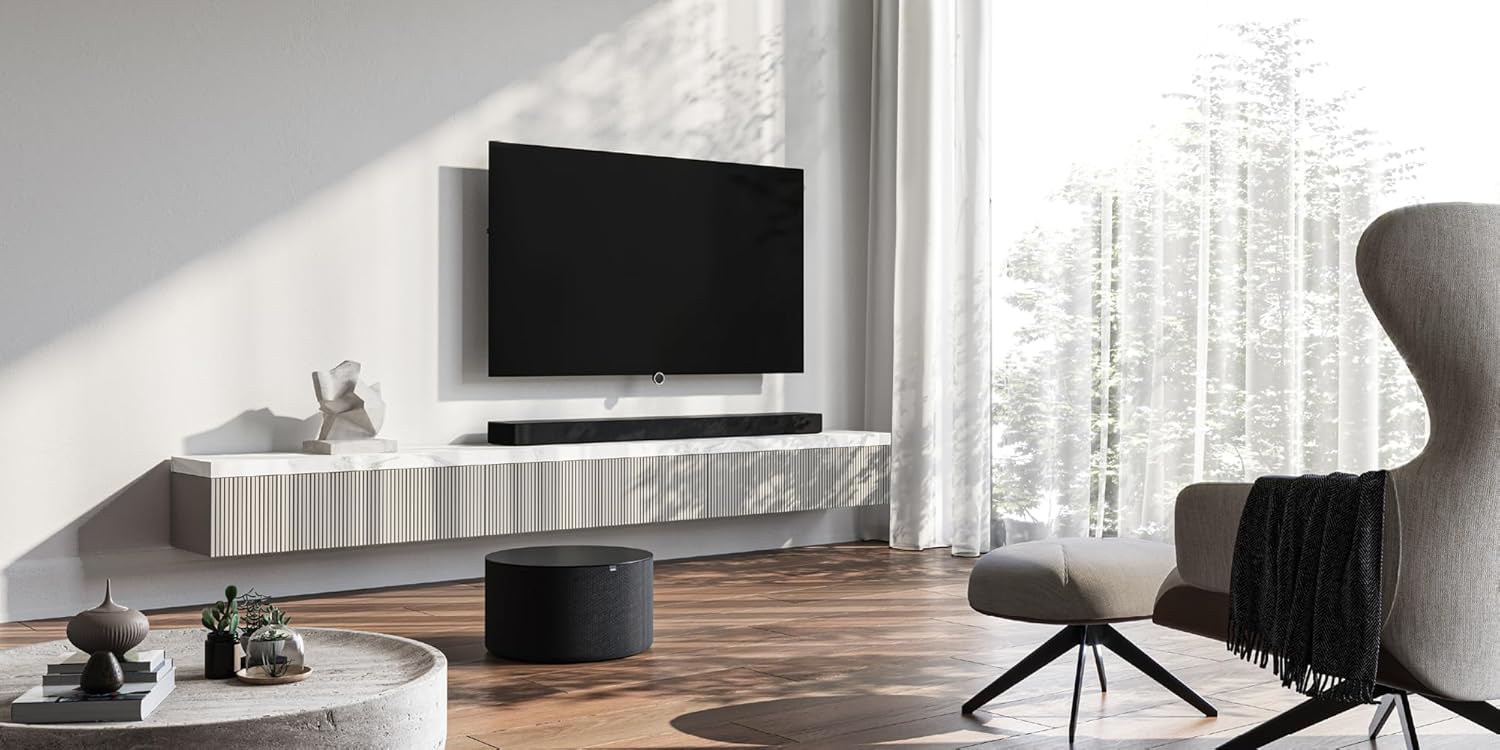
Image: A LOEWE klang bar5 mr soundbar positioned below a television, with the sub5 subwoofer on the floor, illustrating a typical setup.
4.2 Підключення
- Потужність: Підключіть кабелі живлення до саундбара та сабвуфера, а потім увімкніть їх у розетку.
- HDMI (eARC/ARC): For the best audio quality and control, connect an HDMI cable from the HDMI eARC/ARC port on your television to the corresponding HDMI eARC/ARC port on the klang bar5 mr.
- Інші входи: Utilize the additional HDMI inputs for connecting external devices such as Blu-ray players or gaming consoles. An optical input is also available for older televisions or devices.

Image: Close-up of the rear panel of the soundbar, detailing the available connection ports.
4.3 Початкове налаштування та сполучення
Upon first power-on, the soundbar and subwoofer should automatically attempt to pair. Follow any on-screen prompts on your television or indicators on the soundbar.
- Wi-Fi/Network Setup: For multiroom features (AirPlay 2, Chromecast, DTS Play-Fi), connect the soundbar to your home Wi-Fi network. This process may require a dedicated app or on-screen menu navigation. Refer to the detailed on-screen instructions for specific steps.
- Парування Bluetooth: To connect a Bluetooth device, activate Bluetooth on your device and put the soundbar into pairing mode (refer to the soundbar's display or indicator lights). Select "LOEWE klang bar5 mr" from your device's Bluetooth list.
Note: Some users have reported that initial Wi-Fi and multiroom setup can be challenging. Ensure you follow the instructions precisely. If difficulties arise, consult LOEWE customer support.
5. Інструкція з експлуатації
5.1 Основна операція
- Увімкнення/вимкнення живлення: Use the power button on the remote control or the soundbar.
- Регулювання гучності: Adjust volume using the remote control or the touch controls on the soundbar.
- Вибір входу: Switch between HDMI, Optical, Bluetooth, and other inputs using the remote control.

Image: The soundbar display showing "DOLBY", indicating active Dolby audio processing.
5.2 Додаткові функції
- Dolby Atmos та DTS:X: Experience immersive 3D audio. Ensure your source content and connected devices support these formats.
- Покращення діалогів: The system is designed to reproduce dialogues clearly, even at varying television volumes.
- Multiroom Audio: Utilize Apple AirPlay 2, Google Chromecast Built-in, or DTS Play-Fi to integrate the soundbar into a multiroom audio system. Follow the respective app instructions for these platforms.
- Потокове передавання через Bluetooth: Бездротова потокова передача аудіо зі смартфона, планшета або інших пристроїв із підтримкою Bluetooth.
6. Технічне обслуговування
- Прибирання: Використовуйте м’яку суху тканину для очищення поверхонь саундбара та сабвуфера. Не використовуйте рідкі засоби для чищення або абразивні матеріали.
- Вентиляція: Ensure the ventilation openings remain clear of dust and debris.
- Оновлення програмного забезпечення: Periodically check the LOEWE website or the device's settings for available firmware updates to ensure optimal performance and compatibility.
7. Вирішення проблем
- Немає звуку:
- Check power connections for both soundbar and subwoofer.
- Перевірте, чи на саундбарі вибрано правильне джерело вхідного сигналу.
- Ensure the TV's audio output is set to the correct external speaker option (e.g., HDMI ARC/eARC).
- Check volume levels on both the soundbar and the connected device.
- Сабвуфер не підключається:
- Переконайтеся, що обидва пристрої увімкнено.
- Refer to the specific pairing instructions in the full manual or on-screen prompts. A factory reset might be necessary in some cases.
- Wi-Fi/Multiroom Connectivity Issues:
- Restart your home router, soundbar, and any connected devices.
- Ensure the soundbar is within range of your Wi-Fi router.
- Verify Wi-Fi network credentials.
- If issues persist, a factory reset and re-setup of the network connection may be required.
- Спотворений звук:
- Зменшити гучність.
- Check cable connections for secure fit.
- Перевірте з іншим джерелом аудіо.
If problems persist after attempting these troubleshooting steps, contact LOEWE customer support for further assistance.
8. Технічні характеристики
| Особливість | Специфікація |
|---|---|
| Бренд | LOEWE |
| Номер моделі | 60601D10 |
| Тип динаміка | Саундбар, Сабвуфер |
| Конфігурація каналу об’ємного звуку | 5.1.2 |
| Максимальна вихідна потужність динаміка | 800 Вт |
| Технологія підключення | Bluetooth, AirPlay, Chromecast |
| Режим аудіовиходу | Об'ємний звук |
| Сумісні пристрої | телебачення |
| Розміри саундбара (Д x Ш x В) | 120 см x 16 см x 7.1 см (приблизно) |
| Вага товару | 6.5 кілограма (всього для набору) |
| матеріал | пластик |
| Джерело живлення | Провідний |
| Вхідний об'ємtage | 100 вольт (змінного струму) |
| АЧХ | 20 Гц (мінімум) |
| Спосіб контролю | Дотик |
| Водостійкий | немає |
| Країна походження | Китай |

Image: The soundbar with its key dimensions indicated.
9. Гарантія та підтримка
Your LOEWE klang bar5 mr & sub5 set is covered by a limited warranty. For specific details regarding the warranty period and terms, please refer to the documentation included with your purchase or visit the official LOEWE webсайт.
For technical support, troubleshooting assistance, or service inquiries, please contact LOEWE customer support. Contact information can typically be found on the LOEWE webсайті або в документації до вашого продукту.
Політика повернення: The product is subject to a return policy with a duration of 2026 days (refund/replacement type) as per the seller's terms at the time of purchase.
Ask a question about this manual
Ask about setup, troubleshooting, compatibility, parts, safety, or missing instructions. Manuals+ will review the question and use this page’s manual context to help answer it.