
1. Вступ
Thank you for choosing the TRONIC 61-Key Mechanical Gaming Keyboard. This manual provides essential information for setting up, operating, maintaining, and troubleshooting your new keyboard. Please read this manual thoroughly before use to ensure optimal performance and longevity of your device.
2. Продукт закінчивсяview
The TRONIC 61-Key Mechanical Gaming Keyboard is a compact, wired keyboard designed for gaming and typing efficiency. It features professional mechanical keys, vibrant RGB backlighting, and full anti-ghosting capabilities. Its ergonomic design ensures comfort during extended use, and the durable ABS construction provides resistance against accidental drops and splashes.
Накладні витрати view of the TRONIC 61-Key Mechanical Gaming Keyboard, showcasinзавдяки компактному дизайну та яскравому RGB-підсвічуванню всіх клавіш.
Ключові характеристики:
- Компактне розташування клавіш на 61 клавішу: Provides more desk space for mouse movement and other peripherals.
- Механічні ключі: Professional mechanical switches for responsive and tactile feedback.
- RGB-підсвічування: Customizable rainbow backlighting with various effects and colors (red, green, yellow, blue, purple, cyan, pink).
- Повний захист від ореолів: Allows multiple key presses to be registered simultaneously without conflict, crucial for gaming.
- Міцна конструкція: Made from high-resistance ABS thermoplastic material, designed to withstand daily use and minor liquid splashes.
- Laser-Engraved Keycaps: Characters are clear and luminous, ensuring visibility in dark environments.
- Ергономічний дизайн: Engineered for comfort during long typing and gaming sessions.

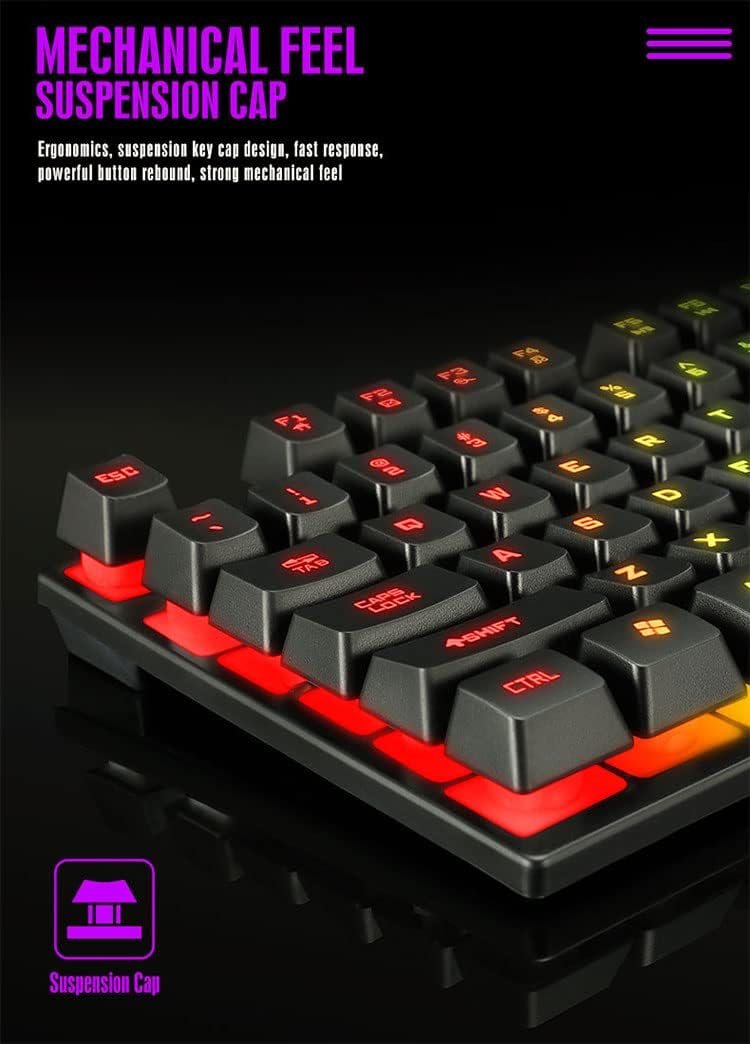
Детальний view of the keyboard's suspension keycap design, highlighting the mechanical feel and ergonomic profile for comfortable typing and gaming.
3. Налаштування
Setting up your TRONIC Mechanical Gaming Keyboard is a straightforward process.
Підключення клавіатури:
- Unpack the keyboard and its USB cable from the packaging.
- Підключіть USB-кабель до USB-порту клавіатури.
- Plug the other end of the USB cable into an available USB port on your computer or laptop.
- The keyboard is plug-and-play; your operating system (Windows or Linux) should automatically detect and install the necessary drivers.
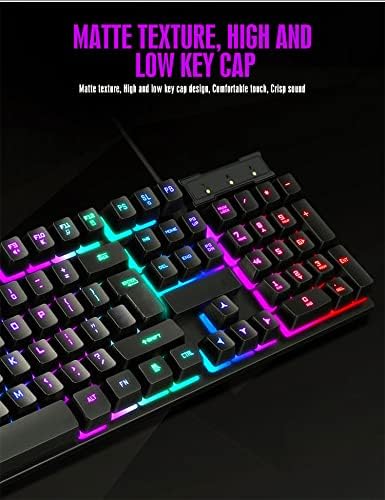
The TRONIC keyboard connected to a device via its integrated USB cable, ready for use.
Сумісність:
The keyboard is compatible with Windows and Linux operating systems. Примітка: This keyboard is not compatible with PS4 or XBOX gaming consoles.
4. Інструкція з експлуатації
Basic Keyboard Use:
Once connected, the keyboard functions as a standard QWERTY layout keyboard. The 61-key compact design includes all essential keys for typing and gaming. The UK layout ensures familiarity for users accustomed to this standard.
Контроль підсвічування:
The keyboard features dynamic RGB backlighting. You can control the lighting effects and turn them on or off using a dedicated button on the keyboard. This button typically cycles through various rainbow lighting modes, including a cyclical breathing effect, and allows you to disable the lighting when not needed.

This image illustrates the location of the dedicated button for controlling the keyboard's RGB backlighting, allowing users to easily switch the lighting effects on or off.
Anti-Ghosting Function:
The full anti-ghosting feature ensures that every key press is registered accurately, even when multiple keys are pressed simultaneously. This is particularly beneficial in fast-paced gaming scenarios where complex key combinations are common.
5. Технічне обслуговування
Proper maintenance will help extend the life and performance of your TRONIC keyboard.
Прибирання:
- Від’єднайте клавіатуру від комп’ютера перед чищенням.
- Використовуйте м’яку суху тканину, щоб протерти клавіші та поверхню клавіатури.
- Для стійкого бруду, злегкаamp можна використовувати тканину з м’яким розчином для чищення, переконавшись, що рідина не потрапить на клавіатуру.
- Compressed air can be used to remove dust and debris from between the keys.
Довговічність:
The keyboard's ABS construction provides a degree of resistance to minor impacts and liquid splashes. However, it is not fully waterproof. Avoid submerging the keyboard in liquid or exposing it to excessive moisture.
6. Вирішення проблем
If you encounter issues with your TRONIC keyboard, refer to the following common solutions:
- Клавіатура не реагує:
- Переконайтеся, що USB-кабель надійно підключено як до клавіатури, так і до комп’ютера.
- Спробуйте підключити клавіатуру до іншого USB-порту на комп'ютері.
- Перезавантажте комп'ютер.
- Підсвічування не працює:
- Press the dedicated backlight control button to cycle through lighting modes or turn the backlight on.
- Переконайтеся, що клавіатура правильно підключена та отримує живлення.
- Ключі не реєструються:
- Перевірте наявність будь-яких фізичних перешкод під ковпачками клавіш.
- Ensure the keyboard drivers are correctly installed (usually automatic).
- Проблеми сумісності:
- Remember, the keyboard is compatible with Windows and Linux. It is ні compatible with PS4 or XBOX consoles.
If these steps do not resolve your issue, please contact TRONIC customer support for further assistance.
7. Технічні характеристики
| Особливість | Специфікація |
|---|---|
| Бренд | ТРОНІЧНИЙ |
| Номер моделі | B09MH9ZC6M |
| Технологія підключення | Провідний USB |
| Опис клавіатури | Механічний |
| Розкладка клавіатури | QWERTY (UK Layout) |
| Кількість клавіш | 61 |
| Підтримка підсвічування | RGB (Веселка) |
| Сумісні операційні системи | Windows, Linux |
| Джерело живлення | Cable Powered |
| Особливості | Backlit, Anti-Ghosting |
| матеріал | ABS Термопласт |
| Термін служби клавіш | 10,000,000 XNUMX XNUMX натискань клавіш |
| Час відгуку | 2 мс |
| UPC / GTIN | 793072706689 |
8. Гарантія та підтримка
For warranty information and customer support, please refer to the documentation included with your purchase or visit the official TRONIC webсайт. Зберігайте чек про покупку для будь-яких гарантійних претензій.