
1. Вступ
Thank you for choosing the Shinco WiFi Karaoke Machine. This portable system features a 15-inch touch screen, two wireless microphones, and multiple connectivity options including Wi-Fi and Bluetooth. This manual provides detailed instructions to help you get the most out of your device.
2. Що в коробці
Ретельно розпакуйте всі предмети та переконайтеся, що ви отримали такі компоненти:
- Wifi Karaoke Machine with Touch Screen
- 2 бездротові мікрофони UHF
- Пульт дистанційного керування
- Адаптер живлення
- RCA кабель
- Посібник користувача (цей документ)
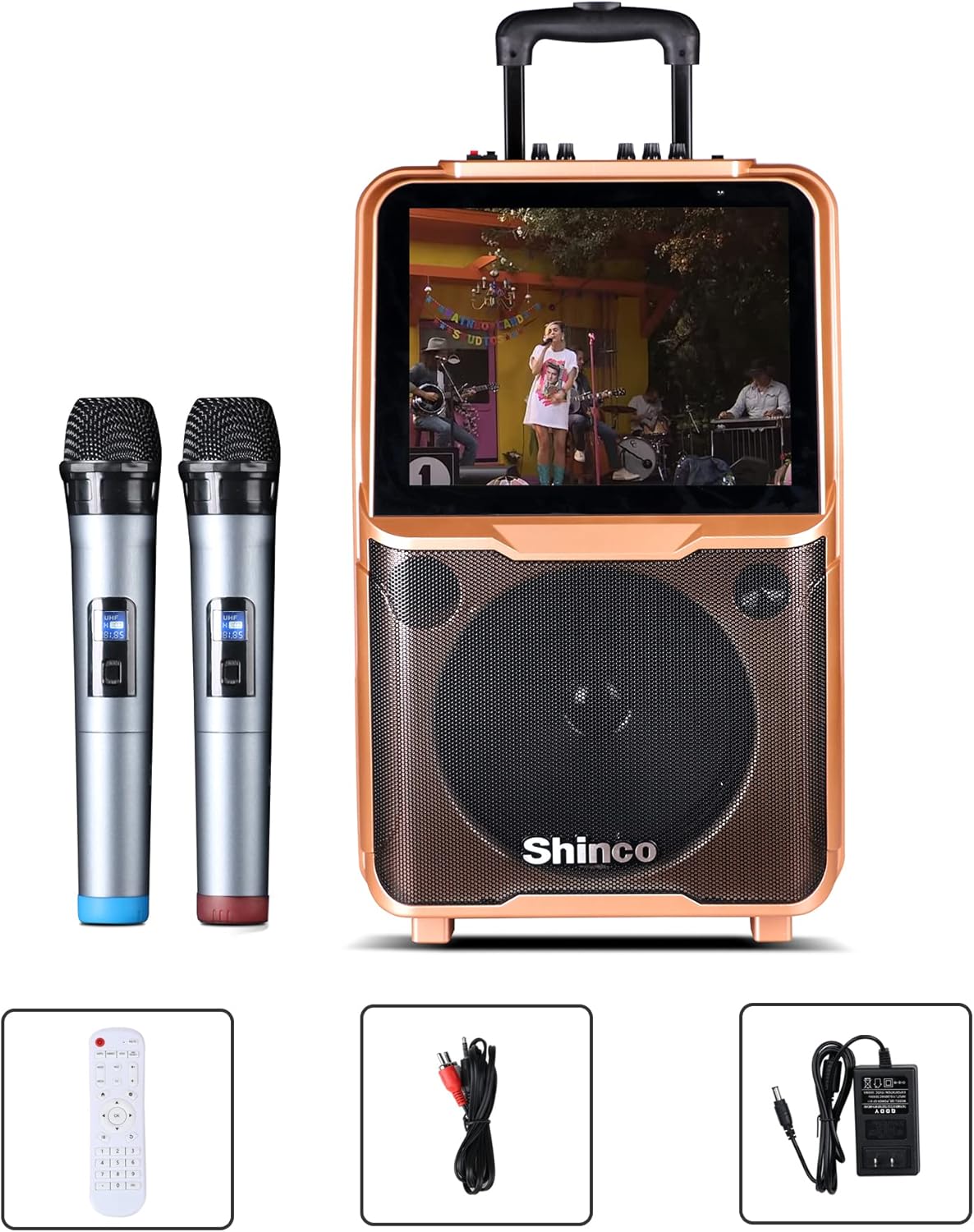
Image: Shinco Karaoke Machine with its accessories, including two wireless microphones, a remote control, an RCA cable, and a power adapter.
3. Особливості продукту
- 15-дюймовий сенсорний екран: Легко переміщайтеся по меню та програмам.
- З'єднання Wi-Fi: Access online content and download apps from the Google Play Store.
- 2 Wireless Microphones: Enjoy untethered vocal performance.
- Потужність 50 Вт RMS Ampліфтер: Delivers clear audio through a 10-inch woofer.
- Вихід HDMI: Connect to an external TV for a larger display.
- Підключення Bluetooth: Бездротова потокова передача аудіо із сумісних пристроїв.
- Функція запису: Record your vocal performances.
- FM-радіо: Налаштуйтеся на свої улюблені радіостанції.
- USB/TF Card Compatible: Play media directly from storage devices.
- Портативний дизайн: Equipped with a trolley and retractable handle for easy transport.
- Вбудована батарея: Provides power for outdoor use.

Image: The Shinco Karaoke Machine highlighting its Android operating system, YouTube app compatibility, and Wi-Fi connectivity.
4. Налаштування
- Розпакуйте пристрій: Remove the karaoke machine and all accessories from the packaging.
- Підключення живлення: Connect the power adapter to the DC 15V input port on the back of the machine and plug it into a standard electrical outlet. The machine can operate on battery power, but it is recommended to charge it fully before first use.
- Увімкнення: Press the Power button located on the control panel to turn on the machine. The 15-inch touch screen will illuminate.
- Підготовка мікрофона: Insert 2 AA batteries (not included) into each wireless microphone. Turn on the microphones using their respective power switches. The microphones are pre-paired with the machine.

Зображення: Задня частина view of the Shinco Karaoke Machine, illustrating the storage compartments for the two wireless microphones.
5. Інструкція з експлуатації
5.1. Навігація за допомогою сенсорного екрана
The 15-inch touch screen operates like a tablet. Swipe left or right to navigate between screens, tap icons to open applications, and use the on-screen keyboard for input.
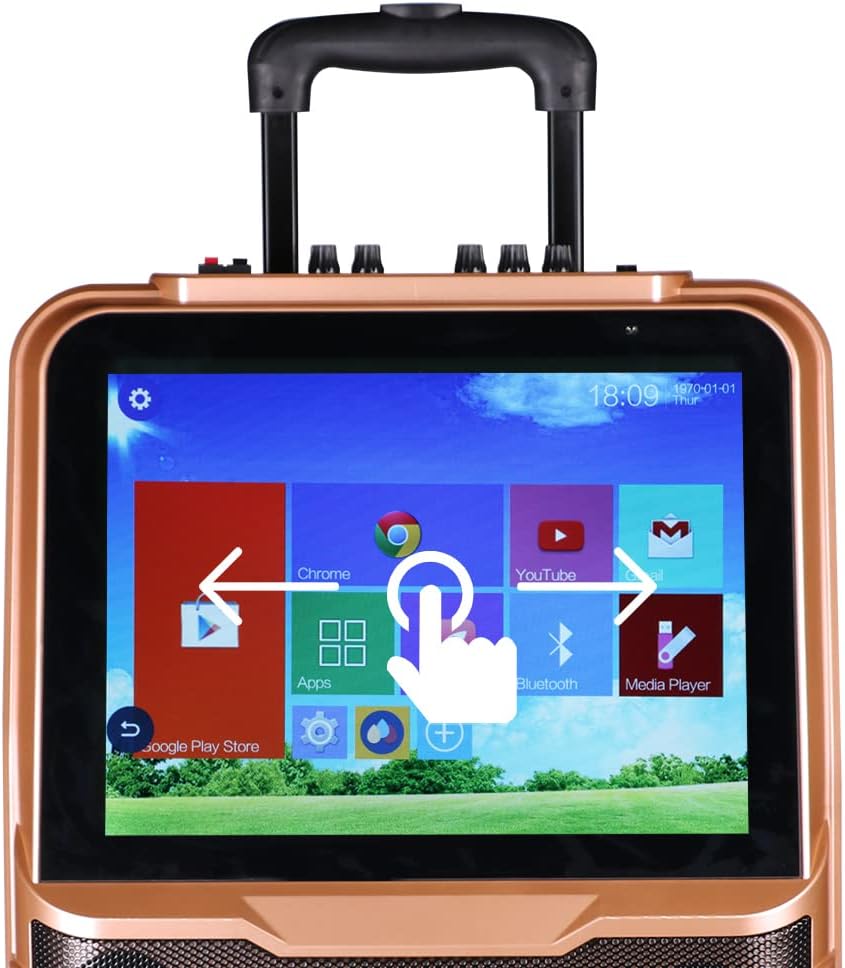
Image: A close-up of the Shinco Karaoke Machine's touch screen, displaying app icons and illustrating touch navigation with a hand gesture.
5.2. Підключення Wi-Fi
- На головному екрані натисніть значок «Налаштування».
- Виберіть «Wi-Fi» та увімкніть його.
- Виберіть потрібну мережу зі списку та введіть пароль, якщо буде запропоновано.
- Once connected, you can access online karaoke apps, YouTube, and other internet services.
5.3. Підключення Bluetooth
- Tap the 'Bluetooth' icon on the home screen or navigate through 'Settings'.
- Ensure Bluetooth is enabled on both the karaoke machine and your external device (e.g., smartphone, tablet).
- Select the karaoke machine's name from your device's Bluetooth list, or select your device from the machine's list to pair.
- Підтвердьте код сполучення, якщо буде запропоновано.
5.4. Using Wireless Microphones
The two UHF wireless microphones are designed for ease of use. Simply turn them on, and they will automatically connect to the karaoke machine. Adjust microphone volume using the dedicated knobs on the machine's control panel.
5.5. HDMI Output to TV
To display the karaoke machine's screen on a larger television:
- Connect one end of an HDMI cable (not included) to the HDMI OUT port on the karaoke machine.
- Підключіть інший кінець кабелю HDMI до вхідного порту HDMI на телевізорі.
- Select the corresponding HDMI input on your TV using your TV's remote control.

Image: The Shinco Karaoke Machine connected to a television via an HDMI cable, demonstrating how lyrics are displayed on both the machine's screen and the TV.
5.6. Відтворення з USB/TF-картки
Insert a USB drive or TF card into the designated port. Use the 'Media Player' app on the touch screen to browse and play audio or video files, що зберігаються на пристрої.
5.7. Recording Voice
Utilize the recording function within compatible karaoke applications to capture your vocal performances. Refer to the specific app's instructions for detailed recording steps.
5.8. FM-радіо
Access the FM Radio application from the touch screen. Use the on-screen controls to scan for stations and adjust the frequency.
5.9. Портативність
The machine is equipped with a retractable handle and wheels for easy transportation. Extend the handle and tilt the machine to roll it to your desired location.

Image: A person demonstrating the portability of the Shinco Karaoke Machine by pulling it with its retractable handle and wheels.
6. Технічне обслуговування
- Прибирання: Use a soft, dry cloth to clean the exterior of the machine. For the touch screen, use a microfiber cloth specifically designed for electronics. Avoid abrasive cleaners or solvents.
- Догляд за акумулятором: For optimal battery life, avoid completely draining the battery frequently. Charge the machine regularly, especially if it will be stored for an extended period.
- Зберігання: Зберігайте караоке-машину в прохолодному, сухому місці, подалі від прямих сонячних променів та екстремальних температур.
- Догляд за мікрофоном: Виймайте батарейки з бездротових мікрофонів, якщо вони не використовуватимуться протягом тривалого часу, щоб запобігти витіканню.
7. Вирішення проблем
| проблема | Можлива причина | Рішення |
|---|---|---|
| Машина не вмикається. | No power, low battery, or power adapter issue. | Ensure power adapter is securely connected and plugged into a working outlet. Charge the battery. |
| Немає звуку з динаміків. | Volume too low, mute activated, or incorrect audio source. | Increase master volume. Check if mute is active. Verify correct audio input source is selected. |
| Бездротові мікрофони не працюють. | Microphones off, low batteries, or pairing issue. | Ensure microphones are powered on. Replace batteries. If issues persist, refer to pairing instructions in the full manual (if applicable, otherwise assume pre-paired). |
| Wi-Fi connection unstable or failing. | Weak signal, incorrect password, or router issue. | Move closer to the Wi-Fi router. Re-enter Wi-Fi password. Restart your Wi-Fi router. |
| Сенсорний екран не реагує або працює повільно. | Temporary software glitch or excessive background apps. | Restart the machine. Close unnecessary applications. Ensure screen is clean. |
8. Технічні характеристики
| Особливість | Деталь |
|---|---|
| Номер моделі | B09K73CG2P |
| Вага товару | 22.4 фунта |
| Розміри упаковки | 26.5 x 17 x 10.5 дюймів |
| Дисплей | 15-дюймовий сенсорний екран |
| Кількість спікерів | 1 (with 10-inch woofer) |
| Джерело живлення | Живлення від батареї / адаптер змінного струму |
| Підключення | Wi-Fi, Bluetooth, USB, TF Card, HDMI Out, RCA |
| мікрофони | 2 бездротові мікрофони UHF |
| Особливість | Wireless, Portable with Trolley and Retractable Handle |
9. Гарантія та підтримка
For warranty information and technical support, please refer to the warranty card included with your product or visit the official Shinco webсайт. Зберігайте чек про покупку як підтвердження покупки для будь-яких гарантійних претензій.