
SUPVAN E10 Black
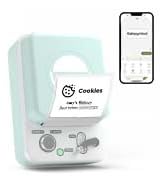
Машина для виготовлення етикеток Bluetooth SUPVAN E10
Посібник користувача
вступ
The SUPVAN E10 Bluetooth Label Maker Machine is a versatile and inkless labeler designed for efficient organization in various environments, including home, kitchen, school, and office. This compact device connects wirelessly via Bluetooth to your smartphone, allowing you to create customized labels using a dedicated mobile application. Its thermal printing technology eliminates the need for ink or toner, offering a cost-effective and convenient labeling solution. The E10 supports both continuous and fixed-size label tapes, providing flexibility for different labeling needs.

Що в коробці
Upon unboxing your SUPVAN E10 Label Maker, please ensure all the following components are present:
- Принтер етикеток
- White Continuous Label * 1
- Кабель USB-C
- Інструкція

Налаштування
1. Зарядка пристрою
Before initial use, fully charge your SUPVAN E10 Label Maker using the provided USB-C cable. A full charge can provide approximately one month of standby time, ensuring readiness for your labeling tasks.

2. Встановлення етикеткової стрічки
The SUPVAN E10 supports both continuous and fixed-size label tapes. To install, open the label compartment, insert the tape roll with the label side facing up, and feed the leading edge of the tape through the output slot. Ensure the tape is properly aligned for optimal printing.

3. Завантаження програми та підключення
The SUPVAN E10 operates via the "Katasymbol" mobile application, available for both Android and iOS devices. There are no fees or registration required to use the app.
- Завантажте додаток: Scan the QR code on the product packaging or search for "Katasymbol" in your device's app store.
- Увімкнути Bluetooth: Переконайтеся, що Bluetooth увімкнено на вашому смартфоні.
- Підключення до принтера: Open the Katasymbol app. The app will guide you to connect to your E10 label maker via Bluetooth. Select "E10" from the list of available devices.

Video: This video demonstrates the process of connecting the SUPVAN E10 Label Maker to its mobile application via Bluetooth.
Інструкція з експлуатації
1. Створення та редагування міток
Once connected, use the Katasymbol app to design your labels. The app offers extensive customization options:
- Текст: Input your desired text.
- Шрифти: Choose from over 40 available fonts.
- Піктограми та символи: Access over 1000 icons and 450+ symbols to enhance your labels.
- кадри: Select from 30 frames to add decorative borders.
- Інші особливості: The app also supports QR codes, barcodes, and integration with Excel for batch printing.


Video: This video demonstrates how to create and customize labels using the E10 label maker and its app.
2. Друк етикеток
After designing your label, tap the "Print" button in the app. The E10 will quickly print your label using thermal technology. The built-in cutter allows for a precise and clean cut of the label tape.
3. Заявка Exampлес
The SUPVAN E10 is suitable for a wide range of labeling applications:
- Організація дому: Label storage boxes, spice jars, food containers, and personal items.
- Office & School: Організуйте files, label office supplies, and create name tags.
- Управління кабелем: Identify cables and wires for electronic devices.
- Kitchen & Bathroom: Labels are waterproof, oil-proof, anti-scratch, and heat-resistant, making them ideal for these environments. They leave no residue upon removal.


Технічне обслуговування
To ensure the longevity and optimal performance of your SUPVAN E10 Label Maker, follow these maintenance guidelines:
- Прибирання: Periodically wipe the exterior of the device with a soft, dry cloth. If print quality degrades, gently clean the print head with a cotton swab lightly dampened with rubbing alcohol. Ensure the device is powered off before cleaning.
- Заміна стрічки: Replace label tape rolls as needed. Always use genuine SUPVAN label tapes for best results.
- Зберігання: Зберігайте етикеточний пристрій у прохолодному, сухому місці, захищеному від прямих сонячних променів та екстремальних температур.
Усунення несправностей
If you encounter issues with your SUPVAN E10 Label Maker, refer to the following common solutions:
| проблема | Можлива причина | Рішення |
|---|---|---|
| Пристрій не вмикається | Низький заряд батареї або її відсутність. | Connect the device to a power source using the USB-C cable and charge it fully. |
| Неможливо підключитися до програми | Bluetooth is off, device is out of range, or app issue. | Ensure Bluetooth is enabled on your phone. Move the device closer to your phone. Restart the app and the label maker. |
| Poor print quality / Faded labels | Print head is dirty or tape is improperly installed. | Clean the print head. Reinstall the label tape, ensuring it is correctly aligned. |
| Label tape not feeding | Tape jam or incorrect installation. | Open the compartment and check for any obstructions. Reinstall the tape correctly. |
Технічні характеристики
| Особливість | Деталь |
|---|---|
| Бренд | СУПВАН |
| Назва моделі | E10 |
| Розміри продукту | 1.1" Г x 3.07" Ш x 5.12" В |
| Вага товару | 5.9 унції (167 грама) |
| Технологія підключення | Bluetooth |
| Технологія друку | Теплові |
| Максимальний розмір носія для принтера | 0.59in x 19.68ft (Continuous) |
| роздільна здатність | 203 DPI |
| Спосіб контролю | App (Android / iOS) |
| Особливості | Waterproof, Lightweight, High Clarity, Works with continuous & fixed-size labels, Inkless |
| Включені компоненти | USB-C Cable, Label Printer, Manual, White Continuous Label * 1 |
| Джерело живлення | Rechargeable Battery (1 A battery required) |
Гарантія та підтримка
For detailed warranty information and further support, please refer to the official user guide provided with your product or visit the SUPVAN official website. You can also download the comprehensive User Guide in PDF format:
Завантажити посібник користувача (PDF)
For direct assistance, please contact SUPVAN customer support through their official channels.
Ask a question about this manual
Ask about setup, troubleshooting, compatibility, parts, safety, or missing instructions. Manuals+ will review the question and use this page’s manual context to help answer it.