
вступ
This manual provides detailed instructions for the installation, operation, and maintenance of your IEI DM-F12A/R-R30 12-inch XGA LCD Monitor. This industrial-grade monitor features a 600 cd/m² brightness, an aluminum front panel, and a USB R-touch screen, designed for robust performance in various environments. It supports a wide 9~36VDC input range.
Вміст упаковки
Please verify that all items are present and in good condition upon unpacking. If any items are missing or damaged, contact your vendor immediately.
- IEI DM-F12A/R-R30 LCD Monitor
- Power Adapter (if included with specific model variant)
- USB Cable for Touch Function
- VGA/HDMI Cable (depending on model configuration)
- Монтажне обладнання (якщо застосовується)
- Documentation (Quick Start Guide, Driver CD if applicable)
Налаштування
1. Монтаж монітора
The DM-F12A/R-R30 monitor is designed for various mounting options, including panel mount or VESA mount. Refer to the specific mounting instructions provided with your mounting kit.
2. З’єднувальні кабелі
- Відео вхід: Connect a VGA or HDMI cable (depending on your system and monitor's available ports) from your computer's video output to the corresponding input port on the monitor.
- USB Touch: Connect the supplied USB cable from your computer's USB port to the USB port on the monitor. This enables the R-touch screen functionality.
- Потужність: Connect the 9~36VDC power input to the monitor. Ensure the power source matches the specified voltagе діапазон.
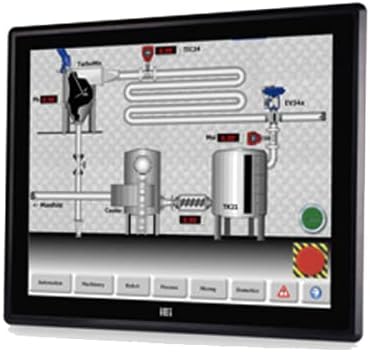
Figure 1: The IEI DM-F12A/R-R30 monitor, showcasing its display and industrial design. This image illustrates the monitor's appearance and typical use in a control system interface.
3. Увімкнення
After all cables are securely connected, power on your computer and then the monitor. The monitor should automatically detect the input signal.
Операційна
Basic Display Functions
The monitor will display the video output from your connected computer. Adjust display settings such as resolution and refresh rate through your computer's operating system display settings for optimal performance.
Using the R-Touch Screen
The R-touch screen functions as a standard mouse input. Once the USB cable is connected and recognized by your operating system, you can interact with the display by touching the screen directly. Calibration may be required for precise touch input, typically accessible through your operating system's tablet PC or touch screen settings.
- Однократне натискання: Еквівалентно клацанню лівою кнопкою миші.
- Натисніть і утримуйте: Equivalent to a right-click (may vary by OS settings).
- Перетягніть: Touch and move your finger across the screen to move items or scroll.
Технічне обслуговування
Очищення монітора
- Завжди вимикайте живлення та від’єднуйте монітор від мережі перед чищенням.
- Злегка протріть м’якою тканиною без ворсу dampened with water or a non-abrasive LCD screen cleaner.
- Do not use alcohol, ammonia-based cleaners, or abrasive materials, as these can damage the screen surface or casing.
- Обережно протріть екран і casing. Avoid spraying liquid directly onto the screen.
Екологічні міркування
Ensure the monitor is operated within its specified temperature and humidity ranges. Avoid exposing the monitor to direct sunlight, excessive dust, or extreme temperatures.
Усунення несправностей
| проблема | Можлива причина | Рішення |
|---|---|---|
| Немає відображення на екрані |
|
|
| Сенсорний екран не реагує |
|
|
| Зображення розмите або спотворене |
|
|
Технічні характеристики
| Особливість | Деталь |
|---|---|
| Модель | DM-F12A/R-R30 |
| Бренд | IEI |
| Розмір екрана | 12 дюймів |
| роздільна здатність | XGA |
| Яскравість | 600 кд/м² |
| Матеріал передньої панелі | Алюміній |
| Тип сенсорного екрана | USB R-Touch |
| Вхідний об'ємtage | 9~36В постійного струму |
| Поверхня екрана | Глянцевий |
| Особливість | Сенсорний екран |
| Виробник | Технологія IEI |
Гарантія та підтримка
For warranty information and technical support, please refer to the documentation included with your product or visit the official IEI Technology webсайт. Контактна інформація служби підтримки клієнтів зазвичай доступна на сторінці підтримки виробника.
Виробник Webсайт: www.ieiworld.com