
1. Вступ
The VEDINDUST HDMI Audio Embedder (Model CHD801) is designed to integrate external audio into an HDMI video signal. This device allows you to replace the original HDMI audio with digital optical (TOSLINK/SPDIF) or analog (3.5mm line) audio sources. It supports high-resolution video up to 4K@60Hz with 18Gbps bandwidth, HDR, CEC, and HDCP2.2/1.4 pass-through. This manual provides detailed instructions for setup, operation, and troubleshooting to ensure optimal performance.
2. особливості
- Digital/Analog Audio to HDMI Embedding: Replaces the original HDMI audio with external digital optical (TOSLINK/SPDIF) or analog (3.5mm line) audio.
- Підтримка високої роздільної здатності: Supports video resolutions up to 4K@60Hz 4:4:4 with 18Gbps bandwidth. Also compatible with 1080p and 720p.
- Розширені функції відео: Supports HDMI2.0, 10-bit High Dynamic Range (HDR), HDCP 2.2/1.4, and CEC pass-through.
- Сумісність аудіоформатів: HDMI port passes through all digital/analog audio formats including PCM, LPCM. Optical audio input supports various digital formats. 3.5mm audio input supports 2-channel stereo PCM audio.
- DVI to HDMI Conversion: Supports combining DVI signals with audio signals into HDMI signals using DVI to HDMI cables.
- Plug and Play: No software installation required for operation.
3. Вміст упаковки
Будь ласка, перевірте, чи всі перелічені нижче предмети входять до вашої упаковки:
- VEDINDUST HDMI Audio Embedder Unit (Model CHD801)
- Кабель живлення Micro USB
- Посібник користувача
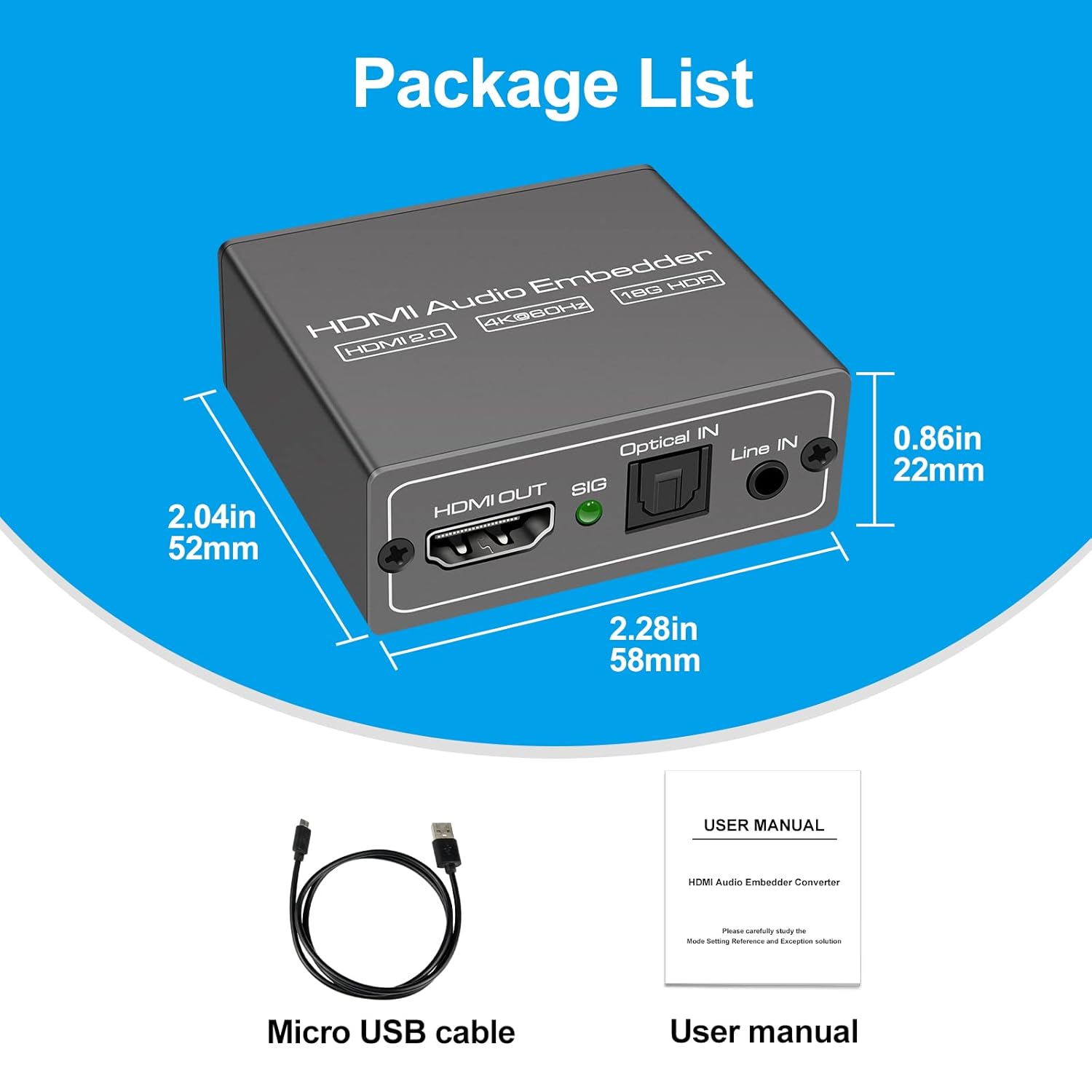
This image displays the items included in the product package: the VEDINDUST HDMI Audio Embedder unit, a Micro USB power cable, and the user manual.
4. Продукт закінчивсяview і порти
Ознайомтеся з портами та елементами керування пристрою:

This close-up shows the mode switch on the device, allowing selection between 'Optical' audio input, 'Line' (3.5mm) audio input, or 'Pass' through mode for original HDMI audio.

This image details the audio output and input ports: HDMI OUT, Optical IN (TOSLINK), and 3.5mm Line IN, along with the signal indicator light.
- Вхід HDMI: Connect your HDMI video source (e.g., laptop, TV box, game console).
- Вихід HDMI: Connect to your display device (e.g., TV, projector).
- Оптичний вхід: Connect your digital optical audio source (TOSLINK/SPDIF).
- Line IN: Connect your analog 3.5mm audio source.
- USB 5V (PW): Connect the Micro USB power cable to a 5V power adapter (not included) or a USB port on your display device.
- Перемикач режимів: Selects the desired audio input mode (Pass, Optical, or Line).
- SIG Indicator: Lights up when a signal is detected.
5. Налаштування
Follow these steps to set up your HDMI Audio Embedder:
- Connect your HDMI video source (e.g., laptop, TV box, PS4, Blu-Ray DVD player) to the HDMI-IN port on the embedder using an HDMI cable.
- Connect your display device (e.g., HD TV, projector) to the HDMI OUT port on the embedder using an HDMI cable.
- Connect your external audio source to either the Оптичний вхід port (for digital audio) or the Лінія В (3.5mm) port (for analog audio), depending on your desired audio input.
- Connect the provided Micro USB power cable to the USB 5V (PW) port on the embedder and then to a 5V power source.
- Select the appropriate audio input mode using the Перемикач режимів on the device (refer to Section 6: Operating Modes).
- Ensure all connections are secure and power on all connected devices.

This diagram shows how to connect various devices to the HDMI Audio Embedder. HDMI sources (laptop, TV box, PS4, Blu-Ray DVD) connect to the HDMI IN. External audio sources (3.5mm or optical) connect to their respective inputs. The HDMI OUT connects to a display device like a projector or HD TV.
6. Режими роботи
The HDMI Audio Embedder features a mode switch to select how audio is handled:
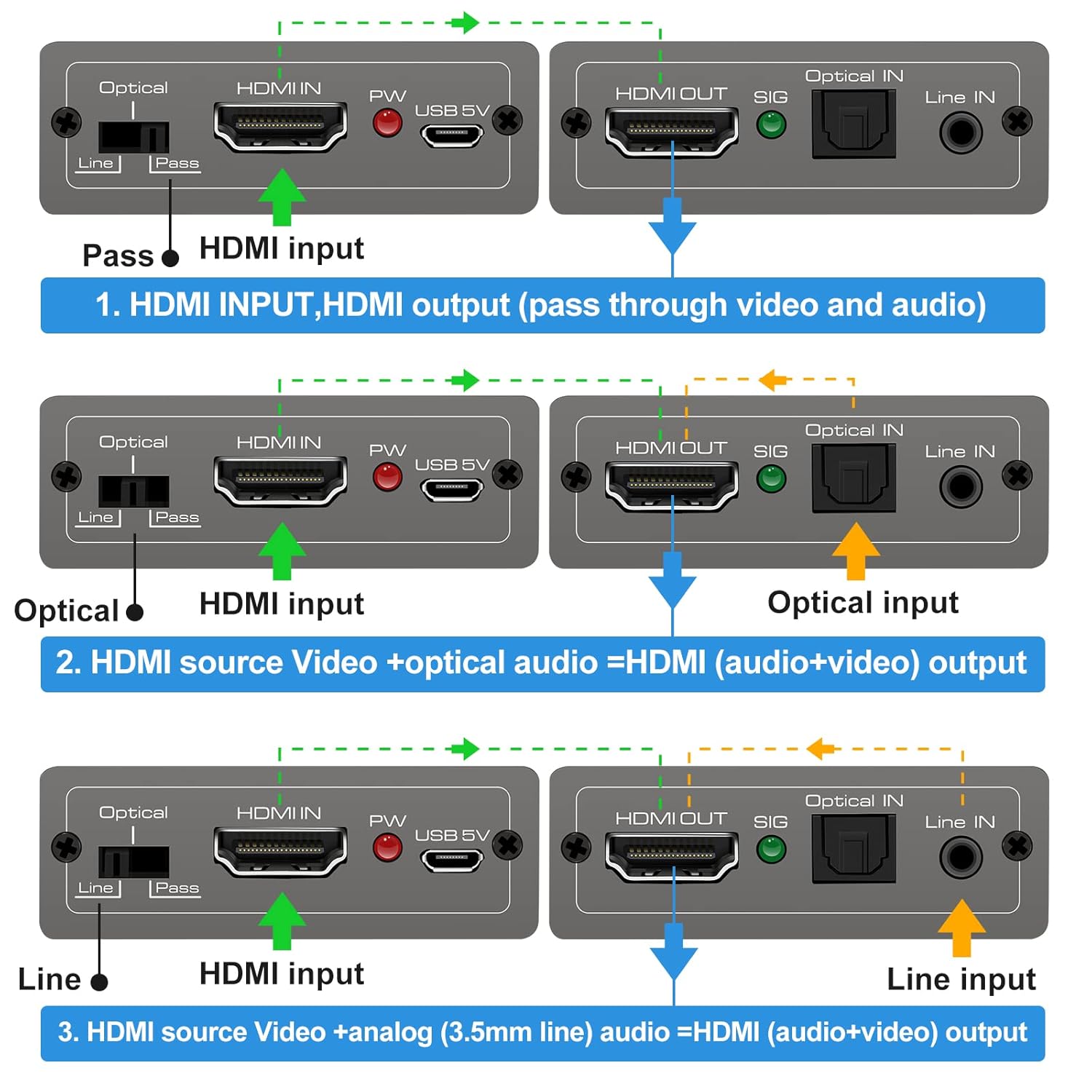
This diagram illustrates the three operational modes: 1. Pass Mode: HDMI input video and audio pass directly to HDMI output. 2. Optical Mode: HDMI input video combines with optical audio input for HDMI output. 3. Line Mode: HDMI input video combines with 3.5mm line audio input for HDMI output.
- Режим пропуску: In this mode, the original HDMI audio from your source device is passed through directly to the HDMI output, along with the video signal. No external audio is embedded.
- Оптичний режим: When selected, the HDMI video signal from your source is combined with the audio signal received from the Оптичний вхід port. The embedded audio is then sent to the HDMI output.
- Лінійний режим: When selected, the HDMI video signal from your source is combined with the audio signal received from the Лінія В (3.5mm) port. The embedded audio is then sent to the HDMI output.
To change modes, simply slide the switch to the desired position. The device will automatically adjust the audio routing.
7. Технічні характеристики
Technical specifications for the VEDINDUST HDMI Audio Embedder:
- модель: 801 CHD
- Версія HDMI: HDMI 2.0
- Версія HDCP: HDCP 2.2 / 1.4
- Роздільна здатність відео: Up to 4K@60Hz (YUV 4:4:4)
- Пропускна здатність: 18 Гбіт/с
- Підтримка HDR: 10-bit HDR
- Підтримка ЦВК: Прохідний
- Audio Input (Digital): Optical (TOSLINK/SPDIF)
- Audio Input (Analog): 3.5mm Line In (2-channel stereo PCM)
- Аудіовихід: HDMI (embedded audio)
- Джерело живлення: 5 В постійного струму (через Micro USB)
- Розміри: 10.16 x 5.18 x 2.18 см (4.0 x 2.04 x 0.86 дюйма)
- вага: 110 г (3.88 унції)
- Виробник: ВЕДІНДУСТ
- UPC: 798610311141

This image highlights the device's capability to support high-resolution video, up to 4K at 60Hz, ensuring clear and detailed visuals.
8. Вирішення проблем
If you encounter issues with your HDMI Audio Embedder, please refer to the following common troubleshooting steps:
- Немає відеовиходу:
- Переконайтеся, що всі кабелі HDMI надійно підключені.
- Verify the power adapter is connected and the device is receiving power.
- Спробуйте підключити джерело HDMI безпосередньо до дисплея, щоб переконатися, що джерело та дисплей працюють належним чином.
- Check if the display's input source is correctly selected.
- No Audio Output / Incorrect Audio:
- Ensure the correct audio input mode (Pass, Optical, or Line) is selected on the embedder's switch.
- Verify that the external audio source is properly connected and producing sound.
- Check the volume levels on both your audio source and display device.
- If using Optical or 3.5mm input, ensure the cables are fully inserted and not damaged.
- Some audio formats may not be supported by all devices. Try adjusting the audio output format on your source device.
- Періодичний сигнал:
- Використовуйте високоякісні кабелі HDMI, особливо для роздільної здатності 4K.
- Ensure the power supply is stable and sufficient (5V).
- Avoid excessive cable lengths.
Якщо проблема не зникає після виконання цих кроків, зверніться до служби підтримки клієнтів.
9. Технічне обслуговування
To ensure the longevity and optimal performance of your HDMI Audio Embedder, follow these maintenance guidelines:
- Прибирання: Використовуйте м’яку суху тканину для очищення пристрою. Не використовуйте рідкі засоби для чищення або аерозолі.
- Середовище: Зберігайте пристрій у прохолодному, сухому місці, подалі від прямих сонячних променів, джерел тепла та вологи.
- Обробка: Уникайте падіння та сильних ударів пристрою.
- Вентиляція: Забезпечте належний потік повітря навколо пристрою, щоб запобігти перегріву.
- Потужність: Disconnect the power supply when the device is not in use for extended periods.
10. Гарантія та підтримка
VEDINDUST products are designed for reliability and performance. For information regarding warranty coverage, technical support, or service, please refer to the warranty card included with your product or visit the official VEDINDUST website. Please have your model number (CHD801) and purchase information ready when contacting support.