
1. Вступ
This manual provides detailed instructions for the installation, operation, and maintenance of your ESLYYDS Double Din Car Stereo. This advanced multimedia system offers a wide range of features including Apple CarPlay, Android Auto, Bluetooth connectivity, a high-definition touchscreen, and support for a backup camera, enhancing your in-car entertainment and navigation experience.

Figure 1.1: ESLYYDS Double Din Car Stereo Overview
2. Вміст упаковки
Будь ласка, перевірте, чи всі перелічені нижче предмети входять до вашої упаковки:
- ESLYYDS Double Din Car Stereo Unit
- Набір монтажних кронштейнів
- Camera Wire A
- Camera Wire B
- Steering Wheel Control Unit
- Джгут проводів А
- Джгут проводів B
- Ззаду-view Камера
- Пульт дистанційного керування
- Посібник користувача (цей документ)

Figure 2.1: Stereo Dimensions and Included Accessories
3. Особливості продукту
The ESLYYDS Double Din Car Stereo is equipped with a variety of features designed for convenience and enhanced driving experience:
- Сумісність з Apple CarPlay та Android Auto: Seamlessly integrate your smartphone for navigation, music, calls, and messages using voice control.
- 7-inch HD Capacitive Touch Screen: A responsive and accurate display supporting 1080P video playback.
- Bluetooth 5.2: For stable and clear hands-free calling and audio streaming.
- Phone Mirror Link: Display your smartphone's screen directly on the stereo.
- Подвійний USB-інтерфейс: One port for media playback and another with 2.1A fast charging capability.
- Задня View Вхід камери: Supports the included 12 HD LED light, night vision, 170° viewing angle waterproof backup camera for safer reversing.
- Керування на кермі (SWC): Compatible with existing steering wheel controls for convenient operation.
- AM/FM Audio Receiver: Access to radio stations with user-friendly digital control.
- AUX IN Connectivity: Для зовнішніх аудіопристроїв.
- 7 Color LED Buttons: Customizable button illumination.
3.1 Apple CarPlay та Android Auto
Connect your smartphone via USB to access navigation, phone contacts, email, notifications, and music directly on the stereo display. This feature utilizes voice control technology for safe operation while driving.
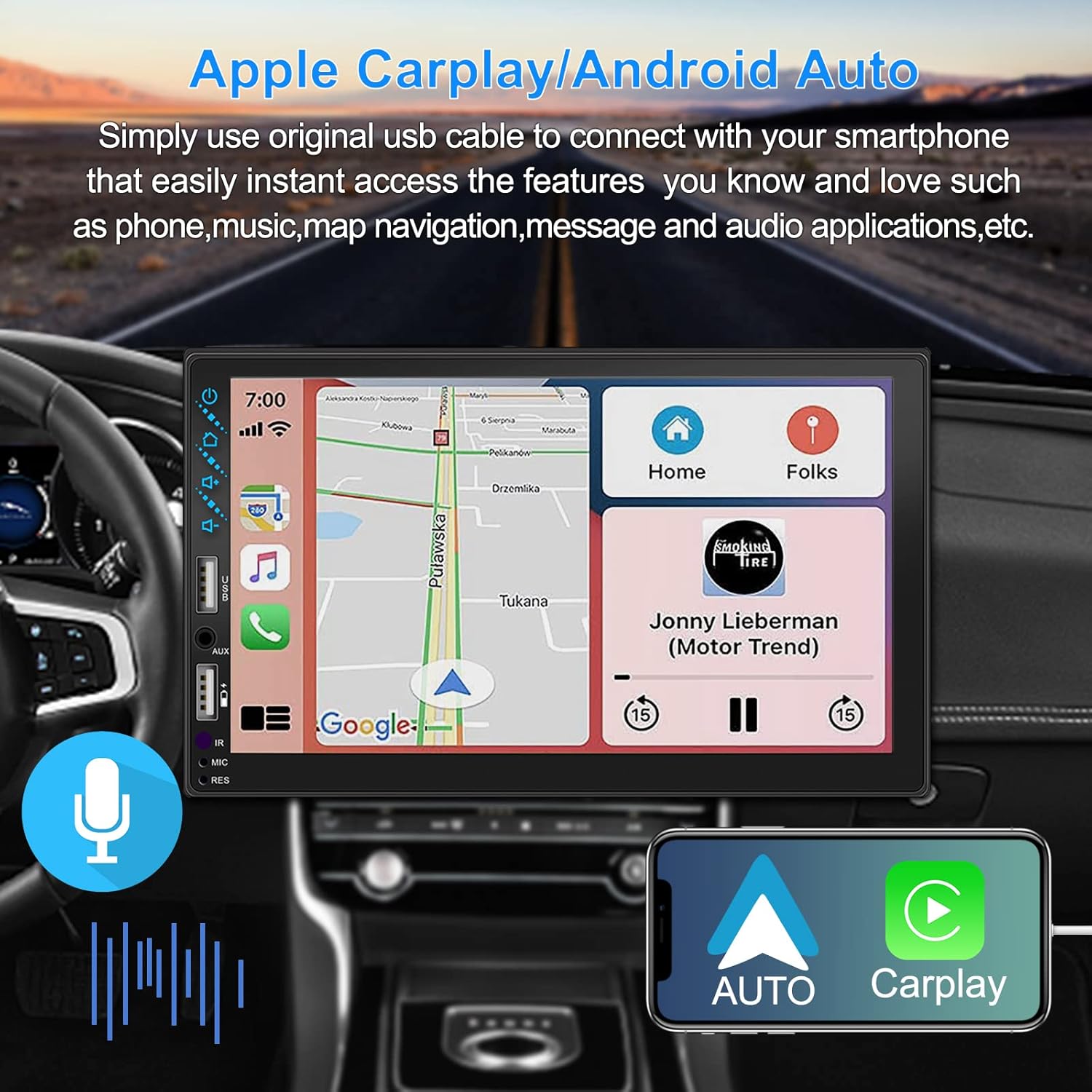
Рисунок 3.1: Інтерфейс Apple CarPlay та Android Auto
3.2 Голосове керування
Utilize voice commands to control various functions such as making calls, playing music, and navigating, allowing you to keep your hands on the wheel and eyes on the road.

Рисунок 3.2: Функціональність голосового керування
3.3 Дзеркальне посилання телефону
The Mirror Link function allows you to display your smartphone's screen directly onto the stereo's touchscreen. This supports Android devices (version 10.1 and below) and iPhone devices (version 14.5 and below, including iPhone 12, 11, XR, and 8 series and below) with resolutions up to 1920x1080 pixels.
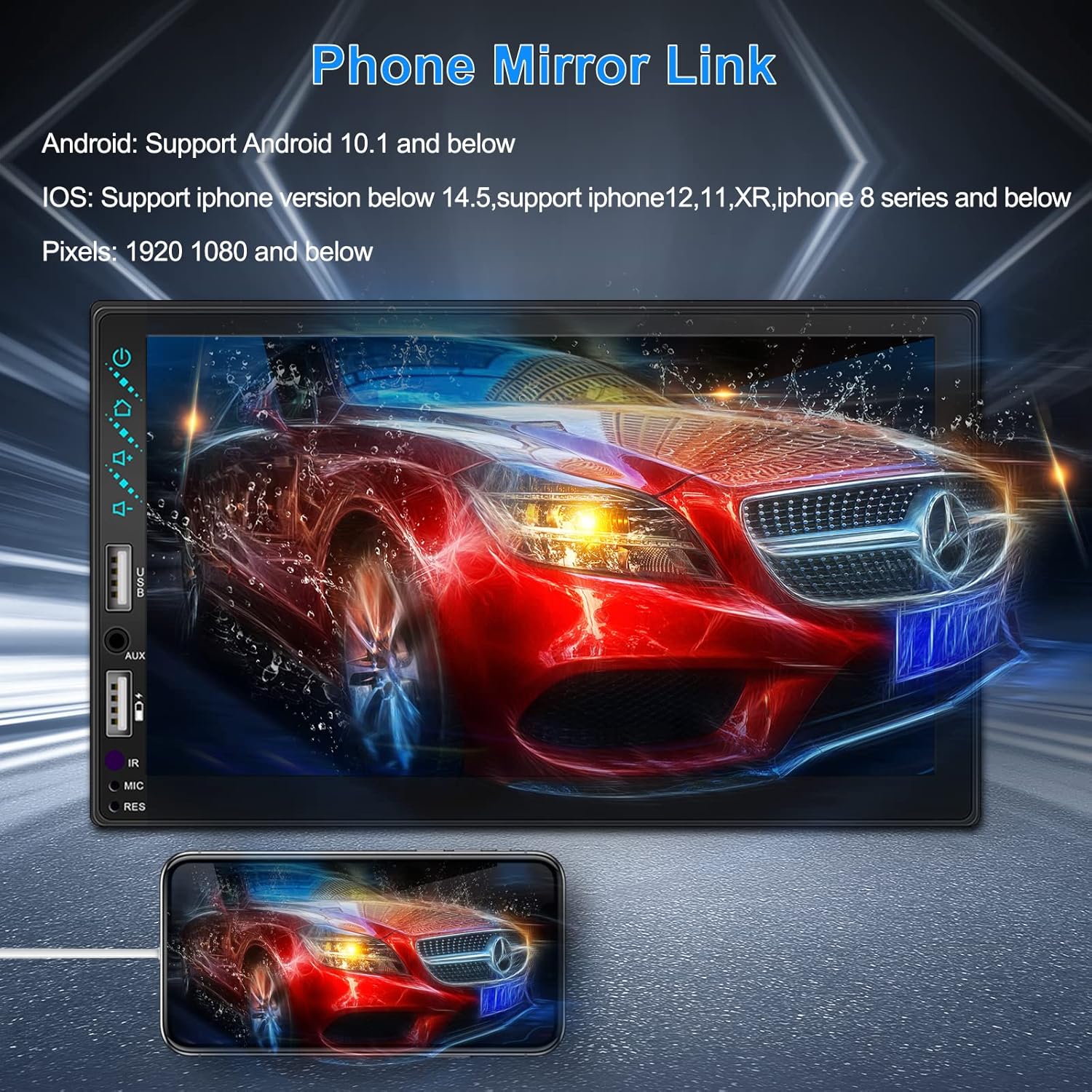
Figure 3.3: Phone Mirror Link
3.4 Задня частина View Камера
The included waterproof backup camera features 12 HD LED lights for night vision and a 170° viewing angle. When you shift into reverse, the system automatically displays the camera feed on the screen, providing optimal visibility in various weather conditions.
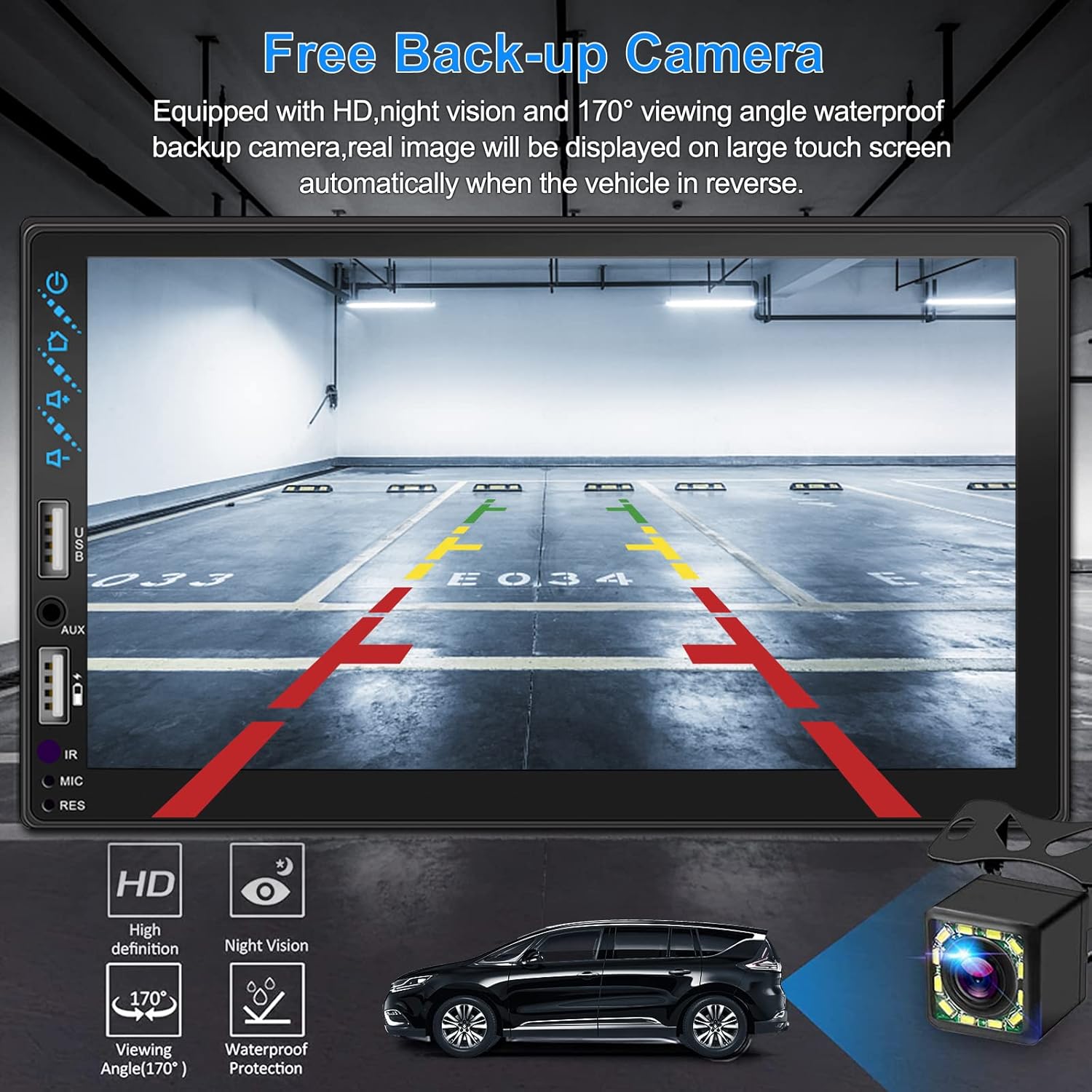
Малюнок 3.4: Задня частина View Дисплей камери
4. Посібник із встановлення
Proper installation is crucial for optimal performance. It is recommended to have the unit installed by a professional if you are unfamiliar with car audio wiring.
4.1 Розміри
The stereo unit has a standard double din size. Refer to Figure 2.1 for detailed dimensions.
- Ширина: 178 мм (7 дюйма)
- Висота: 102 мм (4 дюйма)
- Глибина: 60 мм (2.6 дюймів)
4.2 Схема підключення
Carefully follow the wiring diagram below to connect the stereo to your vehicle's electrical system. Ensure all connections are secure to prevent malfunctions.
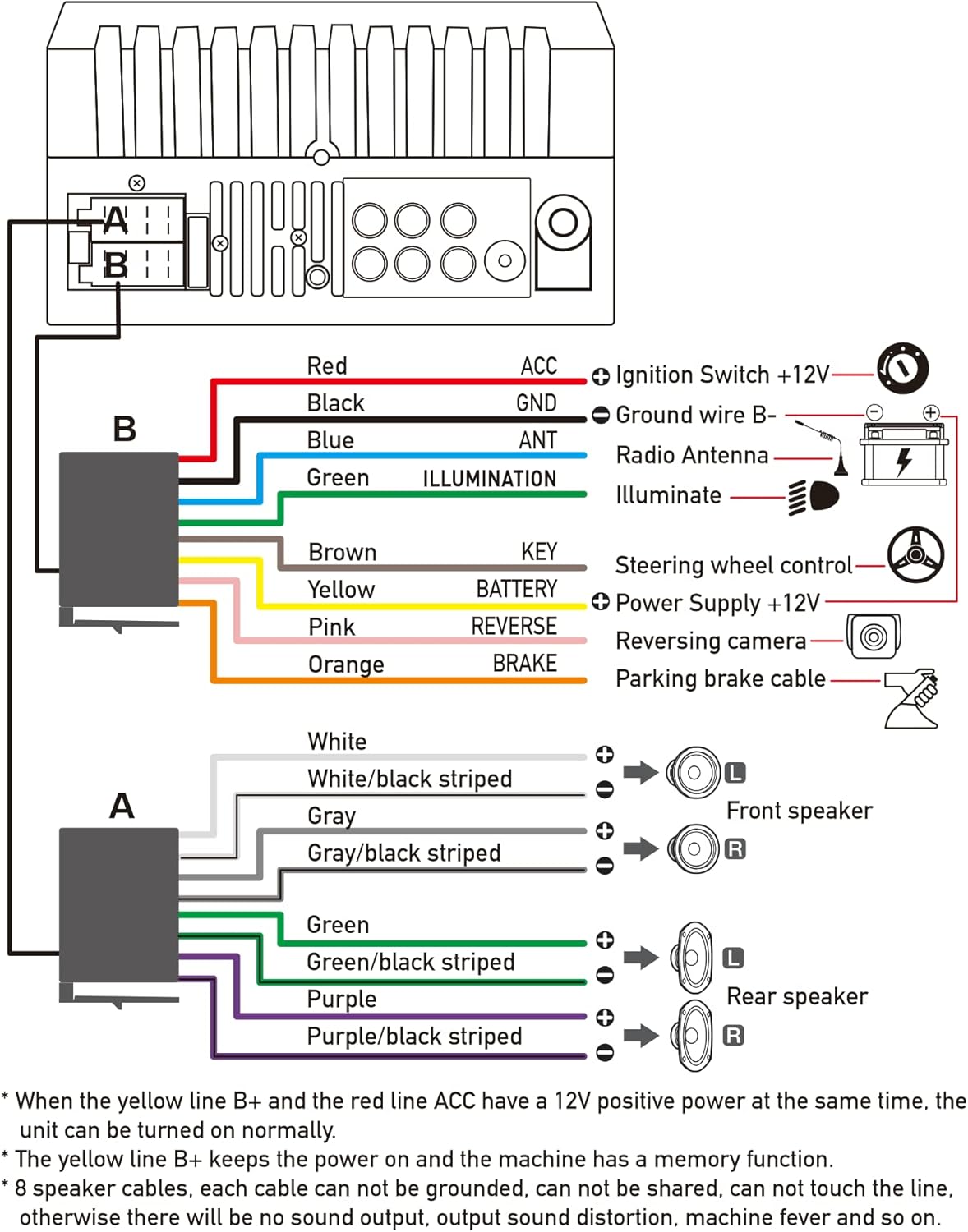
Рисунок 4.1: Схема головної проводки
- Червоний (ACC): Підключіть до замка запалювання +12 В.
- Чорний (GND): Connect to Ground wire B-.
- Синій (АНТ): Підключіть до радіоантени (за наявності).
- Зелений (ПІДСВІТКУВАННЯ): Connect to Illuminate wire.
- Коричневий (KEY): Connect to Steering wheel control.
- Жовтий (БАТАРЕЯ): Connect to Power Supply +12V.
- Рожевий (зворотний бік): Connect to Reversing camera input.
- Помаранчевий (ГАЛЬМО): Connect to Parking brake cable.
Speaker Connections (8 speakers supported):
- White / White/black striped: Передній лівий динамік
- Gray / Gray/black striped: Передній правий динамік
- Green / Green/black striped: Задній лівий динамік
- Purple / Purple/black striped: Задній правий динамік
Важливі зауваження:
- The unit requires both the Yellow (BATTERY) and Red (ACC) wires to have a 12V positive power supply simultaneously for normal operation.
- The Yellow (BATTERY) wire keeps the power on and maintains memory functions.
- For speaker connections, each cable must not be grounded or shared with other cables. Incorrect wiring can lead to no sound output, sound distortion, or damage to the machine.
5. Інструкція з експлуатації
5.1 Основні операції
- Увімкнення/вимкнення живлення: Натисніть кнопку живлення на передній панелі або на пульті дистанційного керування.
- Регулювання гучності: Використовуйте кнопки регулювання гучності на передній панелі, елементи керування на кермі або пульт дистанційного керування.
- Вибір джерела: Tap the 'Source' or 'Mode' icon on the touchscreen to switch between Radio, Bluetooth, USB, AUX, CarPlay, and Android Auto.
5.2 Apple CarPlay / Android Auto Usage
- Connect your compatible iPhone or Android smartphone to the stereo's USB port using a certified USB cable.
- The stereo will automatically detect the connection and prompt you to launch CarPlay or Android Auto.
- Дотримуйтеся вказівок на екрані, щоб завершити налаштування.
- Once connected, you can access supported apps like Maps, Phone, Messages, and Music directly from the stereo's touchscreen or via voice commands.
5.3 Створення пари Bluetooth
- Увімкніть Bluetooth на своєму смартфоні.
- На стереосистемі перейдіть до меню Bluetooth.
- шукати available devices on your smartphone. The stereo's Bluetooth name will typically be 'ESLYYDS' or similar.
- Select the stereo from your smartphone's list and confirm the pairing code if prompted.
- Після сполучення ви можете здійснювати/приймати дзвінки та передавати аудіо бездротовим способом.
5.4 Phone Mirror Link Usage
- Connect your smartphone to the stereo's USB port.
- Select the 'Mirror Link' option on the stereo's screen.
- Follow the specific instructions displayed on the stereo for your phone's operating system (Android or iOS) to enable screen mirroring. This may involve enabling USB debugging for Android or trusting the device for iOS.
5.5 Робота радіо
- Select the 'Radio' source.
- Use the 'Scan' function to automatically search and save stations, or manually tune using the frequency controls.
- Зберігайте улюблені станції на попередньо встановлених кнопках для швидкого доступу.
5.6 Відтворення з USB
- Вставте USB-накопичувач, що містить аудіо- або відеозаписи files into the designated USB playback port.
- The stereo will automatically switch to USB mode or prompt you to select it.
- Browse and play your media files using the touchscreen controls.
6. Технічне обслуговування
Щоб забезпечити довговічність та оптимальну роботу вашої автомобільної стереосистеми, дотримуйтесь цих правил технічного обслуговування:
- Прибирання: Use a soft, dry cloth to clean the screen and exterior. For stubborn smudges on the screen, use a screen cleaner specifically designed for electronic displays. Avoid abrasive cleaners or solvents.
- температура: Уникайте тривалого впливу на пристрій екстремальних температур, як високих, так і низьких.
- вологість: Тримайте пристрій сухим. Не піддавайте його впливу води або надмірної вологості.
- Оновлення прошивки: Перевірте виробника webперіодично перевіряйте сайт на наявність доступних оновлень прошивки для покращення продуктивності та додавання нових функцій.
7. Вирішення проблем
If you encounter issues with your ESLYYDS car stereo, please refer to the following common problems and solutions. If the problem persists, contact customer support.
| проблема | Можлива причина | Рішення |
|---|---|---|
| Немає живлення | Неправильна проводка; перегорілий запобіжник; проблема з акумулятором автомобіля. | Check power (Yellow and Red) and ground (Black) wire connections. Inspect vehicle fuses. Ensure vehicle battery is charged. |
| Ні звуку | Неправильно підключені дроти динаміків; Занадто низька гучність; Активована функція вимкнення звуку. | Verify all speaker wire connections (ensure no shorts or grounds). Increase volume. Check if mute is enabled. |
| Bluetooth не підключається | Bluetooth not enabled on phone/stereo; Incorrect pairing process. | Ensure Bluetooth is active on both devices. Delete previous pairings and re-attempt pairing process. |
| CarPlay/Android Auto не запускається | Несправний USB-кабель; телефон несумісний; проблема з програмним забезпеченням. | Use a high-quality, certified USB cable. Ensure your phone's OS version is compatible. Restart both phone and stereo. |
| Задня камера не відображає зображення | Camera wire disconnected; Reverse trigger wire not connected. | Check the camera's video input and power connections. Ensure the Pink (REVERSE) wire is correctly connected to the vehicle's reverse light trigger. |
| USB not reading media | Не підтримується file format; Corrupted USB drive; USB port issue. | Забезпечте носії інформації files are in supported formats (e.g., MP3, MP4, MKV). Try a different USB drive. |
8. Технічні характеристики
| Особливість | Специфікація |
|---|---|
| Розміри продукту | 7 x 2.6 x 3.94 дюймів |
| Вага товару | 2.33 фунта |
| Номер моделі | L3 |
| Розмір дисплея | 7 дюйма (18 см) |
| Тип дисплея | HD Capacitive Touchscreen |
| Технологія підключення | Carplay, Android Auto, Mirror-Link, Bluetooth 5.2, USB, AUX |
| Тип контролера | Google Assistant, iOS, Android |
| Особливості | Touchscreen, RDS, Steering Wheel Control (SWC), Fast Charging USB (2.1A) |
| Сумісні пристрої | Смартфон |
| Тип роз'єму | USB |
| Режим аудіовиходу | Об'ємний |
| Конфігурація каналу об’ємного звуку | 5.1 |
| Підтримка кодування відео | MKV |
| Колір | чорний |
| Дата першої доступності | 25 вересня 2021 р |
9. Гарантія та підтримка
ESLYYDS is committed to providing excellent customer service and technical support. For any inquiries or assistance, please contact our professional technical team.
- Гарантія повернення грошей: 30-day period from purchase.
- Гарантія на заміну: 12-month period for product replacement.
- Технічна підтримка: Надається довічна технічна підтримка.
Please refer to your purchase documentation for specific contact details or visit the official ESLYYDS webсайт для отримання інформації про підтримку.