
1. Вступ
The MustOOL MT336 is a versatile 2-in-1 True RMS Digital Clamp Meter and Oscilloscope. This device allows for non-contact measurement of AC current waveforms, DC/AC voltage, resistance, capacitance, frequency, and temperature. It features a waveform display for quick analysis and includes functions like diode testing and continuity checks. Designed for safety and efficiency, it is an essential tool for electrical measurements.
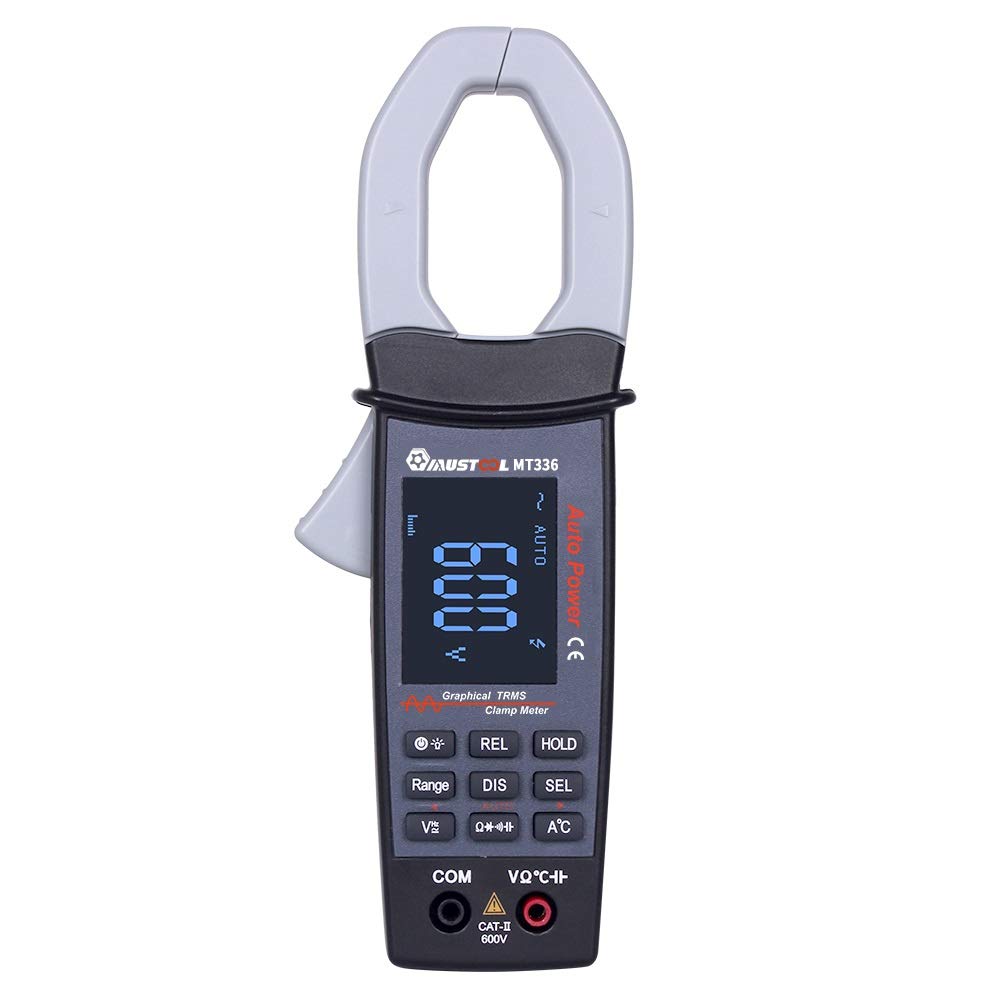
Figure 1: MustOOL MT336 Digital Clamp Meter in use, showing its display.
2. Інформація про безпеку
Always adhere to safety precautions when using electrical testing equipment. Failure to do so may result in electric shock, injury, or damage to the meter or equipment under test.
- Не перевищуйте максимальні обмеження вхідного сигналу для будь-якої функції.
- Ensure the test leads are in good condition and properly connected before use.
- Не використовуйте глюкометр, якщо він виглядає пошкодженим або якщо кришка відсіку для батарейок не закрита належним чином.
- Будьте особливо обережні при роботі з обtagвище 60 В постійного струму або 30 В змінного струму RMS.
- Завжди відключайте живлення кола перед вимірюваннями опору, ємності або діодів.
- Remove test leads from the meter before opening the battery compartment.

Малюнок 2: Задня частина view of the MT336, highlighting safety warnings and battery information.
3. Компоненти продукту
The MustOOL MT336 clamp meter includes the following main components:
- Clamp щелепа: Для безконтактного вимірювання змінного струму.
- Тригер: Відкриває і закриває клamp щелепа.
- РК-дисплей: Shows measurement readings, waveforms, and function indicators.
- Функціональні кнопки: For selecting modes, ranges, and other features.
- Вхідні роз'єми (COM, VΩHz): Для підключення вимірювальних щупів для об'ємуtagе., вимірювання опору, ємності, частоти, діодів та проціління кола.
- Temperature Probe Input: For connecting the included temperature probe.
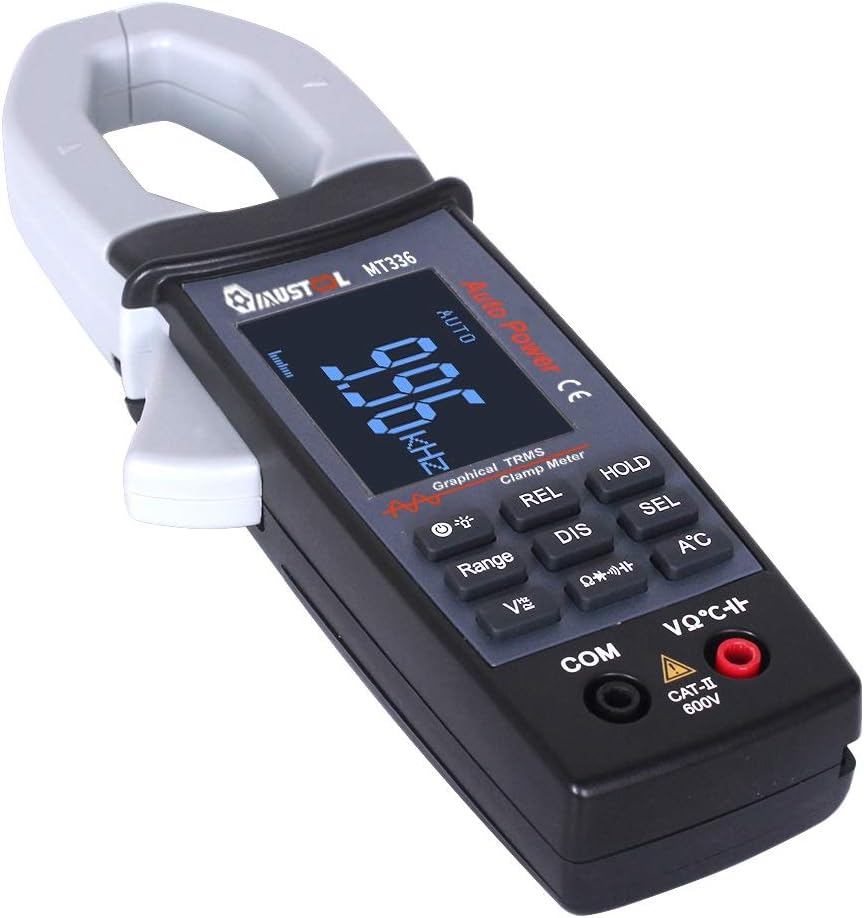
Малюнок 3: Закінченоview of the MT336 clamp meter, showing its main parts.
4. Налаштування
4.1 Встановлення батареї
- Ensure the meter is powered off and no test leads are connected.
- Знайдіть відсік для батарейок на задній панелі глюкометра.
- Відкрутіть кришку батарейного відсіку.
- Insert three AAA 1.5V batteries, observing correct polarity.
- Встановіть на місце кришку батарейного відсіку та закріпіть її гвинтом.
4.2 Підключення вимірювальних щупів
Для випtagвимірювання опору, ємності, частоти, діодів та проціління кола:
- Вставте чорний тестовий провод у COM (Загальний) вхідний роз'єм.
- Вставте червоний тестовий провод у VΩHz вхідний роз'єм.
For temperature measurements, connect the temperature probe to the designated input ports.
5. Інструкція з експлуатації
5.1 Увімкнення/вимкнення живлення
Press the power button to turn the meter on. The meter will automatically shut down after 15 minutes of inactivity to conserve battery life. Press the power button again to turn it off manually.
5.2 Вимірювання змінного струму (Clamp функція)
- Select the AC current mode (usually indicated by 'A~' or a similar symbol).
- Натисніть на спусковий гачок, щоб відкрити клamp щелепа.
- Enclose a single conductor (not a power cord with multiple wires) within the clamp щелепа.
- Відпустіть курок, щоб щільно закрити губку навколо провідника.
- Read the AC current value and waveform on the display.

Figure 4: Measuring AC current and waveform using the clamp функція.
5.3 AC/DC Voltage Вимірювання
- Підключіть вимірювальні дроти, як описано в розділі 4.2.
- Виберіть відповідний томtage mode (DCV or ACV).
- Touch the red and black test probes to the points where voltage потрібно виміряти.
- Прочитайте томtage value on the display. For AC voltage, the waveform may also be displayed.

Рисунок 5: Вимірювання об'єму змінного струмуtage and waveform from a power outlet.
5.4 Resistance, Capacitance, Frequency, Diode, and Continuity
For these functions, ensure the circuit is de-energized before connecting the test leads. Select the desired function using the mode buttons and follow standard measurement procedures for multimeters.
- Опір (Ом): Measures the electrical resistance of a component.
- Ємність (F): Measures the capacitance of capacitors.
- Частота (Гц): Вимірює частоту сигналу змінного струму.
- Випробування діодів: Перевіряє прямий об'ємtagкрапля діода.
- Тест безперервності: Indicates if a circuit is complete with a low resistance path (typically with an audible beep).
5.5 Вимірювання температури
Connect the temperature probe to the meter's designated input. Select the temperature function and place the probe tip on the object or area to be measured. The temperature will be displayed in Celsius or Fahrenheit.
6. Технічне обслуговування
6.1 Очищення
Протріть лічильник сухою м’якою тканиною. Не використовуйте абразивні засоби або розчинники. Захищайте вхідні клеми від бруду та вологи.
6.2 Заміна батареї
When the low battery indicator appears on the display, replace the batteries as described in Section 4.1. Use three new AAA 1.5V batteries.
6.3 Зберігання
If the meter is not used for an extended period, remove the batteries to prevent leakage and damage. Store the meter in a cool, dry place away from direct sunlight.
7. Вирішення проблем
| проблема | Можлива причина | Рішення |
|---|---|---|
| Лічильник не вмикається. | Розряджені або неправильно встановлені батареї. | Замініть батарейки, дотримуючись правильної полярності. |
| Немає показань або відображається напис "OL". | Open circuit, out of range, or incorrect function selected. | Check connections, select appropriate range/function, or ensure circuit is closed. |
| Неточні показання. | Low battery, dirty test leads/terminals, or external interference. | Replace batteries, clean leads/terminals, move away from strong electromagnetic fields. |
| Waveform not displayed correctly. | Signal frequency too high/low, or incorrect range. | Ensure signal is within 1kHz ACV/ACA. Adjust range if available. |
8. Технічні характеристики
Загальні характеристики:
- Дисплей: 128 x 64 LCM with white backlight on black screen (45mm x 35mm)
- Потужність: 3 батареї AAA 1.5 В
- Автоматичне відключення: Приблизно 15 хвилин бездіяльності
- Зберігання даних: 100 data points, 10 waveforms
- Розміри: 78 мм x 210 мм x 36 мм
- вага: 220g (без батарей)
- Операційне середовище: 0°C to 40°C; <75% RH
- Середовище зберігання: -10°C to 60°C; <90% RH
- Рейтинг безпеки: CAT II 600 В
Measurement Specifications (Accuracy ±(rdg + dgt)):
| функція | Діапазон | Точність |
|---|---|---|
| DC Voltage | 400 мВ / 4 В / 40 В / 400 В / 600 В | ± (1.5% + 10) |
| AC Voltage (TRMS) | 4В / 40В / 400В / 600В | ± (2.0% + 10) |
| Змінного струму | 40 А / 400 А | ± (2.5% + 10) |
| опір | 400 Ом / 4 кОм / 40 кОм / 400 кОм / 4 МОм / 40 МОм | ± (1.0% + 5) |
| Ємність | 4nF / 40nF / 400nF / 4uF / 400uF / 4mF | ± (4.0% + 10) |
| Частота | 9.999 Гц до 30 кГц | ± (2.0% + 10) |
| температура | -20℃ до 250℃ | ± (2.0% + 3) |
| Діодний тест | Обрив ланцюга обtage approx. 3V, max test current approx. 2mA | N/A |
| Тест безперервності | Judgment resistance approx. 50Ω | N/A |
| Аналогова пропускна здатність | ACV / ACA 1 kHz | N/A |
9. Гарантія та підтримка
For warranty information and technical support, please refer to the official MustOOL webсайт або зверніться до продавця. Зберігайте чек про покупку як підтвердження покупки.
The package includes: 1x Clamp Meter, 1x Pair of Test Leads, 1x English User Manual, 1x Temperature Probe.