
вступ
This manual provides detailed instructions for the installation, operation, and maintenance of your Hama 00118498 Monitor Desk Mount. Designed to enhance your ergonomic workspace, this monitor arm allows for flexible positioning of your display, promoting a comfortable and productive environment. Please read these instructions carefully before beginning installation.
Інструкції з налаштування
Follow these steps to correctly install your Hama 00118498 Monitor Desk Mount.
1. Кріплення настільного кріпленняamp
- Помістіть письмовий стіл клamp assembly onto the edge of your desk. Ensure the desk surface is sturdy and can support the weight of the mount and your monitor.
- Затягніть клamp screw firmly until the mount is securely fastened to the desk. Do not overtighten.
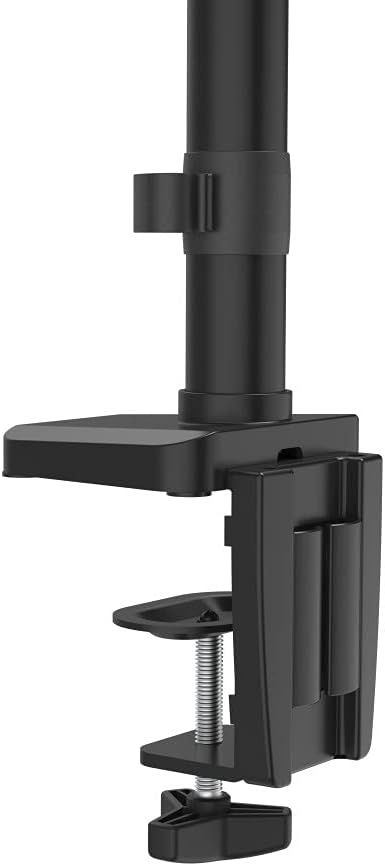
Image: The desk clamp mechanism, showing how it attaches to the desk edge for secure mounting.
2. Підключення монітора
- Ensure your monitor is VESA compatible (100x100mm or 75x75mm).
- Carefully attach the VESA plate from the monitor arm to the back of your monitor using the provided screws. Make sure the screws are tightened securely.
- Slide the monitor (with the attached VESA plate) onto the arm's mounting head. Ensure it clicks into place or is secured with any locking mechanism provided.

Image: The monitor arm's VESA plate and adjustable joint, ready for monitor attachment.

Зображення: Сторона view of the assembled monitor arm, highlighting the VESA mount and integrated cable management channels.
3. Кабельний менеджмент
Utilize the integrated cable management system to route your monitor cables neatly along the arm. This helps maintain a tidy workspace and prevents cable clutter.
Інструкція з експлуатації
The Hama 00118498 Monitor Desk Mount offers various adjustment options for optimal viewкомфорту.
- Регулювання висоти: The integrated pneumatic spring allows for smooth and effortless vertical height adjustment. Gently push or pull the monitor to your desired height.
- Поворотний: The arm can swivel horizontally, allowing you to rotate your monitor to share your screen or change your viewкут.
- Нахил: Adjust the monitor's tilt angle (up or down) to reduce glare and find the most comfortable viewположення.
- Обертання: Rotate your monitor from landscape to portrait orientation as needed for different tasks.
Adjustments should be smooth. If the monitor does not hold its position, refer to the troubleshooting section for tension adjustments.
Технічне обслуговування
Регулярне технічне обслуговування забезпечує довговічність та оптимальну роботу вашого кронштейна для монітора.
- Прибирання: Wipe the surface of the monitor arm with a soft, damp тканина. Уникайте використання абразивних засобів чи розчинників.
- Перевірте підключення: Періодично перевіряйте всі гвинти та з'єднання, щоб переконатися, що вони затягнуті та надійно закріплені. За потреби підтягніть.
- Змащення: The pneumatic spring is maintenance-free. Do not attempt to lubricate internal components.
Усунення несправностей
If you encounter issues with your Hama 00118498 Monitor Desk Mount, refer to the following common problems and solutions:
- Монітор провисає або не утримує положення: The tension of the pneumatic spring may need adjustment. Locate the tension adjustment screw (usually found on the arm joint) and turn it clockwise to increase tension for heavier monitors, or counter-clockwise for lighter monitors. Adjust gradually until the monitor holds its position.
- Монітор важко перемістити: If the arm is too stiff, the tension may be too high. Turn the tension adjustment screw counter-clockwise to decrease tension.
- Arm Feels Loose on Desk: Переконайтеся, що стіл клamp is fully tightened. If the desk surface is too thin or fragile, consider adding a protective pad between the clamp and the desk.
- Коливання монітора: Check all mounting screws on the VESA plate and the arm joints to ensure they are securely fastened.
Технічні характеристики
| Особливість | Деталь |
|---|---|
| Номер моделі | 00118498 |
| Тип монтажу | Робочий стіл Клamp |
| Тип руху | Rotating, Swivel, Tilt, Height Adjustable (Pneumatic Spring) |
| Бренд | Хама |
| матеріал | Алюміній |
| Колір | чорний |
| Сумісні пристрої | Монітор |
| Мінімальний сумісний розмір | 10 дюймів |
| Максимальний сумісний розмір | 32 дюймів |
| Вага товару | 2.2 кілограма |
| Країна походження | Китай |
Гарантія та підтримка
Щоб отримати інформацію про гарантію або технічну підтримку, зверніться до документації, що додається до вашої покупки, або відвідайте офіційний веб-сайт Hama. website. You can typically find support contact details, FAQs, and additional resources there.
Official Hama Webсайт: www.hama.com