
Pigtronix GDR
Pigtronix Gamma Drive Overdrive Pedal
Посібник користувача
вступ
The Pigtronix Gamma Drive is a versatile overdrive pedal designed to deliver a wide range of tones, from subtle boosts to aggressive, all-out grind. Its intuitive controls allow musicians to sculpt their sound with precision, making it an essential tool for any guitarist seeking dynamic and expressive overdrive.

Малюнок 1: Спереду view of the Pigtronix Gamma Drive Overdrive Pedal. This image displays the pedal's blue casing, the four control knobs (Volume, Gain, Treble, Bass), the footswitch, and the DC 9V power input label.
Ключові характеристики
- Overdrive Pedal with Treble Bass Controls
- Wide range of gain from subtle boost to heavy distortion
- Компактний і міцний дизайн
- True bypass switching for signal integrity
Вміст упаковки
Після відкриття упаковки переконайтеся, що всі наступні предмети присутні:
- Pigtronix Gamma Drive Overdrive Pedal
- Керівництво користувача (цей документ)
- З'єднувальний кабель
Посібник із налаштування
Follow these steps to properly set up your Pigtronix Gamma Drive pedal:
1. Підключення живлення
Connect a standard 9V DC power supply (not included) to the "DC 9V" input jack on the top of the pedal. Ensure the power supply is center-negative and provides at least 10mA of current.
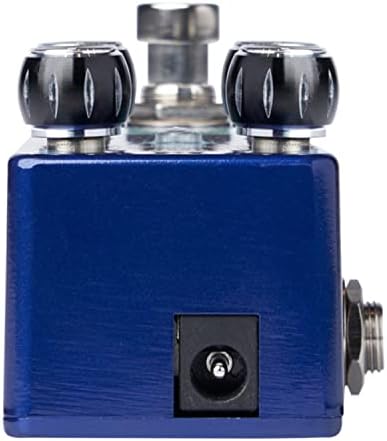
Figure 2: Close-up of the DC 9V power input jack located on the top side of the pedal.
2. Підключення приладу
Connect your instrument (e.g., guitar) to the INPUT jack on the right side of the pedal using a standard 1/4-inch instrument cable.
3. Ampз'єднання ліфіера
Підключіть гніздо OUTPUT на лівій стороні педалі до вашого amplifier's input using another standard 1/4-inch instrument cable.
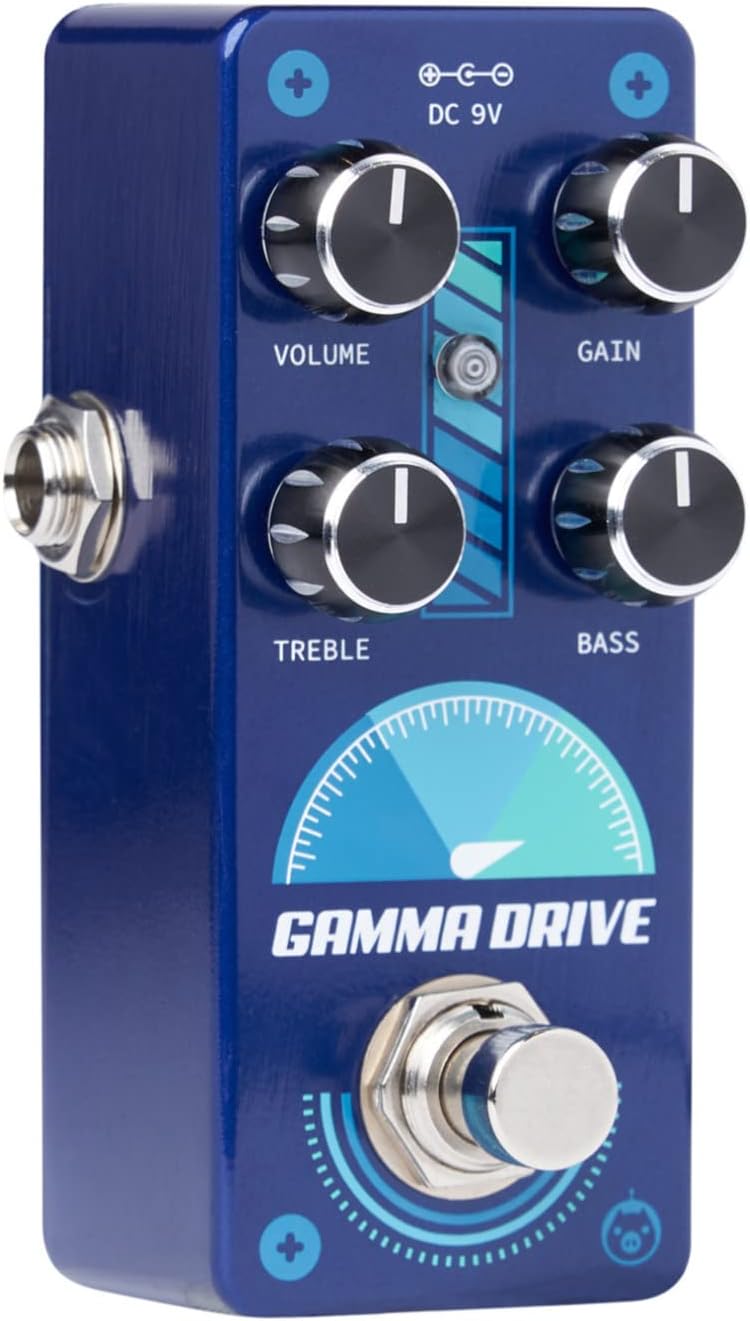
Рисунок 3: Кутовий view illustrating the input jack (right side) and output jack (left side) for instrument and ampз'єднання ліфтерів.
Операція
The Pigtronix Gamma Drive features four primary control knobs and a footswitch for intuitive sound shaping.
Контроль надview
Малюнок 4: Спереду view of the pedal showing the layout of the control knobs.
- ОБ'ЄМ: Controls the overall output level of the pedal. Turn clockwise to increase the volume.
- ПІДИМОК: Adjusts the amount of overdrive and distortion. Higher settings produce more saturated and aggressive tones.
- СЛІД: Shapes the high-frequency content of your tone. Turn clockwise for brighter sounds, counter-clockwise for warmer tones.
- БАС: Controls the low-frequency content. Turn clockwise to add more bass, counter-clockwise to reduce it.
Використання ножного перемикача
The large footswitch at the bottom of the pedal engages or bypasses the effect. When the effect is active, the LED indicator above the footswitch will illuminate. When bypassed, your signal passes through the pedal unaffected (true bypass).
Технічне обслуговування та догляд
- Прибирання: Використовуйте м’яку суху тканину для очищення поверхні педалі. Уникайте абразивних засобів для чищення або розчинників.
- Зберігання: Зберігайте педаль у прохолодному, сухому місці, подалі від прямих сонячних променів та екстремальних температур.
- Потужність: Always use a regulated 9V DC power supply with the correct polarity (center-negative) to prevent damage.
- Підключення: Ensure all cables are securely connected before use. Disconnect cables when not in use to prevent accidental damage.
Усунення несправностей
| проблема | Можлива причина | Рішення |
|---|---|---|
| Немає звуку при натисканні педалі. | Incorrect cable connections; Power supply issue; Pedal not engaged. | Check all input/output cables; Ensure 9V DC power supply is connected and functional; Press footswitch to engage pedal (LED should light up). |
| Слабкий або спотворений звук. | Low power; Incorrect gain/volume settings. | Перевірте потужність джерела живленняtage and current; Adjust GAIN and VOLUME knobs to desired levels. |
| Небажаний шум або гул. | Заземлення; несправні кабелі; перешкоди від іншої електроніки. | Use isolated power supply; Try different cables; Move pedal away from power transformers or fluorescent lights. |
Технічні характеристики
| Специфікація | Значення |
|---|---|
| Вага товару | 9 унції |
| Розміри продукту | 8.4 x 6.3 x 4.7 дюймів |
| Номер моделі | НДР |
| Колір | Light Blue, Black |
| Апаратний інтерфейс | HP-HSC |
| Формат сигналу | Аналоговий |
| Джерело живлення | Battery Powered (Note: Typically refers to ability to use battery, but 9V DC adapter is standard for pedals) |
| томtage | 9 вольта постійного струму |
| Ampераж | 10 міліamps (minimum required) |
Гарантія та підтримка
For detailed warranty information, product registration, and technical support, please visit the official Pigtronix webсайт або зверніться до їхнього відділу обслуговування клієнтів. Зберігайте чек про покупку для гарантійних випадків.
Офіційний Webсайт: www.pigtronix.com
Ask a question about this manual
Ask about setup, troubleshooting, compatibility, parts, safety, or missing instructions. Manuals+ will review the question and use this page’s manual context to help answer it.