
1. Вступ
Дякуємо за покупкуasing the AIYIMA TUBE T9 Bluetooth 5.0 6K4 Tube Amplifier. This device combines a tube preamplifier with a digital power amplifier, offering multiple audio inputs including Bluetooth 5.0, USB, Coaxial, Optical, and RCA. It features a classic VU meter and tone controls for a personalized audio experience. This manual provides detailed instructions for setup, operation, and maintenance to ensure optimal performance and longevity of your ampліфірник.
2. Інформація про безпеку
- Джерело живлення: Use only the provided DC24V power adapter. Ensure the voltage is within the specified range (DC18V-30V).
- Вентиляція: Розмістіть amplifier in a well-ventilated area. Do not block ventilation openings.
- вологість: Тримайте пристрій подалі від води, вологи та високої вологості.
- Тепло: Уникайте розміщення ampзберігайте поблизу джерел тепла або під прямими сонячними променями.
- Обробка труб: Vacuum tubes can become hot during operation. Exercise caution when handling or replacing them. Allow the unit to cool down before touching the tubes.
- Прибирання: Від’єднайте живлення перед чищенням. Використовуйте м’яку суху тканину. Не використовуйте рідкі засоби для чищення або аерозолі.
- Обслуговування: Не намагайтеся обслуговувати цей виріб самостійно. Довірте всі послуги кваліфікованому персоналу.
3. Вміст упаковки
Будь ласка, перевірте упаковку на наявність наступних предметів:
- AIYIMA TUBE T9 Ampліфтер х 1
- 6K4 Vacuum Tube x 2
- Антена Bluetooth x 1
- DC24V Power Adapter x 1
- Кабель ПК-USB x 1
- Remote Control x 1 (AA batteries not included)
- Посібник користувача x 1
- Гарантійний талон х 1 шт

Image: Contents included in the AIYIMA TUBE T9 amplifier package, showing the amplifier unit, two 6K4 tubes, a Bluetooth antenna, power adapter, USB cable, remote control, user manual, and warranty card.
4. Продукт закінчивсяview
4.1 Передня панель
The front panel features controls for power, input selection, volume, and tone, along with a classic VU meter and input indicators.
- Вимірювач VU: Displays audio signal level in real-time.
- Індикатор введення: LEDs indicate the currently selected input (Bluetooth, PC-USB, RCA, Coaxial, Optical).
- Ручка гучності/входу: Rotate to adjust volume. Press to cycle through input sources. Press and hold to power on/off.
- Регулювання басів: Регулює низькочастотний вихідний сигнал.
- Контроль високих частот: Регулює високочастотний вихідний сигнал.
- ІЧ-приймач: For remote control commands.

Зображення: Детальне view of the AIYIMA TUBE T9 amplifier's front panel, showing the VU meter, input indicators, volume knob, bass and treble controls, and the two visible 6K4 vacuum tubes.
4.2 Задня панель
The rear panel provides all necessary audio input and output connections.
- Порт Bluetooth-антени: Connect the included Bluetooth antenna.
- Вхід RCA (лівий/правий): Для аналогових аудіоджерел.
- Коаксіальний вхід: Для цифрових аудіоджерел.
- Оптичний вхід: Для цифрових аудіоджерел.
- Вхід ПК-USB: Для підключення до комп'ютера як USB ЦАП.
- AUX Out (3.5mm): For connecting to an active subwoofer or another ampліфірник.
- Вихід для динаміків (лівий/правий): Connect passive speakers (3-8Ω).
- DC18-30V Power Input: Підключіть адаптер живлення.
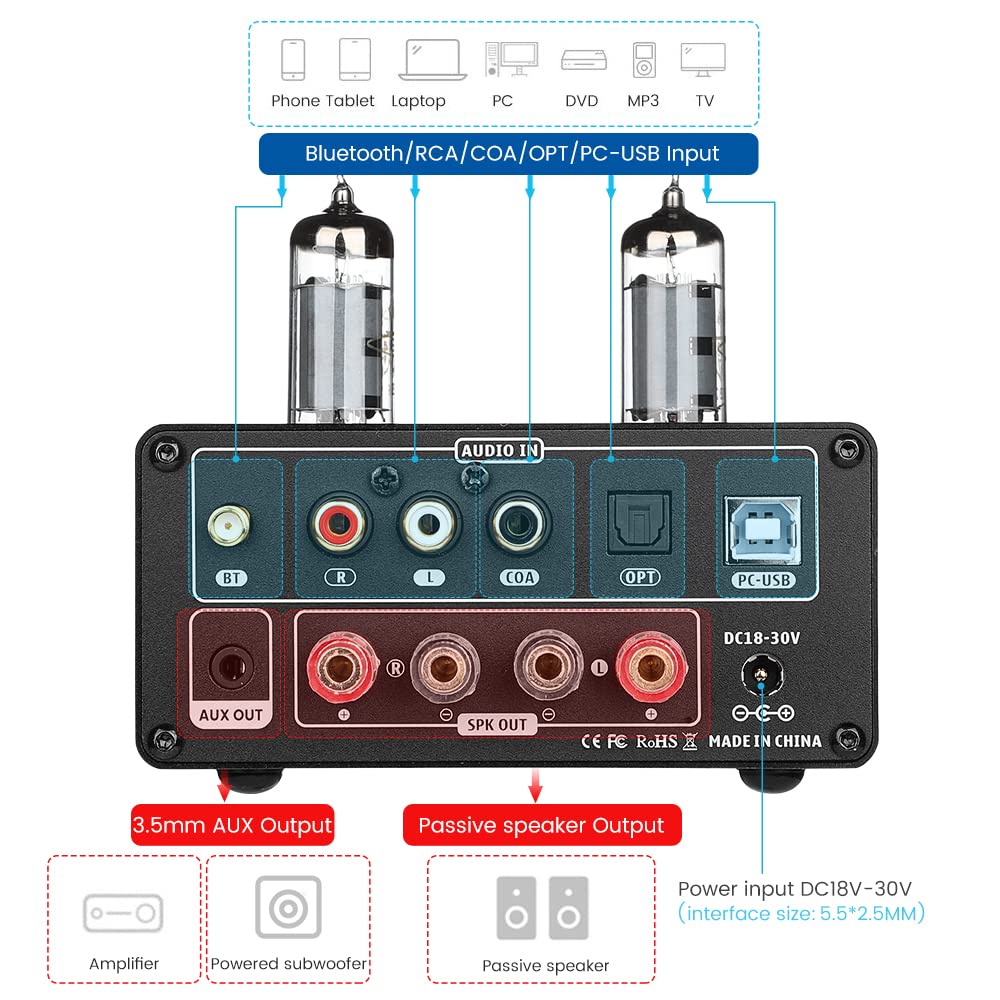
Зображення: Задня частина view of the AIYIMA TUBE T9 amplifier, highlighting the various input and output ports including Bluetooth, RCA, Coaxial, Optical, PC-USB, AUX Out, speaker terminals, and power input.
5. Налаштування
5.1 Встановлення трубки
- Carefully unpack the two 6K4 vacuum tubes.
- Align the pins of each tube with the corresponding holes on the amplifier's tube sockets.
- Gently push the tubes straight down into the sockets until they are firmly seated. Do not force them.
5.2 Підключення динаміків
The TUBE T9 is designed for passive speakers with an impedance of 3-8Ω.
- Підключіть пасивні колонки до Speaker Output (SPK OUT) клем на задній панелі. Переконайтеся в правильній полярності (+ до + та - до -).
- For a 2.1 channel system, connect an active subwoofer to the AUX Out (3.5mm) порт.
5.3 Підключення аудіоджерел
Connect your desired audio sources to the corresponding input ports:
- Bluetooth: Screw the included Bluetooth antenna into the BT порт.
- ПК-USB: Use the provided USB cable to connect your computer to the ПК-USB порт.
- RCA: Connect analog audio devices (e.g., CD player, streamer) using RCA cables to the RCA (Л/П) введення.
- Коаксіальний/Оптичний: Connect digital audio devices (e.g., TV, game console) using Coaxial or Optical cables to the respective inputs.
Важлива примітка: Це amplifier does not have a built-in phono preamplifier. Do not connect a vinyl record player directly to the RCA input without an external phono preamp, as this may result in very low volume or distorted sound.

Image: Diagrams illustrating various connection scenarios for the AIYIMA TUBE T9 amplifier, including connecting to passive speakers, an amplifier, and different audio sources like phones, tablets, laptops, PCs, DVDs, and TVs.

Image: A visual warning indicating that the AIYIMA TUBE T9 amplifier cannot be directly connected to a vinyl record player without an external phono preampліфірник.
5.4 Підключення живлення
- Переконайтеся, що всі аудіопідключення безпечні.
- Connect the DC24V power adapter to the DC18-30V input port on the rear panel.
- Підключіть адаптер живлення до настінної розетки.
6. Інструкція з експлуатації
6.1 Увімкнення/вимкнення живлення
Press and hold the main Volume/Input Knob on the front panel for approximately 1 second to power the amplifier on or off. The VU meter and tubes will illuminate upon power-on.
6.2 Вибір входу
Short press the main Volume/Input Knob to cycle through the available input sources: Bluetooth, PC-USB, RCA, Coaxial, Optical. The corresponding LED indicator on the front panel will light up.
6.3 Регулювання гучності
Rotate the main Volume/Input Knob за годинниковою стрілкою для збільшення гучності та проти годинникової стрілки для зменшення гучності.
6.4 Регулювання тембру
Використовуйте Бас і Високі частоти knobs on the front panel to adjust the low and high frequencies according to your preference. This allows for fine-tuning the sound profile.
6.5 Створення пари Bluetooth
- Select the Bluetooth input using the Volume/Input Knob. The Bluetooth indicator will flash.
- На мобільному пристрої (телефоні, планшеті тощо) увімкніть Bluetooth та виконайте пошук доступних пристроїв.
- Select "AIYIMA TUBE T9" from the list of devices to pair.
- Once paired, the Bluetooth indicator will stop flashing and remain solid. You can now play audio from your device.

Image: A smartphone connected via Bluetooth 5.0 to the AIYIMA TUBE T9 amplifier, demonstrating wireless audio streaming.
6.6 ВУ метр
The integrated VU meter provides a visual representation of the audio output level. Its warm light and dynamic movement add a retro aesthetic to your listening experience. The meter is designed to respond to various volume levels.

Зображення: Крупний план view of the illuminated VU meter on the AIYIMA TUBE T9 amplifier, showing its needle indicating audio levels.
7. Технічне обслуговування
7.1 Заміна трубки
The 6K4 vacuum tubes can be replaced to customize the sound or if they wear out. Compatible tube models include:
- 6J1
- 6J2
- GE5654
- 6J3
- 6J4
- 6J5
- 6Ж1п (6Zh1p)
- 6AK5
To replace tubes:
- Вимкніть amplifier and disconnect it from the power outlet.
- Allow the tubes to cool completely (this may take several minutes).
- Gently pull the existing tubes straight up from their sockets.
- Insert the new compatible tubes, aligning the pins carefully, and push them straight down until seated firmly.
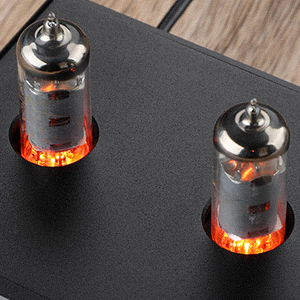
Зображення: Крупний план view of the two 6K4 vacuum tubes installed on the AIYIMA TUBE T9 amplifier, showing their glowing filaments during operation.
7.2 Очищення
Витріть ampПротріть зовнішню частину опалювального приладу м’якою сухою тканиною. Не використовуйте абразивні засоби для чищення або розчинники.
7.3 Вентиляція
Забезпечте достатній потік повітря навколо amplifier to prevent overheating. Do not place objects on top of the unit that could obstruct ventilation.
8. Вирішення проблем
| проблема | Можлива причина | Рішення |
|---|---|---|
| Немає звуку |
|
|
| Спотворений звук |
|
|
| Проблеми з підключенням Bluetooth |
|
|
| Clicking sound after silence | Automatic hibernation mode engaging | The amplifier may enter a hibernation state after a period of no audio signal, producing a soft click. This feature can be disabled using the remote control: press the M1 button on the remote to toggle the hibernation prompt on/off. |
| VU Meter not moving | Very low volume or specific audio characteristics | The VU meter is designed to respond to audio levels. Ensure the volume is sufficiently high for the meter to register movement. This issue has been addressed in updated models to work at various levels. |
9. Технічні характеристики

Image: The AIYIMA TUBE T9 amplifier shown with its physical dimensions and a table summarizing its key specifications.
| Особливість | Специфікація |
|---|---|
| Номер моделі | TUBE T9 |
| Бренд | АЙІМА |
| Інтерфейси введення | Bluetooth 5.0, PC-USB, RCA, Coaxial, Optical |
| Вихідні інтерфейси | Passive Speaker Output, 3.5mm AUX Out (for active subwoofer/ampліфтер) |
| Вихідна потужність | 100W x 2 (at 4Ω load) |
| Імпеданс динаміка | 3-8 Ом |
| АЧХ | 20-20 кГц (±1 дБ) |
| Співвідношення сигнал/шум (S/N) | ≥98 дБ |
| Робочий випtage | DC18V-30V |
| Розміри (Д x Ш x В) | 22 x 22 x 10 см (приблизно 8.66 x 8.66 x 3.94 дюймів) |
| Вага товару | 1 кг (прибл. 2.2 фунта) |
| Сертифікати | CE |
| Країна походження | Китай |
10. Гарантія та підтримка
10.1 Інформація про гарантію
According to the product specifications, there is no explicit warranty provided for this product. Please refer to your retailer's return policy for any issues within the initial purchase period.
10.2 Підтримка клієнтів
For technical assistance or inquiries, please contact the seller or AIYIMA customer support through their official channels. Keep your purchase receipt or order details handy for any support requests.