
вступ
Thank you for choosing the VETEK AF6 4K Video Camera Camcorder. This manual provides comprehensive instructions for the proper setup, operation, and maintenance of your device. Please read this manual thoroughly before using the camcorder to ensure optimal performance and longevity.
Вміст упаковки
Перевірте, чи всі перелічені нижче предмети входять до вашої упаковки:
- 1x VETEK AF6 4K Camcorder
- 1x кабель USB
- 1x кабель HDMI
- 1x Lens Hood
- 1x Fill Light (External LED Light)
- 1x USB зарядний пристрій
- 1x пульт дистанційного керування
- 1 карти SD на 32 ГБ
- 1x Microphone Cable
- 1 зовнішній мікрофон
- 1x Reusable Camera Bag
- 2x Rechargeable Lithium Batteries
- 1x Dual External Battery Charger
- 1x Camera Instruction Manual
- 1x Microphone Instruction Manual
- 1x Handheld Stabilizer

Продукт закінченийview
Familiarize yourself with the main components of your VETEK AF6 camcorder.

Ключові характеристики:
- Роздільна здатність відео 4K: Records videos at 3840*2160.
- 48.0 MP Image Resolution: Captures still images at 7920*5940.
- 3.0-inch 270° Rotatable Touch Screen: Забезпечує гнучкість viewing angles and intuitive control.
- 18-кратне цифрове збільшення: Дозволяє робити знімки віддалених об'єктів ближче.
- З'єднання Wi-Fi: Enables remote control and file transfer via a smartphone app.
- Функція камери ПК: Can be used as a webcam for live streaming and video calls.
- Підтримка зовнішнього мікрофона: Enhances audio quality.
- External Fill Light Support: Improves illumination in low-light conditions.
- Handheld Stabilizer Compatibility: Зменшує тремтіння камери для плавнішої зйомкиtage.
- Special Shooting Modes: Includes Slow Motion and Time-Lapse.
Налаштування
1. Встановлення та зарядка акумулятора
- Open the battery compartment cover on the camcorder.
- Insert a rechargeable lithium battery, ensuring correct polarity.
- Закрийте кришку батарейного відсіку.
- To charge, insert the batteries into the dual external battery charger. Connect the charger to a power source using the provided USB cable and charger. The indicator lights will show charging status.
Примітка: Ensure batteries are fully charged before first use for optimal performance. If indicator lights flicker or do not show a stable charging status, ensure the batteries are correctly seated in the charger and the power connection is stable.
2. Встановлення SD-карти
- Locate the SD card slot on the camcorder.
- Insert the 32GB SD card (included) into the slot with the metal contacts facing the correct direction, until it clicks into place.
- Щоб вийняти, обережно натисніть на SD-карту, доки вона не вискочить.
Важливо: Format the SD card in the camcorder's menu before initial use to ensure compatibility and prevent data corruption.
3. Прикріплення аксесуарів
- Зовнішній мікрофон: Slide the external microphone onto the hot shoe mount on top of the camcorder. Connect the microphone cable to the MIC input port.
- Бленда об'єктива: Attach the lens hood to the front of the camcorder lens by twisting it clockwise until secure. The lens hood helps reduce glare and protects the lens.
- External LED Light: Slide the external fill light onto the hot shoe mount. Ensure it is securely fastened. This light provides additional illumination.
- Ручний стабілізатор: Attach the camcorder to the handheld stabilizer using the screw mount at the bottom of the camcorder. The stabilizer helps maintain steady footage.



Інструкція з експлуатації
1. Увімкнення/вимкнення живлення
Open the LCD screen to power on the camcorder. Close the LCD screen to power off. Alternatively, use the power button located on the device.
2. Базовий запис (відео/фото)
- Перемикання режимів: Use the Mode button to switch between video recording mode and photo capture mode.
- Почати/зупинити запис: In video mode, press the Record button to start recording. Press it again to stop.
- Зробити фото: In photo mode, press the Photo button to capture a still image.

3. Функція масштабування
Use the T (Telephoto) and W (Wide) buttons on the camcorder or the zoom controls on the remote control to adjust the 18X digital zoom.
4. Робота з сенсорним екраном
The 3.0-inch LCD screen is rotatable up to 270 degrees and supports touch input. Navigate menus, adjust settings, and review фуtage by tapping or swiping on the screen.
5. Wi-Fi Connection & App
Download the specified app (refer to the camera's manual for the app name) on your smartphone or tablet. Enable Wi-Fi on the camcorder and connect your mobile device to the camcorder's Wi-Fi network (SSID: 4K_WIFI1079, Password: 12345678). This allows for remote viewing, image capture, video shooting, and sharing to social media.

6. PC Camera Mode (Webcam Function)
Connect the camcorder to your PC using the USB cable. Select "PC CAM" mode on the camcorder. Your computer will recognize the camcorder as a webcam, enabling its use for video chatting and live streaming on platforms like YouTube or Facebook.

7. Особливості
- Уповільнений рух: Access this mode through the camcorder's menu to record videos at a higher frame rate, allowing for slow-motion playback.
- Фотозйомка із затримкою: Select this option in the menu to capture a series of still images at set intervals, which can then be compiled into a time-lapse video.
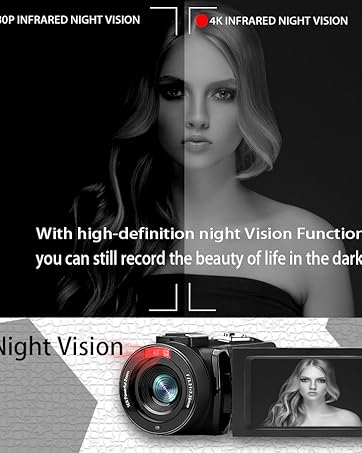
- Нічне бачення: The camcorder features an infrared night vision function, enabling recording in low-light or dark environments. Activate this feature via the menu.


8. Пульт дистанційного керування
The included remote control allows you to operate the camcorder from a distance, controlling functions such as recording, photo capture, and zoom without touching the device.

Технічне обслуговування
- Прибирання: Use a soft, dry cloth to clean the camcorder body. For the lens, use a specialized lens cleaning cloth and solution. Avoid abrasive materials or harsh chemicals.
- Зберігання: Зберігайте відеокамеру в прохолодному, сухому місці, подалі від прямих сонячних променів та екстремальних температур. Виймайте батареї, якщо зберігаєте її протягом тривалого часу.
- Водонепроникність: This camcorder is не водостійкийУникайте впливу води або високої вологості.
Усунення несправностей
| проблема | Можлива причина | Рішення |
|---|---|---|
| Відеокамера не вмикається. | Батарея розряджена або неправильно встановлена. | Переконайтеся, що батареї повністю заряджені та правильно вставлені. |
| Battery charger indicator lights flicker. | Poor contact between battery and charger, or unstable power supply. | Re-seat batteries firmly in the charger. Check USB cable and power adapter connection. Try a different USB port or power source. |
| Не можна записувати відео або робити фотографії. | SD card is full, not inserted, or corrupted. Incorrect mode selected. | Check SD card status, ensure it's inserted and has free space. Format the SD card if necessary (this will erase all data). Verify camcorder is in the correct mode. |
| Погана якість відео/фото. | Lens is dirty. Insufficient lighting. Incorrect settings. | Clean the lens. Use the external fill light or shoot in better-lit conditions. Adjust resolution and other settings in the menu. |
| Проблеми з підключенням до Wi-Fi. | Incorrect Wi-Fi password or app not installed. | Ensure correct SSID (4K_WIFI1079) and password (12345678). Download and install the correct app. |
Технічні характеристики
- Бренд: ВЕТЕК
- Номер моделі: AF6
- Роздільна здатність захоплення відео: 4K (3840*2160)
- Ефективна роздільна здатність фото: 48.0 Мп (7920*5940)
- Цифрове збільшення: 18X
- Розмір екрана: 3.0 дюймів
- Тип дисплея: 270° Rotatable Touch Screen
- Тип флеш-пам'яті: SD (supports up to 128GB, 32GB included)
- Формат запису відео: MP4
- Підтримуваний формат аудіо: MP4
- Технологія підключення: USB, HDMI, Wi-Fi
- Сумісність з операційною системою: Windows XP/7/8/10, MAC
- Стабілізація зображення: цифровий
- Рівень водонепроникності: Не водостійкий
- Кількість батарей: 2 літій-полімерна батарея (включена)
- Розміри предмета (Д x Ш x В): 3.9" Г x 6.2" Ш x 7.8" В
Гарантія та підтримка
For warranty information and technical support, please refer to the contact details provided in the separate warranty card or visit the official VETEK webсайт. Якщо у вас виникнуть будь-які проблеми, не розглянуті в цьому посібнику, зверніться за допомогою до служби підтримки клієнтів.