
1. Вступ
This manual provides detailed instructions for the setup, operation, maintenance, and troubleshooting of your uRage Exodus 700 Semi-Mechanical Gaming Keyboard. Please read this manual thoroughly before using the product to ensure optimal performance and longevity.
2. Вміст упаковки
Перевірте наявність усіх елементів в упаковці:
- uRage Exodus 700 Semi-Mechanical Gaming Keyboard
- Посібник користувача (цей документ)
- Гарантійний талон
3. Налаштування
3.1 Підключення клавіатури
The uRage Exodus 700 keyboard connects via a wired USB-A connection. Follow these steps to connect your keyboard:
- Знайдіть доступний порт USB-A на вашому комп’ютері.
- Plug the USB-A connector of the keyboard cable into the USB-A port on your computer.
- The operating system (Windows 11/10/8/7) will automatically detect and install the necessary drivers.
3.2 Встановлення програмного забезпечення (необов'язково)
For advanced customization, including macro programming and lighting effects, dedicated gaming software is available. Refer to the official uRage website for the latest software download and installation instructions.

Image 1: uRage Exodus 700 Semi-Mechanical Gaming Keyboard connected and ready for use.
4. Робота з клавіатурою
4.1 Основні характеристики
- Semi-Mechanical Keys: Provides a tactile typing experience with fast response times (1 ms) and a key travel of 2.5 mm.
- Анти-привиди: Ensures that multiple key presses are registered simultaneously, crucial for gaming. Up to 24 keys can be registered at once.
- RGB освітлення: Customizable backlighting with various effects and colors.
- WIN Lock-Function: Disables the Windows key to prevent accidental interruptions during gameplay.
- Вбудована підставка для зап'ястя: Designed for enhanced comfort during extended use.
4.2 Керування RGB-підсвічуванням
The keyboard features integrated RGB lighting. Specific key combinations (often involving the 'Fn' key) or the dedicated gaming software can be used to:
- Turn the lighting on or off.
- Cycle through different lighting modes and effects.
- Відрегулюйте рівні яскравості.
Refer to the keyboard's function key legends for specific lighting control shortcuts.

Image 2: Keyboard in use, demonstrating RGB lighting.
4.3 Macro and Multimedia Functions
The keyboard includes 4 dedicated macro buttons (G1-G4) and additional multimedia functions. These can be programmed and controlled:
- Програмування макросів: Use the dedicated gaming software to record and assign complex key sequences to the macro buttons.
- Елементи керування мультимедіа: Access functions like volume control, play/pause, and track skipping via function key combinations.
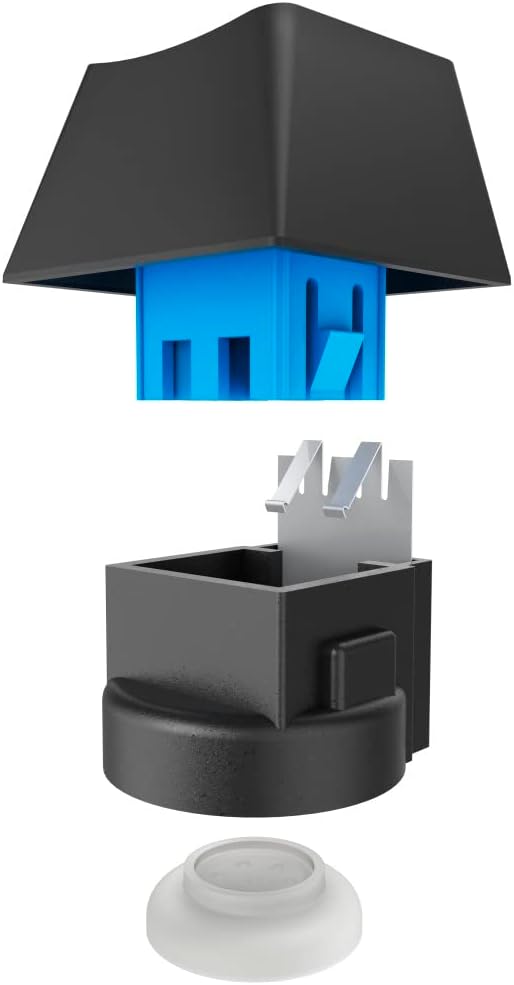
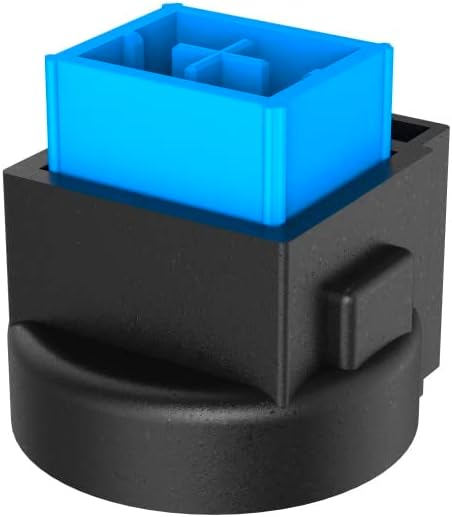
Image 3: Exploded and assembled views of the semi-mechanical key structure.
5. Технічне обслуговування
Правильне обслуговування забезпечує довговічність та продуктивність вашої клавіатури.
5.1 Очищення
- Від’єднайте клавіатуру від комп’ютера перед чищенням.
- Використовуйте м’яку, суху тканину для протирання поверхні клавіатури.
- Для видалення пилу та сміття між клавішами використовуйте стиснене повітря.
- Уникайте використання агресивних хімікатів, абразивних засобів для чищення або надмірної вологості.
5.2 Зберігання
Коли клавіатура не використовується, зберігайте її в чистому, сухому місці, подалі від прямих сонячних променів та екстремальних температур.
6. Вирішення проблем
If you encounter issues with your uRage Exodus 700 keyboard, refer to the following common solutions:
- Клавіатура не реагує:
- Переконайтеся, що USB-кабель надійно підключено як до клавіатури, так і до комп’ютера.
- Спробуйте підключити клавіатуру до іншого USB-порту.
- Перезавантажте комп'ютер.
- Ключі не реєструються:
- Перевірте наявність будь-яких фізичних перешкод під ковпачками клавіш.
- Ensure the keyboard drivers are correctly installed (check Device Manager on Windows).
- RGB-підсвічування не працює:
- Verify that the lighting is not turned off via keyboard shortcuts.
- Check the gaming software settings if installed.
- Макрофункції не працюють:
- Ensure the gaming software is running and macros are correctly configured.
- Update the gaming software to the latest version.
If problems persist, contact uRage customer support for further assistance.
7. Технічні характеристики
| Особливість | Специфікація |
|---|---|
| Назва моделі | Вихід 700 |
| Номер моделі | ham_n8_U8186011 |
| Розкладка клавіатури | QWERTY (англійська) |
| Ключові технології | Semi-Mechanical |
| Кількість клавіш | 114 |
| Rollover Buttons | До 24 |
| Час відгуку | 1 мс |
| Термін служби ключа | 10 Million Attacks |
| Work Travel | 2.5 мм |
| Підключення | Дротовий USB-A |
| Освітлення | Кольори RGB |
| Сумісна ОС | Windows 11/10/8/7 |
| Number of Macro Buttons | 4 |
| Колір | чорний |
| матеріал | пластик |
| Довжина кабелю | 180 см |
| Розміри (Ш x В x Г) | 47 см х 3.5 см х 19 см |
| вага | 885 г |
8. Гарантія та підтримка
8.1 Гарантія виробника
The uRage Exodus 700 Semi-Mechanical Gaming Keyboard comes with a Гарантія від виробника 5 рікБудь ласка, збережіть чек про покупку для гарантійного обслуговування. Гарантія поширюється на дефекти матеріалів та виготовлення за умов нормального використання.
8.2 Підтримка клієнтів
For technical support, warranty claims, or further inquiries, please visit the official uRage website or contact their customer service department. Contact information can typically be found on the warranty card included in your package or on the brand's official webсайт.