
UNITOPSCI A2878
UNITOPSCI A2878 Double Din Car Stereo User Manual
Модель: А2878
1. Вступ
This manual provides instructions for the installation, operation, and maintenance of your UNITOPSCI A2878 Double Din Car Stereo. This unit features a 7-inch touchscreen, Apple CarPlay, Android Auto, Bluetooth connectivity, FM radio, support for a backup camera, mirror link functionality, and dual USB ports.
Будь ласка, уважно прочитайте цю інструкцію перед використанням виробу, щоб забезпечити його належну роботу та запобігти пошкодженням.
2. Вміст упаковки
Перевірте, чи всі перелічені нижче предмети входять до вашої упаковки:
- Головний головний пристрій
- Резервна камера
- Зовнішній мікрофон
- Dual USB Adapter
- Кабель живлення
- Посібник користувача
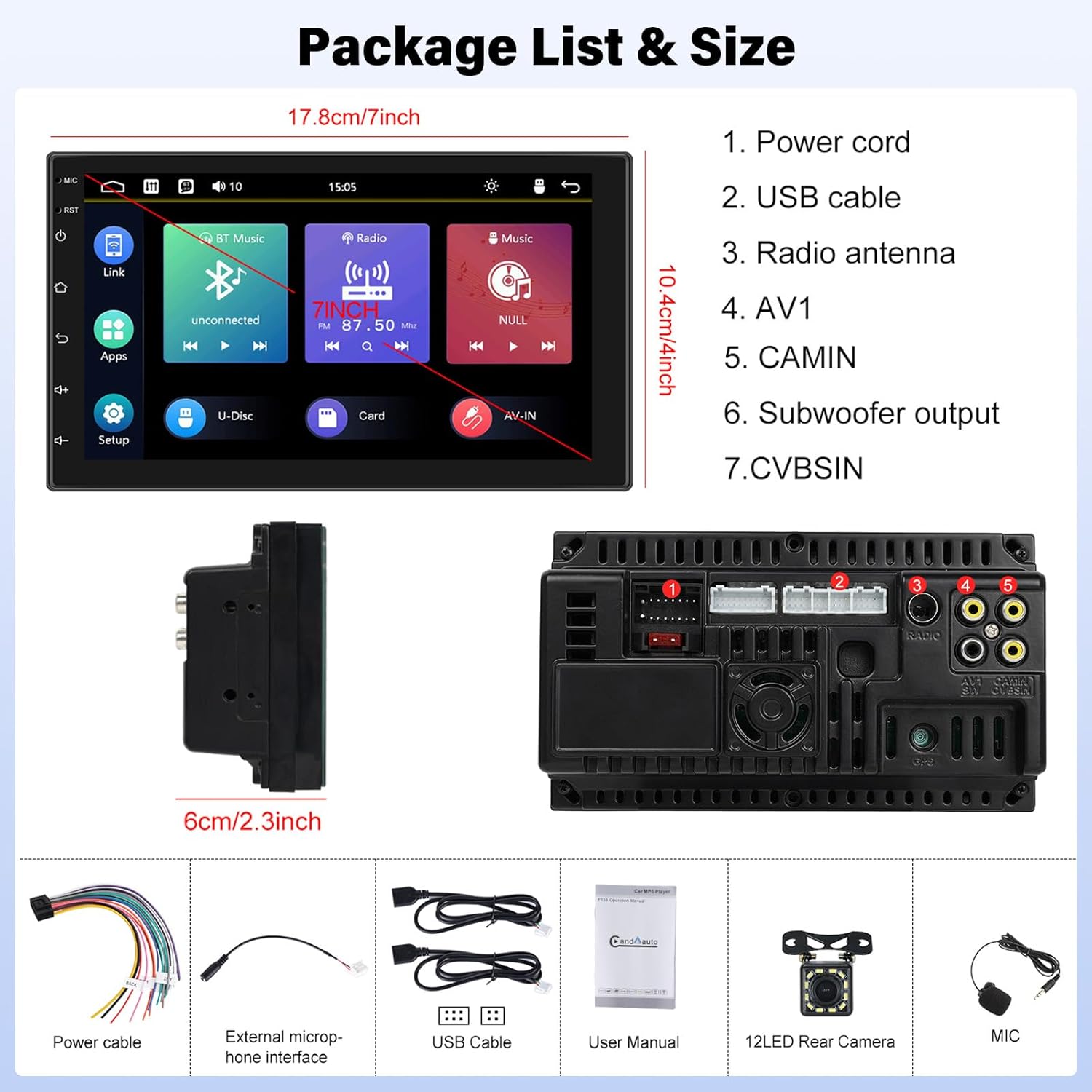
Image: Contents of the UNITOPSCI A2878 package, showing the main unit, wiring, and accessories.
3. Продукт закінчивсяview
The UNITOPSCI A2878 is a double din car stereo featuring a 7-inch high-definition touchscreen. The front panel includes essential controls and the display for various functions. The rear panel provides all necessary connection ports for power, speakers, USB devices, and external accessories like the backup camera.

Зображення: спереду view of the UNITOPSCI A2878 car stereo with its 7-inch touchscreen interface.

Image: Rear panel connections of the UNITOPSCI A2878 head unit, indicating ports for power, USB, radio antenna, AV, camera, subwoofer, and CVBS.
4. Налаштування та встановлення
Proper installation is crucial for the performance and safety of your car stereo. It is recommended that installation be performed by a qualified professional.
4.1 Підключення проводів
Зверніться до схеми підключення, що додається до вашого пристрою, для отримання інформації про конкретні з'єднання. Основні з'єднання включають:
- Шнур живлення: Connect to the vehicle's power supply (constant 12V, accessory 12V, and ground).
- USB кабелі: Connect the provided USB cables for CarPlay/Android Auto and media playback.
- Радіоантена: Connect your vehicle's FM/AM antenna.
- CAMIN (Camera Input): Connect the backup camera video signal.
- Вихід сабвуфера: Для підключення зовнішнього сабвуфера.
- Зовнішній мікрофон: Підключіть зовнішній мікрофон для покращення якості дзвінків.
4.2 Встановлення камери заднього виду
Install the backup camera at the rear of your vehicle. Connect its video output to the CAMIN port on the head unit and its power to the vehicle's reverse light circuit so it activates automatically when reversing.
5. Інструкція з експлуатації
5.1 CarPlay та Android Auto
Connect your smartphone to the stereo via a USB cable to activate Apple CarPlay or Android Auto. This allows access to your phone's navigation, music, calls, and other compatible apps directly on the stereo's screen, controlled by voice or touch.

Image: Wired connection setup for CarPlay and Android Auto.

Image: CarPlay and Android Auto interfaces displayed on the stereo screen.
5.2 Дзеркальне посилання
The mirror link function allows you to project your smartphone's screen (both iOS and Android) onto the stereo display via a USB cable. This enables viewing videos, navigation maps, and images from your phone on the larger screen.

Image: Mirror Link functionality with a smartphone connected to the stereo.
5.3 Bluetooth Hands-free & FM Radio
Bluetooth: Pair your smartphone with the stereo via Bluetooth for hands-free calling and wireless audio streaming. The built-in microphone facilitates clear communication. You can access your phone book and dial directly from the stereo.
FM-радіо: The unit includes an FM tuner with 18 preset stations. Tune into your favorite radio programs, music, and traffic updates.

Image: FM Radio interface and Bluetooth hands-free call screen.
5.4 Вхід для камери заднього виду
When the vehicle is shifted into reverse, the stereo automatically displays the clear image from the connected backup camera, assisting with safe parking maneuvers.
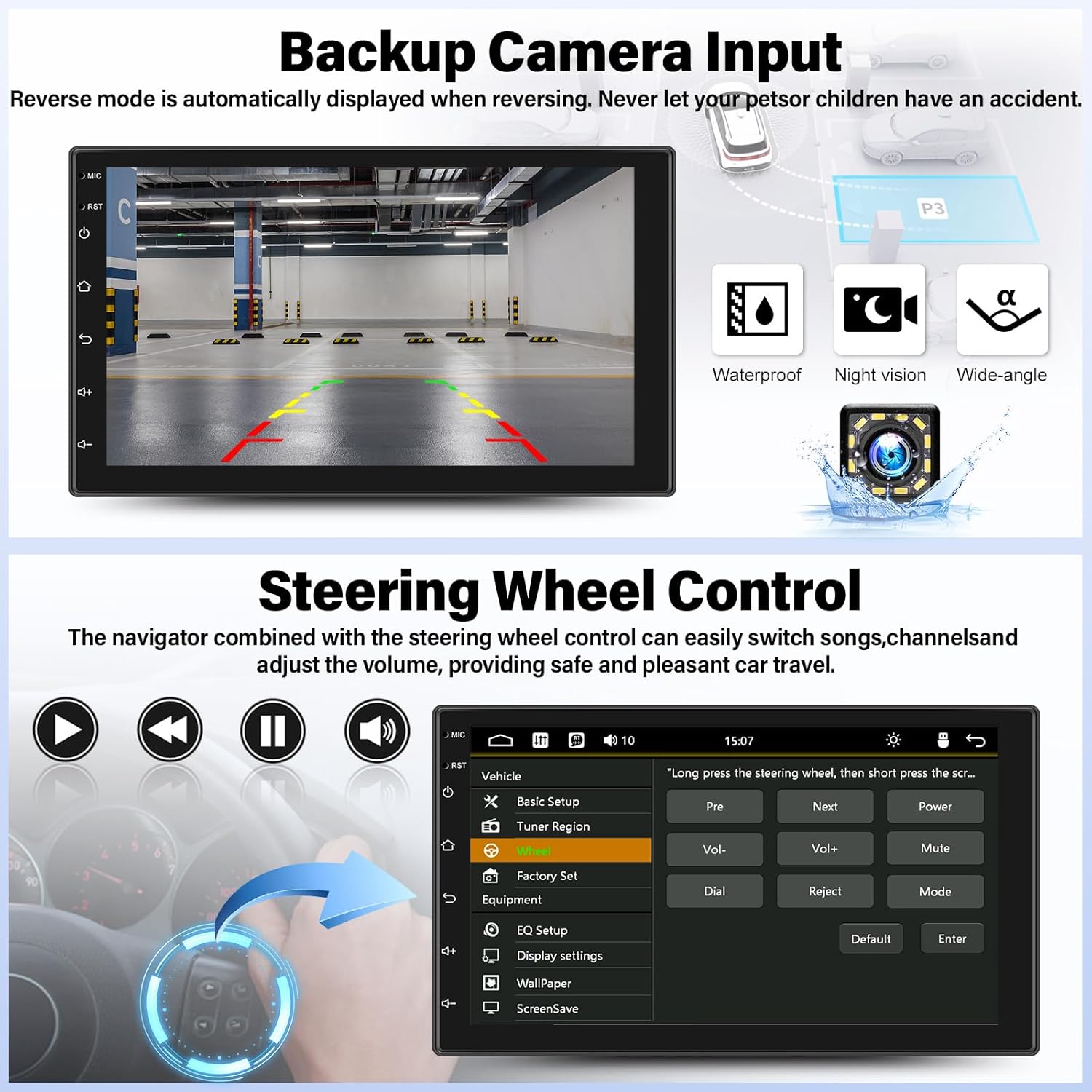
Image: Backup camera display on the stereo screen.
5.5 Керування на кермі (SWC)
The unit supports steering wheel control, allowing you to manage functions such as volume adjustment, track skipping, and mode switching directly from your vehicle's steering wheel buttons (if compatible and wired correctly). This enhances convenience and safety while driving.
5.6 Відтворення та заряджання через USB
The two USB adapter ports allow for media playback from a USB drive (audio/video files) and charging of compatible devices.

Image: USB media playback and charging capabilities.
5.7 Audio Equalizer (EQ)
Adjust the audio output using the built-in equalizer. You can select from various preset audio styles (e.g., Classic, Pop, Rock, Jazz) or customize settings to match your preferences and vehicle acoustics. The unit also supports subwoofer output for enhanced bass.

Image: Audio Equalizer interface for sound customization.
6. Технічне обслуговування
Щоб забезпечити довговічність та оптимальну роботу вашої автомобільної стереосистеми, дотримуйтесь цих правил технічного обслуговування:
- Прибирання: Використовуйте м’яку суху тканину для очищення сенсорного екрана та зовнішньої частини пристрою. Уникайте абразивних засобів для чищення або розчинників.
- температура: Уникайте тривалого перебування пристрою під екстремальними температурами, прямими сонячними променями або високою вологістю.
- Підключення: Періодично перевіряйте всі з'єднання проводів, щоб переконатися в їх надійності.
7. Вирішення проблем
If you encounter issues with your UNITOPSCI A2878 car stereo, refer to the following common problems and solutions:
- Немає живлення: Check the power cable connections (constant 12V, accessory 12V, ground). Ensure the vehicle's fuse for the stereo is not blown.
- Немає звуку: Verify speaker connections. Check volume levels and audio settings (EQ). Ensure the mute function is not activated.
- CarPlay/Android Auto не підключається: Ensure your phone is connected via a compatible USB cable. Try a different USB port or cable. Check phone settings for CarPlay/Android Auto permissions.
- Проблеми зі сполученням Bluetooth: Ensure Bluetooth is enabled on both the stereo and your phone. Delete previous pairings and try pairing again.
- Не відображається камера заднього виду: Check the camera's power and video signal connections. Ensure the camera is properly installed and wired to the reverse light trigger.
- Сенсорний екран не реагує: Try resetting the unit using the reset button (if available, typically a small pinhole).
Якщо проблеми не зникнуть, зверніться по допомогу до служби підтримки клієнтів.
8. Технічні характеристики
| Особливість | Специфікація |
|---|---|
| Номер моделі | A2878 |
| Розмір дисплея | 7 дюймів |
| Роздільна здатність дисплея | 1024x600 |
| Розміри продукту | 7.01 x 1.77 x 4.02 дюймів |
| Вага товару | 2.4 фунта (1.09 кілограма) |
| Технологія підключення | Bluetooth, USB, RCA |
| Тип контролера | Android, iOS (via CarPlay/Android Auto) |
| Режим аудіовиходу | Стерео |
| Конфігурація каналу об’ємного звуку | 2.0 |
| Підтримка кодування відео | H.264, H.263 |
9. Гарантія та підтримка
UNITOPSCI provides comprehensive customer support for its products:
- Заміна: Доступно протягом 24 місяців з моменту покупки.
- Технічна підтримка: Довічна післяпродажна консультація та технічна підтримка.
- Повернення: 60-денна політика повернення.
For any inquiries or support, please contact UNITOPSCI customer service at: UNITOPSCI@126.com
Пов'язані документиA2878


Ask a question about this manual
Ask about setup, troubleshooting, compatibility, parts, safety, or missing instructions. Manuals+ will review the question and use this page’s manual context to help answer it.