
1. Вступ
Thank you for choosing the Greadio MD-T26 Portable AM/FM/SW Radio. This manual provides detailed instructions for the proper setup, operation, and maintenance of your radio. Please read this manual thoroughly before use to ensure optimal performance and longevity of your device.
The Greadio MD-T26 is a versatile portable radio featuring AM, FM, and Shortwave (SW) bands, an LCD display for clear frequency and time viewing, and dual power options for both indoor and outdoor use. It is designed for ease of use with large, accessible controls and a built-in speaker for clear audio.

Малюнок 1: Спереду view of the Greadio MD-T26 Portable AM/FM/SW Radio.
2. Особливості продукту
- Багатодіапазонний прийом: Receives AM, FM, and Shortwave (SW) frequencies.
- РК-дисплей: Clear digital display for frequency and time settings.
- Подвійні варіанти живлення: Operates via AC power or 4 x D cell batteries (not included).
- Високоякісний динамік: Integrated 2W speaker for clear sound output.
- Контроль тону: Adjustable tone settings (Low/High) for personalized audio.
- Роз'єм для навушників: 3.5mm stereo earphone jack for private listening.
- Портативний дизайн: Equipped with a sturdy handle for easy transport.
3. Налаштування
3.1 Увімкнення радіо
The Greadio MD-T26 radio offers two methods for power supply:
- Блок живлення змінного струму: For indoor use, connect the included AC power cable to the radio's AC input jack and then plug it into a standard wall outlet.
- Джерело живлення від батареї: For portable use, insert four (4) D cell batteries (not included) into the battery compartment located on the back of the radio. Ensure correct polarity (+/-) as indicated inside the compartment.
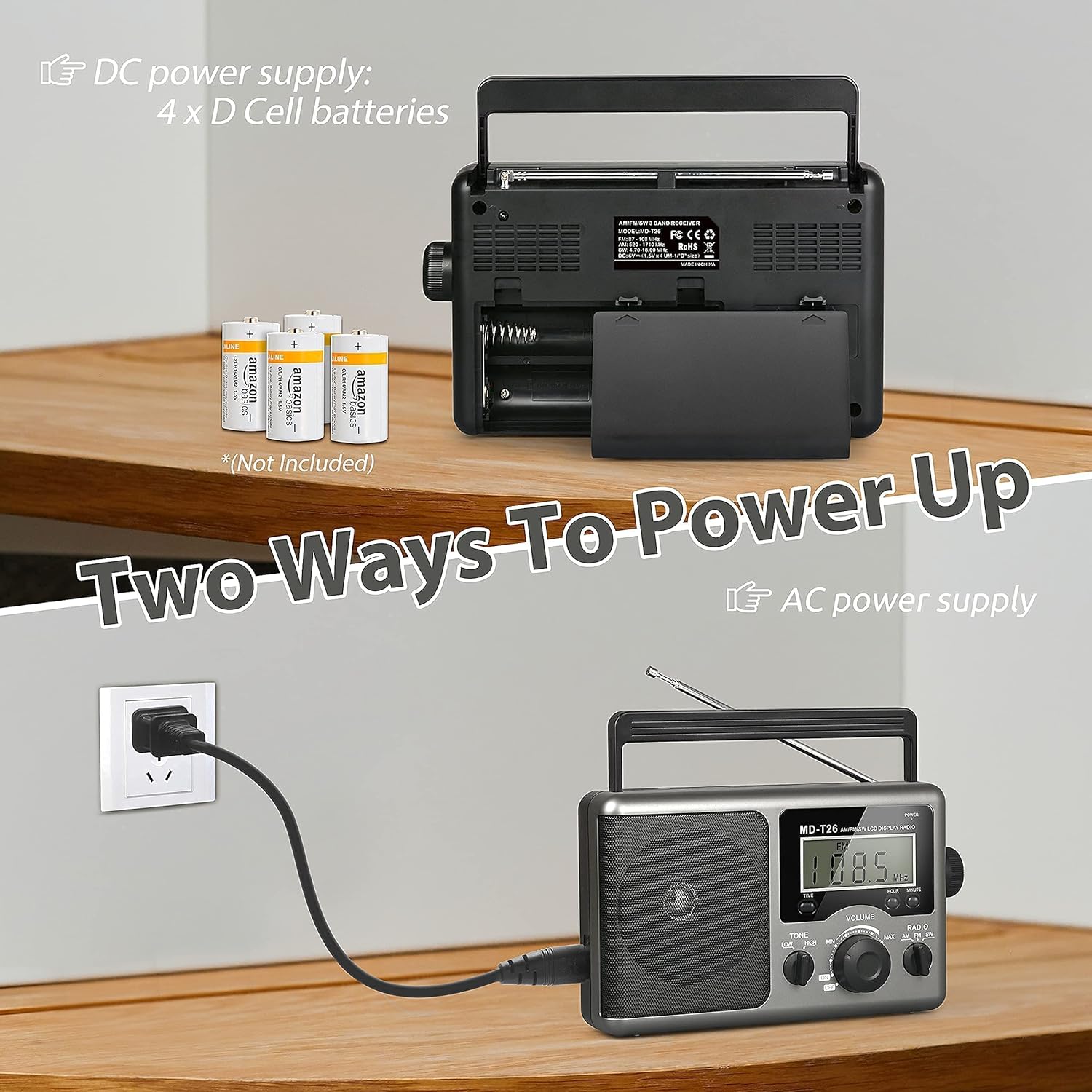
Figure 2: Illustration of AC power connection and battery compartment for D cell batteries.
3.2 Регулювання антени
For optimal reception, adjust the antenna as follows:
- FM/SW Reception: Extend the telescopic antenna fully and adjust its angle for the clearest signal.
- Ранковий прийом: The radio uses a built-in ferrite rod antenna for AM. Rotate the entire radio unit to find the strongest signal.
4. Інструкція з експлуатації
4.1 Контроль надview

Малюнок 3: Детально view of the radio's control panel.
- Кнопка живлення: Located on the top right, press to turn the radio ON/OFF.
- Ручка налаштування: Located on the right side, rotate to select radio stations.
- Регулятор гучності: Located on the front panel, rotate to adjust the sound level.
- RADIO Band Selector: Switch between AM, FM, and SW bands.
- Перемикач TONE: Select between LOW and HIGH tone settings.
- TIME/HOUR/MINUTE Buttons: Used for setting the time on the LCD display.
4.2 Turning On and Selecting a Band
- Натисніть ПОТУЖНІСТЬ button to turn on the radio. The LCD display will illuminate.
- Використовуйте РАДІО band selector switch to choose your desired band: AM, FM, or SW.
4.3 Налаштування станції
Після вибору діапазону повільно обертайте ТЮНІНГ knob on the right side of the radio. Observe the frequency displayed on the LCD screen. Stop rotating when you hear your desired station clearly.
4.4 Регулювання гучності та тону
- обсяг: Обертайте ОБ'ЄМ knob on the front panel clockwise to increase volume and counter-clockwise to decrease it.
- Тон: Використовуйте ТОН switch to select between 'LOW' for a warmer sound or 'HIGH' for a brighter sound, according to your preference.
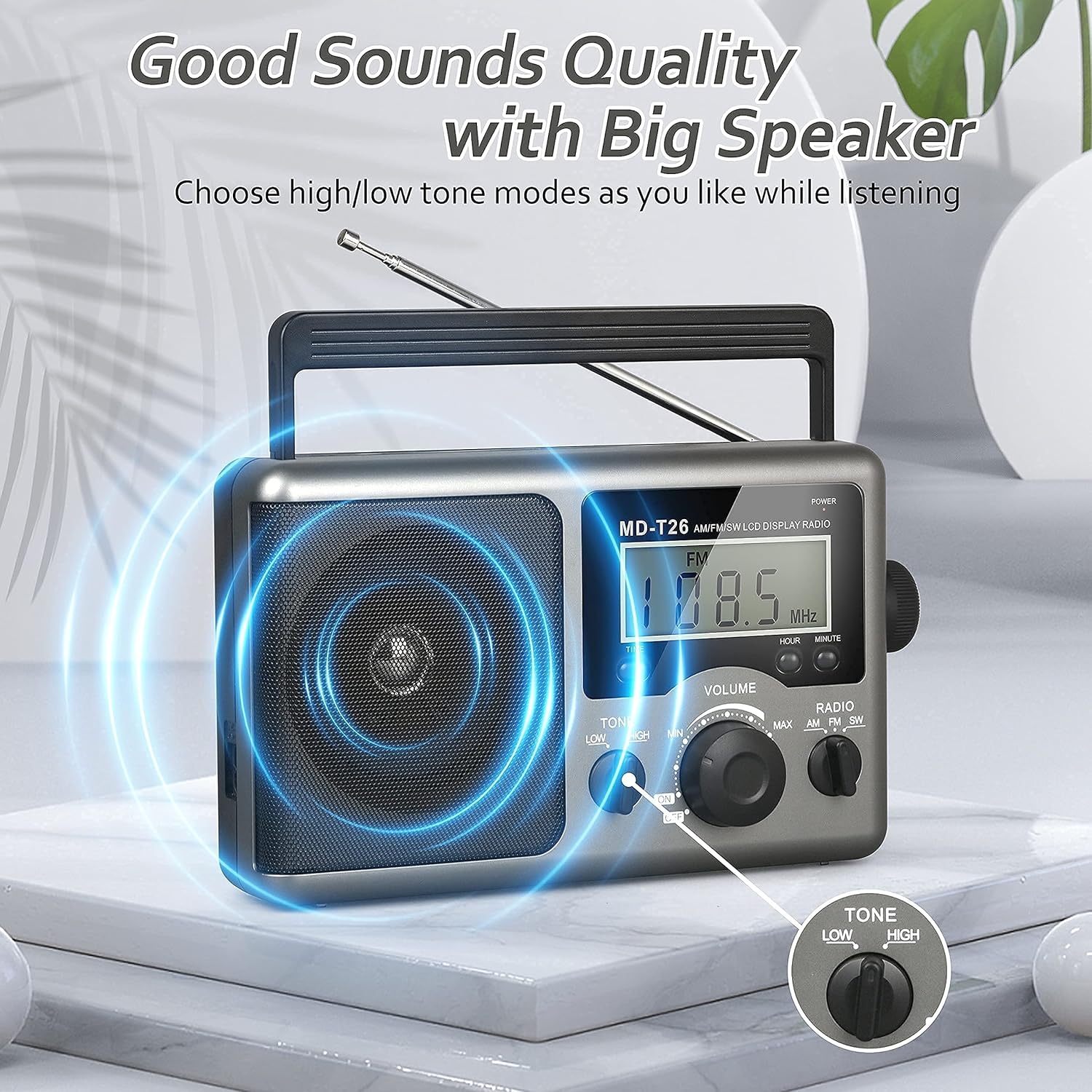
Figure 4: Speaker and Tone control detail.
4.5 Встановлення часу
The LCD display can also show the current time. To set the time:
- Натисніть ЧАС button once to enter time setting mode.
- Використовуйте ГОДИНА кнопку для налаштування години.
- Використовуйте ХВИЛИНА кнопку для налаштування хвилин.
- The time system is 24-hour format.
4.6 Using the Earphone Jack
For private listening, plug any standard 3.5mm stereo earphones (not included) into the Гніздо для підключення телефону located on the side of the radio. The internal speaker will automatically mute when earphones are connected.
5. Технічне обслуговування
- Прибирання: Протріть зовнішню частину радіоприймача м’якою сухою тканиною. Не використовуйте абразивні засоби для чищення або розчинники.
- Догляд за акумулятором: If the radio will not be used for an extended period, remove the D cell batteries to prevent leakage and damage.
- Зберігання: Зберігайте радіоприймач у прохолодному, сухому місці, подалі від прямих сонячних променів та екстремальних температур.
- Водонепроникність: Це радіо не водостійкий. Avoid exposure to rain, moisture, or splashing water.
6. Вирішення проблем
| проблема | Можлива причина | Рішення |
|---|---|---|
| Немає живлення | AC cable not connected, batteries depleted or incorrectly inserted. | Перевірте підключення кабелю змінного струму. Замініть батарейки або переконайтеся в правильній полярності. |
| Поганий прийом / Статичні перешкоди | Antenna not extended/adjusted, weak signal area, interference. | Extend and adjust telescopic antenna (FM/SW). Rotate radio for AM. Move to an area with better signal. Avoid sources of electronic interference. |
| Немає звуку з динаміка | Гучність занадто низька, підключено навушники. | Increase volume. Disconnect earphones if not intended for private listening. |
| РК-дисплей не працює | Проблема з живленням, внутрішня несправність. | Перевірте блок живлення. Якщо проблема не зникає, зверніться до служби підтримки клієнтів. |
7. Технічні характеристики
| Особливість | Деталь |
|---|---|
| Бренд | Greadio |
| Номер моделі | MD-T26 |
| Технологія підключення | Auxiliary (for earphone) |
| Технологія тюнера | AM, FM, Пд-Зх |
| Джерело живлення | AC Power, 4 x D Cell Batteries |
| Сумісні пристрої | Навушники |
| Тип дисплея | ЖК |
| Апаратний інтерфейс | 3.5mm Audio Jack |
| Рівень водонепроникності | Не водостійкий |
8. Гарантія та підтримка
8.1 Інформація про гарантію
Greadio provides a Гарантія 12 місяців for this product, covering manufacturing defects from the date of purchase. Additionally, a 30-денна гарантія повернення грошей пропонується.
Ця гарантія не поширюється на пошкодження, спричинені неправильним використанням, нещасним випадком, несанкціонованою модифікацією або нормальним зносом.
8.2 Підтримка клієнтів
For any questions, technical assistance, or warranty claims, please contact Greadio customer service. We offer Цілодобове обслуговування клієнтів щоб допомогти вам.
Будь ласка, зверніться до упаковки продукту або до інструкцій продавця. webсайт для отримання найактуальнішої контактної інформації.