
1. Вступ
This manual provides essential instructions for the installation, operation, and maintenance of your Hikvision 8MP AcuSense WDR Mini Bullet Network Camera, model DS-2CD2083G2-IU. Please read this manual thoroughly before using the product and retain it for future reference.
Продукт закінченийview
The Hikvision DS-2CD2083G2-IU is a high-performance 8-megapixel (4K) network camera designed for advanced surveillance. It features AcuSense technology for accurate human and vehicle target classification, Wide Dynamic Range (WDR) for clear imaging against strong backlight, and a fixed 2.8mm lens for a wide field of view. Its IP67 rating ensures robust outdoor performance, and the integrated microphone allows for audio monitoring.
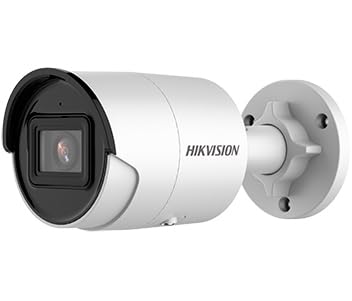
Figure 1: Hikvision 8MP AcuSense WDR Mini Bullet Network Camera (DS-2CD2083G2-IU)
This image displays the Hikvision 8MP AcuSense WDR Mini Bullet Network Camera, highlighting its compact bullet-style design suitable for various installation environments.
Ключові характеристики
- 8 Megapixel (4K) Resolution: Delivers high-quality, detailed video.
- AcuSense Technology: Reduces false alarms by accurately classifying human and vehicle targets.
- Широкий динамічний діапазон (WDR): Ensures clear images even in scenes with strong contrast.
- Fixed 2.8mm Lens: Забезпечує широкий viewкут.
- Інфрачервоне (ІЧ) підсвічування: Night vision up to 40 meters.
- Клас захисту від атмосферних впливів IP67: Suitable for outdoor use in various weather conditions.
- Вбудований мікрофон: Enables audio monitoring.
- Вбудований зчитувач карток: Supports local storage (microSD card not included).
2. Інформація про безпеку
Будь ласка, дотримуйтесь наступних запобіжних заходів, щоб запобігти травмуванню або пошкодженню виробу:
- Ensure the power supply meets the camera's requirements (6.5 Watts).
- Не піддавайте камеру впливу екстремальних температур, вологості або агресивного середовища.
- Avoid pointing the lens directly at strong light sources, as this may damage the sensor.
- Встановлення має виконуватися кваліфікованим персоналом відповідно до місцевих електротехнічних норм.
- Використовуйте лише аксесуари, зазначені виробником.
- Clean the camera lens with a soft, dry cloth. Avoid harsh chemicals.
3. Налаштування та встановлення
3.1 Розпакування
Carefully unpack the camera and check for any signs of damage. Ensure all components are present. (Typical components include: camera unit, mounting template, screws, waterproof connector, quick start guide).
3.2 Фізичне встановлення
The camera is designed for ceiling mounting. Select a suitable location that provides the desired field of view and is within reach of network and power cables. Due to its IP67 rating, it is suitable for outdoor environments.
- Use the provided mounting template to mark drill holes on the ceiling.
- Drill the necessary holes and insert wall plugs if required.
- Закріпіть основу камери на монтажній поверхні за допомогою гвинтів, що додаються.
- Відрегулюйте кут камери для оптимального покриття.
3.3 Підключення до мережі та живлення
This is an IP network camera. It requires a network connection and power. Power over Ethernet (PoE) is typically supported, simplifying installation by delivering both power and data over a single Ethernet cable. If PoE is not used, a separate 12V DC power adapter (not included) will be required.
- Connect an Ethernet cable from your network switch/router to the camera's RJ45 port. Use the waterproof connector for outdoor installations.
- If not using PoE, connect a 12V DC power adapter to the camera's power input.
- Після підключення камера увімкнеться. Зачекайте кілька хвилин, поки вона завантажиться.
3.4 Початкова конфігурація
Доступ до камери web інтерфейс через a web browser using its default IP address (refer to the quick start guide or use Hikvision's SADP tool to discover the IP address). You will be prompted to set a strong password for security. Follow the on-screen instructions to configure network settings, date/time, and other basic parameters.
4. Інструкція з експлуатації
4.1 Живий View і Запис
After initial setup, you can view the live feed from the camera through its web interface, a Network Video Recorder (NVR), or Hikvision's client software (e.g., iVMS-4200) or mobile app (Hik-Connect). Configure recording schedules and methods (continuous, motion-triggered) via the camera's settings or NVR.
4.2 AcuSense Smart Features
The AcuSense technology allows the camera to distinguish between humans, vehicles, and other moving objects, significantly reducing false alarms caused by animals, rain, or falling leaves. Configure these detection rules in the camera's event settings to receive more accurate alerts.
- Виявлення руху 2.0: Set up detection zones and sensitivity for human and vehicle events.
- Виявлення вторгнень: Define virtual boundaries, and the camera will trigger an alarm if a human or vehicle crosses them.
- Виявлення перетину лінії: Similar to intrusion, but for a specific line.
4.3 Широкий динамічний діапазон (WDR)
WDR compensates for extreme lighting conditions, such as strong backlight, to ensure that both bright and dark areas of the image are clearly visible. This feature is typically enabled by default but can be adjusted in the image settings.
4.4 Infrared (IR) Night Vision
The camera automatically switches to IR mode in low-light conditions, providing clear black-and-white video up to 40 meters. Ensure no obstructions block the IR LEDs for optimal night vision performance.
4.5 Аудіомоніторинг
With its built-in microphone, the camera can capture audio from the surveillance area. Audio settings, including gain control, can be configured in the camera's web interface. Ensure local regulations regarding audio recording are followed.
5. Технічне обслуговування
- Прибирання: Регулярно очищуйте об'єктив і корпус камери м'якою губкоюamp тканина. Не використовуйте абразивні чистячі засоби.
- Оновлення прошивки: Періодично перевіряйте офіційну інформацію Hikvision website for firmware updates. Keeping the firmware updated ensures optimal performance, new features, and security enhancements.
- Перевірка кабелю: For outdoor installations, periodically inspect cables and connections for wear or damage, especially the waterproof connectors.
- Керування паролями: Regularly change your camera's password to maintain security.
6. Вирішення проблем
| проблема | Можлива причина | Рішення |
|---|---|---|
| No image/camera offline | No power, network cable disconnected, incorrect IP address. | Check power supply and network cable. Verify IP address using SADP tool. Restart camera. |
| Погана якість зображення | Dirty lens, incorrect focus (if adjustable), poor lighting, network bandwidth issues. | Clean the lens. Ensure adequate lighting. Check network connection speed. Adjust image settings (WDR, exposure). |
| False alarms from motion detection | Sensitivity too high, environmental factors (trees, animals), AcuSense not configured. | Adjust motion detection sensitivity. Configure AcuSense human/vehicle detection. Adjust detection zones. |
| Неможливо отримати доступ web інтерфейс | Неправильна IP-адреса, проблеми з підключенням до мережі, сумісність браузера. | Verify IP address. Ensure camera and PC are on the same network segment. Try a different browser. |
If the problem persists after attempting these solutions, please contact Hikvision technical support.
7. Технічні характеристики
| Особливість | Деталь |
|---|---|
| Номер моделі | DS-2CD2083G2-IU |
| Датчик зображення | CMOS |
| Макс. роздільна здатність | 8 МП (4 тис.) |
| Об'єктив | 2.8мм фіксований об'єктив |
| Діапазон ІЧ | До 40 метрів |
| WDR | Підтримується |
| AcuSense | Human and Vehicle Target Classification |
| Аудіо | Вбудований мікрофон |
| Локальна пам'ять | Integrated Card Reader (MicroSD slot) |
| Рейтинг погодостійкості | IP67 |
| Споживана потужність | 6.5 Вт |
| Розміри (Д x Ш x В) | 15 x 15 x 8 см (приблизно) |
| Тип монтажу | Стельове кріплення |
| Тип сповіщення | Motion Only (configurable for human/vehicle) |
8. Гарантія та підтримка
Hikvision products typically come with a limited manufacturer's warranty. Please refer to the warranty card included with your product or visit the official Hikvision webсайт для отримання детальних гарантійних умов, що стосуються вашого регіону.
For technical support, firmware downloads, or further assistance, please visit the official Hikvision support portal or contact their customer service department. Ensure you have your product model number (DS-2CD2083G2-IU) and serial number ready when contacting support.
Official Hikvision Webсайт: www.hikvision.com