
1. Вступ
The Temtop M100 Air Station is a sophisticated indoor air quality monitor designed to provide comprehensive data on your environment. This device integrates multiple sensors to detect various air pollutants and environmental factors, offering real-time insights into the air you breathe. This manual will guide you through the setup, operation, and maintenance of your M100 Air Station to ensure optimal performance and accurate readings.

Image 1.1: The Temtop M100 Air Station displaying various environmental parameters.
2. Особливості продукту
The Temtop M100 Air Station combines an air quality monitor, weather station, and indoor thermometer into a single device, offering an 8-in-1 monitoring solution. Key features include:
- Передова сенсорна технологія: Equipped with an industrial-grade PM2.5 laser sensor, SenseAir NDIR carbon dioxide sensor, and Sensirion temperature & humidity sensor for high accuracy.
- 8-в-1 моніторинг: Provides accurate readings for CO2, PM2.5, PM10, AQI (Air Quality Index), temperature, humidity, weather forecast, and displays date & time.
- Зручний інтерфейс: Features a large 7.8-inch touch screen with three adjustable brightness levels.
- Кольорові індикатори: Utilizes 6 colorful AQI index levels and 3 colorful CO2 concentration levels to visually represent air quality status from Good to Hazardous/Poor.
- З'єднання Wi-Fi: Supports 2.4GHz and 5GHz Wi-Fi for connection to the Temtop APP, enabling real-time monitoring, data download, and history tracking.
- Перемикання одиниць температури: Easily switch between Celsius and Fahrenheit directly from the device settings.

Зображення 2.1: закінченоview of the 8-in-1 professional sensors integrated into the M100 Air Station.
3. Вміст упаковки
Після відкриття упаковки, будь ласка, перевірте наявність усіх наступних предметів:
- Temtop M100 Air Station (8-in-1 Multifunction Device)
- USB-кабель для зарядки (від USB-A до USB-C)
- Посібник користувача (цей документ)
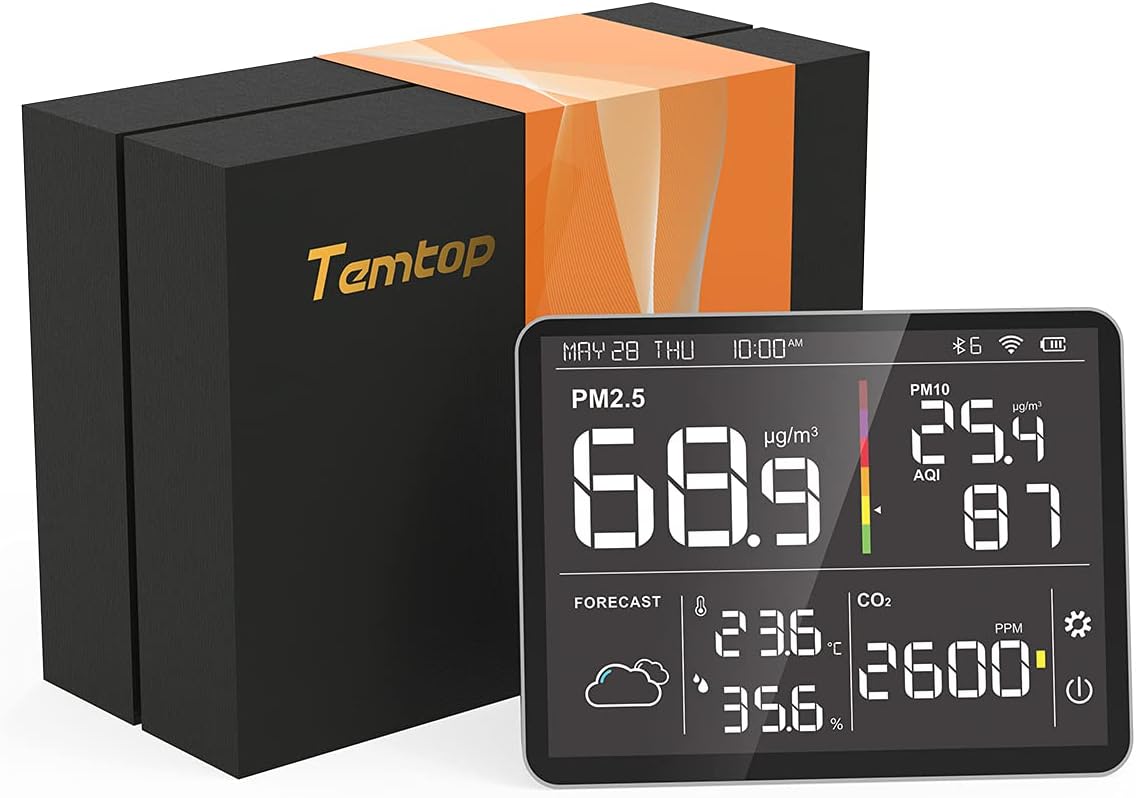
Image 3.1: Temtop M100 Air Station and its packaging.
4. Початок роботи: Налаштування
4.1 Початкове заряджання
Before first use, connect the M100 Air Station to a power source using the provided USB charging cable. A standard 5V/1A DC power adapter (not included) is recommended. Ensure the device is fully charged for optimal performance, especially if planning to use it without continuous power.
4.2 Initial CO2 Calibration
For accurate CO2 readings, it is recommended to perform an initial calibration. Place the M100 Air Station outdoors in a well-ventilated area for approximately 7 hours. This allows the CO2 sensor to establish a baseline with ambient outdoor CO2 levels, which are typically around 400 ppm.
4.3 Connecting to Wi-Fi and Mobile Application
- Download the Temtop App: шукати 'Temtop' in your device's app store (available on Apple App Store and Google Play Store).
- Реєстрація/Увійти: Open the app and follow the prompts to create an account or log in.
- Додати пристрій: Within the app, select the option to add a new device. The app will guide you through connecting the M100 Air Station via Bluetooth initially, then configuring its Wi-Fi connection (supports 2.4GHz and 5GHz networks).
- Мережева сумісність: While the device supports both 2.4GHz and 5GHz Wi-Fi, some 5GHz bands may have compatibility issues. If you encounter connection problems, try connecting to a 2.4GHz network.

Image 4.1: The Temtop mobile application interface for monitoring devices.
4.4 Налаштування дисплея
- Налаштувати яскравість: Single-click the ON/OFF button on the device to cycle through the three available brightness models for the screen.
- Одиниці вимірювання температури перемикача: Long-press the setting button on the device to toggle the temperature display between Celsius (°C) and Fahrenheit (°F).
5. Operating Your Air Station
5.1 Розуміння дисплея
The M100 Air Station's large LCD screen provides real-time readings for all monitored parameters:
- PM2.5 і PM10: Displays particulate matter concentrations in µg/m³.
- AQI: Air Quality Index, a numerical value indicating overall air quality.
- CO2: Carbon Dioxide concentration in PPM (parts per million).
- Температура та вологість: Current ambient temperature and relative humidity.
- Прогноз погоди: Provides a basic weather forecast.
- Дата й час: Поточна дата та час.
The display uses color-coded indicators for AQI and CO2 to quickly convey air quality status:
- AQI: 6 color levels ranging from Good to Hazardous.
- CO2: 3 color levels indicating Good, Moderate, or Poor concentration.
5.2 Використання мобільного застосунку
The Temtop mobile application enhances the functionality of your M100 Air Station:
- Моніторинг у режимі реального часу: View all sensor readings remotely.
- Історія даних: Доступ і реview historical air quality data.
- Експорт даних: Download monitoring history via the app or USB cable for further analysis.
- Налаштування: Adjust device settings, such as logging frequency.

Image 5.1: M100 Air Station in use, demonstrating connectivity with a mobile device.
6. Understanding Air Quality Readings
The M100 Air Station measures several key air quality parameters:
- PM2.5 (тверді частинки 2.5): Refers to fine inhalable particles with diameters generally 2.5 micrometers and smaller. These particles can penetrate deep into the respiratory tract.
- PM10 (тверді частинки 10): Refers to inhalable particles with diameters generally 10 micrometers and smaller.
- CO2 (вуглекислий газ): A gas naturally present in the atmosphere. Elevated indoor CO2 levels can indicate poor ventilation and may lead to drowsiness or reduced cognitive function.
- AQI (індекс якості повітря): A standardized index used to report daily air quality. It indicates how clean or polluted the air is, and what associated health effects might be a concern.

Image 6.1: Explanation of the impact of fine particulate matter (PM2.5) on human health.
7. Технічне обслуговування
To ensure the longevity and accuracy of your Temtop M100 Air Station, follow these maintenance guidelines:
- Прибирання: Gently wipe the device's screen and body with a soft, dry cloth. Avoid using abrasive cleaners, solvents, or spraying liquids directly onto the device.
- Догляд за датчиком: Do not attempt to clean the internal sensors. Exposure to dust and debris should be minimized.
- Зберігання: Якщо пристрій не використовується протягом тривалого часу, зберігайте його в прохолодному, сухому місці, подалі від прямих сонячних променів та екстремальних температур.
8. Вирішення проблем
If you encounter issues with your M100 Air Station, refer to the following common problems and solutions:
- Короткий термін служби батареї: The M100 Air Station is designed for continuous monitoring and is best used when connected to a power source. If operating on battery, expect a limited duration (e.g., 1-3 hours). For prolonged use, keep the device plugged in.
- Проблеми з підключенням до Wi-Fi: If the Wi-Fi icon blinks or the device frequently disconnects, ensure your Wi-Fi network is stable. Try restarting your router and the M100. If using a dual-band router, attempt to connect to the 2.4GHz band as it often provides a more stable connection for smart home devices.
- App Displaying Incorrect Temperature Units: If the app's main screen shows Celsius while the device or detailed app view is set to Fahrenheit, this may be a known app display bug. Refer to the detailed device view within the app for accurate unit display. Ensure your app is updated to the latest version.
- Device Not Powering On with USB-C to USB-C Cable: The M100 Air Station may require a USB-A to USB-C cable for charging, such as the one provided. If using a USB-C to USB-C cable, ensure it is compatible and provides sufficient power. It is recommended to use the included charging cable.
- Неточні показники CO2: Ensure the initial CO2 calibration was performed outdoors in fresh air. If readings seem consistently off, repeat the outdoor calibration process.
9. Технічні характеристики
Detailed technical specifications for the Temtop M100 Air Station:
| Параметр | Значення |
|---|---|
| Модель | M100 |
| Загальні розміри | 6.9 x 2.6 x 1.2 дюймів |
| Експорт даних | WiFi |
| Адаптер живлення | 5 В/1 А постійного струму |
| Діапазон робочих температур | 0 ~ 50 ° C (32 ~ 122 ° F) |
| Робочий діапазон вологості | 0~90% відносної вологості |
| Атмосферний тиск | 1 атм |
| Діапазон вимірювання PM2.5 | 0~999 мкг/м³ |
| PM2.5 Resolution | 0.1 мкг/м³ |
| Точність PM2.5 | ±5µg/m³ (0~50µg/m³), ±10µg/m³ (50~100µg/m³), ±10% (>100µg/m³) |
| Діапазон вимірювання PM10 | 0~999 мкг/м³ |
| PM10 Resolution | 0.1 мкг/м³ |
| Діапазон вимірювання CO2 | 0~5000 ppm |
| Роздільна здатність CO2 | 1 проміле |
| Точність CO2 | ±50ppm + 5% |
| Точність температури | ±1 °C |
| Технологія підключення | Wi-Fi |
| Тип батареї | 1 літій-іонний акумулятор (у комплекті) |
| Тип дисплея | ЖК |
| Вага товару | 1.81 фунта |
| UPC | 781454250493 |
10. Гарантія та підтримка
Temtop provides a Гарантія 12 місяців for the M100 Air Station, covering manufacturing defects and malfunctions under normal use. For any inquiries, technical assistance, or warranty claims, please contact Temtop customer support.
Підтримка клієнтів: Temtop offers 24/7 customer support access via email and phone. Refer to the contact information provided on the Temtop official website or your product packaging for specific details.