
Продукт закінченийview
The EWO'S XRT140 Universal Remote Control is designed as a direct replacement for various VIZIO Smart TV remotes. This product has been professionally inspected and tested to ensure it functions and appears like new. It offers seamless control over your VIZIO Smart TV, providing a reliable and user-friendly experience.

Зображення: Спереду та збоку view of the EWO'S XRT140 Universal Remote Control, showcasinйого ергономічний дизайн та розташування кнопок.
Посібник із налаштування
The EWO'S XRT140 remote control is designed for immediate use with compatible VIZIO Smart TVs. No pairing or programming is required.
Установка батареї
- Знайдіть батарейний відсік на задній панелі пульта дистанційного керування.
- Відкрийте кришку відсіку для батарей.
- Insert two (2) 1.5V AAA batteries, ensuring the positive (+) and negative (-) terminals align correctly with the indicators inside the compartment.
- Надійно закрийте кришку батарейного відсіку.
Once batteries are installed, the remote is ready to operate your VIZIO Smart TV.
Керування пультом дистанційного керування
This section details the functions of the buttons on your EWO'S XRT140 Universal Remote Control.
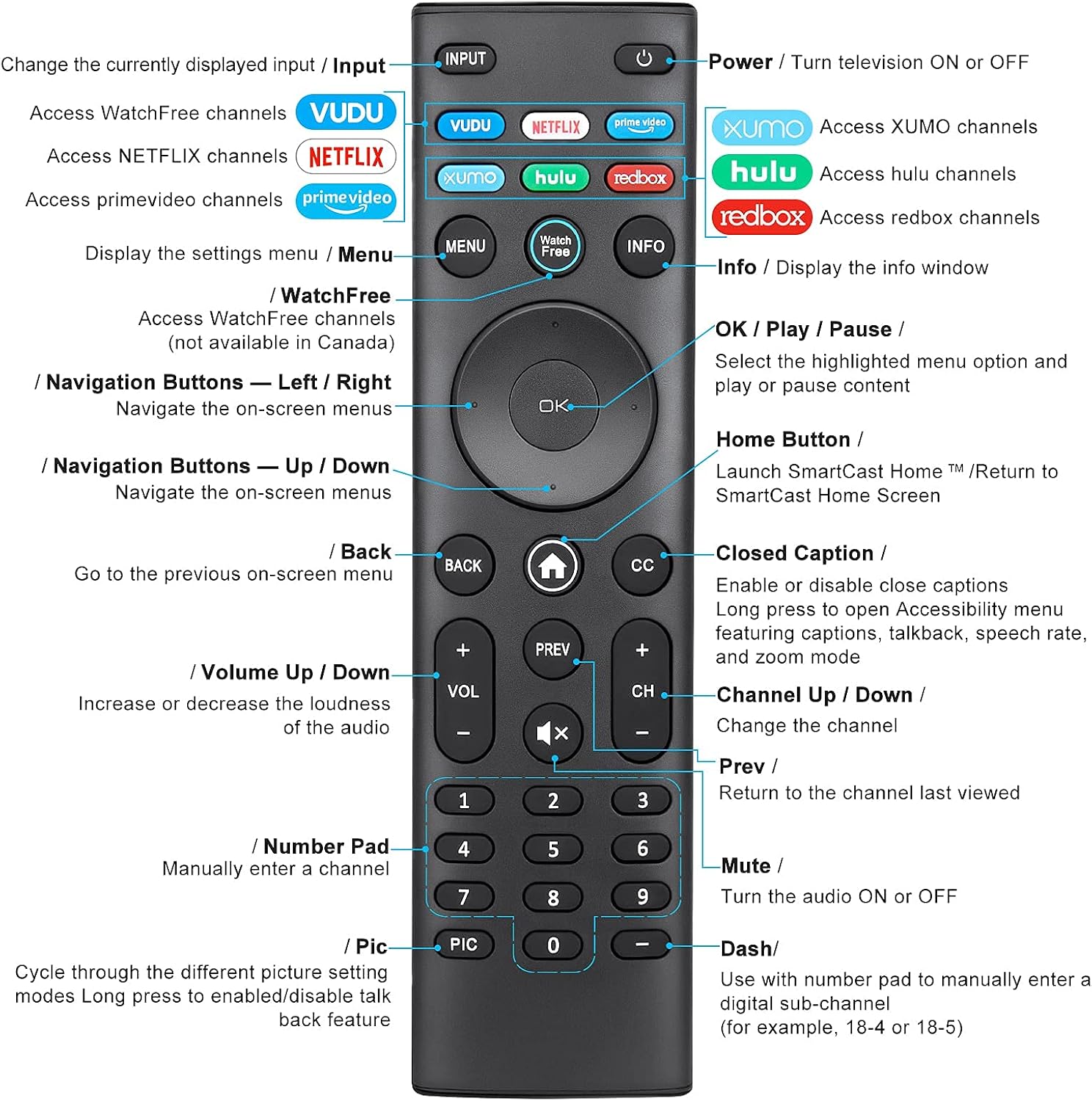
Image: Detailed diagram of the EWO'S XRT140 remote control, labeling each button with its corresponding function.
Функції кнопок:
- ВХОД: Change the currently displayed input source.
- ПОТУЖНІСТЬ (⏻): Turn the television ON or OFF.
- ВУДУ: Access VUDU channels.
- NETFLIX: Access Netflix channels.
- prime video: Access Prime Video channels.
- XUMO: Access XUMO channels.
- hulu: Access Hulu channels.
- redbox: Access Redbox channels.
- МЕНЮ: Display the settings menu.
- WatchFree: Access WatchFree channels (Note: May not be available in all regions, e.g., Canada).
- ІНФО: Display the info window.
- OK / Play / Pause: Select the highlighted menu option and play or pause content.
- Кнопки навігації (Вгору/Вниз/Вліво/Вправо): Навігація екранними меню.
- Кнопка «Головна» (⌂): Launch SmartCast Home or return to the SmartCast Home Screen.
- НАЗАД: Go to the previous on-screen menu.
- CC (Приховані субтитри): Enable or disable closed captions. Long press to open Accessibility menu featuring captions, talkback, speech rate, and zoom mode.
- VOL +/- (Volume Up/Down): Збільште або зменшіть гучність звуку.
- НАЗАД: Return to the channel last viewвид.
- CH +/- (Channel Up/Down): Змінити канал.
- БЕЗ ЗВУКУ (🔇): Turn the audio ON or OFF.
- Цифрова клавіатура (0-9): Manually enter a channel number.
- PIC: Cycle through different picture setting modes. Long press to enable/disable talk back feature.
- ТИРЕ (-): Use with the number pad to manually enter a digital sub-channel (e.g., 18-4 or 18-5).
Ключові характеристики
- Миттєва відповідь: This remote control boasts a quick transmission and response time of 0.2 seconds, ensuring minimal delay between your command and the TV's action.
- Міцні кнопки: The buttons are rigorously tested to support over 150,000 clicks, providing long-lasting reliability.
- Розширений діапазон: The remote transmits a signal effectively over long distances, up to 12 meters (40 feet), allowing for flexible viewпозиції.
- Преміальний дизайн: Upgraded with a high-end glossy finish, the remote is made from durable ABS material, making it safe for use by children.
- Спеціальні кнопки швидкого доступу: Features 7 convenient shortcut buttons for popular streaming services like VUDU, Netflix, Prime Video, XUMO, Hulu, and Redbox, plus a WatchFree button for quick access.
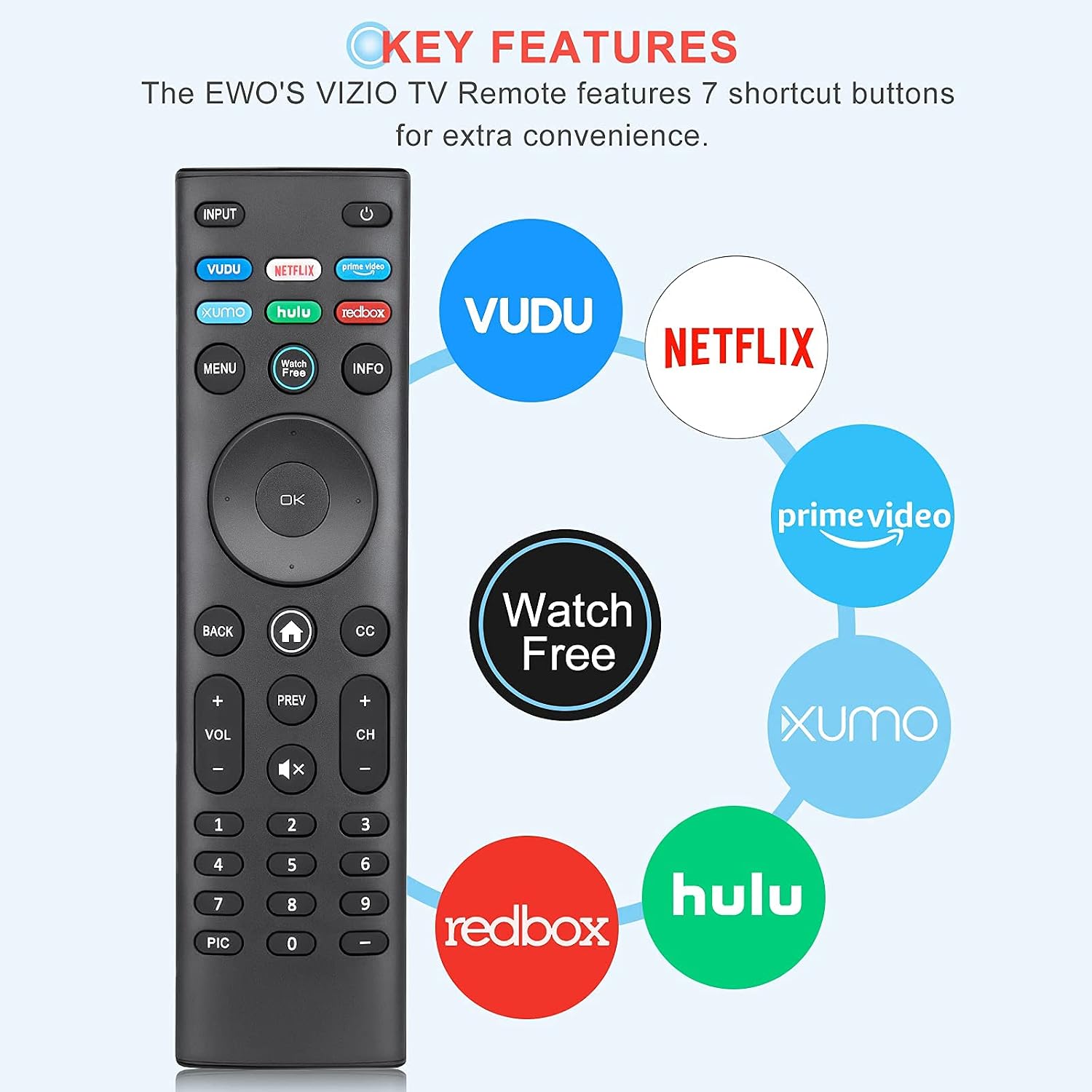
Image: The EWO'S XRT140 remote control with its 7 shortcut buttons for streaming services highlighted, emphasizing convenience.

Image: A hand holding the EWO'S XRT140 remote, with text indicating its fast response time and high click durability.

Image: An illustration demonstrating the EWO'S XRT140 remote's ability to transmit signals over 40 feet, highlighting its long-distance capability.
Сумісність
The EWO'S XRT140 Universal Remote Control is designed for broad compatibility with VIZIO Smart TVs and various VIZIO remote models.
Compatible VIZIO TV Series:
- All VIZIO LED LCD HD UHD HDR Smartcast 4K 3D Smart TVs
- Including D-Series, E-Series, M-Series, P-Series, PX-Series, V-Series, and OLED-Series.

Image: The EWO'S XRT140 remote alongside various VIZIO SmartCast TV models, illustrating its broad compatibility.
Compatible VIZIO Remote Models:
The XRT140 is a universal remote control compatible with, but not limited to, the following VIZIO remote models:
- XRT112
- XRT122
- XRT302
- XRT135
- XRT510
- XRT500
- XRT100
- XRT136
- VR1
- VR2
- VR10
- VR15

Image: The EWO'S XRT140 remote displayed next to several other VIZIO remote models, indicating its universal compatibility.
Технічне обслуговування
Правильний догляд та обслуговування подовжать термін служби вашого пульта дистанційного керування.
Прибирання:
- Протріть пульт дистанційного керування м’якою сухою тканиною.
- Для стійкого бруду злегкаampПротріть тканину водою або м’яким неабразивним засобом для чищення. Не розпилюйте засіб для чищення безпосередньо на пульт дистанційного керування.
- Avoid using harsh chemicals, solvents, or abrasive cleaning pads, as these can damage the remote's surface or internal components.
Догляд за акумулятором:
- Replace batteries when the remote's performance degrades or it stops responding.
- Завжди замінюйте обидві батарейки одночасно на нові одного типу (AAA).
- If the remote will not be used for an extended period (e.g., several weeks or months), remove the batteries to prevent leakage and potential damage to the remote.
Усунення несправностей
Якщо у вас виникли проблеми з пультом дистанційного керування, зверніться до наступних поширених кроків усунення несправностей:
| проблема | Можлива причина | Рішення |
|---|---|---|
| Пульт дистанційного керування не відповідає | Розряджені або неправильно вставлені батареї | Замініть батарейки новими батарейками типу AAA 1.5 В, дотримуючись правильної полярності. |
| Пульт працює з перебоями | Low battery power; Obstruction between remote and TV; Remote sensor on TV is blocked. | Replace batteries. Ensure a clear line of sight between the remote and the TV's IR sensor. Remove any objects blocking the TV's sensor. |
| Певні кнопки не працюють | Бруд або сміття під кнопкою; несправність кнопки. | Clean the remote surface around the button. If the issue persists, the button may be faulty. |
| Remote range is reduced | Low battery power; Interference from other electronic devices. | Replace batteries. Move other electronic devices away from the TV or remote. |
Технічні характеристики продукту
| Специфікація | Деталь |
|---|---|
| Бренд | EWO'S |
| Модель | XRT140 |
| Сумісні пристрої | Television (VIZIO Smart TVs) |
| Максимальна дальність | 40 футів (приблизно 12 метрів) |
| Тип батареї | 2 x AAA (не входять в комплект) |
| Вага товару | 2.39 унції |
| Розміри упаковки | 8.19 x 3.66 x 0.83 дюймів |
| ASIN | B098YWCB68 |
| UPC | 656942198109 |
| Дата першої доступності | 8 липня 2021 р |
Гарантія та підтримка
As an Amazon Renewed product, the EWO'S XRT140 Universal Remote Control is backed by the Amazon Renewed Guarantee. This ensures that the product has been professionally inspected and tested to work and look like new.
If you are not satisfied with your purchase, renewed products are eligible for replacement or refund under the Amazon Renewed Guarantee. Please refer to the Amazon Renewed program terms and conditions for specific details regarding returns, replacements, and refunds.
For further assistance or inquiries, please contact Amazon customer support or refer to the Amazon Renewed Store for more information.
Amazon Renewed Store Link: Відвідайте оновлений магазин Amazon