
1. Вступ
This manual provides detailed instructions for the setup, operation, and maintenance of your WISE TIGER LED Digital Alarm Clock (Model CK-LED1302). Please read this manual thoroughly before use to ensure proper functionality and to maximize your product experience.

Image 1.1: WISE TIGER LED Digital Alarm Clock and its remote control.
2. Вміст упаковки
Будь ласка, перевірте наявність усіх предметів у вашій упаковці:
- WISE TIGER LED Digital Alarm Clock (Model CK-LED1302)
- Пульт дистанційного керування
- USB кабель живлення
- Посібник користувача (цей документ)
- Fixed Bracket (for desk placement)
3. Продукт закінчивсяview
The WISE TIGER LED Digital Alarm Clock features a modern 3D design, offering clear time display and multiple functions for various environments.
3.1 Основні характеристики
- Відображення часу: 12-hour or 24-hour format.
- Відображення календаря: Shows date.
- Будильник: With snooze function.
- Індикація температури: Показує температуру навколишнього середовища.
- Регульована яскравість: Automatic brightness sensor and manual adjustment via remote control.
- Функція нічного освітлення: Provides soft illumination.
- Функція пам'яті: Built-in battery retains time settings for 4-8 hours during power disconnection.
- Універсальне розміщення: Suitable for desk or wall mounting.

Image 3.1: Visual representation of the clock's main functions.
3.2 Компоненти
Зверніться до діаграми нижче для більшої інформаціїview of the clock's components and connection points.
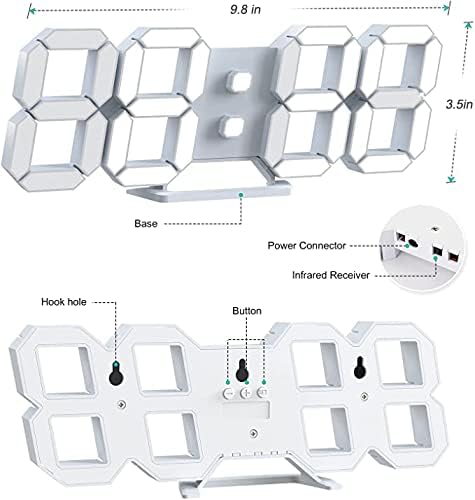
Зображення 3.2: Задня частина view and dimensions of the clock, highlighting the power connector, infrared receiver, and mounting options.
- Дисплей: Large 3D LED digits for time, date, and temperature.
- база: Removable stand for desk placement.
- Роз'єм живлення: USB port for power input.
- Інфрачервоний приймач: Для сигналів дистанційного керування.
- Hook Holes: Для настінного монтажу.
- Кнопки управління: Located on the back for basic settings (Power, Up, Down, Set).
4. Налаштування
4.1 Підключення живлення
- Connect the provided USB power cable to the power connector on the back of the clock.
- Підключіть інший кінець USB-кабелю до стандартного USB-адаптера живлення (не входить до комплекту) або USB-порту комп’ютера.
- The clock will power on and display the time.
The clock is powered by the USB cable only. A built-in battery serves to record time settings when power is disconnected, ensuring settings are retained for 4-8 hours.

Image 4.1: Explanation of the clock's power and memory function.
4.2 Варіанти розміщення
The clock can be used as a desk clock or a wall clock.
- Розміщення столу: Attach the fixed bracket to the bottom of the clock. The angle of the bracket can be adjusted for optimal viewінж.
- Настінне кріплення: Remove the fixed bracket if attached. Use the installation slots (hook holes) on the back of the clock to hang it securely on a wall using appropriate fasteners (not included).

Image 4.2: The clock configured for wall mounting and desk placement.
5. Інструкція з експлуатації
The clock's functions are primarily controlled using the included remote control. Basic settings can also be adjusted via the buttons on the back of the clock.
5.1 Встановлення часу та дати
- Натисніть ЧАС button on the remote control to enter time setting mode.
- Використовуйте UP і ВНИЗ arrows to adjust the hour.
- Прес ЧАС again to move to minute setting, then use UP і ВНИЗ налаштувати.
- Продовжуйте натискати ЧАС щоб перемикатися між налаштуваннями року, місяця та дня, коригуючи кожне з них за допомогою UP і ВНИЗ.
- Прес ЧАС востаннє або зачекайте кілька секунд, поки налаштування збережуться автоматично.
5.2 12/24-годинний формат
Щоб переключитися між 12-годинним та 24-годинним форматами часу, натисніть кнопку 12/24 год кнопку на пульті дистанційного керування.

Зображення 5.1: Наприкладample of 12-hour and 24-hour time display.
5.3 Налаштування будильника
- Натисніть ТРИВОГА button on the remote control to enter alarm setting mode.
- Використовуйте UP і ВНИЗ arrows to set the desired alarm hour.
- Прес ТРИВОГА again to move to minute setting, then use UP і ВНИЗ налаштувати.
- Прес ТРИВОГА one last time or wait for the settings to save.
- Щоб увімкнути/вимкнути будильник, натисніть кнопку ТРИВОГА button briefly outside of setting mode. An alarm icon will appear/disappear on the display.
5.4 Функція відкладання
Коли пролунає будильник, натисніть кнопку СНОЙЗ button on the remote control to temporarily silence the alarm. The alarm will sound again after a set interval (typically 5-10 minutes).

Image 5.2: The snooze alarm function in use.
5.5 Регулювання яскравості
The clock features both automatic and manual brightness control.
- Автоматична яскравість: The built-in sensor automatically adjusts the display brightness based on ambient light conditions.
- Ручне налаштування яскравості: Натисніть ЯСКРАВИЙ button on the remote control to cycle through different brightness levels (e.g., high, medium, low).

Image 5.3: Automatic brightness adjustment based on ambient light.

Image 5.4: Manual adjustment through three brightness levels.
5.6 Відображення температури
The clock automatically displays the ambient temperature. No manual adjustment is typically required for this function.
6. Технічне обслуговування
To ensure the longevity and optimal performance of your WISE TIGER LED Digital Alarm Clock, follow these maintenance guidelines:
- Прибирання: Use a soft, dry cloth to wipe the display and casing. Avoid abrasive cleaners, solvents, or spray cleaners directly on the clock.
- Потужність: Always use the provided USB cable for power. Ensure the power source is stable.
- Середовище: Тримайте годинник подалі від екстремальних температур, прямих сонячних променів та високої вологості.
- Пульт дистанційного керування: Store the remote control in a safe place to prevent loss or damage. Ensure batteries are replaced when needed (typically 2 Lithium Ion batteries, included).
7. Вирішення проблем
If you encounter issues with your clock, refer to the following common problems and solutions:
| проблема | Можлива причина | Рішення |
|---|---|---|
| Годинник не включається | Немає живлення або слабке з’єднання | Ensure USB cable is securely connected and power source is active. Try a different USB port or adapter. |
| Пульт не працює | Remote batteries are dead or remote is out of range/blocked | Replace remote control batteries. Ensure remote is pointed at the clock's infrared receiver (refer to Image 3.2) and within 8 meters. Remove any obstructions. |
| Час неточний | Time was not set precisely | Reset the time carefully, ensuring you set it at the exact second of the desired time. |
| Display is too dim or too bright | Потрібно налаштувати яскравість | Натисніть ЯСКРАВИЙ button on the remote to cycle through manual brightness levels. Check if automatic brightness is functioning correctly in different light conditions. |
| Сигналізація не звучить | Сигналізація не активована або налаштована неправильно | Ensure the alarm is set and activated (alarm icon visible). Verify the alarm time is correct. |
8. Технічні характеристики
| Особливість | Деталь |
|---|---|
| Бренд | МУДРИЙ ТИГР |
| Номер моделі | CK-LED1302 |
| Тип дисплея | цифровий |
| Колір | Білий |
| Розміри продукту | 9.7 см (Ш) x 3.5 см (В) |
| Джерело живлення | Провідний електричний (USB) |
| Акумулятор пам'яті | 2 Lithium Ion batteries (included), retains settings for 4-8 hours |
| Тип монтажу | Wall Mount, Desk Mount |
| Особливості | Adjustable Brightness, Alarm Clock, Temperature Display, Date Display, 12/24 Hour Format |
| матеріал | Акрилонітрил бутадієн стирол |
| Вага товару | 0.317 унції (приблизно 9 грамів) |
| UPC | 728990655931 |
9. Гарантія та підтримка
Щоб отримати інформацію про гарантію або технічну підтримку, зверніться до упаковки продукту або до продавця, у якого було придбано продукт. Зберігайте чек про покупку як підтвердження покупки.