
EZ EAR CCZ Coffee Bean
Інструкція з експлуатації дротових навушників EZ EAR CCZ Coffee Bean
Model: CCZ Coffee Bean (LX668E2Brown)
1. Вступ
Thank you for choosing the EZ EAR CCZ Coffee Bean Wired Earbuds. These in-ear monitors are designed to provide a high-fidelity audio experience with a focus on clear musical details and comfortable wear. This manual provides essential information for proper setup, operation, maintenance, and troubleshooting to ensure optimal performance and longevity of your earbuds.

Image 1.1: EZ EAR CCZ Coffee Bean Wired Earbuds
2. Особливості продукту
The EZ EAR CCZ Coffee Bean earbuds incorporate several design and technological features for an enhanced listening experience:
- Dual Magnetic Circuit Dynamic Driver: Equipped with a 10mm dual magnetic circuit single dynamic driver unit, offering improved energy efficiency and transient response due to low impedance and high sensitivity.
- PET Composite Diaphragm: Features a PET composite diaphragm for elastic low frequencies, accurate resolution, and rich details.
- Patented Ear Tips: TPE material ear tips with a groove design and short sound guide tubes reduce sound loss and bring a more stereo sound.
- Patented Ear Hooks: Designed for comfortable, lightweight, and stable wear, preventing the cable from resting or being pulled down during movement.
- UV-Curing PC Cavity: The cavity is constructed from solid, anti-impact high-density PC materials with a German nice-fit UV varnish, resembling coffee beans in appearance.
- Легкий дизайн: Each earbud weighs approximately 2.3g, ensuring comfortable wear without pressure.
- 4 Core 4N OFC Cable: Utilizes a 0.78MM 2-pin detachable cable made of professional 4 core 4N Oxygen-Free Copper (OFC), enhancing transparency, separation, and soundstage.

Image 2.1: 10mm Dual Magnetic Circuit Dynamic Driver

Зображення 2.2: Ключові характеристики вищеview
3. Інструкції з налаштування та носіння
Follow these steps to properly set up and wear your EZ EAR CCZ Coffee Bean earbuds for optimal comfort and sound quality:
- Визначте ліве та праве: Locate the 'L' and 'R' markings on the earbuds and the cable connectors to ensure correct placement.
- Підключіть кабель: Carefully align the 2-pin connectors on the cable with the corresponding ports on each earbud. Push firmly until they are securely connected.
- Виберіть вушні насадки: Choose the ear tip size (small, medium, large) that provides the best seal and comfort for your ears. A good seal is crucial for bass response and sound isolation.
- Вставте навушники: Gently insert the earbuds into your ear canals. The patented ear hooks are designed to go over your ears, securing the cable and preventing accidental dislodgement.
- Відрегулювати для прилягання: Press and hold the earbud panel to adjust the seal. Ensure the ear fins sit snugly around the inner part of your ear for stability.
- Управління кабелем: Fix the headset wire behind your ear to prevent it from snagging or pulling.

Image 3.1: Earbud Installation Guide
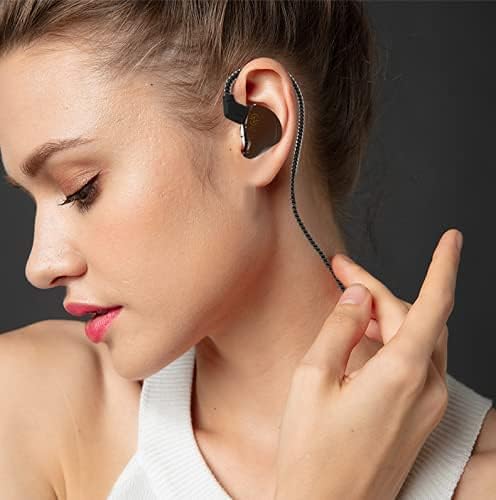
Image 3.2: Proper Wearing Technique
Video 3.1: Demonstration of earbud fit, comfort, and sound quality, including proper wearing technique.
4. Інструкція з експлуатації
These wired earbuds are designed for straightforward use with any device featuring a 3.5mm audio jack.
- Підключення до пристрою: Plug the 3.5mm single-end plug into the audio output jack of your smartphone, computer, game console, or other compatible device.
- Регулювання гучності: Adjust the volume directly on your connected playback device. If your model includes an inline microphone with control, it may offer call control functionality.
- Call Control (if applicable): For models with a microphone, the inline control typically allows you to answer/end calls with a single press. Refer to your device's specific instructions for further control options.

Image 4.1: Device Compatibility
5. Технічне обслуговування
Proper care will extend the life and maintain the performance of your earbuds:
- Поради щодо чищення вух: Регулярно знімайте вушні насадки та очищуйте їх м’якою губкоюamp тканиною. Переконайтеся, що вони повністю сухі, перш ніж знову прикріплювати.
- Чищення навушників: Wipe the earbud bodies with a dry, soft cloth. Avoid using harsh chemicals or abrasive materials.
- Догляд за кабелем: Handle the cable gently. Avoid sharp bends or excessive pulling to prevent damage.
- Зберігання: When not in use, store your earbuds in a clean, dry place, preferably in a protective case, to prevent tangling and damage.
- Водонепроникність: Ці навушники є не водостійкий. Avoid exposure to water, sweat, or high humidity.
6. Вирішення проблем
Якщо у вас виникли проблеми з навушниками, зверніться до наступних поширених рішень:
| проблема | Можлива причина | Рішення |
|---|---|---|
| Ні звуку, ні низької гучності | Incorrect connection, low device volume, dirty ear tips, improper fit. | Ensure cable is fully connected. Increase device volume. Clean ear tips. Adjust earbuds for a secure fit. |
| Погана якість звуку (наприклад, слабкий бас, приглушений звук) | Improper ear tip seal, incorrect ear tip size, dirty ear tips. | Experiment with different ear tip sizes to achieve a tight seal. Clean ear tips. Ensure earbuds are inserted correctly. |
| Навушники легко випадають | Incorrect ear tip size, improper wearing technique. | Try a larger ear tip size. Ensure ear hooks are correctly positioned over your ears. |
| Microphone not working (if applicable) | Device compatibility, cable connection issue. | Ensure your device supports inline microphone functionality. Check cable connection. |
Якщо проблема не зникає після спроби цих рішень, зверніться до служби підтримки клієнтів.
7. Технічні характеристики
| Особливість | Деталь |
|---|---|
| Назва моделі | Coffee Bean (LX668E2Brown) |
| Бренд | EZ EAR |
| Технологія підключення | Провідний |
| Гніздо для навушників | 3.5 мм джек |
| Тип драйвера | 10mm Dual Magnetic Circuit Dynamic Driver |
| АЧХ | 20 Гц - 20 000 Гц |
| Чутливість | 111 дБ |
| Імпеданс | 18 Ом |
| Контроль шуму | Звукоізоляція |
| матеріал | Полікарбонат (ПК), термопластичний еластомер (ТПЕ) |
| Вага виробу (один навушник) | 2.3g (0.09 Kilograms for pair / 3.2 ounces for pair) |
| Рівень водонепроникності | Не водостійкий |
| Функція кабелю | Detachable 0.78MM 2 PIN, 4 Core 4N OFC |
| Тип управління | Call Control (if mic included) |
8. Гарантія та підтримка
Your EZ EAR CCZ Coffee Bean earbuds come with a Гарантія 12 місяців з дати покупки. Ця гарантія поширюється на виробничі дефекти за умов нормального використання.
На що поширюється гарантія:
- Дефекти матеріалів і виготовлення.
На що не поширюється гарантія:
- Damage caused by misuse, abuse, accident, or negligence.
- Нормальний знос.
- Несанкціонований ремонт або модифікація.
To Claim Warranty or for Support:
If you have any questions, experience issues with your product, or need to make a warranty claim, please contact EZ EAR customer support. We aim to respond within 24 hours to assist you.
For the most up-to-date contact information, please visit the official EZ EAR store on Amazon: EZ EAR Store
Відео 8.1: Кінецьview of CCZ Coffee Bean features and 12-month warranty information.
Ask a question about this manual
Ask about setup, troubleshooting, compatibility, parts, safety, or missing instructions. Manuals+ will review the question and use this page’s manual context to help answer it.