
вступ
This manual provides detailed instructions for the installation, operation, and maintenance of your Xigmatek Aquarius Plus Black ATX PC Case. Please read this manual thoroughly before beginning installation to ensure proper setup and safe use of your new PC case.
The Xigmatek Aquarius Plus Black is a mid-tower gaming PC case designed to accommodate ATX, Micro-ATX, and Mini-ITX motherboards. It features excellent cooling potential with support for up to 10 x 120mm fans, including 7 pre-installed ARGB 120mm AY120 fans. The case also offers ample space for a 360mm graphics card, a 158mm CPU cooler, and includes 4 drive bays (2 x 3.5" and 2 x 2.5"/3.5"). Its aesthetic design includes two seamless tempered glass panels and three dust filters for protection.
Інформація про безпеку
- Завжди від’єднуйте блок живлення від розетки перед встановленням або видаленням будь-яких компонентів.
- Поводьтеся з усіма компонентами обережно, щоб запобігти пошкодженню від електростатичного розряду (ESD). Рекомендується використовувати антистатичний браслет.
- Avoid placing the PC case in direct sunlight, near heat sources, or in areas with high humidity.
- Забезпечте належну вентиляцію навколо корпусу, щоб запобігти перегріву.
- Зберігайте дрібні деталі та пакувальні матеріали подалі від дітей.
- Do not attempt to modify the case structure. Unauthorized modifications may void your warranty and pose safety risks.
Вміст упаковки
Перевірте наявність усіх елементів в упаковці:
- Xigmatek Aquarius Plus Black ATX PC Case
- 7 x 120mm ARGB AY120 Fans (pre-installed)
- Комплект аксесуарів (гвинти, стійки, кабельні стяжки)
- Посібник користувача (цей документ)
особливості
- Дизайн середньої вежі: Підтримує материнські плати форматів ATX, Micro-ATX та Mini-ITX.
- Покращене охолодження: Pre-installed with 7 x 120mm ARGB AY120 fans; supports up to 10 x 120mm fans.
- Панелі із загартованого скла: Two seamless tempered glass panels for a clear view внутрішніх компонентів.
- AmpЗберігання: 4 drive bays (2 x 3.5" HDD, 2 x 2.5"/3.5" SSD/HDD).
- Зазор компонентів: Підтримує відеокарти довжиною до 360 мм та процесорні кулери довжиною до 158 мм.
- Dust Filtration: Three dust filters included to protect internal components.
- Передній вхід / вивід: 1 x USB 2.0, 3 x USB 3.0 ports.
Налаштування та встановлення
Follow these steps to install your PC components into the Xigmatek Aquarius Plus case.
1. Підготовка справи
Carefully remove the tempered glass side panels by unscrewing the thumb screws at the rear of the case. Place the panels on a soft, flat surface to prevent scratches.

Image: The bare chassis of the Xigmatek Aquarius Plus, showing its internal structure before component installation.
2. Install the Motherboard
- Identify the correct standoff positions for your ATX, Micro-ATX, or Mini-ITX motherboard. The case may have pre-installed standoffs or require you to install them using the provided accessory kit.
- Place the motherboard I/O shield into the rear opening of the case.
- Обережно вирівняйте материнську плату з опорами та екраном вводу/виводу, потім обережно опустіть її на місце.
- Secure the motherboard with the appropriate screws from the accessory kit. Do not overtighten.

Зображення: Внутрішній view of the Xigmatek Aquarius Plus case, illustrating the motherboard tray and fan placement.
3. Install Storage Drives
The case supports 2 x 3.5" HDDs and 2 x 2.5"/3.5" SSDs/HDDs.
- Locate the drive bays. Typically, 3.5" bays are found in a cage near the power supply shroud, and 2.5" mounts are on the back of the motherboard tray.
- For 3.5" drives, slide the drive into the bay and secure it with screws.
- For 2.5" drives, mount them to the designated trays or screw points on the motherboard tray.
4. Install the Power Supply Unit (PSU)
The Xigmatek Aquarius Plus supports bottom-mounted PSUs.
- Вставте блок живлення у відведений для нього відсік у нижній задній частині корпусу.
- Закріпіть блок живлення до корпусу гвинтами ззаду.
- Прокладіть необхідні кабелі живлення через вирізи для кабелів до материнської плати та інших компонентів.
5. Install Expansion Cards (e.g., Graphics Card)
The case has 4 expansion slots.
- Зніміть необхідні кришки слотів розширення із задньої частини корпусу.
- Insert your graphics card or other expansion card into the appropriate PCIe slot on your motherboard.
- Закріпіть карту гвинтом до корпусу.
6. Connect Front I/O Cables
Connect the front panel cables (USB 2.0, USB 3.0, HD Audio, Power Switch, Reset Switch, Power LED, HDD LED) to their corresponding headers on your motherboard. Refer to your motherboard manual for exact header locations.
7. Кабельний менеджмент
Використовуйте вирізи для керування кабелями та точки кріплення за лотком материнської плати, щоб прокласти та закріпити кабелі. Це покращує потік повітря та естетику.
8. Reattach Panels
Once all components are installed and cables are managed, carefully reattach the tempered glass side panels and secure them with the thumb screws.
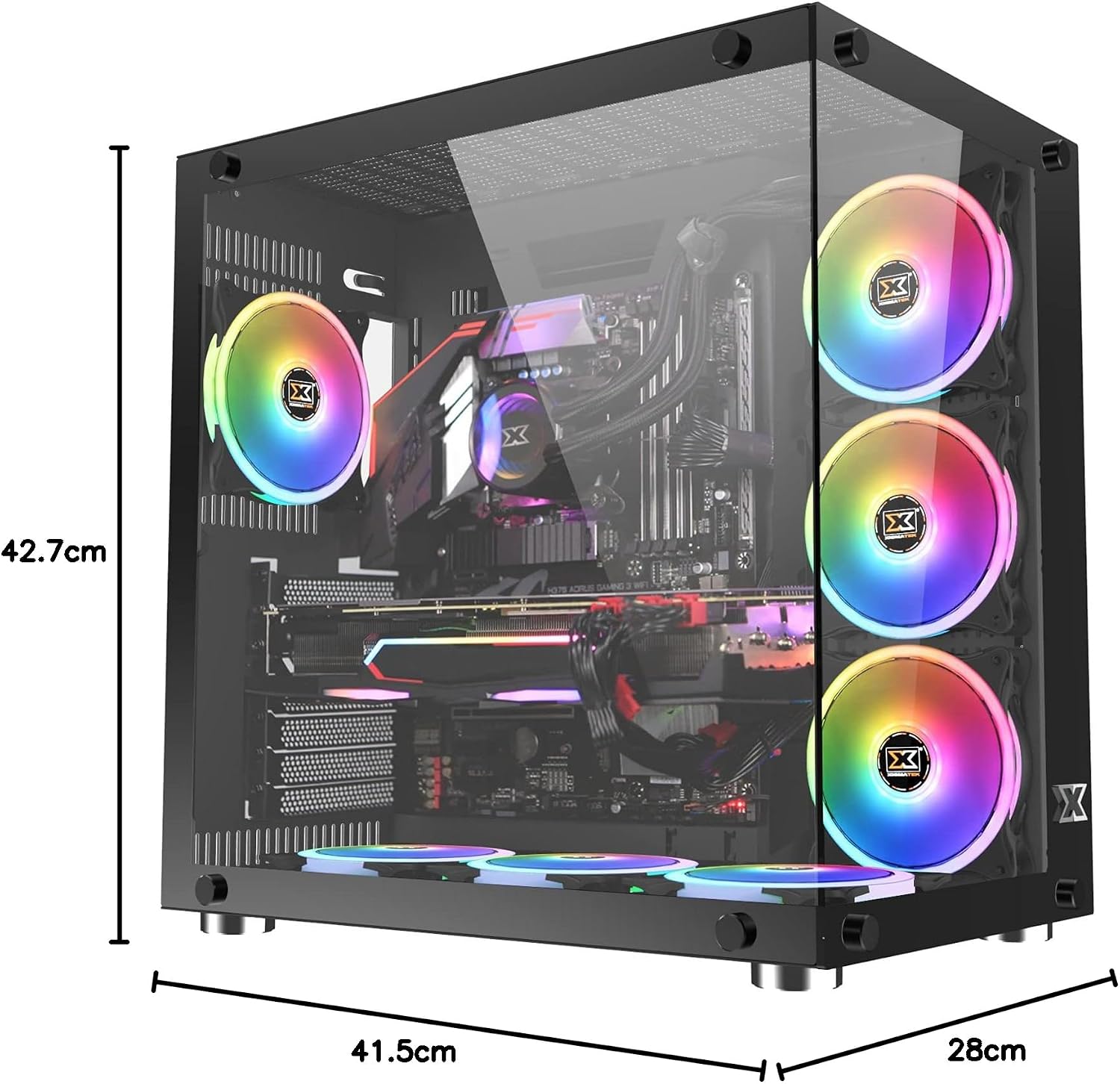
Image: The Xigmatek Aquarius Plus case fully assembled with internal components, showcasing its dimensions (41.5cm D x 28cm W x 42.7cm H).
Інструкція з експлуатації
After successful installation, connect your peripherals (monitor, keyboard, mouse) and power cable to the PSU. Press the power button on the front panel to start your system.
ARGB Fan Control
The pre-installed ARGB fans are typically connected to a fan controller or directly to an ARGB header on your motherboard. Refer to your motherboard's manual or the fan controller's instructions for details on how to customize the lighting effects and fan speeds.
Технічне обслуговування
Регулярне технічне обслуговування допомагає забезпечити оптимальну продуктивність та довговічність компонентів вашого ПК.
- Пилові фільтри: The Xigmatek Aquarius Plus includes three dust filters. Regularly remove and clean these filters to prevent dust buildup inside the case. Use compressed air or a soft brush.
- Внутрішнє очищення: Periodically open the case and use compressed air to remove dust from fans, heatsinks, and other components. Ensure the system is powered off and unplugged before cleaning.
- Панелі із загартованого скла: Clean the tempered glass panels with a soft, lint-free cloth and a glass cleaner designed for electronics. Avoid abrasive materials.
Усунення несправностей
Якщо у вас виникли проблеми, розгляньте такі поширені кроки усунення несправностей:
- Система не вмикається:
- Check if the power cable is securely connected to the PSU and the wall outlet.
- Переконайтеся, що перемикач блоку живлення знаходиться в положенні «УВІМК.».
- Перевірте, чи кабель вимикача живлення на передній панелі правильно підключений до роз'єму материнської плати.
- Confirm all internal power cables (24-pin ATX, CPU, GPU) are properly seated.
- Вентилятори не обертаються/ARGB не світиться:
- Перевірте підключення живлення вентилятора до материнської плати або контролера вентилятора.
- Verify ARGB connections to the motherboard or controller.
- Ensure fan controller is powered (if applicable).
- Порти USB не працюють:
- Confirm the front panel USB cables are correctly connected to the motherboard's USB headers.
For more complex issues, consult the manuals for your individual PC components (motherboard, GPU, PSU) or contact Xigmatek customer support.
Технічні характеристики
| Назва моделі | Aquarius Plus Black |
| Номер моделі | EN46423 |
| Тип корпусу | Середня вежа |
| Сумісність материнської плати | ATX, Micro ATX, Mini ITX |
| Розміри (Д x Ш x В) | 41.5 см х 28 см х 42.7 см |
| вага | 7 кг |
| матеріал | Загартоване скло, сталь |
| Слоти розширення | 4 |
| Привідні відсіки | 2 x 3.5" HDD, 2 x 2.5"/3.5" SSD/HDD |
| Попередньо встановлені вентилятори | 7 x 120mm ARGB AY120 Fans |
| Максимальна підтримка вентилятора | До 10 х 120 мм вентиляторів |
| Максимальна довжина GPU | 360 мм |
| Максимальна висота процесорного кулера | 158 мм |
| Монтаж блоку живлення | Дно |
| Передні порти вводу-виводу | 1x USB 2.0, 3x USB 3.0 |
| Спосіб охолодження | повітря |
| Освітлення | RGB (on fans) |
Гарантія та підтримка
Щоб отримати інформацію про гарантію та технічну підтримку, зверніться до офіційного представника Xigmatek. webсайт або зверніться до місцевого продавця. Зберігайте чек про покупку для гарантійних випадків.

