
1. Вступ
Thank you for choosing the AIYIMA A05 TPA3221 Power Amplifier. This compact 2.0 channel stereo amplifier is designed to deliver high-fidelity audio to passive speakers, featuring both Bluetooth and RCA input options. This manual provides detailed instructions for setup, operation, and maintenance to ensure optimal performance and longevity of your device.
2. Техніка безпеки
- Джерело живлення: Use only the specified power adapter (DC 12-32V) to prevent damage. Ensure the power outlet voltage сумісний.
- Вентиляція: Розмістіть amplifier in a well-ventilated area. Do not block ventilation openings. Avoid placing it on soft surfaces that may obstruct airflow.
- вологість: Keep the device away from water, humidity, and liquids. Do not operate with wet hands.
- Тепло: Уникайте прямих сонячних променів, джерел тепла або екстремальних температур.
- Прибирання: Від’єднайте живлення перед чищенням. Використовуйте м’яку суху тканину. Не використовуйте рідкі або аерозольні засоби для чищення.
- Обслуговування: Не намагайтеся ремонтувати або розбирати пристрій самостійно. Зверніться до кваліфікованого персоналу для проведення будь-яких робіт з обслуговування.
- діти: Зберігати в недоступному для дітей місці.
3. Вміст упаковки
Будь ласка, перевірте упаковку на наявність наступних предметів:
- AIYIMA A05 Bluetooth 5.0 Ampліфтер х 1
- Антена Bluetooth x 1
- Посібник користувача x 1
- Гарантійний талон х 1 шт
- Адаптер живлення DC 32 В x 1

Зображення 3.1: Contents of the AIYIMA A05 ampрятувальний пакет, включаючи amplifier unit, Bluetooth antenna, user manual, warranty card, and power adapter.
4. Продукт закінчивсяview
4.1 Елементи керування передньої панелі
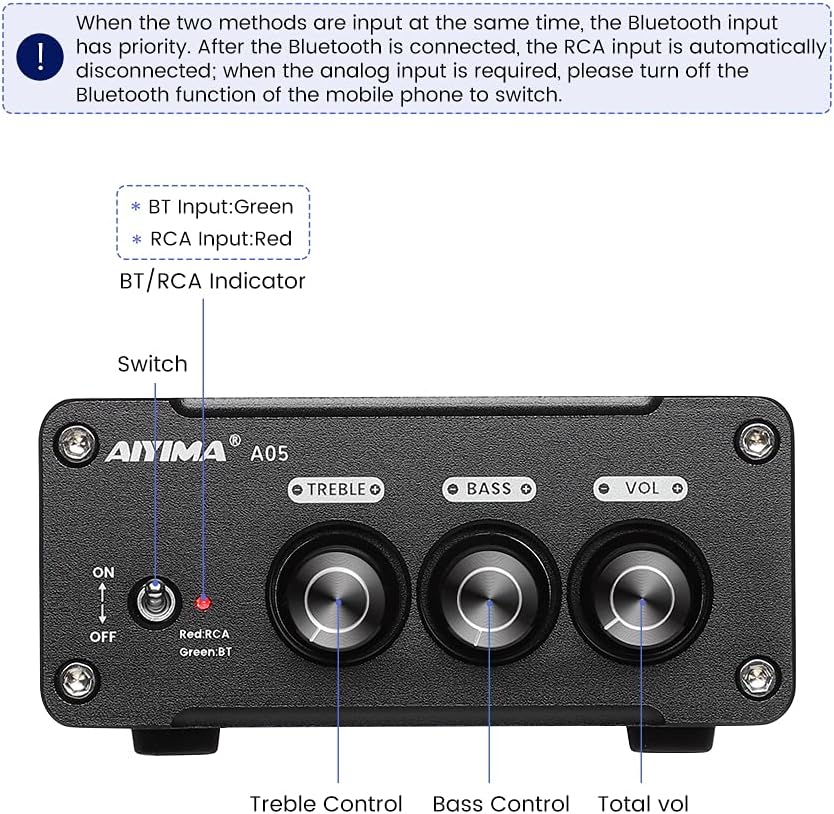
Зображення 4.1: Front panel of the AIYIMA A05 amplifier, showing the power switch, input indicator, treble, bass, and volume controls.
- Перемикач живлення (ON/OFF): Перемикає ampживуча сила.
- BT/RCA Indicator: Displays the active input source. Green indicates Bluetooth (BT) input, Red indicates RCA input.
- Контроль високих частот: Регулює високочастотний аудіовихід.
- Регулювання басів: Регулює низькочастотний аудіовихід.
- Регулювання гучності: Регулює загальний рівень вихідного аудіо.

Зображення 4.2: Крупним планом view of the power switch and the BT/RCA input indicator on the front panel.

Зображення 4.3: Крупним планом view of the Treble, Bass, and Volume control knobs.
4.2 Підключення задньої панелі

Зображення 4.4: Rear panel of the AIYIMA A05 amplifier, showing the Bluetooth antenna port, RCA audio input, speaker outputs, and DC power input.
- ANT (Bluetooth Antenna Port): Connect the included Bluetooth antenna here for wireless audio reception.
- AUDIO IN (RCA Input): Connect audio sources (e.g., CD player, TV, DAC) using RCA cables.
- SPEAKER (Audio Output): Connect passive speakers using speaker wires. Ensure correct polarity (+ to + and - to -).
- DC 24-32V (Power Input): Connect the provided DC power adapter.
5. Інструкції з налаштування
Follow these steps to set up your AIYIMA A05 ampліфтер:
- Підключення Bluetooth-антени: Screw the included Bluetooth antenna into the ANT port on the rear panel.
- Підключення динаміків: Connect your passive speakers to the SPEAKER output terminals on the rear panel. Ensure the positive (+) terminal of the amplifier connects to the positive (+) terminal of the speaker, and the negative (-) terminal connects to the negative (-).
- Connect Audio Source (RCA): If using a wired audio source, connect it to the AUDIO IN (RCA) ports on the rear panel using appropriate RCA cables.
- Підключіть живлення: Connect the DC power adapter to the DC 24-32V input port on the rear panel, then plug the adapter into a wall outlet.
- Увімкнення: Flip the power switch on the front panel to the "ON" position. The input indicator will light up.

Зображення 5.1: Rear panel of the amplifier with Bluetooth antenna, RCA cables, speaker wires, and power adapter connected.
6. Інструкція з експлуатації
6.1 Увімкнення/вимкнення
Щоб увімкнути amplifier, flip the front panel switch to the "ON" position. To power off, flip the switch to the "OFF" position.
6.2 Підключення Bluetooth
- Забезпечити amplifier is powered on and the BT/RCA indicator is green, indicating Bluetooth mode. If it's red, ensure no RCA cable is connected or disconnect it.
- На мобільному пристрої (телефоні, планшеті тощо) увімкніть Bluetooth та виконайте пошук доступних пристроїв.
- Select "AIYIMA A05" from the list of devices to pair.
- Once paired, the indicator light will remain green, and you can play audio from your device through the ampліфірник.
6.3 RCA Input Usage
- Connect your audio source to the RCA input ports on the rear panel.
- Забезпечити amplifier is powered on. The BT/RCA indicator should be red, indicating RCA input mode.
- If the indicator is green (Bluetooth mode), ensure Bluetooth is disconnected on any paired device, or turn off Bluetooth on your mobile device to switch to RCA input.
6.4 Налаштування звуку
- обсяг: Rotate the "VOL" knob clockwise to increase volume and counter-clockwise to decrease.
- ВЧ: Rotate the "TREBLE" knob to adjust high-frequency sounds to your preference.
- Бас: Rotate the "BASS" knob to adjust low-frequency sounds to your preference.
7. Технічне обслуговування
- Прибирання: Disconnect the power adapter before cleaning. Use a soft, dry, lint-free cloth to wipe the surface of the amplifier. Do not use harsh chemicals or abrasive materials.
- Зберігання: If not in use for an extended period, store the ampЗберігайте охолоджувач у прохолодному, сухому місці, подалі від прямих сонячних променів та екстремальних температур.
- Підключення: Періодично перевіряйте всі кабельні з'єднання, щоб переконатися в їх надійності та відсутності корозії.
8. Вирішення проблем
If you encounter issues with your AIYIMA A05 amplifier, будь ласка, зверніться до наступних поширених проблем та рішень:
| проблема | Можлива причина | Рішення |
|---|---|---|
| Немає звуку |
|
|
| Distorted or buzzing sound |
|
|
| Bluetooth не підключається |
|
|
| Loud noise/ticking on startup |
|
|
If the problem persists after trying these solutions, please contact AIYIMA customer support for further assistance.
9. Технічні характеристики

Зображення 9.1: Dimensions of the AIYIMA A05 amplifier: 107mm (4.2in) width, 87mm (3.4in) depth, 36mm (1.4in) height.
| Особливість | Специфікація |
|---|---|
| Модель | A05 |
| Вихідна потужність | 105 Watts (at 4 Ω) |
| Кількість каналів | 2.0 (стерео) |
| Версія Bluetooth | QCC3034 APTX Bluetooth 5.0 |
| Чіпсет | TPA3221 |
| Мінімальний обсяг пропозиціїtage | 12 вольт (постійний струм) |
| Максимальний об'єм подачіtage | 32 вольт (постійний струм) |
| Вага товару | 500 грамів |
| Розміри (прибл.) | 107 мм (Ш) х 87 мм (Д) х 36 мм (В) |
10. Гарантія та підтримка
AIYIMA A05 amplifier comes with a warranty. Please refer to the included Warranty Card for specific terms and conditions. For technical support, troubleshooting assistance, or warranty claims, please contact AIYIMA customer service through the retailer where the product was purchased or visit the official AIYIMA webсайт.
Інтернет-ресурси: For additional information and support, you may visit the AIYIMA store page: AIYIMA Official Store