
CDIYTOOL 4yhujuyj
CDIYTOOL 100A MPPT Solar Charge Controller User Manual
Model: 4yhujuyj
вступ
This manual provides essential information for the safe and efficient operation of your CDIYTOOL 100A MPPT Solar Charge Controller. This controller is designed for 36V, 48V, and 60V battery systems and features an LCD display, multiple load control modes, and dual USB outputs. Please read this manual thoroughly before installation and use.
The controller automatically adapts to 36V/48V/60V systems and is not suitable for 12V/24V systems. It utilizes innovative MPPT technology for high tracking efficiency, detecting the maximum charging current.
Інструкції з техніки безпеки
Always adhere to the following safety guidelines to prevent injury and damage to the controller or other components.
- Переконайтеся, що акумулятор має достатній зарядtage for the controller to recognize the correct battery type upon first use.
- Connect the battery to the controller first, then connect the solar panels. Reversing this order can damage the controller.
- Максимальний об'єм вхідного сигналуtage is 50V. Ensure your solar panel configuration does not exceed this limit. For example, a 19V photovoltaic panel matches a 12V battery, and a 38V photovoltaic panel matches a 24V battery. When a 38V panel is connected, the maximum voltage may reach 42V.
- The controller is suitable for various battery types (including open, lead-acid, gel, and lithium batteries). Refer to the controller's settings for specific battery types.
- The controller provides protection against overvoltage, short circuit, overload, overcharge, and over-discharge.
- Не намагайтеся розбирати або ремонтувати контролер самостійно. Зверніться до кваліфікованого персоналу для обслуговування.

Image: Excerpt from the user manual detailing safety instructions and a connection diagram.
Особливості продукту
- Багатофункціональний РК-дисплей: Provides real-time display of charging current, discharge current, and power generation.
- Технологія MPPT: Innovative Maximum Power Point Tracking with high efficiency (up to 99%) for optimal solar energy harvesting.
- Надійний захист: Включає overvoltage, short circuit, overload, overcharge, and over-discharge protection.
- Automatic Focusing MPPT Tracking: Ensures high charging efficiency and bidirectional focusing tracking.
- Температурна компенсація: Автоматично регулює гучність зарядкиtage based on ambient temperature changes.
- Два USB-виходи: Provides 5V/2A output for charging mobile devices.

Зображення: спереду view of the CDIYTOOL 100A MPPT Solar Charge Controller, highlighting the LCD display and dual USB ports.
Налаштування та встановлення
Follow these steps for proper installation of the solar charge controller:
- Підготовка проводки: Ensure all wires are correctly sized for the expected current and are properly insulated.
- Підключіть акумулятор: Connect the battery to the charge controller first. Ensure correct polarity (+ to + and - to -). The controller requires sufficient battery voltage to recognize the system type.
- Підключіть сонячну панель: Connect the solar panel(s) to the charge controller. Ensure correct polarity. Do not exceed the maximum input voltage 50 В.
- Підключення навантаження (необов'язково): Connect your DC load to the load terminals of the controller. The controller can manage load output based on settings.
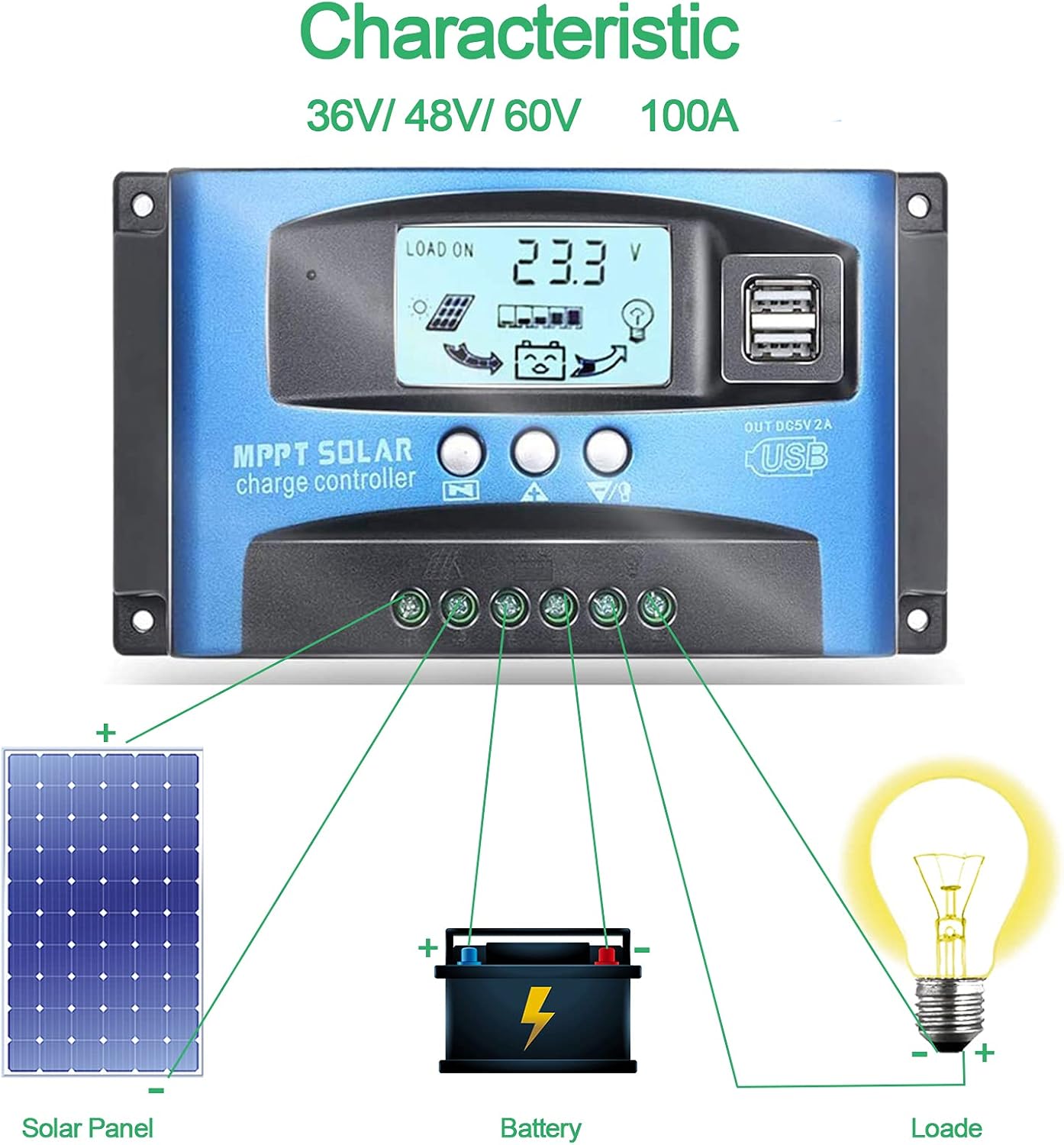
Image: Connection diagram illustrating how to connect solar panels, battery, and load to the charge controller.

Зображення: Детальне view of the controller with labels for its components, including buttons, LCD, USB ports, and connection points.
Інструкція з експлуатації
Контролер оснащений РК-дисплей та трьома кнопками для керування: Меню, Сторінка вгору та Сторінка вниз/Вручну.
РК-дисплей
РК-дисплей відображає різні параметри, включаючи рівень заряду батареїtage, charging current, discharge current, and system status. The icons on the display indicate solar panel activity, battery charge level, and load status.
Функції кнопок
- Кнопка меню: Press to enter the menu interface and cycle through different settings. Long press to modify parameters.
- Кнопка Page Up: Використовується для збільшення значень або навігації вгору в меню.
- Кнопка «Сторінка вниз/Вручну»: Used to decrease values or navigate downwards in menus. Also functions as a manual load control switch (on/off) when on the main interface.
USB зарядка
The controller is equipped with dual USB ports providing 5V/2A output for charging compatible devices such as mobile phones and tablets.

Image: Demonstration of the controller's dual USB ports being used to charge a mobile phone.
Технічне обслуговування
Регулярне технічне обслуговування забезпечує довговічність та оптимальну роботу вашого контролера сонячного заряду.
- Перевірте підключення: Періодично перевіряйте всі з'єднання проводів на міцність та наявність корозії. Нещільні з'єднання можуть призвести до втрати живлення або перегріву.
- Чистий контролер: Тримайте контролер чистим та без пилу та сміття. Використовуйте суху тканину для протирання поверхні. Не використовуйте рідкі засоби для чищення.
- Монітор продуктивності: Regularly check the LCD display for normal operation and expected voltagе/поточні показники.
- Здоров'я акумулятора: Ensure your battery is well-maintained and within its recommended operating parameters.
Усунення несправностей
У цьому розділі наведено рішення поширених проблем, з якими ви можете зіткнутися.
| Ситуація | Ймовірна причина | Рішення |
|---|---|---|
| Немає відображення на екрані | Акумулятор не підключений або низький рівень зарядуtage | Connect battery, check battery voltage |
| No charge when sunny | Solar panel reversed or open circuit | Reconnect solar panel, check wiring |
| Навантаження не працює | Load short circuit, overload, or over-discharge protection | Check load wiring, reduce load, or charge battery |
| Контролер не заряджається | Сонячна панель томtage too low or battery full | Ensure sufficient solar input, check battery status |
The controller includes built-in protections for reverse polarity, overvoltage, short circuit, overload, overcharge, and over-discharge. If an issue persists after troubleshooting, contact customer support.
Технічні характеристики
| Параметр | Значення |
|---|---|
| Модель | 4yhujuyj |
| Бренд | CDIYTOOL |
| Номінальний струм | 100А |
| System Voltage | 36V/48V/60V Auto Adapt (Not for 12V/24V) |
| Максtage | 50 В |
| Вихід USB | Dual 5V/2A |
| Тип дисплея | ЖК |
| Вага товару | 14.4 унції |
| Розміри упаковки | 6.81 x 3.98 x 2.01 дюймів |

Image: Diagram showing the physical dimensions of the solar charge controller.
Додаткові ресурси та підтримка
For further assistance or to access the mobile application for monitoring, please refer to the following:
Мобільний додаток
The BL-912V APP can be installed on your Android phone to monitor and control the solar charge controller. Scan the QR code below or visit the provided link to download and install the application.
Посилання для завантаження: http://fir.sdhzwl.cn/5w4b
The mobile phone app allows for remote monitoring of charging and discharging data, daily power generation, and other functions.
Image: Section of the user manual detailing the BL-912V APP installation process, including a QR code.
Гарантія та обслуговування клієнтів
For warranty information or technical support, please contact CDIYTOOL customer service through the platform where you purchased the product. Keep your purchase receipt for warranty claims.
Типові програми
The CDIYTOOL MPPT Solar Charge Controller is suitable for a variety of off-grid solar power applications, including:
- Residential solar power systems
- RV and marine solar setups
- Solar street lighting
- Remote monitoring stations
- Agricultural irrigation systems

Зображення: Прamples of typical applications for the solar charge controller in various settings.
Ask a question about this manual
Ask about setup, troubleshooting, compatibility, parts, safety, or missing instructions. Manuals+ will review the question and use this page’s manual context to help answer it.