
1. Вступ
This manual provides comprehensive instructions for the installation, operation, and maintenance of your SENSTREE WTC200 Wireless Thermostat Plug-in Temperature Controller Outlet. Please read this manual thoroughly before using the device to ensure proper function and safety. Keep this manual for future reference.
2. Продукт закінчивсяview
2.1 Включені компоненти
- Wireless Thermostat Receiver (Plug-in Outlet)
- Бездротовий пульт дистанційного керування
- 2m/6ft NTC Temperature Probe
- Посібник користувача (цей документ)
- 2 AAA batteries (for remote controller, may be included or required separately)
2.2 Основні характеристики
- Бездротова робота: Control temperature remotely with the handheld unit.
- Високоточний датчик: The temperature is detected automatically by the thermostat outlet or remote.
- Heating & Cooling Modes: Automatically activates or deactivates connected devices based on preset temperatures.
- Ручна кнопка ON/OFF: The plug-in outlet features a manual power button.
- Перемикач одиниці температури: Легко перемикатися між градусами Цельсія (℃) та Фаренгейта (℉).
- Програмований: Simple two-step setup for heating or cooling applications.
- Сигналізація високої/низької температури: Provides alerts for temperature deviations.
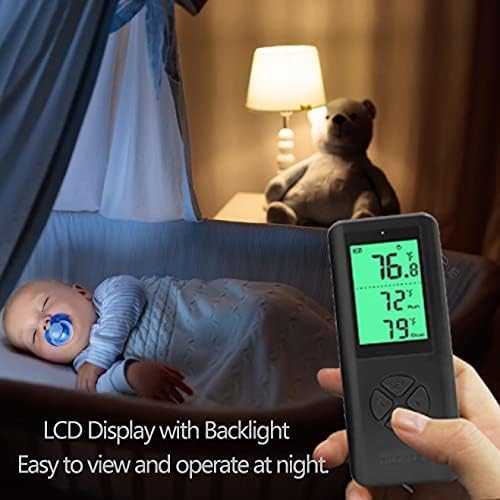
- РК -дисплей з підсвічуванням: Clear digital display for easy reading, even in low light.
2.3 Product Components Visual Guide


3. Інструкції з налаштування
3.1 Встановлення батарейок пульта дистанційного керування
- Знайдіть батарейний відсік на задній панелі пульта дистанційного керування.
- Відкрийте кришку батарейного відсіку.
- Вставте дві батарейки типу AAA, дотримуючись правильної полярності (+/-).
- Закрийте кришку батарейного відсіку.
3.2 Connecting the Temperature Probe
- Identify the NTC temperature probe cable.
- Plug the probe's jack into the designated port on the side of the wireless thermostat receiver (plug-in outlet).
- Position the probe in the area where you wish to measure and control the temperature. Ensure it is not obstructed or directly exposed to heat/cold sources that do not represent the ambient temperature.
3.3 Початкове ввімкнення та сполучення
- Plug the wireless thermostat receiver into a standard 3-prong grounded electrical outlet.
- The remote controller and receiver are designed to automatically pair upon initial power-up. The display on the remote should activate and show temperature readings.
- If the remote does not display readings or connect, ensure batteries are correctly installed and the receiver is powered. Refer to the Troubleshooting section if issues persist.
4. Інструкція з експлуатації
4.1 Розташування пульта дистанційного керування

The remote controller features a digital display and several buttons:
- Кнопка SET: Використовується для введення та підтвердження налаштувань.
- Up (▲) / Down (▼) Buttons: Used to adjust temperature values and navigate menu options.
- Кнопка M (режим): Used to switch between heating and cooling modes, and other functions.
4.2 Setting Temperature and Mode
- Виберіть режим: Натисніть M button to toggle between Heating (indicated by a flame icon or similar) and Cooling (indicated by a snowflake icon or similar) modes.
- Enter Setting: Натисніть НАБІР button once. The target temperature display will begin to flash.
- Налаштувати температуру: Використовуйте Вгору (▲) і Вниз (▼) buttons to set your desired target temperature.
- Підтвердити налаштування: Натисніть НАБІР button again to confirm and save the target temperature. The display will stop flashing.
- The thermostat will now automatically turn on or off the connected device to maintain the set temperature.
4.3 Перемикання одиниць вимірювання температури (℃/℉)
Щоб перемикатися між градусами Цельсія (℃) та Фаренгейта (℉):
- With the remote display active, press and hold the M button for approximately 3 seconds. The temperature unit on the display will change.
- Release the button once the desired unit is shown.
4.4 Сигналізація високої/низької температури
The WTC200 features adjustable high and low-temperature alarms. When the ambient temperature exceeds the high alarm setting or falls below the low alarm setting, the remote controller will emit an audible alert.
- Натисніть НАБІР button twice to enter the alarm setting mode.
- Використовуйте Вгору (▲) і Вниз (▼) buttons to adjust the high-temperature alarm threshold.
- Прес НАБІР again to switch to the low-temperature alarm threshold.
- Використовуйте Вгору (▲) і Вниз (▼) buttons to adjust the low-temperature alarm threshold.
- Прес НАБІР a third time to save and exit the alarm settings.
4.5 Manual ON/OFF on the Outlet
The plug-in outlet receiver has a manual power button. Press this button to manually turn the connected device ON or OFF, overriding the thermostat's automatic control. The remote will reflect the current status.
5. Технічне обслуговування
5.1 Очищення
- Перед очищенням переконайтеся, що пристрій відключено від мережі.
- Wipe the surfaces of the remote controller and plug-in outlet with a soft, dry cloth.
- Не використовуйте абразивні засоби для чищення, розчинники та не занурюйте пристрій у воду.
5.2 Заміна батареї
When the battery indicator on the remote controller's display shows low power, replace the AAA batteries as described in Section 3.1. Prompt battery replacement ensures continuous and reliable operation.
6. Вирішення проблем
| проблема | Можлива причина | Рішення |
|---|---|---|
| Дисплей пульта дистанційного керування порожній або не реагує. | Низький заряд або розряджені батареї; неправильне встановлення батарей. | Замініть батарейки типу AAA, дотримуючись правильної полярності. |
| Thermostat not controlling connected device. | Device not plugged into the outlet; outlet not receiving power; incorrect mode (heating/cooling); temperature settings outside range. | Ensure device is securely plugged into the thermostat outlet. Verify the thermostat outlet is plugged into a live wall socket. Check if the correct mode (heating/cooling) is selected. Adjust target temperature settings. |
| Показники температури неточні. | Temperature probe is disconnected or improperly placed; probe is damaged. | Ensure the temperature probe is securely connected to the outlet. Reposition the probe away from direct heat/cold sources or drafts. If damage is suspected, contact support. |
| Remote and outlet not communicating. | Поза зоною дії; перешкоди; проблема зі сполученням. | Move the remote closer to the outlet. Ensure no large metal objects or strong electronic devices are between them. Re-power both units to attempt re-pairing. |
| Несподівано звучить сигналізація. | Ambient temperature has reached a set high or low alarm threshold. | Check the current temperature and your alarm settings. Adjust alarm thresholds if necessary (refer to Section 4.4). |
7. Технічні характеристики
| Особливість | Деталь |
|---|---|
| Бренд | SENSTREE |
| Номер моделі | WTC200 |
| Тип контролера | Дистанційний |
| Тип контролю температури | Автоматичний |
| Технологія підключення | RF (радіочастота) |
| Джерело живлення | Електричний |
| томtage | 1.5 Volts (Remote), 100-240 Volts (Outlet) |
| Максимальне навантаження | 14A, 1500W (at 110V), 3000W (at 220V) |
| Тип дисплея | Цифровий РК-дисплей з підсвічуванням |
| Спосіб контролю | Button Control, Remote |
| Датчик температури | 2m/6ft NTC probe |
| Батарейки (пульт дистанційного керування) | Потрібні 2 батарейки ААА |
| Вага товару | 8.4 унції |
| Розміри упаковки | 4.8 x 4.17 x 2.32 дюймів |
8. Гарантія та підтримка
8.1 Гарантія на виріб
The SENSTREE WTC200 Wireless Thermostat Plug-in Temperature Controller Outlet comes with a один рік гарантії з дати покупки. Ця гарантія поширюється на дефекти матеріалів та виготовлення за умов нормального використання. Вона не поширюється на пошкодження, спричинені неправильним використанням, нещасним випадком, несанкціонованою модифікацією або неправильним встановленням.
8.2 Підтримка клієнтів
For technical assistance, troubleshooting, or warranty claims, please contact SENSTREE customer support. Refer to the product packaging or the official SENSTREE webсайт для отримання найактуальнішої контактної інформації.