
1. Вступ
Thank you for choosing the Ciciglow Mini MP3 Player. This ultra-lightweight, clip-on device is designed for portable music playback, featuring an LCD screen for easy navigation and a durable metal shell. This manual will guide you through the setup, operation, and maintenance of your new MP3 player.

Зображення 1: спереду view of the Ciciglow Mini MP3 Player.
2. Продукт закінчивсяview
2.1 Особливості
- Mini LCD Screen Display: Provides clear visibility of song progress and menu options.
- Ultra-Lightweight Clip-on Design: Allows for secure attachment to clothing or other devices, ideal for sports and active use.
- Memory Card Expansion Slot: Supports a maximum extension of 32GB (memory card not included).
- Тривалий термін служби батареї: Offers over 5 hours of continuous playback on a single charge.
- Durable Aluminum Alloy Material: Ensures a firm and long-lasting service life.
2.2 Що в коробці
- 1 x Ciciglow Mini MP3 Player
- 1 х навушники
- 1 x USB кабель
2.3 Діаграма продукту

Image 2: Close-up of the MP3 player's screen and control buttons.
The MP3 player features a central control panel with 'M' (Menu/Mode), Play/Pause, Previous Track, Next Track, and 'VOL' (Volume) buttons. The LCD screen displays current mode and song information.
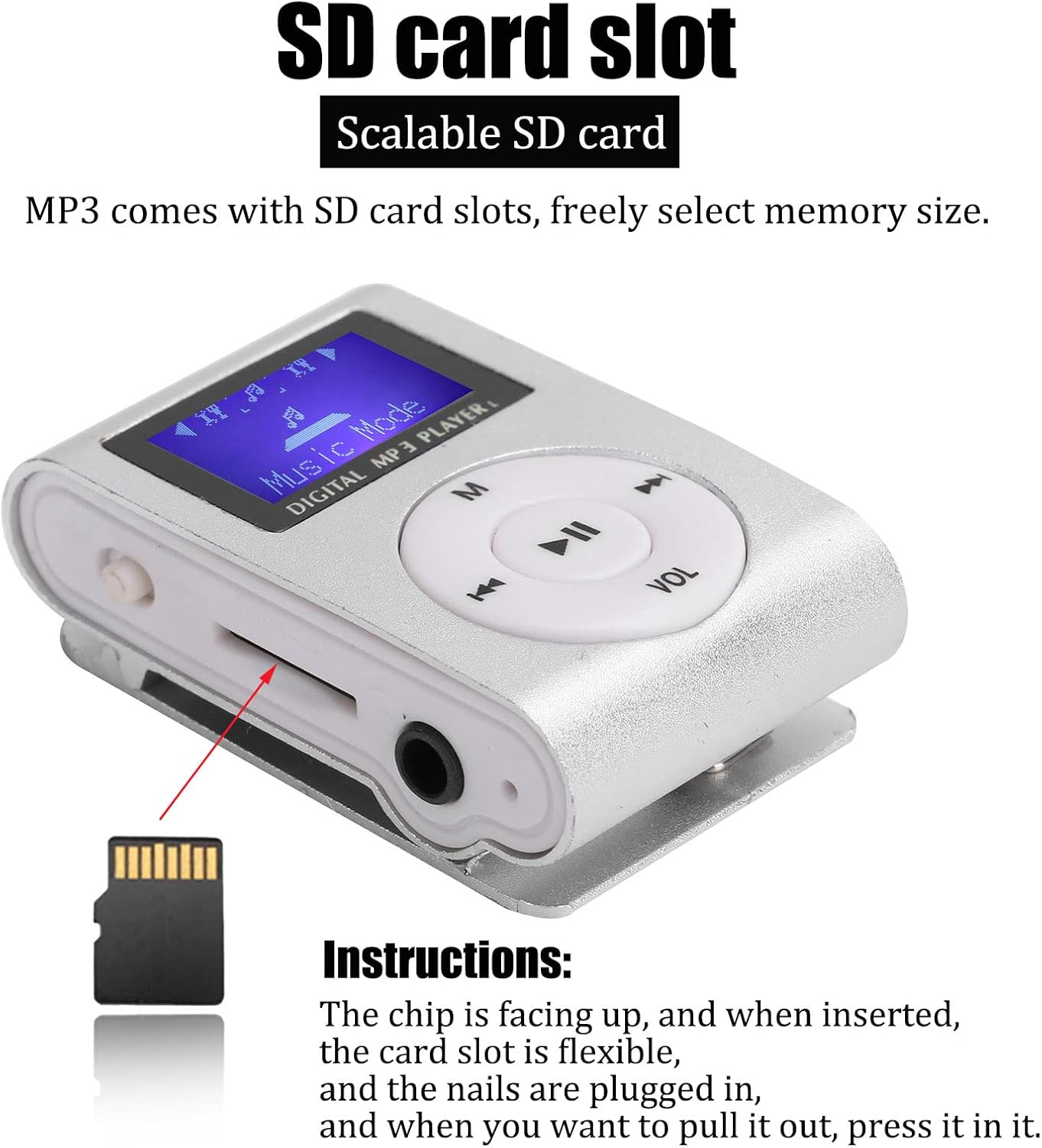
Зображення 3: Збоку view showing the Micro SD card slot, 3.5mm headphone jack, and power switch.
On the side, you will find the Micro SD card slot, a 3.5mm headphone jack, and the power switch. The USB charging port is located on the opposite side.
3. Налаштування
3.1 Зарядка пристрою
Before first use, fully charge the MP3 player. Connect the included USB cable to the player's USB port and to a computer's USB port or a compatible USB wall adapter. The device will indicate when charging is complete.
3.2 Вставлення карти Micro SD
Для зберігання музики MP3-плеєру потрібна карта Micro SD (не входить до комплекту) files. Locate the Micro SD card slot on the side of the device. Insert the Micro SD card with the metal contacts facing up until it clicks into place. To remove, gently press the card until it springs out.
Image 4: Instructions for inserting the Micro SD card. Ensure the chip is facing up.
3.3 Підключення навушників
Plug the 3.5mm jack of the included earphones into the headphone port on the side of the MP3 player.
4. Інструкція з експлуатації
4.1 Увімкнення/вимкнення живлення
To power on the device, slide the power switch to the 'ON' position. To power off, slide the switch to the 'OFF' position.
4.2 Передача музики Files
Connect the MP3 player to your computer using the USB cable. The player will appear as a removable disk. Drag and drop your MP3 format music files into the player's storage (Micro SD card). Ensure files are in MP3 format for compatibility.
4.3 Відтворення музики
- Увімкніть пристрій.
- The LCD screen will display "Music Mode".
- Натисніть Відтворення/Пауза , щоб розпочати відтворення.
- Прес Попередній трек or Наступний трек buttons to skip songs.
- Натисніть «М» button to cycle through different modes or menu options.
4.4 Регулювання гучності
Натисніть 'VOL' , а потім скористайтеся кнопкою Попередній трек і Наступний трек buttons to adjust the volume level. Press 'VOL' again to confirm or wait a few seconds for the volume adjustment to exit.
Video 1: A short demonstration of the Mini MP3 Player's features and operation.
Video 2: Product show and introduction, highlighting the design and functionality.
5. Технічне обслуговування
- Тримайте пристрій сухим. Уникайте контакту з вологою або рідинами.
- Протирайте пристрій м’якою сухою тканиною. Не використовуйте агресивні хімікати або розчинники.
- Уникайте екстремальних температур.
- Не кидайте пристрій і не піддавайте його сильним ударам.
- Store the device in a protective case when not in use to prevent scratches.

Image 5: The MP3 player stored in a protective case.
6. Вирішення проблем
- Пристрій не вмикається: Ensure the battery is charged. Connect to a power source and try again. Check the power switch is in the 'ON' position.
- No music playback: Verify that a Micro SD card with MP3 files is correctly inserted. Check earphone connection and volume level.
- Неможливо передати files до пристрою: Ensure the MP3 player is properly connected to the computer via USB. The computer should recognize it as a removable drive.
- Короткий час автономної роботи: Ensure the device is fully charged before use. Battery performance may decrease over time.
7. Технічні характеристики
| Бренд | Ciciglow |
| Номер моделі | CiCiglowyiwue9a2km1039-11 |
| Колір | Срібло |
| Дисплей | LCD Mini Screen (1 inch) |
| Технологія підключення | Допоміжний пристрій, USB |
| Ємність пам'яті | Supports up to 32 GB (Micro SD card not included) |
| Підтримувані стандарти | MP3 |
| Тип батареї | Вбудований літієвий акумулятор на 250 мАг |
| Термін служби батареї | Більше 5 годин |
| Вага товару | 47 грамів |
| матеріал | Алюмінієвий сплав |
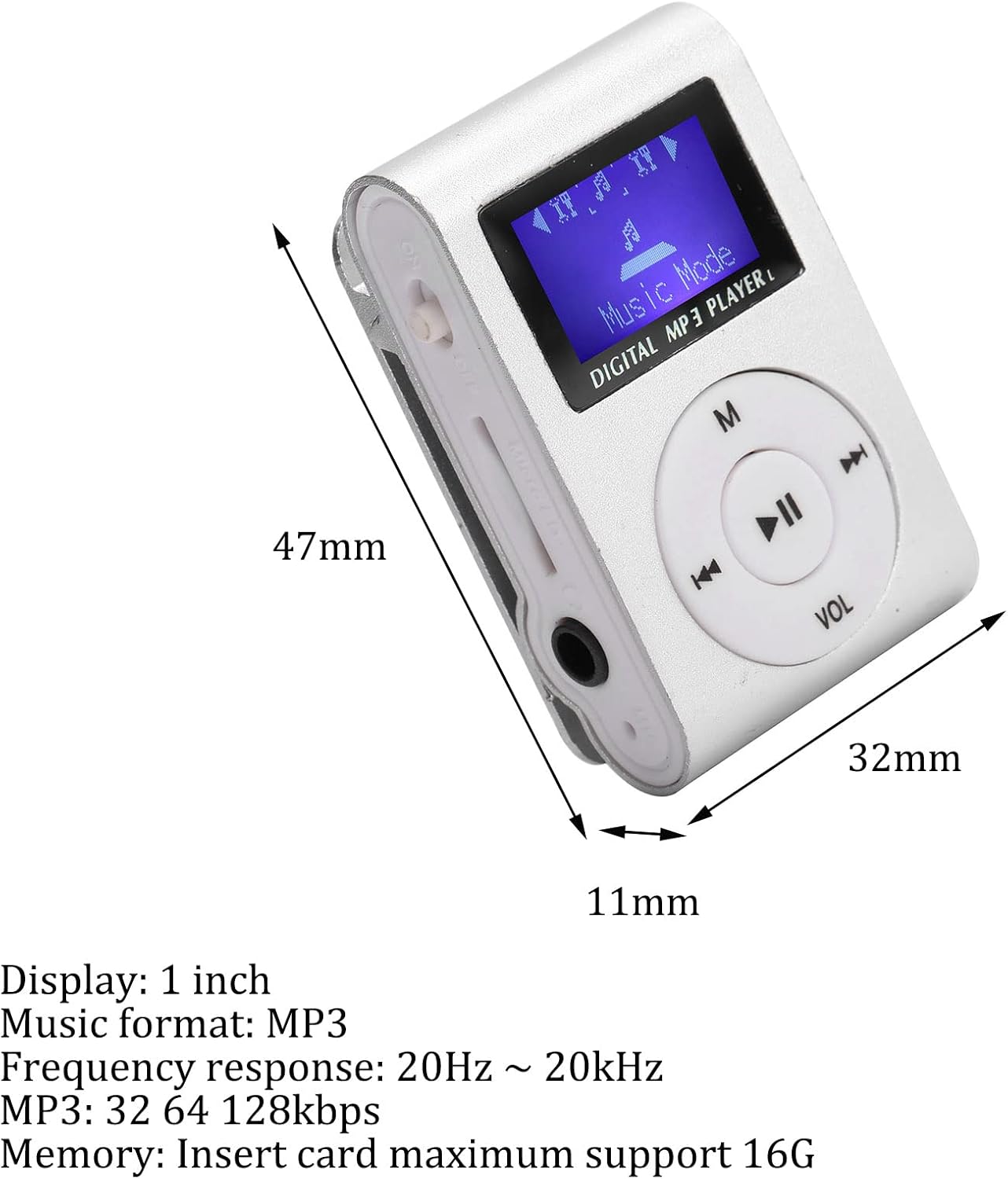
Image 6: Dimensions of the MP3 player.
8. Гарантія та підтримка
For warranty information or technical support, please refer to the product packaging or contact Ciciglow customer service through the retailer where the product was purchased. Keep your purchase receipt for warranty claims.