
Saooer BLUE 20A
Saooer 20A Solar Charge Controller User Manual
Model: BLUE 20A
вступ
This manual provides essential information for the safe and efficient operation of your Saooer 20A Solar Charge Controller. This intelligent regulator is designed to manage the working of solar panels and batteries in a solar system, featuring dual USB ports for mobile device charging. It is compatible with 12V and 24V systems and includes multiple protection functions to ensure system efficiency and prolong battery lifespan.

Малюнок 1: Спереду view of the Saooer 20A Solar Charge Controller.
Інструкції з техніки безпеки
- Ensure all connections are correct before powering on the controller. Incorrect wiring can damage the device or connected components.
- The controller is designed for indoor use or in a protected environment. Avoid exposure to direct sunlight, high temperatures, or moisture.
- Не намагайтеся розбирати або ремонтувати контролер самостійно. Зверніться до кваліфікованого персоналу для обслуговування.
- Зберігати в недоступному для дітей місці.
- This controller is only suitable for lead-acid batteries: OPEN, AGM, GEL. Do not use with other battery types like Lithium-ion or LiFePO4, as this may cause damage or safety hazards.
- Always connect the battery first, then the solar panel, and finally the load. When disconnecting, reverse the order: disconnect the load, then the solar panel, and finally the battery.
Особливості продукту
- Автоматична система Voltage Ідентифікація: Automatically detects 12V/24V system voltage.
- ШІМ-зарядка: Efficient Pulse Width Modulation charging mode.
- Подвійні порти USB: Provides 5V/2A output for charging mobile devices.
- РК-дисплей: Clear display of status and data, allowing for convenient mode switching and parameter configuration.
- Кілька функцій захисту: Включає захист від короткого замикання, захист від розриву ланцюга, захист від зворотного ходу та захист від перевантаження.
- Регульовані параметри: User-adjustable charge and discharge parameters.
- Температурна компенсація: Автоматична температурна компенсація для оптимального заряджання.
Налаштування та встановлення
Follow these steps carefully to install your solar charge controller. Incorrect installation can lead to damage or malfunction.
- Підготовка проводки: Ensure all wires are properly stripped and have appropriate connectors if necessary. Use wires of sufficient gauge for your system's current.
- Підключіть батарею: Connect the battery to the charge regulator first. Observe correct polarity (+ to + and - to -). The controller will automatically recognize the battery voltage (12 В або 24 В).
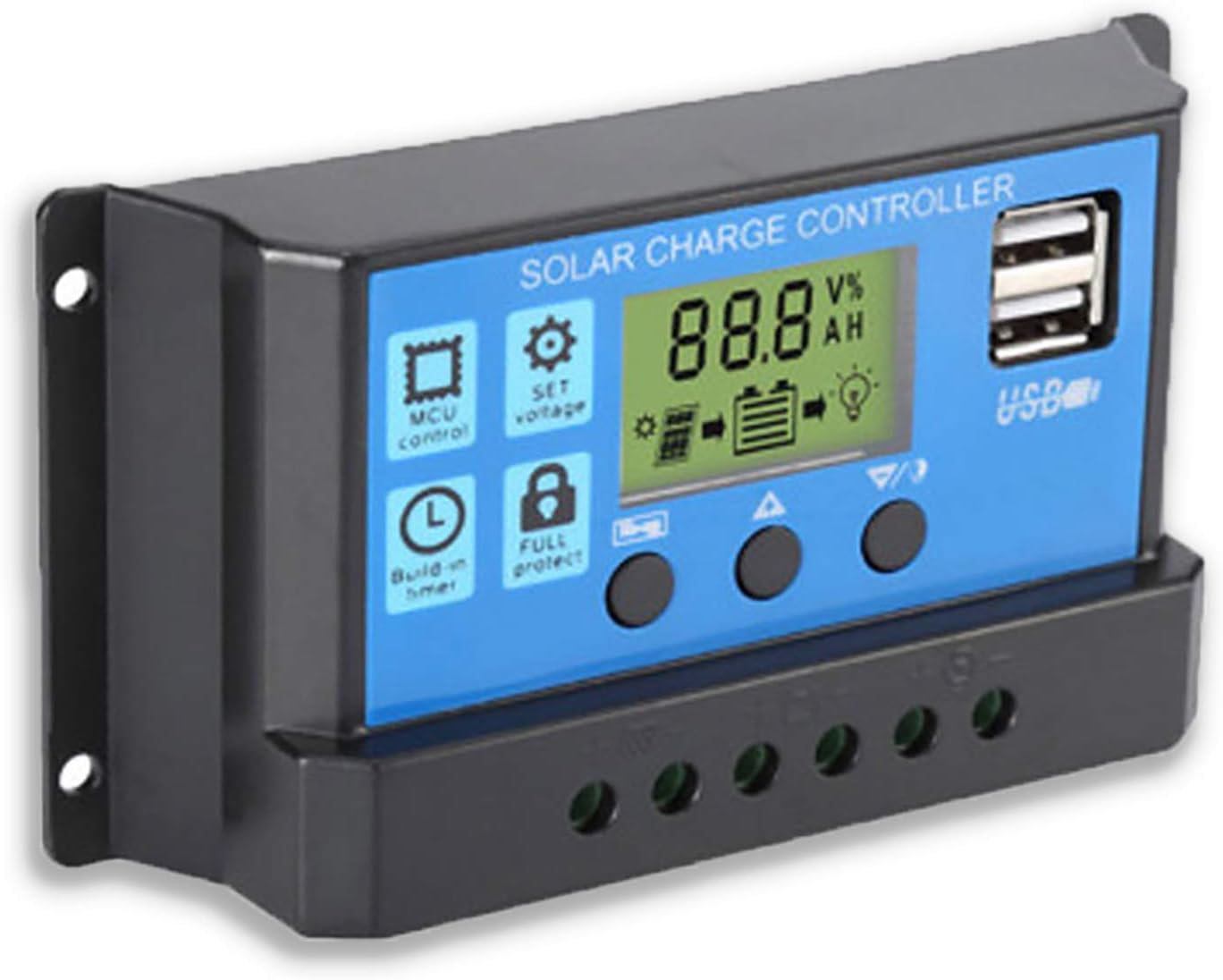
Малюнок 2: Сторона view showing the connection terminals for battery, solar panel, and load.
- Підключіть сонячну панель: Connect the solar panel to the solar charge controller. Ensure correct polarity.
- Підключіть навантаження: Connect the consumer or load to the charge controller regulator. Ensure correct polarity.
Важлива примітка: Always connect the battery first, then the solar panel, and finally the load. When disconnecting the controller, please remove the solar panel, then the load, and finally the battery. This sequence helps the controller recognize the battery voltage correctly and prevents damage.
Інструкція з експлуатації
РК-дисплей і кнопки

Рисунок 3: Кутовий view showing the LCD display and control buttons.
Контролер оснащений РК-дисплеєм та трьома кнопками для керування:
- Кнопка меню: Used to cycle through display modes and enter parameter setting mode.
- Кнопка вгору: Використовується для збільшення значень або навігації вгору в меню.
- Кнопка вниз: Використовується для зменшення значень або навігації вниз у меню.
Режими відображення
Press the Menu button to cycle through the following display modes:
- Акумулятор Voltagе (V)
- Сонячна панель випtagе (V)
- Струм навантаження (А)
- Battery Temperature (°C)
- Струм заряду (A)
- Струм розряду (A)
- Load Working Mode (24H, 0-23H, 0H)
Налаштування параметрів
To enter parameter setting mode, press and hold the Menu button for 5 seconds. Use the Up and Down buttons to adjust values, and the Menu button to confirm and move to the next parameter. Press and hold Menu again to exit setting mode.
| Параметр | опис | Default (12V) | Range (12V) |
|---|---|---|---|
| B01/B02/B03 | Battery Type Selection (B01=Lead-acid, B02=Lithium Ion, B03=LiFePO4) | B01 | N/A |
| Charge Off Voltage | томtage at which charging stops | 14.4 В | 13.0 В - 15.0 В |
| Розрядка Повторне підключення Томtage | томtage at which load reconnects after low voltage відключити | 12.6 В | 11.0 В - 13.5 В |
| Об'єм зупинки розрядуtage | томtage at which load disconnects to protect battery | 10.7 В | 9.0 В - 11.5 В |
| Load Working Time | Timer for load output (24H, 0-23H, 0H) | 24H | N/A |
Note: For 24V systems, multiply the 12V values by two.
Технічне обслуговування
- Регулярна перевірка: Періодично перевіряйте всі з'єднання проводів на міцність та наявність корозії.
- Чистота: Тримайте контролер чистим та без пилу. Використовуйте суху тканину для очищення.
- Вентиляція: Забезпечте належну вентиляцію навколо контролера, щоб запобігти перегріву.
- Здоров'я акумулятора: Монітор об’єму акумулятораtage and health regularly. Replace batteries as needed.
Усунення несправностей
| проблема | Можлива причина | Рішення |
|---|---|---|
| Контролер не вмикається / РК-дисплей порожній | Батарея не підключена або неправильна полярність; заряд батареїtage занадто низький. | Check battery connections and polarity. Ensure battery has sufficient charge. |
| Solar panel not charging battery | Solar panel not connected or reverse polarity; Insufficient sunlight; Damaged solar panel. | Check solar panel connections and polarity. Ensure panel is in direct sunlight. Test solar panel output. |
| Навантаження не працює | Load not connected or reverse polarity; Battery voltagзанадто низький (низький об'ємtage disconnect); Overload protection activated. | Check load connections and polarity. Charge battery. Reduce load or check for short circuit. |
| Порти USB не заряджаються | Акумулятор обtage too low; Device not compatible; Faulty USB cable. | Ensure battery is charged. Try a different device or cable. |
| Контролер нагрівається | Перевантаження; Погана вентиляція. | Reduce load. Ensure controller has adequate airflow and is not in an enclosed space. |
Технічні характеристики
| Особливість | Деталь |
|---|---|
| Модель | СИНІЙ 20А |
| System Voltage | 12В / 24В Авто |
| Максимальний струм заряду/розряду | 20А |
| Вихід USB | Dual USB, 5V/2A (Max) |
| Сумісність типу батареї | Lead-acid (OPEN, AGM, GEL) |
| Розміри продукту | 5.12 x 2.76 x 1.5 дюйма (приблизно 133 мм x 70 мм x 38 мм) |
| Вага товару | 5 унції |
| Дисплей | ЖК |
| Робоча температура | від -35°C до +60°C |

Figure 4: Product dimensions of the solar charge controller.
Гарантія та підтримка
For warranty information or technical support, please contact the manufacturer, Saooer, through their official channels. Refer to your purchase documentation for specific warranty terms and contact details.
Виробник: Saooer
ASIN: B095764VB7
UPC: 605832982977
Ви можете відвідати Saooer Store on Amazon щоб отримати додаткову інформацію або зв’язатися зі службою підтримки.
Ask a question about this manual
Ask about setup, troubleshooting, compatibility, parts, safety, or missing instructions. Manuals+ will review the question and use this page’s manual context to help answer it.